
1. はじめに
The VOTOL EM50-4 is a high-performance programmable motor controller designed for electric scooters, supporting 48V-72V battery systems and motors ranging from 400W to 2000W. This controller features a sine wave output for smooth operation and offers extensive customization through PC programming. This manual provides essential information for the proper installation, operation, and maintenance of your EM50-4 controller.
2. 仕様
| 特徴 | 詳細 |
|---|---|
| モデル | EM50-4 ECU Sine Wave Controller |
| Available Battery Voltage | 48V-72V |
| 定格DC電流 | 40A |
| Boost DC Current | 80A |
| ピーク相電流 | 170A |
| 最大出力 | 5760W |
| MOSFET | 12 FET |
| Matched Motor Rated Power | 800W-2000W |
| 最大限の効率 | 92% |
| 防水等級 | IP65 |
| Flux Weakening Ratio | 150% |
| 認証 | CE、CCC |
| コミュニケーション | ホールセンサ |
| 正味重量 | 800g(1.76ポンド) |
| 寸法(長さ×幅×高さ) | 181mm X 94mm X 50mm(7.13 "×3.7"×1.97 ") |
| プログラム可能 | Yes, via PC |
3. 含まれるコンポーネント
The package for the VOTOL EM50-4 controller typically includes the following items:
- 1 x EM50-4 Controller with pre-attached function cables
- 1 x USB cable for PC programming
4. セットアップとインストール
Proper installation is crucial for the safe and efficient operation of your EM50-4 controller. It is recommended that installation be performed by a qualified technician. Ensure the battery is disconnected before beginning any wiring procedures.
4.1物理的な設置
Mount the controller securely in a location that provides adequate ventilation and protection from direct water exposure. The aluminum heat sink on the bottom of the controller (Image 4.1) is designed to dissipate heat, so ensure it is not obstructed.

画像4.1: The VOTOL EM50-4 controller, showing its main body, attached wiring harness, and the included USB programming cable.

画像4.2: 底 view of the EM50-4 controller, highlighting the aluminum heat sink fins for thermal management.

画像4.3: Dimensional drawing of the VOTOL EM50-4 controller, providing measurements in millimeters for mounting purposes.
4.2配線接続
Refer to the following diagrams for correct wiring of the controller to your electric scooter's components. Incorrect wiring can cause damage to the controller or other electrical systems.

画像4.4: 閉じる view of the EM50-4 controller's wiring harness, with individual wires and connectors labeled for various functions such as throttle, brakes, and anti-theft.
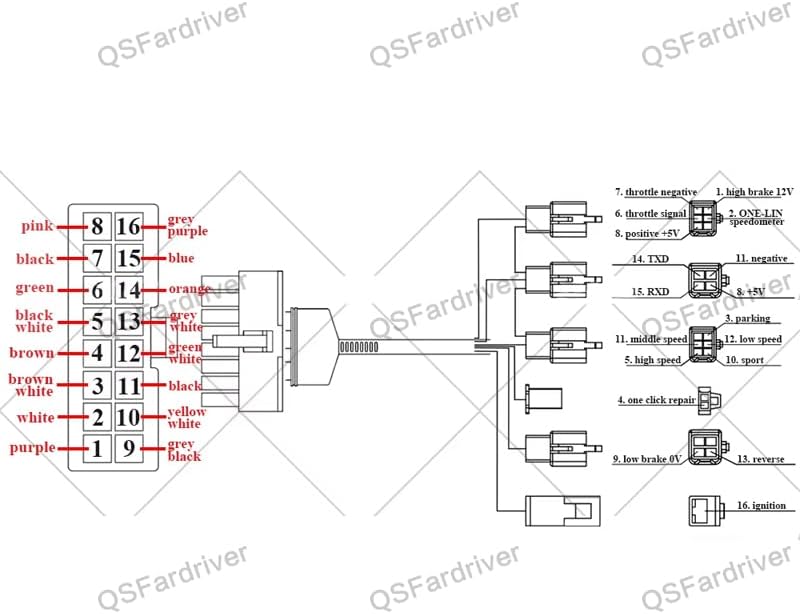
画像4.5: Pinout diagram illustrating the connections for the EM50-4 controller, detailing each pin's function and corresponding wire color.
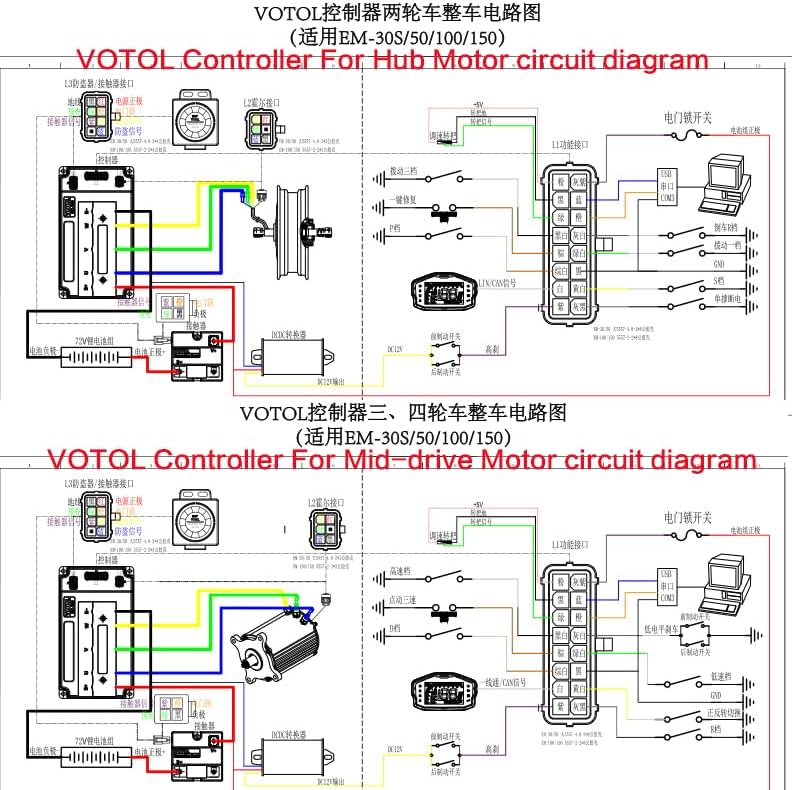
画像4.6: Comprehensive circuit diagram for the VOTOL EM50-4 controller, showing wiring configurations for both hub motors and mid-drive motors, including connections for various peripherals.
重要な配線ポイント:
- 電源接続: Connect the main battery positive (B+) and negative (B-) terminals to the corresponding controller inputs.
- モーター相線: Connect the three phase wires from the motor to the controller's phase outputs.
- ホールセンサーワイヤー: Connect the motor's Hall sensor wires to the controller's Hall sensor input.
- スロットル: Connect the throttle (0-5V) signal wire, positive, and negative wires.
- ブレーキ: Connect low brake (0V) and high brake (12V) wires as per your system.
- 点火: Connect the ignition wire to the vehicle's ignition switch.
- Learning Wires: Two learning wires are provided to assist in motor phase angle detection. Connect them temporarily during initial setup to allow the controller to learn the motor's phase angle, then disconnect.
- その他の機能: Connect wires for reverse, one-LIN/Hall speed sensor, program port, three-speed switch, sport mode, parking, anti-theft, and regen charge as required by your setup.
5. 操作
5.1 Default Functions
The EM50-4 controller comes with the following default functions enabled:
- Hall Plug
- 逆行する
- Low Brake (0V)
- Throttle (0-5V)
- High Brake (12V)
- 点火
- One-LIN/Hall Speed Sensor
- プログラム ポート
- 3速
- スポーツモデル
- 駐車場
- 盗難防止
- Regen Charge
- Flux Weaken Current
5.2 PCプログラミング
The EM50-4 controller is fully programmable via a PC using the provided USB cable. This allows for fine-tuning of various parameters to match your motor and riding preferences. The programming interface typically includes settings for:
- バッテリーvoltage limits (overvoltage、undervoltage)
- Current limits (busbar current, phase current)
- スロットルvoltage設定
- Start torque and rate of rise
- Brake settings
- 速度モード
- Flux weakening parameters
Connect the controller to your PC using the USB cable. Open the programming software (not included, typically provided by the manufacturer or seller) and follow the on-screen instructions to adjust parameters. Always save your current configuration before making significant changes.
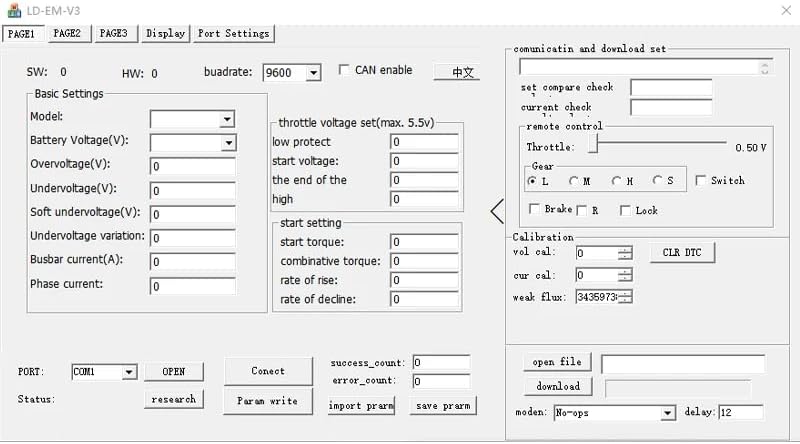
画像5.1: Screenshot of the PC programming interface for the VOTOL EM50-4 controller, showing various adjustable parameters and settings.
6. メンテナンス
The VOTOL EM50-4 controller is designed for durability and requires minimal maintenance. However, adhering to the following guidelines can extend its lifespan:
- 定期点検: すべての配線接続部の締め付け具合や摩耗、腐食の兆候がないか定期的に確認してください。
- 清潔さ: Keep the controller free from dust, dirt, and moisture. Use a dry, soft cloth for cleaning. Avoid using harsh chemicals or solvents.
- 換気: Ensure the controller's mounting location allows for adequate airflow around the heat sink to prevent overheating.
- 過負荷を避ける: コントローラーは指定された範囲内で操作してくださいtag損傷を防ぐための電流制限。
7。 トラブルシューティング
If you encounter issues with your EM50-4 controller, consider the following common troubleshooting steps:
- 電源なし: Check battery connections, ignition switch, and main power fuses. Ensure the battery voltage is within the controller's operating range (48V-72V).
- モーターが応答しません: Verify throttle connections and functionality. Check motor phase wire connections and Hall sensor connections. Ensure the motor's Hall sensors are functioning correctly.
- 不規則な操作: Inspect all wiring for loose connections or shorts. Ensure no water or moisture has entered the controller. If recently programmed, revert to a known working configuration or default settings.
- 過熱: Check for obstructions around the controller's heat sink. Reduce continuous high-power operation if possible. Ensure the motor is not drawing excessive current.
- プログラミングの問題: Ensure the correct USB cable is used and drivers are installed on your PC. Verify the programming software is compatible with your controller model.
For persistent issues, consult a qualified technician or contact the product support for assistance.
8. 保証とサポート
Specific warranty terms and conditions are typically provided by the seller or manufacturer at the time of purchase. Please refer to your purchase documentation for details regarding warranty coverage and duration.
For technical support, troubleshooting assistance beyond this manual, or inquiries about replacement parts, please contact the retailer or manufacturer directly. Have your product model number (EM50-4) and purchase information ready when seeking support.