
Aqualin YL21177
Aqualin Water Timer Garden Irrigation Hose Timer User Manual
モデル: YL21177
製品終了view
The Aqualin Water Timer is an advanced irrigation system designed for efficient and automated watering of lawns, gardens, and pools. It features three independent irrigation programs, rain delay functionality, and a manual watering mode, providing flexible control over your watering schedule. Its durable and waterproof design ensures reliable performance in various outdoor conditions.

図1: 前面 view of the Aqualin Water Timer, showing the large LCD display, rotary dial, and control buttons.
主な特徴:
- 3 Independent Irrigation Programs: Customize watering schedules with distinct start times, durations (1 to 360 minutes), and frequencies (1 hour to 15 days).
- Waterproof and Durable Design: Constructed with waterproof materials and a sealed battery cover to prevent internal leakage. Features a sturdy metal thread connection.
- 使いやすいインターフェース: Large LCD screen for clear display of watering information and intuitive controls for programming.
- 雨天遅延モード: Pause scheduled watering for 6, 12 hours, or 1-7 days to conserve water during rainfall.
- 手動モード: Allows for on-demand watering without affecting programmed schedules.
- Intelligent Timing System: Built-in solenoid valve for precise and stable program execution.
設定
1. 開梱とコンポーネント
Carefully remove the Aqualin Water Timer from its packaging. Ensure all components are present. The main unit includes the timer body, an integrated metal filter, and a connection nut.

Figure 2: The Aqualin Water Timer highlighting the built-in metal filter for durability and the easy-to-operate rotary dial.
2. バッテリーの取り付け
- タイマーの背面にある電池ボックスを見つけます。
- Open the sealed battery cover.
- Insert two (2) AA 1.5V batteries (not included) into the compartment, ensuring correct polarity (+/-).
- Securely close the battery cover to maintain its waterproof seal.
3. Installation to Faucet
- 屋外の蛇口が閉まっていることを確認してください。
- Thread the Aqualin Water Timer onto your standard outdoor faucet. The top connection features a durable metal thread for a secure fit.
- Tighten the connection by hand until snug. Avoid over-tightening.
- Connect your garden hose to the bottom outlet of the water timer.
- Slowly turn on your outdoor faucet. Check for any leaks at the connections.
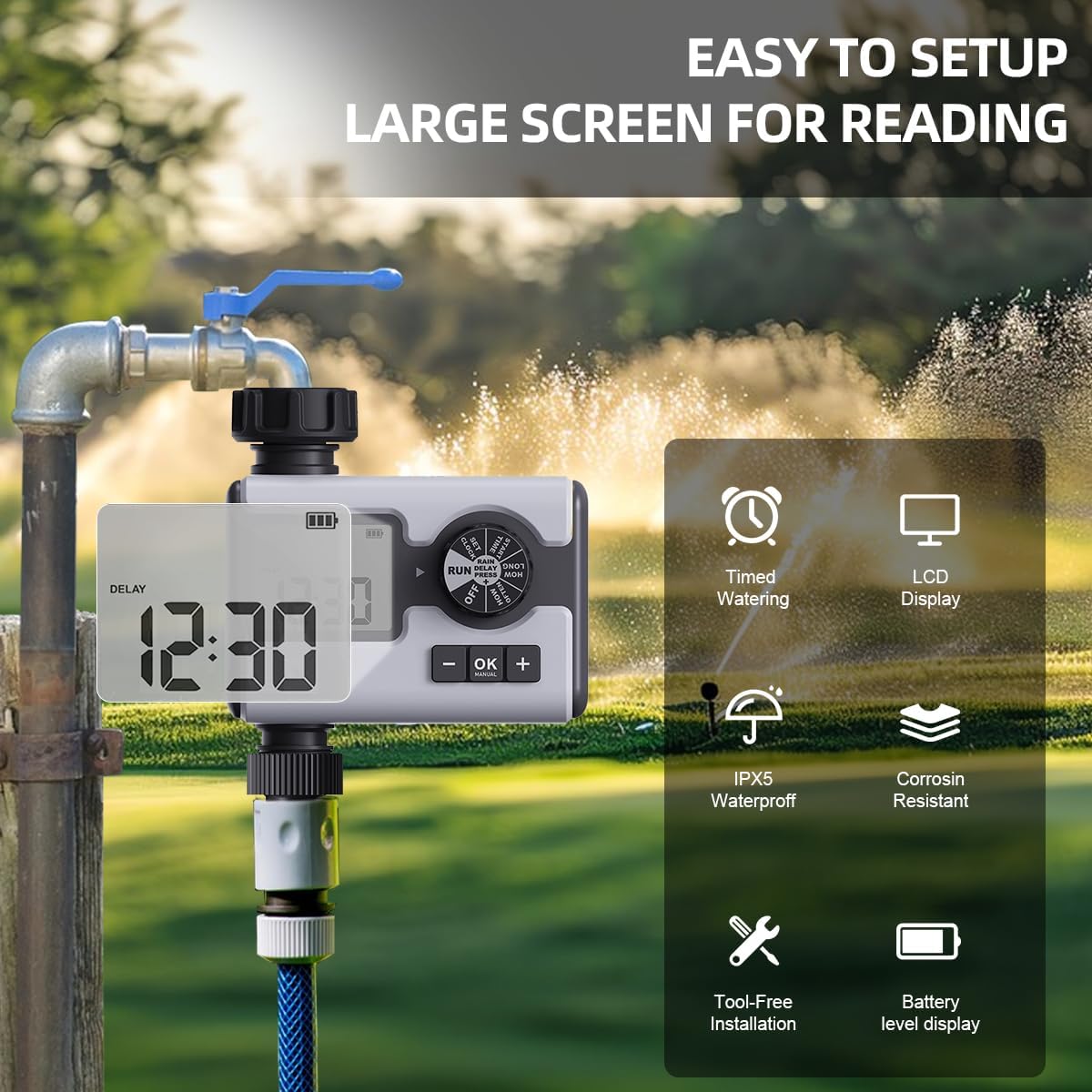
Figure 3: The Aqualin Water Timer connected to a faucet, illustrating its large LCD display for easy reading, IPX5 waterproof rating, corrosion resistance, and tool-free installation.
4. 時計の設定
- Rotate the dial to the "SET CLOCK" position.
- 「+」ボタンと「-」ボタンを使用して現在の時刻を調整します。
- Press "OK" to confirm the setting and move to the next digit or exit the setting mode.
操作手順
1. Understanding the Control Dial
The central rotary dial allows you to navigate through different settings and modes. The available positions are:
- OFF: すべての散水プログラムをオフにします。
- 実行: Activates the programmed watering schedules.
- 時計の設定: 現在の時刻を設定するために使用されます。
- 開始時間: Sets the beginning time for a watering program.
- どのぐらいの間: Sets the duration of watering.
- どのくらいの頻度で: Sets the frequency of watering.
- 雨による遅れ: Activates the rain delay function.
2. Programming Irrigation Schedules (P1, P2, P3)
The Aqualin Water Timer supports three independent programs (P1, P2, P3). Each program can be configured with its own start time, duration, and frequency.
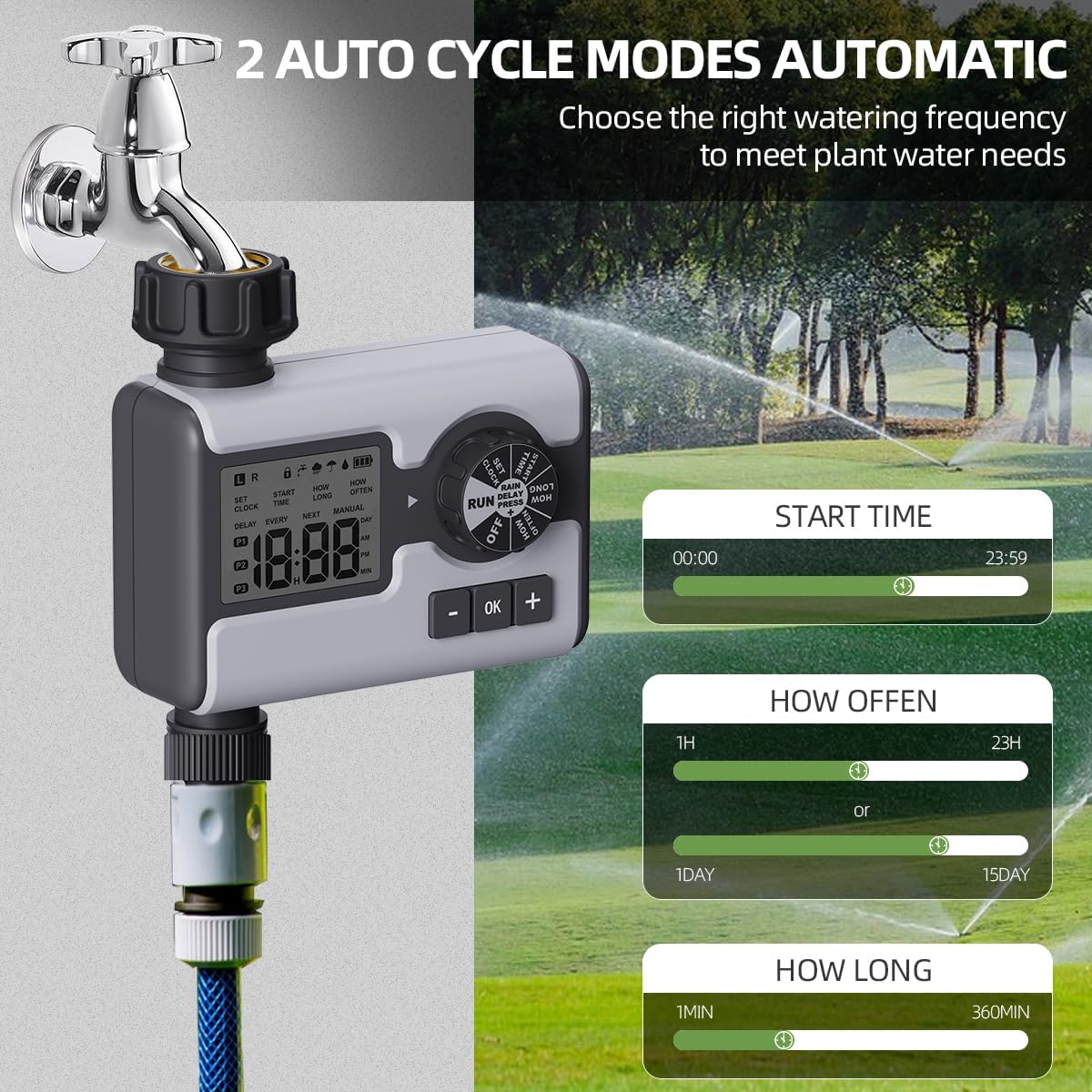
Figure 4: Display illustrating the settings for Start Time (00:00-23:59), How Often (1 hour-23 hours or 1 day-15 days), and How Long (1 minute-360 minutes) for the automatic watering cycles.
- プログラムを選択してください: While in "RUN" mode, press the "OK" button repeatedly to cycle through P1, P2, P3. The active program will be displayed on the LCD.
- 開始時刻の設定:
- Rotate the dial to "START TIME".
- Use "+" and "-" buttons to set the desired start time for the selected program.
- 「OK」を押して確定します。
- 散水時間の設定(「どのくらい長く」):
- Rotate the dial to "HOW LONG".
- Use "+" and "-" buttons to set the watering duration from 1 minute to 360 minutes.
- 「OK」を押して確定します。
- 水やりの頻度を設定します(「どのくらいの頻度で」):
- Rotate the dial to "HOW OFTEN".
- Use "+" and "-" buttons to set the frequency: from 1 hour to 23 hours, or from 1 day to 15 days.
- 「OK」を押して確定します。
- After setting all parameters for a program, rotate the dial back to "RUN" to activate the schedule.
3. 雨天遅延モード
The rain delay feature allows you to temporarily pause your watering schedule to avoid overwatering during or after rainfall.

Figure 5: The Aqualin Water Timer displaying the rain delay function, which can be set for 6/12 hours or 1-7 days.
- While the timer is in "RUN" mode, press the "+" button.
- The display will show "DELAY". Use the "+" or "-" buttons to select the desired delay duration: 6 hours, 12 hours, or 1 to 7 days.
- Press "OK" to confirm the rain delay. The timer will resume its schedule automatically after the delay period ends.
4. 手動散水モード
The manual mode allows for immediate, on-demand watering without interrupting your pre-programmed schedules.

Figure 6: A person using the manual watering feature with the Aqualin Water Timer, indicating that temporary water use does not alter automatic watering schedules. The watering duration can be set from 1 minute to 360 minutes.
- While the timer is in "RUN" mode, press the "MANUAL" (OK) button.
- The display will show the manual watering duration. Use the "+" and "-" buttons to adjust the desired manual watering time.
- Press "OK" to start manual watering.
- To stop manual watering prematurely, press the "MANUAL" (OK) button again.
メンテナンス
- クリーニング: 定期的にタイマーの外側を拭いてくださいamp 布で汚れやゴミを拭き取ってください。研磨剤入りの洗剤は使用しないでください。
- フィルターのクリーニング: The timer has a built-in metal filter. If water flow is reduced, unscrew the timer from the faucet, remove and clean the filter screen under running water. Reinstall the filter before reattaching the timer.
- バッテリー交換: Replace batteries when the low battery indicator appears on the LCD screen. Always use fresh AA 1.5V alkaline batteries.
- 冬の保管: Before freezing temperatures, disconnect the timer from the faucet and hose. Remove the batteries. Store the timer indoors in a dry, frost-free location to prevent damage.
トラブルシューティング
| 問題 | 考えられる原因 | 解決 |
|---|---|---|
| タイマーがオンにならない/LCD が空白です。 | 電池が切れているか、正しく取り付けられていない。 | Replace with new AA 1.5V batteries, ensuring correct polarity. |
| 水が出ない、または水圧が低い。 |
|
|
| タイマーにより予定の時間に水やりが行われません。 |
|
|
| 接続部から水が漏れています。 | 接続が緩んでいるか、ワッシャーが欠落または破損しています。 | Ensure connections are hand-tight. Check and replace rubber washers if damaged. |
仕様
| 特徴 | 詳細 |
|---|---|
| ブランド | Aqualin |
| モデル番号 | YL21177 |
| 材料 | Plastic (with metal thread connection) |
| 色 | グレー |
| 製品寸法(奥行き×幅×高さ) | 奥行き2.56インチ x 幅5.24インチ x 高さ5.91インチ |
| アイテム重量 | 357グラム(12.6オンス) |
| 水圧範囲 | 14.5psiから116psi |
| 電源 | 単2形1.5V電池XNUMX本(別売) |
| 散水時間 | 1分から360分 |
| 散水頻度 | 1時間から15日間 |
| 雨天延期オプション | 6 hours, 12 hours, 1-7 days |
| 防水等級 | IPX5 (implied from "IPX5 Waterproff" image) |
保証とサポート
For warranty information and customer support, please refer to the documentation provided with your purchase or contact the retailer where the product was acquired. You may also visit the official Aqualin webさらにサポートが必要な場合は、サイトをご覧ください。
注: 提供されたデータには、販売者からの公式製品ビデオは見つかりませんでした。
Ask a question about this manual
Ask about setup, troubleshooting, compatibility, parts, safety, or missing instructions. Manuals+ will review the question and use this page’s manual context to help answer it.