
1. はじめに
ご購入ありがとうございますasing the AGPTEK External Blu-ray Drive, Model G01R13. This portable optical drive offers versatile read and write capabilities for Blu-ray, DVD, and CD formats, featuring high-speed USB 3.0 and Type-C connectivity. Its compact design and multi-port functionality make it an ideal solution for various computing needs across Windows, macOS, and Linux operating systems. This manual provides essential information for proper setup, operation, maintenance, and troubleshooting to ensure optimal performance and longevity of your device.

Figure 1: AGPTEK External Blu-ray Drive, Model G01R13
2.製品オーバーview
2.1 パッケージ内容
- AGPTEK External Blu-ray Drive (Model G01R13) x 1
2.2 Device Features and Components
The AGPTEK External Blu-ray Drive is designed for convenience and functionality. It features an integrated cable for easy storage and dual USB 3.0 and Type-C connectivity. Additionally, it includes multiple ports, allowing it to function as a USB hub.

Figure 2: Key features of the AGPTEK External Blu-ray Drive
The drive incorporates a silent design to minimize noise during operation, making it suitable for quiet environments. Its lightweight and slim profile (approximately 350g) enhance portability.
3. セットアップ
3.1 コンピュータへの接続
The drive supports both USB 3.0 (Type-A) and Type-C connections. Use the appropriate cable to connect the drive to an available USB port on your computer.
- For USB Type-A: Connect the USB 3.0 Type-A connector to your computer's USB-A port.
- For USB Type-C: Connect the USB Type-C connector to your computer's USB-C port.

Figure 3: Connecting the drive to a laptop
3.2 電源
The drive is primarily powered via USB bus power. In most cases, a single USB connection will provide sufficient power for operation. However, if you experience unstable operation or power-intensive tasks (e.g., Blu-ray playback or burning), an auxiliary power source can be used.
- 補助力: Connect a Micro USB cable (not always included, may require separate purchase) from the drive's auxiliary power port to a USB power adapter or another USB port on your computer. This ensures stable power delivery, especially during extended use or when playing Blu-ray discs.
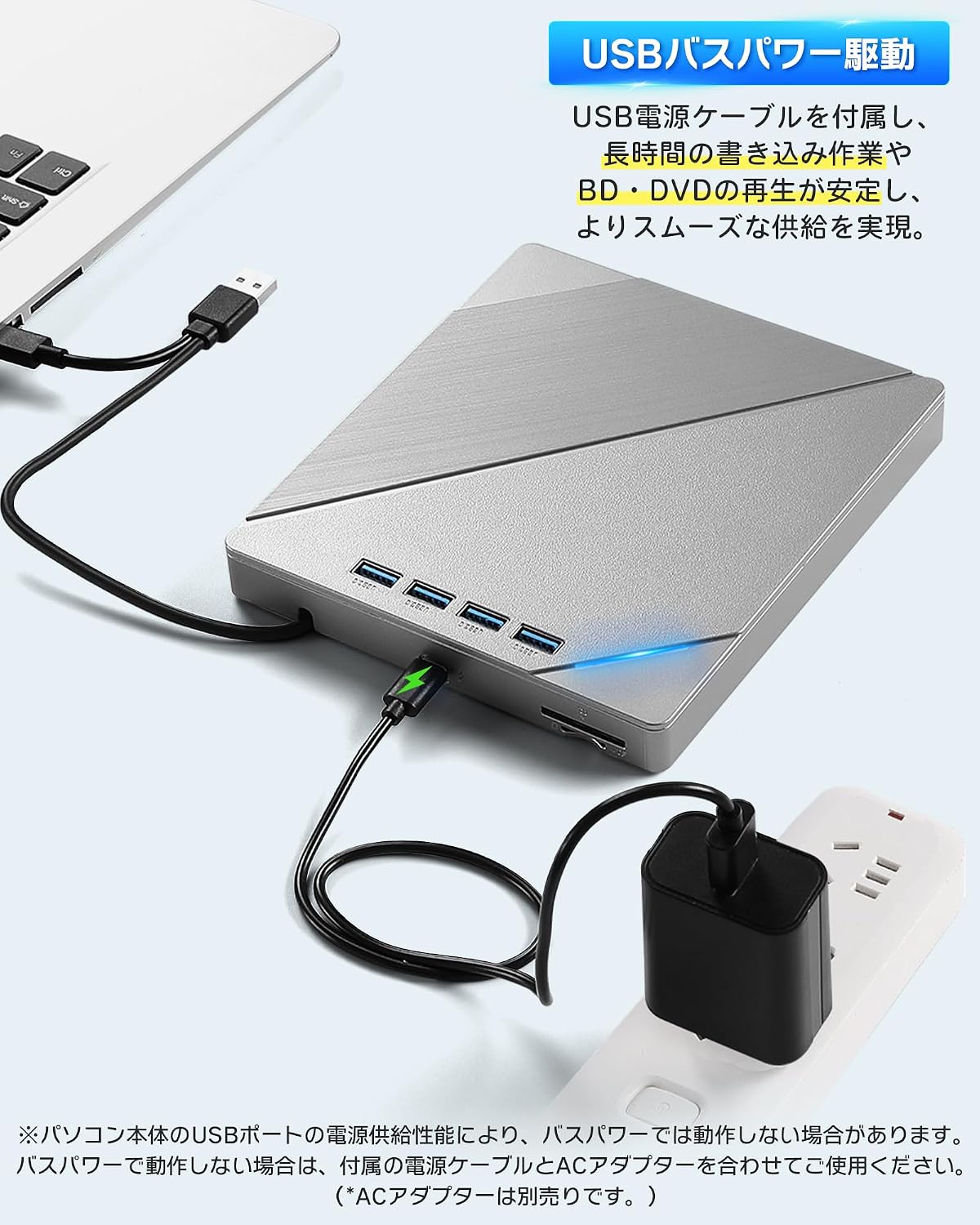
Figure 4: Connecting auxiliary power to the drive
3.3 オペレーティングシステムの互換性
The AGPTEK External Blu-ray Drive is compatible with a wide range of operating systems, including:
- Windows (Windows 7, 8, 10, 11, XP)
- macOS
- リナックス
No additional drivers are typically required for basic plug-and-play functionality.
4. 操作手順
4.1 ディスクの挿入と取り出し
- 挿入するには: Gently press the eject button on the front of the drive to open the disc tray. Place the disc label-side up onto the tray, ensuring it is centered on the spindle. Gently push the tray back into the drive until it clicks into place.
- 取り出すには: Press the eject button on the front of the drive. Alternatively, you can eject the disc through your computer's operating system (e.g., right-click the drive icon and select 'Eject').

Figure 5: Inserting a disc
4.2 ディスクの再生
After inserting a disc, your computer's operating system should recognize it. You may need compatible software to play Blu-ray movies, DVDs, or audio CDs. This drive does not include playback software.
- For Blu-ray/DVD Movies: Install a third-party Blu-ray/DVD playback software (e.g., Leawo Blu-ray Player, VLC Media Player, CyberLink PowerDVD).
- For Audio CDs: Most operating systems have built-in media players that can play audio CDs.
- データディスクの場合: The disc contents should appear in your file explorer/finder.
4.3 ディスクの書き込み
To burn data to a blank Blu-ray, DVD, or CD, you will need compatible burning software. This drive does not include burning software.
- Insert a blank recordable disc (BD-R, DVD-R, CD-R, etc.) into the drive.
- Open your preferred burning software and follow its instructions to select files を実行し、燃焼プロセスを開始します。
4.4 Using the Integrated USB Hub and Card Readers
The drive features multiple ports, allowing it to function as a USB hub. You can connect various peripherals simultaneously:
- USB ポート: Connect USB memory sticks, external hard drives, mice, keyboards, or other USB devices.
- SD / TFカードスロット: Insert SD or TF (MicroSD with adapter) cards to access their contents.
Note that while the drive offers expandability, simultaneous heavy usage of all ports and the optical drive might require auxiliary power for stable operation.
5. メンテナンス
5.1 Cleaning the Drive
- ドライブを清潔に保ち、ほこりを取り除いてください。外側は柔らかく乾いた布で拭いてください。
- 液体クリーナーや研磨剤は使用しないでください。
- Avoid opening the drive casing, as this may void the warranty and expose sensitive components.
5.2 Handling Discs
- データ表面に指紋や傷が付かないように、必ずディスクの端を持って扱ってください。
- ディスクを使わないときは、ほこりや損傷から守るためにケースに入れて保管してください。
- 汚れたディスクは、柔らかく糸くずの出ない布で中心から外側に向かって拭いてください。
5.3 ストレージ
When not in use, store the drive in a cool, dry place away from direct sunlight and extreme temperatures. Ensure the integrated cable is neatly stored in its compartment.
6。 トラブルシューティング
6.1 Drive Not Recognized by Computer
- USB ケーブルがドライブとコンピュータの両方にしっかりと接続されていることを確認します。
- コンピューターの別のUSBポートに接続してみてください。
- If using a desktop PC, try connecting to a USB port on the back of the computer, which typically provides more stable power.
- Connect the auxiliary power cable if the drive is not receiving sufficient power from a single USB port.
- コンピュータを再起動します。
6.2 Disc Read/Write Errors
- ディスクがきれいで、傷や汚れがないことを確認してください。
- Verify that the disc type is compatible with the drive (refer to Specifications).
- Ensure you are using appropriate playback or burning software.
- Connect the auxiliary power cable to ensure stable power delivery, especially for Blu-ray discs or during burning.
- ディスクに欠陥がないことを確認するために、別のディスクを試してください。
6.3 パフォーマンスの低下
- Ensure the drive is connected to a USB 3.0 or Type-C port on your computer for optimal speed. Connecting to a USB 2.0 port will result in slower transfer rates.
- 要求の厳しい複数のアプリケーションを同時に実行することは避けてください。
- If using the integrated USB hub, disconnect other peripherals if you need maximum speed for disc operations.
7. 仕様
| 特徴 | 説明 |
|---|---|
| ブランド | AGPTEK |
| モデル番号 | G01R13 |
| 光学ストレージ書き込み速度 | 6X (Blu-ray) |
| 光学ストレージの読み取り速度 | 24X (CD), 8X (DVD), 6X (Blu-ray) |
| データ転送速度 | 5ギガビット/秒(USB 3.0) |
| 接続インターフェース | USB 3.0、USBタイプC |
| フォームファクター | ポータブル |
| ハードウェアプラットフォーム | Desktop PC, Notebook PC |
| オペレーティング システムのサポート | Windows、macOS、Linux 対応 |
| サポートされているディスク形式(読み取り/書き込み) | BD-R, BD-R DL, BD-RE, BD-RE DL, DVD-R, DVD-ROM, DVD-R DL, DVD-RW, DVD-RAM, DVD+R, DVD+R9, DVD+RW, CD-R, CD-RW, Blu-ray, 3D Blu-ray, BDXL |
| 含まれるもの | 本体×1 |
| 原産国 | 中国 |
8. 保証とサポート
8.1 保証情報
This AGPTEK External Blu-ray Drive (Model G01R13) comes with a 180-day warranty from the date of purchase. This warranty covers manufacturing defects under normal use. Please retain your proof of purchase for warranty claims.
以下の原因による損傷は保証の対象外となります。
- 事故、乱用、誤用、または不適切な取り付け。
- 許可されていない修理または改造。
- 電力サージまたは外部の電気的障害。
- Use with incompatible accessories.
8.2 カスタマーサポート
For technical assistance, warranty claims, or product inquiries, please contact AGPTEK customer support through the retailer's platform where you purchased the product or visit the official AGPTEK web連絡先情報のサイト。