
導入
This manual provides essential information for the safe and efficient operation, maintenance, and troubleshooting of your Leitz IQ Slim Paper Shredder. Please read this manual thoroughly before using the shredder and retain it for future reference.
The Leitz IQ Slim Paper Shredder is designed for home and home office use, offering P4 cross-cut security for confidential documents. It features a compact design, quiet operation, and anti-jam technology to ensure a smooth shredding experience.
安全情報
警告: これらの安全指示に従わなかった場合、火災、感電、または怪我の原因となる可能性があります。
- 紙挿入口に手、髪の毛、ゆったりした衣服を近づけないでください。
- 子供やペットをシュレッダーに近づけないでください。
- シュレッダーを使用していないとき、または移動、清掃、ゴミ箱を空にする前には、シュレッダーのプラグを抜いてください。
- Do not shred metal objects, adhesive labels, or wet paper.
- 電源コードが損傷している場合はシュレッダーを操作しないでください。
- Do not attempt to service the shredder yourself. Refer all servicing to qualified service personnel.
- シュレッダーが安定した水平な面に設置されていることを確認してください。
設定
- 開梱: Carefully remove the shredder from its packaging. Ensure all components are present, including the shredder head, waste bin, and power cord.
- 配置: Position the shredder on a flat, stable surface in your desired home or office location. Ensure there is adequate space around the unit for ventilation and access to the power outlet.
- Bin Installation: Place the waste bin securely into the shredder base. The shredder head should sit firmly on top of the bin. The unit will not operate if the head is not correctly seated.
- 電源接続: 電源コードを標準の電源コンセントに差し込みます。

図1: フロント view of the Leitz IQ Slim Paper Shredder, illustrating its compact design suitable for home or office environments.
操作手順
コントロールパネルオーバーview
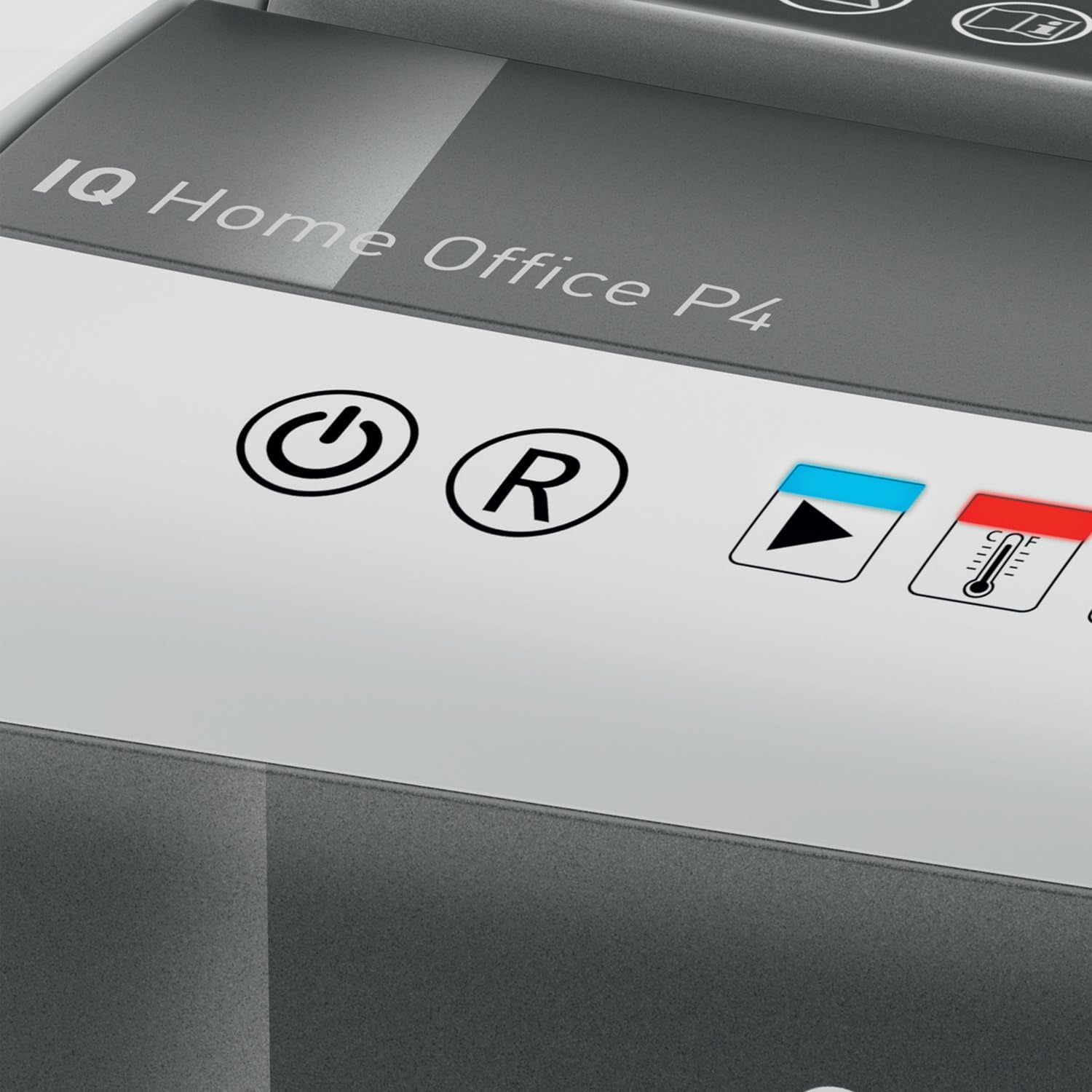
図2: Close-up of the shredder's touch control panel, showing the power, reverse, and status indicators.
The shredder features intuitive touch controls for easy operation.
- Power Button (⌛): Press to turn the shredder ON or OFF.
- Reverse Button (R): Press to reverse the shredding mechanism, useful for clearing minor paper jams.
- Overload Indicator (Red LED): Illuminates if too much paper is inserted, indicating a potential jam.
- Overheat Indicator (Red LED with Thermometer): Illuminates when the shredder has reached its maximum continuous run time and needs to cool down.
文書のシュレッダー処理
- Ensure the shredder is plugged in and powered ON.
- 最大挿入 10枚 of letter-size (8.5" x 11") paper into the paper entry slot. The shredder will automatically begin shredding.
- The shredder can also process staples and small paper clips.
- 最適なパフォーマンスを実現し、紙詰まりを防止するために、最大シート容量を超えないようにしてください。

図3: The shredder in operation, demonstrating the secure cross-cut shredding of a confidential document.

図4: Visual representation of the shredder's capacity, capable of shredding up to 10 letter-size sheets simultaneously.
Continuous Run Time and Cool Down
The shredder has a continuous run time of approximately 6 minutes. After this period, the overheat indicator LED will illuminate, and the shredder will automatically shut off to prevent damage. Allow the shredder to cool down for at least 30 minutes before resuming operation. This helps prolong the life of the motor.
メンテナンス
ごみ箱を空にする
定期的に空にする 6-gallon (225 sheet capacity) waste bin to prevent paper jams and maintain optimal shredder performance. The transparent window on the bin allows for easy monitoring of the shredded paper level.
- Ensure the shredder is turned OFF and unplugged from the power outlet.
- シュレッダーヘッドをゴミ箱から慎重に持ち上げます。
- Empty the shredded paper into a suitable recycling container.
- Replace the shredder head securely onto the waste bin.

図5: The shredder head lifted from the waste bin, revealing the shredded paper inside and demonstrating the bin's capacity.
クリーニング
To clean the exterior of the shredder, wipe it with a soft, dry cloth. Do not use abrasive cleaners or solvents. For optimal performance, consider using shredder oil sheets periodically to lubricate the cutting blades. Follow the instructions provided with the shredder oil sheets.
トラブルシューティング
| 問題 | 考えられる原因 | 解決 |
|---|---|---|
| シュレッダーが起動しません。 | Not plugged in; shredder head not properly seated; power switch off. | Ensure power cord is securely plugged in. Re-seat the shredder head firmly onto the waste bin. Turn the power switch ON. |
| 紙詰まり。 | 挿入した紙が多すぎるため、紙が折れたりくしゃくしゃになったりしています。 | を押す リバース(R) button to clear the paper. If necessary, unplug the shredder, carefully remove the shredder head, and manually clear the paper. Do not force paper. |
| Shredder stops during operation and Overheat LED is on. | Exceeded continuous run time. | Allow the shredder to cool down for at least 30 minutes. The LED will turn off when it is ready for use again. |
| シュレッダーはうるさいです。 | Blades require lubrication; waste bin is full. | Use shredder oil sheets to lubricate the blades. Empty the waste bin. |
仕様
| 特徴 | 仕様 |
|---|---|
| モデル番号 | 170004 |
| シュレッドタイプ | クロスカット |
| セキュリティレベル | DIN P4 |
| シート容量 | Up to 10 sheets (8.5" x 11" paper) |
| ビン容量 | 6ガロン(約225枚) |
| 連続実行時間 | 6 minutes |
| クールダウン時間 | 約30分 |
| シュレッドスピード | 毎分6フィート |
| シュレッド | Paper, staples, paper clips |
| アンチジャム技術 | Automatic stop and reverse |
| コントロール | タッチコントロール |
| 製品の寸法(W x H x D) | 10 x 14.7 x 14.5インチ |
| アイテム重量 | 15.12ポンド |
| メーカー | ACCOブランド |
保証とサポート
限定保証
Your Leitz IQ Slim Paper Shredder is covered by a 限定2年間保証 from the date of purchase. This warranty covers defects in materials and workmanship under normal use. It does not cover damage resulting from misuse, abuse, accident, unauthorized service, or normal wear and tear.
保証請求のために購入証明書を保管してください。
カスタマーサポート
For technical assistance, warranty inquiries, or to order replacement parts, please contact Leitz customer support. Refer to the contact information provided on the official Leitz webサイトまたは製品パッケージ。
Online resources and FAQs may also be available on the Leitz brand webサイト: Visit the Leitz Store on Amazon