
1. はじめに
ご購入ありがとうございますasing the Sofirn SC13 Flashlight and H35R Dual Color Headlamp bundle. This manual provides detailed instructions for the safe and efficient use, setup, operation, and maintenance of your new lighting devices. Please read this manual thoroughly before use and retain it for future reference.
The H35R headlamp is designed for versatility, offering powerful white light and a specialized 660nm deep red light, suitable for various outdoor and indoor activities. The SC13 flashlight provides a compact and reliable illumination source.

Image 1.1: The Sofirn SC13 Flashlight and H35R Headlamp bundle, including the headlamp, a compact flashlight, and two USB-C charging cables.
2. 安全に関する注意事項
- 目の安全性: 光を直接目に当てないでください。強力な光線は一時的な視力障害や永久的な眼の損傷を引き起こす可能性があります。
- 子供たち: 小児の手の届かない場所に保管。 この商品はおもちゃではありません。
- 熱: ヘッドルamp and flashlight may become hot during prolonged use at high output levels. Avoid direct contact with hot surfaces to prevent burns.
- バッテリーの安全性: Use only recommended batteries. Do not disassemble, puncture, or short-circuit the battery. Dispose of batteries properly.
- 充電: Use the provided USB-C cable for charging. Do not attempt to charge with damaged cables or chargers.
- 分解: ヘッドを分解したり改造したりしないでください。amp or flashlight, as this may void the warranty and pose safety risks.
3. パッケージ内容
パッケージに以下の項目が含まれているか確認してください。
- Sofirn H35R Dual Color Headlamp
- ソフィルン SC13 懐中電灯
- Adjustable Headband for H35R
- USB-A to USB-C Charging Cable (for H35R)
- USB-A to USB-C Charging Cable (for SC13)
- ユーザーマニュアル

Image 3.1: The complete bundle showing the H35R headlamp, SC13 flashlight, and two USB-C charging cables. The headlamp is also shown with both white and red light activated.
4.製品オーバーview
4.1 Sofirn H35R Headlamp 特徴
- デュアルカラー出力: White light (up to 1500 Lumens) and 660nm Deep Red Light.
- ビーム距離: Up to 112 meters for white light.
- 耐水性: IPX6の防水等級。
- 耐久性: Impact resistant.
- 調整可能な角度: 180-degree adjustable headlamp 体。
- 充電: Built-in USB-C rechargeable port with power indicator.
- 軽量: Weighs approximately 80g (2.82oz).

Image 4.1: The H35R headlamp highlighting its lightweight design (2.82oz) and the ability to adjust the light angle by 180 degrees for optimal illumination.
4.2 Sofirn SC13 Flashlight Features
- コンパクトで持ち運びに便利なデザイン。
- Reliable illumination for everyday carry.
- USB-C充電可能。
5. セットアップ
5.1 初期充電
Before first use, fully charge both the H35R headlamp and the SC13 flashlight.
- Locate the hidden USB-C charging port on each device. For the H35R, this is typically under a rubber flap.
- Connect the provided USB-C charging cable to the device and plug the USB-A end into a standard USB power adapter (not included) or a computer USB port.
- The power indicator light will show 赤 充電中。
- 完全に充電されると、インジケータライトが点灯します 緑.
- Disconnect the charging cable and ensure the rubber flap (if present) is securely closed to maintain water resistance.

画像5.1: クローズアップ view H35Rヘッドのamp's built-in USB-C charging port. The image illustrates the charging indicator: red for charging and green for a full charge.
5.2 Headband Adjustment (H35R)
The H35R headlamp comes with a high-elastic adjustable strap for comfortable wear.
- ヘッドルを置きますamp あなたの頭の上に。
- Adjust the buckle on the strap to achieve a snug yet comfortable fit. The strap is designed to fit head sizes from 12.6 to 35.4 inches.

Image 5.2: The adjustable strap of the H35R headlamp, demonstrating how to use the buckle to customize the fit for various head sizes.
6. 操作手順
6.1 H35R Headlamp 手術
The H35R headlamp すべての操作を 1 つのボタンで実行できます。
- Turn On White Light: ボタンをXNUMX回クリックします。
- Turn On Red Light: Long press the button from OFF.
- サイクルホワイトライトモード: When the white light is ON, long press the button to cycle through Moonlight → Low → Medium → High → Turbo. Release the button at the desired mode.
- サイクル赤信号モード: When the red light is ON, long press the button to cycle through its available modes (e.g., Moonlight Red → Low Red → Medium Red → High Red → Turbo Red). Release the button at the desired mode.
- 消す: Click the button once from any ON state.
- Switch Between White/Red: From ON, double-click the button to switch between white and red light modes.
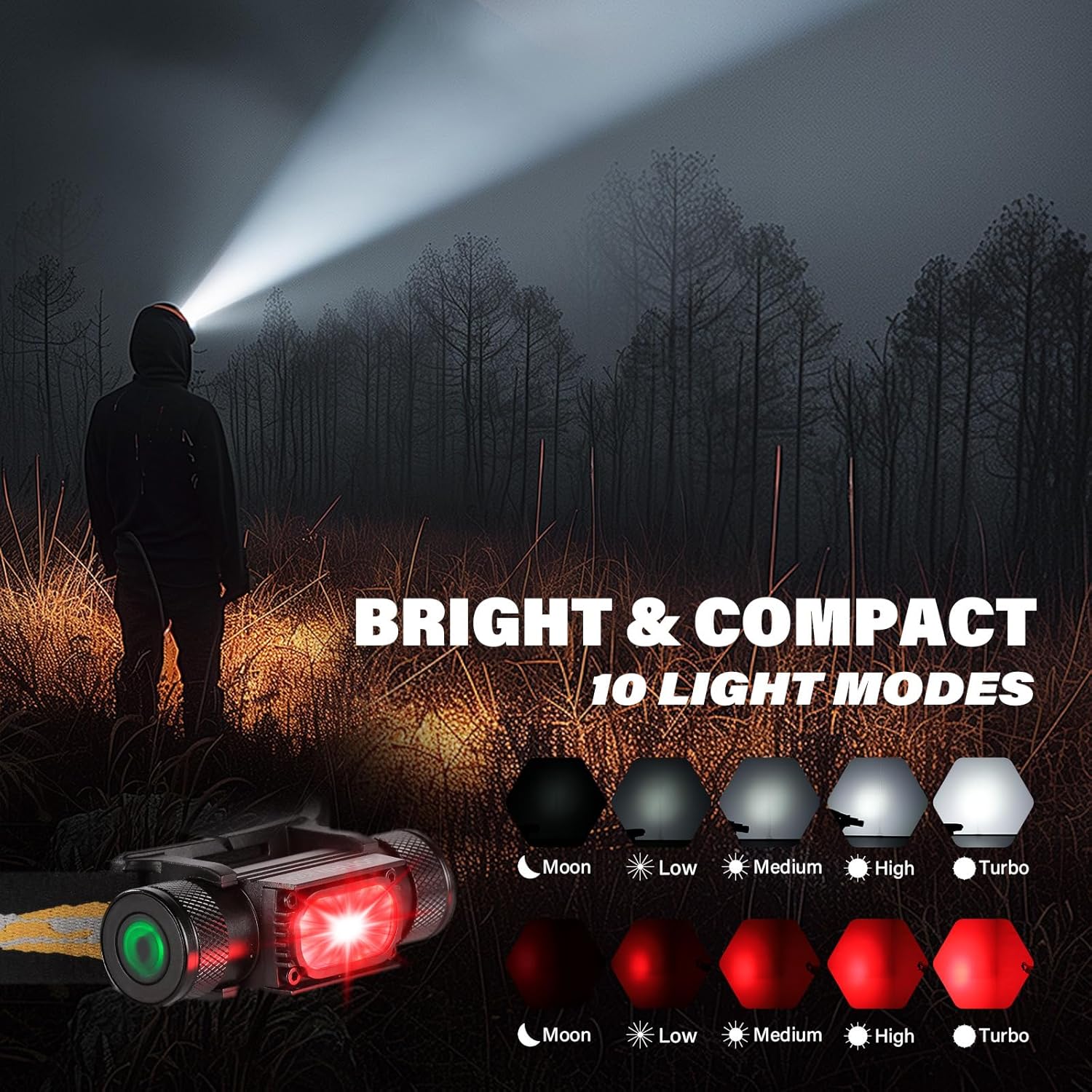
Image 6.1: The H35R headlamp demonstrating its various white light modes (Moon, Low, Medium, High, Turbo) and red light modes (Moon, Low, Medium, High, Turbo). The headlamp is shown emitting a bright white beam.

Image 6.2: A person standing on a path in a forest, illuminated by the 660nm deep red light from the H35R headlamp, demonstrating its night vision-friendly properties.
6.2 SC13 Flashlight Operation
Specific operating instructions for the SC13 flashlight are typically similar to other Sofirn compact flashlights. Generally:
- オン/オフ: Single click the tail switch or side switch (depending on model variant).
- モードの変更: With the light ON, long press the switch to cycle through brightness levels.
- 特別モード: Double-click for Turbo, triple-click for Strobe/SOS (may vary).
7. メンテナンス
- クリーニング: Clean the body of the headlamp and flashlight with a soft, damp 布で拭いてください。研磨剤や溶剤は使用しないでください。
- スレッド: Periodically lubricate the threads of the battery cap (if removable) with silicone grease to ensure smooth operation and maintain water resistance.
- Oリング: Check O-rings for wear and tear. Replace if damaged to maintain water resistance.
- 充電ポート: USB-C充電ポートは清潔に保ち、ゴミが付着しないようにしてください。充電していないときは、ゴムカバーがしっかりと閉まっていることを確認してください。
- ストレージ: Store the devices in a cool, dry place when not in use for extended periods. Recharge every 3-6 months to maintain battery health.

Image 7.1: The H35R headlamp shown in a wet environment, highlighting its IPX6 waterproof rating and impact resistance, ensuring durability in challenging conditions.
8。 トラブルシューティング
| 問題 | 考えられる原因 | 解決 |
|---|---|---|
| ライトが点灯しない | Low battery; Lockout mode activated; Loose connections (if applicable) | Charge the battery; Deactivate lockout mode (refer to specific model instructions); Ensure battery cap is tightened. |
| ライトが突然ちらついたり消えたりする | Low battery; Poor contact; Overheating protection | Charge the battery; Clean contacts; Reduce brightness level to allow cooling. |
| 充電できません | Faulty cable/charger; Charging port obstructed; Device malfunction | Try a different USB-C cable and charger; Clean the charging port; Contact customer support. |
| Red light not working (H35R) | Incorrect operation; Device malfunction | Ensure you are long-pressing from OFF or double-clicking from white light mode to activate red light. |
9. 仕様
9.1 Sofirn H35R Headlamp
| 特徴 | 仕様 |
|---|---|
| 電源 | バッテリー駆動(内部充電可能) |
| 光源の種類 | LED(白と赤) |
| 白の明るさ | 最大1500ルーメン |
| 赤色光の波長 | 660nm Deep Red |
| 耐水性レベル | IPX6防水 |
| 重さ | 約80g(2.82oz) |
| 充電ポート | USB-C |
9.2 Sofirn SC13 Flashlight
| 特徴 | 仕様 |
|---|---|
| 電源 | バッテリー駆動(内部充電可能) |
| 光源の種類 | 導かれた |
| 充電ポート | USB-C |
| 重さ | Approx. 2.82oz (as per image, likely for SC13) |
10. 保証とサポート
Sofirn products are manufactured to high-quality standards. For specific warranty information, please refer to the warranty card included with your product or visit the official Sofirn website. If you encounter any issues or have questions regarding your SC13 Flashlight or H35R Headlamp, please contact Sofirn customer support for assistance.
Sofirn Customer Support: Please refer to the contact information provided on the product packaging or the official Sofirn webサイト。