
Solenco 204
Solenco 204 Air Purifier User Manual
モデル: 204
導入
Thank you for choosing the Solenco 204 Air Purifier. This device is designed to significantly improve your indoor air quality by removing various airborne pollutants. Featuring an advanced multi-filtration system, UV light sterilization, and smart controls, the Solenco 204 provides clean, fresh air for spaces up to 30m².
機器を操作する前にこのマニュアルをよくお読みになり、今後の参考のために保管してください。
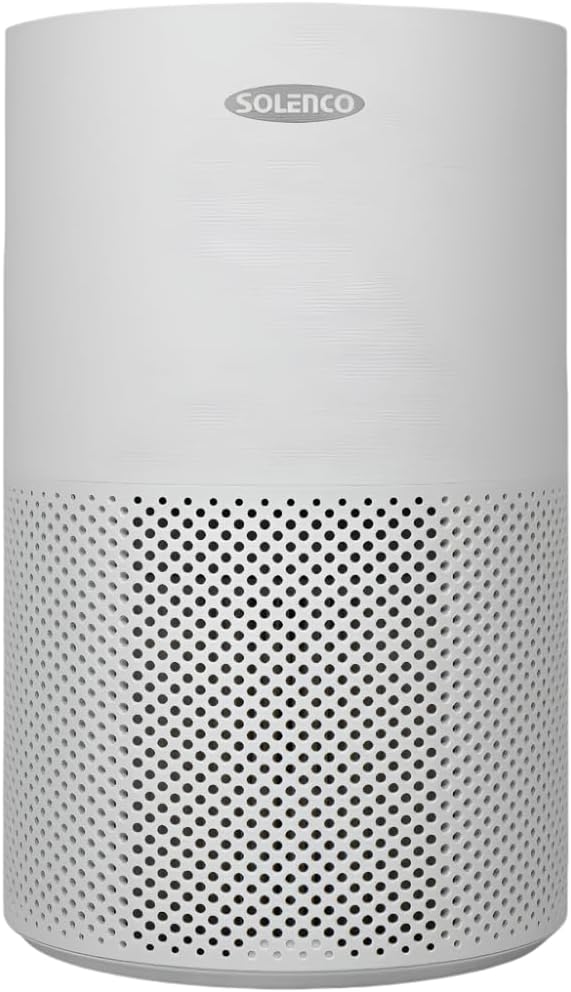
Figure 1: Solenco 204 Air Purifier
製品構成
The Solenco 204 Air Purifier consists of the following main components:
- 本体: ファン、モーター、コントロール パネルを収納します。
- Multi-Layer Filter: Combines a pre-filter, H13 Medical Grade HEPA filter, antiviral filter, and activated carbon filter.
- UV-CLamp: 内部lamp 殺菌のため。
- 電源コード: 電源コンセントに接続します。

Figure 2: Advanced Filtration System - Equipped with a pre-filter, H13 Medical Grade HEPA filter, activated carbon filter, and an antiviral filter to capture dust, pollen, smoke, odours, VOC's and airborne viruses.
セットアップガイド
- 開梱: 空気清浄機を梱包から慎重に取り出してください。梱包材はすべて保管し、将来の保管や輸送に備えてください。
- フィルターのインストール: Before first use, ensure the multi-layer filter is correctly installed and any protective plastic wrapping is removed. Refer to the filter compartment instructions for specific steps.
- 配置: Place the air purifier on a firm, level surface. Ensure there is at least 20 cm of clear space around all sides for optimal airflow. The unit is suitable for rooms up to 30m².
- 電源接続: 電源コードを標準のコンセントに差し込みます。ユニットはスタンバイモードになります。
操作ガイド
コントロールパネル
The Solenco 204 features an intuitive touch panel for easy control:

Figure 3: Smart Control - Features a touch panel with easy-to-use controls, including a timer, speed settings, UV light, and sleep mode. WiFi Enabled: Connect and control the air purifier remotely through the Smart Life app.
- 電源ボタン: を押して、ユニットのオン/オフを切り替えます。
- ファン速度: ファン速度を調整します(低、中、高)。
- 自動モード: 検出された空気の質に基づいてファン速度を自動的に調整します。
- UVライト: Activate or deactivate the UV-C sterilization lamp.
- スリープモード: Reduces fan speed and dims lights for quiet operation (as low as 26dB).
- タイマー: Set the operating duration (e.g., 2, 4, 8 hours).

Figure 4: Auto Mode - Automatically adjusts the fan speed based on the air quality detected by the built-in sensor.

Figure 5: UV-C Light Technology - Destroys harmful microorganisms such as bacteria, viruses, and mould spores.

Figure 6: Quiet Operation - Operates at a noise level as low as 26dB in sleep mode, ensuring a peaceful environment.
WiFi Connectivity (Smart Life App)
The Solenco 204 can be controlled remotely via the Smart Life app. Download the app from your smartphone's app store and follow the in-app instructions to pair your device. This allows for remote control, scheduling, and monitoring of air quality.
メンテナンスとケア
フィルターの交換
The multi-layer filter has a limited lifespan and requires regular replacement to maintain optimal performance. The filter indicator light on the control panel will illuminate when a replacement is needed (typically every 6-12 months, depending on usage and air quality).
- 空気清浄機の電源を切り、プラグを抜いてください。
- Locate the filter compartment (usually at the bottom or back of the unit).
- 古いフィルターを取り外して適切に廃棄してください。
- Unpack the new filter and insert it into the compartment, ensuring correct orientation.
- フィルターコンパートメントを閉じます。
- Plug in and turn on the unit. Reset the filter indicator by pressing and holding the filter reset button (refer to control panel diagram for exact location) for 3-5 seconds.
ユニットのクリーニング
- 本体の外側は、乾いた柔らかい布で拭いてください。
- 研磨剤や溶剤は使用しないでください。
- Periodically vacuum the air intake and outlet vents to remove dust buildup.
トラブルシューティング
| 問題 | 考えられる原因 | 解決 |
|---|---|---|
| ユニットがオンにならない | 電源が供給されていません。電源ボタンが押されていません。 | 電源コードの接続を確認し、コンセントが機能していることを確認し、電源ボタンをしっかりと押します。 |
| 風量が弱い | フィルターが詰まっている;空気の入口/出口が塞がれている | フィルターを交換し、障害物を取り除いてください。 |
| 異常なノイズ | 内部に異物あり;ユニットが水平面上に設置されていない | Turn off and inspect for objects; Place on a stable, flat surface. |
| フィルターインジケーターは交換後も点灯したまま | フィルターのリセットは実行されませんでした | Press and hold the filter reset button for 3-5 seconds. |
| WiFiに接続できません | Incorrect WiFi password; Router issues; App issues | Verify WiFi password; Restart router; Reinstall Smart Life app. |
技術仕様
| 特徴 | 仕様 |
|---|---|
| モデル | Solenco 204 |
| ブランド | Solenco |
| 色 | グレー |
| 電力/ワットtage | 40ワット |
| 騒音レベル | 26 dB(最小) |
| アイテム重量 | 3.53キロ |
| 製品寸法(奥行き×幅×高さ) | 22.6D x 22.6W x 36H センチメートル |
| 制御方法 | アプリ、タッチパネル |
| フィルタータイプ | H13 HEPA, Activated Carbon, Antiviral |
| 床面積のカバー率 | 最大30平方メートル |

Figure 7: Coverage Area - Effectively purifies the air in rooms up to 30m² at 4 air changes per hour.
保証とカスタマーサポート
For warranty information and customer support, please refer to the documentation provided at the time of purchase or visit the official Solenco website. You may also contact the seller, Solenco SA, for assistance.
Community Rhino Conservation Initiative: A portion of every Solenco air purifier purchase contributes to the Community Rhino Conservation Initiative (CRCI). Learn more about this initiative and meet the rhinos by scanning the QR code or visiting the link below:

Figure 8: Solenco's contribution to the Community Rhino Conservation Initiative.
Ask a question about this manual
Ask about setup, troubleshooting, compatibility, parts, safety, or missing instructions. Manuals+ will review the question and use this page’s manual context to help answer it.