
グーグルピクセル9a
Google Pixel 9a ユーザー マニュアル
Model: Pixel 9a (GA05769-GB)
1. はじめに
Welcome to the user manual for your new Google Pixel 9a smartphone. This guide provides essential information to help you set up, operate, maintain, and troubleshoot your device. The Pixel 9a combines advanced AI capabilities with a powerful camera and long-lasting battery, designed to enhance your daily mobile experience.

Figure 1: Google Pixel 9a in Obsidian
2.セットアップガイド
2.1. 箱の中身
- Google Pixel 9a Smartphone
- USB-C to USB-C Cable (1m, USB 2.0)
- SIMツール

図2: ボックスの内容
2.2. 初期設定
- SIM カードの挿入: Use the provided SIM tool to open the SIM tray. Insert your nano-SIM card.
- 電源オン: Press and hold the power button on the side of the device until the Google logo appears.
- 画面上の指示に従ってください: The phone will guide you through connecting to Wi-Fi, signing in to your Google account, and transferring data from your old device.
- 充電バッテリー: Connect the USB-C cable to the phone and a compatible power adapter (sold separately) to charge the device.
3. デバイスの操作
3.1. カメラ機能
The Pixel 9a camera is equipped with advanced AI features to capture stunning photos and videos.
Include Me (Inclúyeme)
This feature ensures no one is left out of group photos. Take one group photo, switch photographers, take another, and Pixel will magically merge both photos.

マクロフォーカス
Use Macro Focus to reveal vivid colors and surprising contrast in photos and videos of the smallest details, such as raindrops, flowers, or splashes.

Best Take (Mejor Versión)
Capture group photos where everyone looks their best. The phone can combine different facial expressions from a burst of photos to create the perfect group shot.

3.2. ジェミニAIアシスタント
Gemini is your integrated AI assistant, simplifying multitasking and information retrieval across your Google applications.
Single Request, Multiple Apps
Ask Gemini to find information and perform actions for you across your Google apps, streamlining your workflow.

ジェミニライブ
Interact with Gemini through voice commands for quick assistance and information.

3.3.バッテリー管理
The Pixel 9a features an intelligent battery designed for extended use.
- The smart battery can last over 24 hours with typical usage.
- 活性化 Extreme Battery Saver to extend battery life up to 100 hours.

4. お手入れとメンテナンス
Proper care ensures the longevity and optimal performance of your Pixel 9a.
- クリーニング: 画面と本体の清掃には、柔らかく糸くずの出ない布をご使用ください。研磨剤や刺激の強い化学薬品の使用は避けてください。
- 温度: バッテリーの寿命や内部コンポーネントに影響を与える可能性があるため、デバイスを極端な温度(高温または低温)にさらさないでください。
- 防水・防塵性能: The Pixel 9a is rated IP68 for water and dust resistance, meaning it can withstand submersion in up to 1.5 meters of fresh water for up to 30 minutes. However, this is not permanent and resistance may decrease over time with normal wear. Avoid intentional submersion.
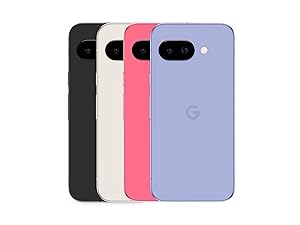
図3: 耐水性
- リサイクル素材: The Pixel 9a is manufactured with recycled materials, contributing to environmental sustainability.
5。 トラブルシューティング
This section addresses common issues you might encounter with your Pixel 9a.
| 問題 | 考えられる原因 | 解決 |
|---|---|---|
| バッテリー寿命が短い | High screen brightness, excessive app usage, background processes. | Reduce screen brightness, close unused apps, activate Extreme Battery Saver, check battery usage in settings. |
| Setup Issues / Freezing | Software glitch, network connectivity problems during setup. | Restart the device. Ensure a stable Wi-Fi connection. If issues persist, perform a factory reset (data will be erased). |
| Fingerprint Sensor Not Working | Dirty sensor, screen protector interference, un-registered fingerprint. | Clean the sensor. Re-register your fingerprint. Ensure screen protector is compatible with in-display sensors. |
| Camera Quality Concerns | Dirty lens, poor lighting conditions, incorrect settings. | Clean the camera lens. Ensure adequate lighting. Adjust camera settings (e.g., HDR, night mode). |
6. 技術仕様
Detailed specifications for the Google Pixel 9a.
| 特徴 | 仕様 |
|---|---|
| オペレーティング·システム | アンドロイド15 |
| 寸法 | 7.33 x 15.47 x 0.89 cm |
| 重さ | 186グラム |
| 表示サイズ | 6.3インチ |
| 解決 | 2340×1080 |
| ラム | 8ギガバイト |
| ストレージ容量 | 128ギガバイト |
| CPUモデル | キンギョソウ |
| バッテリー電力定格 | 5100 mAh (Approximate) |
| 通話時間 | 30時間 |
| 接続性 | 5G |
| オーディオコネクタ | 3.5ミリメートル |
| モデル番号 | GA05769-GB |
| 初回利用可能日 | 14年2025月XNUMX日 |
For detailed product information and energy efficiency, refer to the EPREL database:

図4: EUエネルギーラベル
7. 保証とサポート
Your Google Pixel 9a is manufactured by Google and comes with a standard warranty. For specific warranty terms and conditions, please refer to the documentation included with your device or visit the official Google support webサイト。
- メーカー: グーグル
- 公式サポート: For technical assistance, troubleshooting, and warranty claims, please visit the official Google Support page or contact Google customer service.
- 保証期間: Information regarding the warranty duration is typically provided at the point of purchase or within the device's packaging.
Ask a question about this manual
Ask about setup, troubleshooting, compatibility, parts, safety, or missing instructions. Manuals+ will review the question and use this page’s manual context to help answer it.