
Micool BT-X easy
Micool BT-X Easy On-Ear ヘッドホン ユーザーマニュアル
Model: BT-X easy
導入
Thank you for choosing the Micool BT-X Easy On-Ear Headphones. These headphones are designed to provide a comfortable listening experience with high-quality audio and extended battery life. Featuring Bluetooth 5.4 technology and a unique open-ear design, they are perfect for various activities, from sports to daily commutes.
箱の中身
- Micool BT-X Easy On-Ear Headphones (Left & Right)
- ワイヤレス充電ケース
- USB-C充電ケーブル
- ユーザーマニュアル
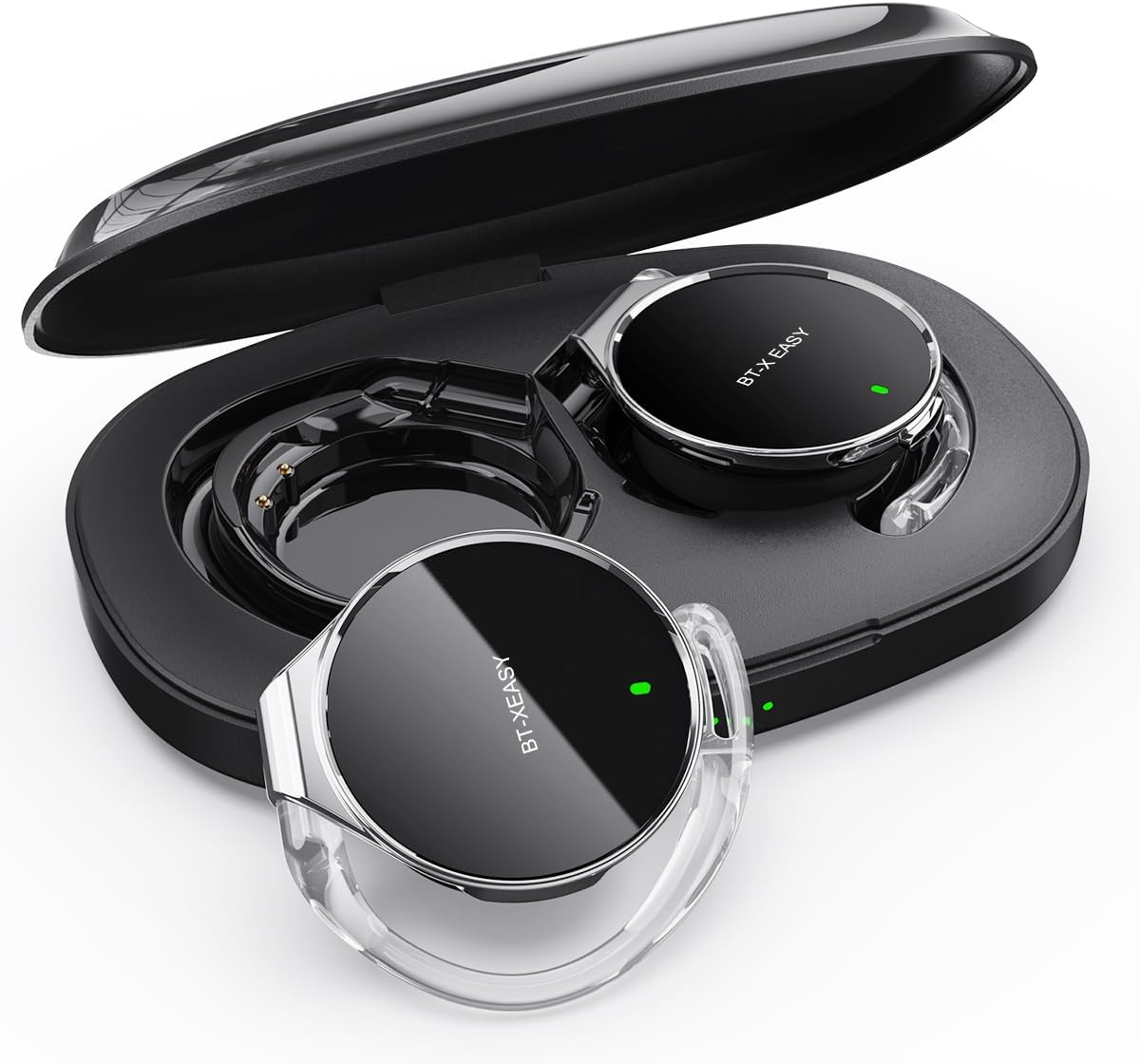
Image: Micool BT-X Easy On-Ear Headphones and their charging case, showing the headphones placed inside the open case.
製品の特徴
- HDステレオオーディオ: 28mm speakers for rich bass and clear sound.
- Bluetooth 5.4: Fast pairing, stable connection, and reliable use.
- ノイズ低減: ANC+ENC adaptive noise reduction for clearer calls with 4 microphones.
- 長いバッテリー寿命: 1 回の充電で最大 18 時間の音楽再生が可能で、充電ケースを使用すると合計最大 52 時間の音楽再生が可能です。
- 快適なフィット感: Small, lightweight 36mm diameter with sponge earcup design for comfortable wear without ear compression.
- マルチポイント接続: Connect to two devices simultaneously (e.g., phone, laptop, tablet).
- 直感的なコントロール: Easy control of music and calls via multifunction buttons.
- 耐水性: 水しぶきや汗に耐えられるよう設計されています。

画像: クローズアップ view of the headphone highlighting its compact design and touch control area.
設定
1. 初期充電
Before first use, fully charge the headphones and the charging case. Connect the provided USB-C cable to the charging case and a power source. The 4-stage power indicator lights on the case will show the charging progress (each light represents 25% battery capacity).

Image: The charging case displaying its 4-stage battery indicator lights.
2. デバイスとのペアリング
- 充電ケースを開けると、ヘッドホンは自動的にペアリングモードになります。
- デバイス(スマートフォン、タブレット、ラップトップ)で Bluetooth を有効にします。
- 検索する "BT-XEASY" in the list of available Bluetooth devices and select it to connect.
- 接続されると、音声プロンプトによってペアリングの成功が確認されます。
3. Multi-point Connection (Optional)
To connect to a second device, disconnect the headphones from the first device's Bluetooth settings. Then, pair with the second device following the steps above. Reconnect to the first device from its Bluetooth settings. The headphones will now be connected to both devices simultaneously.
操作手順
ヘッドフォンを装着する
- ステップ1: Open the ear-hook at a 30° angle.
- ステップ2: Rotate the headphone around your ear to the bottom of the ear-hook.
- ステップ3: ヘッドフォンを押してamp them tightly to your ear.
- ステップ4: Adjust the angle to make wearing more comfortable.

Image: Step-by-step visual guide on how to properly wear the on-ear headphones.
タッチコントロール
The BT-X Easy headphones feature intuitive touch controls on each headset for easy management of audio and calls.
| 関数 | アクション |
|---|---|
| 音楽の再生/一時停止 | x1をクリックします |
| 通話の応答/終了 | x1をクリックします |
| 通話を拒否 | 長押し |
| Mute (in call) | Click x2 (prompt sound will confirm) |
| 次のトラック | Click x2 (Right Headphone) |
| 前のトラック | Click x2 (Left Headphone) |
| 音量を上げる | Hold (Right Headphone) |
| 音量を下げる | Hold (Left Headphone) |

Image: Diagram illustrating the touch control functions on the headphone.
公式製品ビデオ
Video: An official product video from Micool demonstrating the features and usage of the BT-X Easy On-Ear Headphones. This video provides a visual guide to the product's design, comfort, and functionality, including how to wear them and use the touch controls.
メンテナンス
- クリーニング: ヘッドホンと充電ケースのお手入れには、柔らかく乾いた布をご使用ください。研磨剤入りの洗剤や溶剤は使用しないでください。
- ストレージ: 使用していないときは、ヘッドフォンを保護し、次回使用するときに充電されるように、充電ケースに保管してください。
- バッテリーのケア: バッテリー寿命を延ばすには、ヘッドフォンを頻繁に完全に放電させないでください。長期間使用しない場合でも、定期的に充電してください。
- 耐水性: The headphones are water-resistant, but not waterproof. Avoid submerging them in water or exposing them to heavy rain. Dry them thoroughly if they get wet.
トラブルシューティング
| 問題 | 考えられる解決策 |
|---|---|
| ヘッドフォンがペアリングされない | Ensure headphones are charged. Turn off and on Bluetooth on your device. Forget "BT-XEASY" from your device's Bluetooth list and re-pair. |
| 音が出ない、または音量が小さい | Check device volume and headphone volume. Ensure headphones are properly connected. Try playing different audio sources. |
| 片方のイヤホンが動作しない | Place both headphones back in the charging case, close the lid, wait a few seconds, then open and try again. Ensure both are charged. |
| 充電ケースが充電されない | Check USB-C cable and power adapter. Ensure proper connection. |
| 接続が不安定 | Move closer to your device. Avoid strong electromagnetic interference. Ensure no other devices are trying to connect simultaneously. |
仕様
| 特徴 | 詳細 |
|---|---|
| モデル名 | BT-X easy |
| 接続技術 | ワイヤレス(Bluetooth 5.4) |
| オーディオドライバータイプ | ダイナミックドライバー(28mmスピーカー) |
| バッテリー寿命(ヘッドフォン) | 最大18時間 |
| バッテリー総寿命(ケース付き) | 最大52時間 |
| 騒音制御 | Active Noise Cancellation (ANC+ENC for calls) |
| マイク | 4マイク |
| 耐水性レベル | 耐水性 |
| 材料 | アクリロニトリルブタジエンスチレン(ABS) |
| アイテム重量 | 5オンス |
| 欧州連合 | 775494925862 |
保証とサポート
Micool provides 24-hour after-sales service for all purchased items. For any issues or inquiries, please contact Micool customer support through the official brand store or the platform where you purchased the product.
For detailed warranty information, please refer to the warranty card included in your product packaging or visit the official Micool webサイト。保護プランにより、より広範囲の保護が受けられる場合もあります。
Micool Brand Store: Visit Micool Store on Amazon
Ask a question about this manual
Ask about setup, troubleshooting, compatibility, parts, safety, or missing instructions. Manuals+ will review the question and use this page’s manual context to help answer it.