
導入
This manual provides essential information for the proper use and maintenance of your Yeabomy AK6 PRO Wired Gaming Earbuds. These in-ear monitors are designed for high-fidelity audio, featuring a 10mm dynamic driver for deep bass and clear sound, suitable for music, gaming, and video calling. The ergonomic design ensures a comfortable and stable fit, while passive noise cancellation helps reduce ambient noise.
パッケージ内容
- 1 pair AK6 PRO Earbuds
- イヤホンケーブル1本
- イヤーチップ3組(各種サイズ)
- 1 ユーザーマニュアル(本書)

Image: The Yeabomy AK6 PRO Wired Gaming Earbuds, showing both black and green color variants with their detachable cables.
製品の特徴
- 人間工学に基づいたデザイン: Lightweight cavity and soft fit for the auricle, with new PU memory ear hooks for comfortable and stable wear.
- 優れた音質: Features a new 1DD 10mm dynamic driver for rich, vigorous performance across bass, midrange, and treble. Independent sound channels prevent distortion.
- パッシブノイズキャンセリング: Designed to block out approximately 90% of ambient noise, enhancing immersion during listening.
- 取り外し可能なケーブル: The earphones cable is detachable, offering flexibility and ease of replacement.
- 幅広い互換性: Compatible with laptops, desktops, gaming consoles, tablets, and cellphones via a 3.5mm jack.
セットアップ手順
- Attach the Earbuds to the Cable:
Identify the left (L) and right (R) earbuds and the corresponding connectors on the cable. Gently push the earbud connector onto the cable pin until it clicks securely into place. Ensure a firm connection for optimal audio performance.

Image: Step-by-step diagram illustrating the connection of the earbud units to the cable and the correct over-ear wearing method.
- 適切なイヤーチップを選択してください:
The package includes three pairs of ear tips (small, medium, large). Choose the size that provides the most comfortable and secure fit in your ear canal. A proper seal is crucial for effective noise cancellation and sound quality.
- イヤホンを装着する:
Insert the earbud into your ear canal. The cable is designed to loop over the top of your ear, providing a secure fit and reducing microphonics (cable noise). Adjust the memory ear hook to conform to the shape of your ear for maximum comfort and stability.
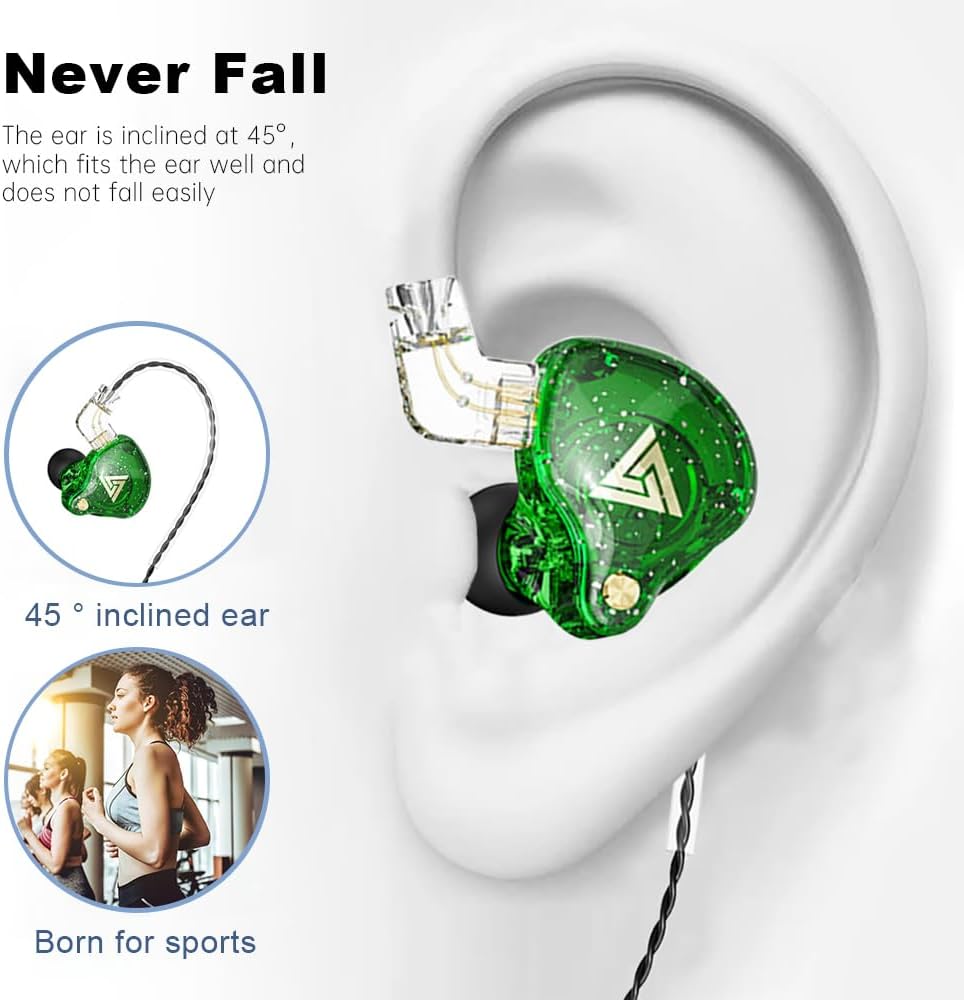
Image: Visual guide demonstrating the ergonomic fit of the earbuds, showing how they sit securely in the ear with the cable looped over.
- デバイスに接続します:
Plug the 3.5mm audio jack into the headphone port of your audio device (smartphone, tablet, PC, gaming console, etc.).
操作手順
- オーディオ再生: Once connected, your device should automatically recognize the earbuds. Begin playing audio from your device.
- 音量コントロール: 接続されたデバイスから直接音量を調整します。
- マイクの使用: The integrated microphone allows for clear communication during gaming, calls, or recording. Position the microphone for optimal voice pickup.
- ノイズキャンセル: The passive noise cancellation feature works by physically sealing the ear canal. Ensure a snug fit with the correct ear tip size to maximize this effect.
Video: An official seller video demonstrating the features and usage of the AK6 PRO in-ear monitor headphones, highlighting their design and sound capabilities.
メンテナンス
- クリーニング: イヤーチップは定期的に柔らかく乾いた布で拭いてください。よりしっかりと洗浄するには、イヤーチップを取り外し、中性洗剤と水で洗い、完全に乾いてから再度取り付けてください。
- ケーブルのお手入れ: Avoid sharp bends or excessive pulling on the cable to prevent damage. When not in use, coil the cable loosely.
- ストレージ: イヤホンは、極端な温度や直射日光を避け、清潔で乾燥した場所に保管してください。
- 取り外し可能なケーブル: If the cable needs replacement, ensure you use a compatible cable to maintain sound quality and functionality.
トラブルシューティング
| 問題 | 考えられる原因 | 解決 |
|---|---|---|
| 音が出ない、または音量が小さい |
|
|
| 音の歪み |
|
|
| イヤホンが簡単に外れてしまう |
|
|
仕様
| 特徴 | 詳細 |
|---|---|
| ブランド | Yeabomy |
| モデル名 | AK6PRO |
| 接続技術 | 有線 |
| ヘッドフォンジャック | 3.5ミリジャック |
| 騒音制御 | 遮音性(パッシブノイズキャンセリング) |
| 感度 | 105デシベル |
| インピーダンス | 16オーム |
| オーディオドライバータイプ | ダイナミックドライバー(10mm) |
| 材料 | 金属、プラスチック |
| アイテム重量 | 4.6 オンス (0.13 キログラム) |
| 含まれるコンポーネント | Cable, Eartips, User Manual |
| 対応デバイス | Laptops, Desktops, Gaming Consoles, Tablets, Telephones, Cellphones |
| 推奨用途 | Calling, Exercising, Gaming, Recording |
保証とサポート
For warranty information and customer support, please refer to the contact details provided on the product packaging or the official Yeabomy webサイトでご確認ください。保証請求の際は購入証明として領収書を保管してください。