
1. はじめに
This manual provides detailed instructions for the setup, operation, maintenance, and troubleshooting of your ACEMAGIC Vista Mini V1 Mini PC. Please read this manual thoroughly before using the product to ensure proper functionality and to prevent damage.

Figure 1.1: ACEMAGIC Vista Mini V1 Mini PC. This image displays the compact, silver-colored mini PC from a slightly elevated angle, showcasing the ACEMAGIC logo on top, two USB ports, and an audio jack on the front panel, along with the power button.
2. パッケージ内容
パッケージにすべてのアイテムが揃っていることを確認します。
- ACEMAGIC Vista Mini V1 Mini PC
- 電源アダプター
- HDMIケーブル
- VESA Mount (for monitor or wall installation)
- ユーザーマニュアル(このドキュメント)
3.製品オーバーview
The ACEMAGIC Vista Mini V1 is a compact and powerful mini PC designed for various applications, from office tasks to multimedia entertainment. It features a 12th Gen Intel Alder Lake-N N97 processor, 16GB DDR4 RAM, and a 1TB SSD.
3.1 外部機能とポート
Familiarize yourself with the various ports and buttons on your Mini PC:

Figure 3.1: Front and Rear Ports of the ACEMAGIC Vista Mini V1. The top part of the image shows the front panel with a power button, two USB 3.2 Gen2 Type-A ports, and a 3.5mm audio jack. The bottom part illustrates the rear panel, featuring a LAN port (RJ45 1000M), HDMI 2.0 port, DisplayPort 1.4, two USB 2.0 Type-A ports, and a DC IN jack.
- フロントパネル: Power Button, 2 x USB 3.2 Gen2 Type-A Ports (10Gbps), 1 x 3.5mm Audio Jack.
- 後面パネル: 1 x RJ45 Gigabit Ethernet Port (10M/100M/1000M), 1 x HDMI 2.0 Port (4K@60Hz), 1 x DisplayPort 1.4 (4K@60Hz), 2 x USB 2.0 Type-A Ports, 1 x DC IN Port.
3.2 内部コンポーネント
The internal design of the Mini PC is optimized for performance and cooling.
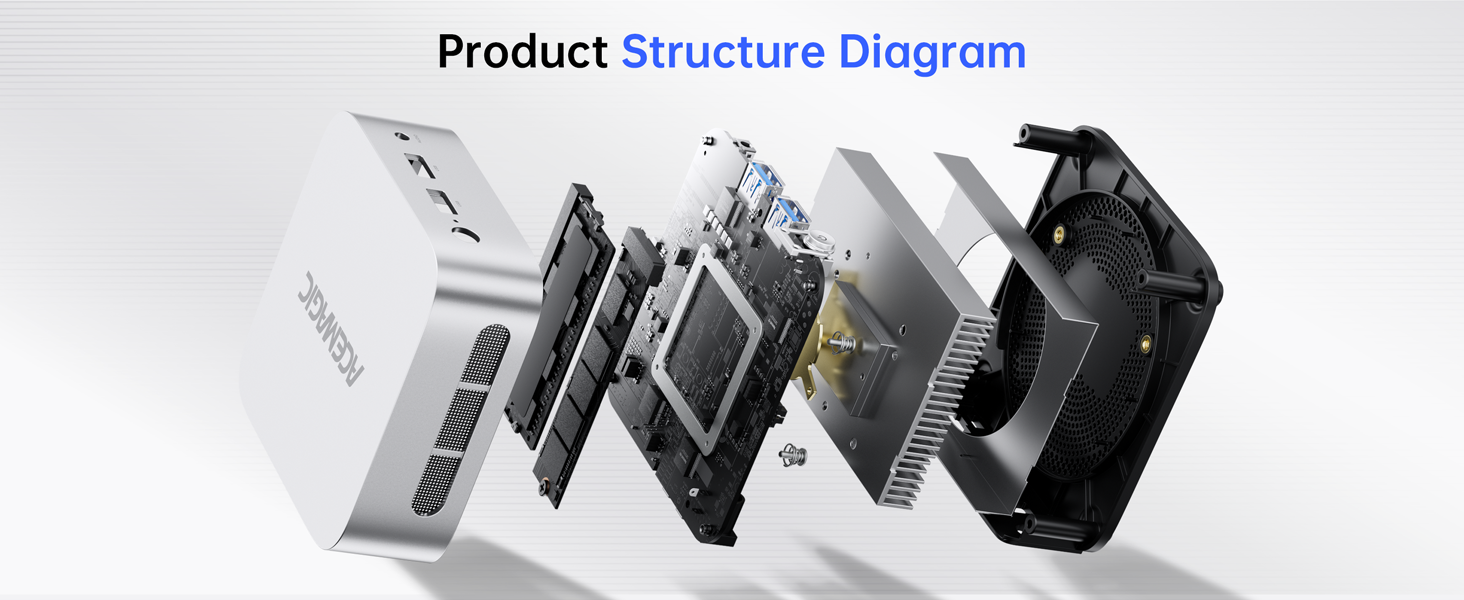
図 3.2: 分解 view of the ACEMAGIC Vista Mini V1. This diagram shows the internal components of the mini PC, including the motherboard, cooling fan, heatsink, and storage drive, illustrating its modular design.
4.セットアップガイド
4.1 周辺機器の接続
- ディスプレイを接続する: Use the provided HDMI cable or a DisplayPort cable to connect your monitor to the HDMI 2.0 or DP 1.4 port on the rear of the Mini PC.
- キーボードとマウスを接続します。 Plug your USB keyboard and mouse into any available USB ports (USB 3.2 on the front or USB 2.0 on the rear). For wireless peripherals, ensure they are paired via Bluetooth or connected via their respective USB dongles.
- ネットワークに接続(オプション): For a wired internet connection, connect an Ethernet cable from your router or modem to the RJ45 Gigabit Ethernet port on the rear.
4.2電源オン
- 電源アダプタを接続: Plug the power adapter into the DC IN port on the rear of the Mini PC, then plug the adapter into a power outlet.
- 電源オン: ミニPCの前面パネルにある電源ボタンを押します。電源インジケータライトが点灯します。
4.3 オペレーティングシステムの初期セットアップ
The Mini PC comes pre-installed with Windows 11 Pro. Upon first boot, follow the on-screen instructions to complete the initial Windows setup, including language selection, network connection, account creation, and privacy settings.
5. オペレーティングシステム
The ACEMAGIC Vista Mini V1 is pre-installed with ウィンドウズ11プロ, offering a secure and efficient computing environment. It also supports other operating systems such as Windows 10 Pro, Ubuntu, and Linux, providing flexibility for advanced users.

Figure 5.1: ACEMAGIC Vista Mini V1 supporting various operating systems. This image shows the mini PC connected to a monitor displaying Windows 11 Pro, with overlays indicating support for Windows 10 Pro, Ubuntu, and Linux.
6. ストレージの拡張
The Mini PC is equipped with a 1TB SSD. For additional storage, you can expand the memory up to 2TB by adding an M.2 NVMe PCIe 3.0 SSD or an M.2 SATA SSD. Refer to the product's internal structure diagram (Figure 3.2) for the location of the M.2 slot. Professional installation is recommended for storage upgrades.
7. 接続性
7.1 有線接続
- イーサネット: The 10M/100M/1000M RJ45 Gigabit Ethernet Port provides a stable and high-speed wired network connection.
7.2 ワイヤレス接続
- Wi-Fi: Built-in Wi-Fi 5 (802.11ac) ensures reliable and fast wireless internet access.
- ブルートゥース: Integrated Bluetooth 4.2 allows for seamless connection with various wireless peripherals such as keyboards, mice, headsets, and other compatible devices.
8. ディスプレイ設定
The ACEMAGIC Vista Mini V1 supports dual display output and 4K UHD resolution, enhancing productivity and visual experience.
8.1 ディスプレイの接続
Connect your monitors to the HDMI 2.0 and DisplayPort 1.4 ports on the rear of the Mini PC. Both ports support 4K@60Hz output.
8.2 デュアルディスプレイ設定
To set up a dual display configuration:
- 2 台のモニターを HDMI および DisplayPort 出力に接続します。
- Once both monitors are connected and powered on, Windows will typically detect them automatically.
- To configure display settings (e.g., extend or duplicate displays), right-click on the desktop, select 'Display settings', and adjust as needed.

Figure 8.1: Dual-screen UHD Display setup with ACEMAGIC Vista Mini V1. This image shows the mini PC connected to two monitors, demonstrating an extended desktop setup for enhanced productivity with 4K UHD resolution.
9. 冷却システム
The Vista Mini V1 incorporates an advanced cooling system to ensure stable and quiet operation, even under load.
- Internal Cooling Technology: Precision cutouts facilitate direct airflow to internal components, utilizing 180° dual exhaust for efficient convection cooling.
- Upgraded Axial Fan: The axial fan efficiently dissipates heat with high efficiency. Its optimized blade design ensures strong airflow and quiet operation, maintaining up to 15W of sustained performance.

Figure 9.1: ACEMAGIC Vista Mini V1 Cooling System. This diagram illustrates the internal airflow and fan design, highlighting the efficient heat dissipation mechanism of the mini PC.
10. 仕様
ACEMAGIC Vista Mini V1 ミニ PC の詳細な技術仕様:
| 特徴 | 仕様 |
|---|---|
| モデル | エースマジック ビスタ ミニ V1 |
| プロセッサ | Intel Alder Lake-N N97 Processor (4 Cores/4 Threads, 6M Intel Smart Cache, 2.0GHz, MAX TO 3.6GHz) |
| 統合グラフィックス | Intel UHD Graphics (Graphics Max Dynamic Frequency 1.20 GHz, Execution Units 24EUs) |
| メモリ | 16GB DDR4 SO-DIMM |
| ストレージ | 1TB SSD (M.2 2280 PCIe & SATA Slot * 1 for expansion up to 2TB) |
| ネットワーク | Wi-Fi 5, Bluetooth 4.2, Gigabit Ethernet (RJ45 1000M) |
| ポート(前面) | 2 x USB 3.2 Type-A, 1 x 3.5mm Audio Jack |
| ポート(背面) | 1 x RJ45, 1 x HDMI 2.0, 1 x DP 1.4, 2 x USB 2.0 Type-A, 1 x DC IN |
| オペレーティング·システム | Windows 11 Pro (supports Windows 10 Pro, Ubuntu, Linux) |
| 寸法 | 100mm x 100mm x 33mm(約3.9 x 3.9 x 1.3インチ) |
| 材料 | ABS + PC (Silver color) |
| アイテム重量 | 1.37ポンド |
11。 トラブルシューティング
このセクションでは、ミニ PC で発生する可能性のある一般的な問題について説明します。
11.1 電源なし
- 電源接続を確認してください: 電源アダプタがミニ PC と機能している電源コンセントにしっかりと接続されていることを確認します。
- アウトレットを確認: 別のデバイスで電源コンセントをテストし、機能していることを確認します。
- 電源ボタン: 電源ボタンがしっかりと押されていることを確認してください。
11.2 ディスプレイ出力なし
- ケーブル接続: Verify that the HDMI or DisplayPort cable is securely connected to both the Mini PC and the monitor.
- モニター入力: Ensure your monitor is set to the correct input source (HDMI or DisplayPort).
- 別のモニター/ケーブルでテストする: If possible, test the Mini PC with a different monitor or cable to rule out display or cable issues.
11.3 インターネット接続なし
- 有線接続: ミニPCとルーター/モデムの両方へのイーサネットケーブルの接続を確認してください。ルーター/モデムの状態を確認してください。
- Wi-Fi接続: Windowsの設定でWi-Fiが有効になっていること、そして正しいパスワードで正しいネットワークに接続していることを確認してください。ルーター/モデムを再起動してください。
- ドライバーの問題: Ensure network drivers are up to date in Device Manager.
11.4 周辺機器が応答しない
- USB デバイス: Try connecting USB devices to different USB ports. Ensure drivers are installed if required.
- Bluetoothデバイス: Ensure Bluetooth is enabled and devices are properly paired in Windows settings. Check device batteries.
12. メンテナンス
ACEMAGIC Vista Mini V1 ミニ PC の寿命を延ばし、最適なパフォーマンスを確保するには、次のメンテナンス ガイドラインに従ってください。
- クリーニング: ミニPCの外装は、柔らかく乾いた布で定期的に清掃してください。通気口の埃は、圧縮空気で優しく取り除いてください。液体クリーナーを直接デバイスに使用しないでください。
- 換気: ミニ PC が換気のよい場所に設置され、通気口が塞がれていないことを確認してください。
- ソフトウェアアップデート: セキュリティとパフォーマンスを確保するために、オペレーティング システムとドライバーを最新の状態に保ってください。
- 環境条件: ミニPCは推奨温度と湿度の範囲内でご使用ください。極端な温度や直射日光は避けてください。
13. 保証とサポート
ACEMAGIC provides comprehensive support for its products.
- 保証: The ACEMAGIC Vista Mini V1 Mini PC typically comes with a 12-month warranty. Please refer to your purchase documentation for specific warranty terms and conditions.
- 顧客サービス: For technical assistance, troubleshooting, or warranty claims, please contact ACEMAGIC customer support.
13.1連絡先情報
- サポートメール: service@acemagicians.com
- 電話番号(米国): +1 800 908 1980
- オンラインサポート: You can also log in to your Amazon buyer account, find your order, and click "Get Help" for assistance.