
1.製品オーバーview
The MOVE SPEED 145W Laptop Power Bank is a high-capacity portable charging solution designed for a wide range of electronic devices, including laptops, smartphones, and tablets. Featuring PD 3.1 fast charging technology and a 25,000mAh capacity, it ensures your devices remain powered during travel, work, or outdoor activities. The integrated digital display provides real-time charging insights, enhancing user convenience.
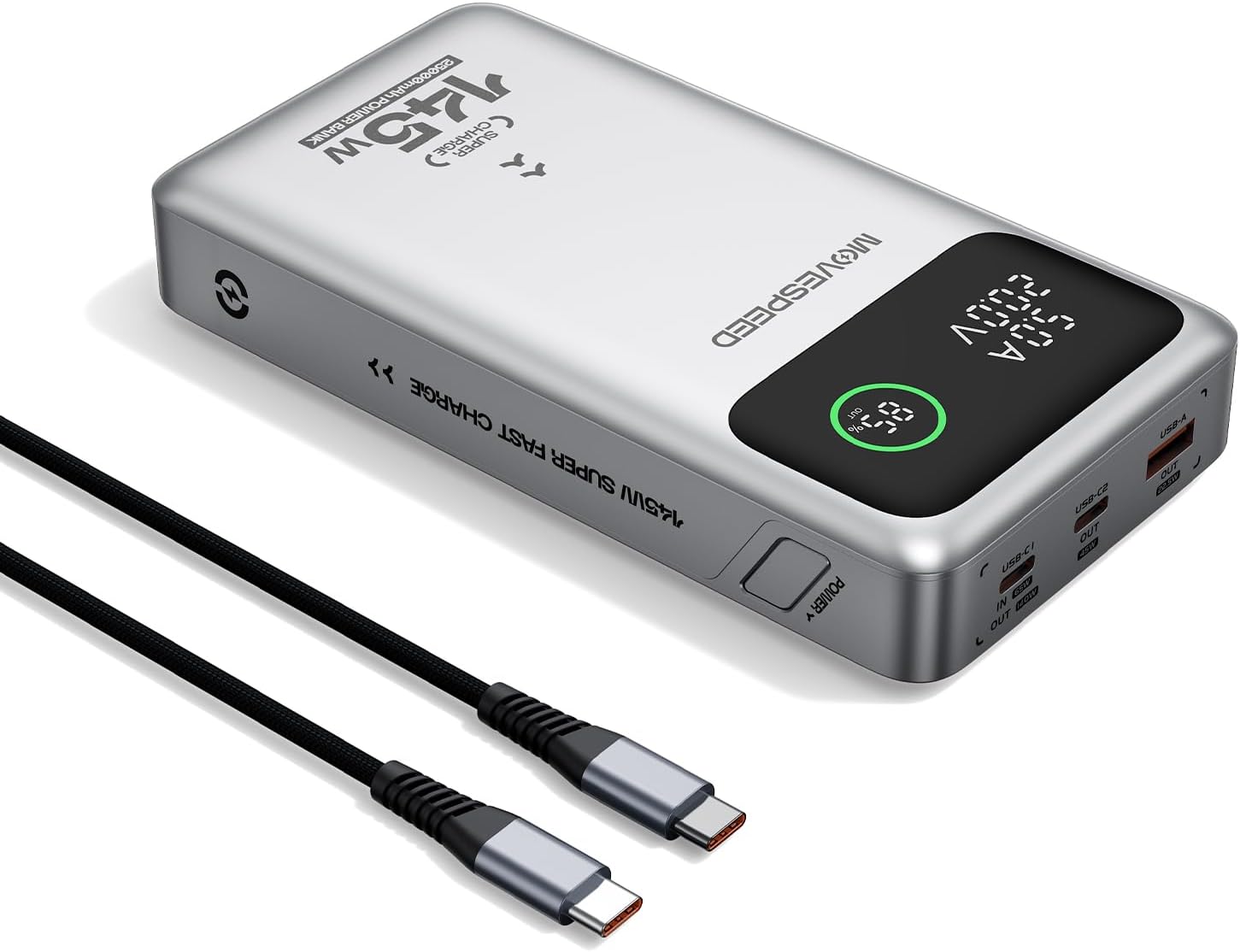
Figure 1.1: MOVE SPEED 145W Laptop Power Bank and 240W Type-C Cable.
2. 安全情報
重要な安全上の注意事項:
- パワーバンクを極端な温度、直射日光、火気にさらさないでください。
- デバイスを落としたり、分解したり、自分で修理しようとしたりしないでください。
- 水や湿気の多い場所には置かないでください。
- 使用中および充電中は適切な換気を行ってください。
- This power bank is flight-approved (25000mAh/92.5Wh) and meets FAA and TSA carry-on regulations.
- The device incorporates 9-layer protection against overcharging, overheating, and short circuits.

Figure 2.1: The power bank is designed to be air-travel friendly.

Figure 2.2: Built-in NTC Temperature Sensor and comprehensive protection features.
3. パッケージ内容
パッケージにすべてのアイテムが揃っていることを確認します。
- MOVE SPEED 145W Laptop Power Bank x 1
- 240W 3.28Ft Type-C Cable x 1
- ユーザーマニュアル x 1

図 3.1: 製品パッケージに含まれるアイテム。
4 製品の特徴
- 140W Ultra-Fast Single-Port Charging: Supports PD 3.1, capable of charging a 16-inch MacBook Pro to 56% in approximately 30 minutes.
- 65W Ultra-Fast Recharging: Fully recharges the power bank in about 2 hours using a compatible high-wattage充電器。
- 大容量25,000mAh: Provides multiple charges for various devices (e.g., 4 full charges for iPhone 16, 3 for Galaxy S24, 2 for iPad 11).
- Triple-Port Output:
- USB-C1 (IN/OUT): Up to 140W output, 65W input.
- USB-C2 (OUT): Up to 45W output.
- USB-A (OUT): Up to 22.5W output.

Figure 4.1: Single port output capabilities.

Figure 4.2: Two-port simultaneous output capabilities.

Figure 4.3: Three-port simultaneous output capabilities.
- Smart Dynamic Charging: Optimizes power distribution up to 145W combined output when multiple USB-C ports are active.
- スマート LED ディスプレイ: 正確なバッテリー残量を表示tage, charging status (INPUT/OUTPUT), and real-time voltage and current for each active port.
- パススルー充電: Allows simultaneous charging of devices while the power bank itself is being recharged.

Figure 4.4: Key features of the MOVE SPEED 145W Power Bank.

Figure 4.5: Fast charging capability for laptops.

Figure 4.6: Extended power supply for multiple devices.

Figure 4.7: Simultaneous charging of up to three devices.

Figure 4.8: Rapid recharging of the power bank.

Figure 4.9: The smart LED display provides comprehensive charging information.

Figure 4.10: Pass-through charging capability for convenience.
5. セットアップ
初めて使用する前に、パワーバンクを完全に充電することをお勧めします。
- Connect the included 240W Type-C cable to the USB-C1 port (IN/OUT) on the power bank.
- ケーブルのもう一方の端を互換性のある USB-C 壁充電器に接続します (最適な充電速度を得るには 65 W 以上を推奨)。
- The digital display will show "IN" and the battery percentag増加asing, indicating that the power bank is charging.
- ディスプレイに 100% と表示されたら、パワーバンクは完全に充電され、使用できる状態になります。
6. 操作手順
6.1 充電装置
電子機器を充電するには:
- Connect your device's charging cable to the appropriate output port on the power bank (USB-C1, USB-C2, or USB-A).
- ケーブルのもう一方の端をデバイスに接続します。
- The digital display will show "OUT" and the real-time voltage and current, indicating that your device is charging.
- The power bank will automatically detect the connected device and deliver the optimal charging speed.
Video 6.1: Demonstration of the MOVE SPEED power bank charging a laptop. This video highlights the product's ability to provide power to larger devices.
ビデオ6.2: 終了view of the MOVE SPEED laptop power bank's features and usage. This video provides a general demonstration of the product.
Video 6.3: Demonstration of the MOVESPEED portable laptop charger and its 145W power bank capabilities. This video showcases the power bank in action with various devices.
6.2 パワーバンクの充電
パワーバンクを充電するには:
- Connect the included 240W Type-C cable to the USB-C1 port (IN/OUT) on the power bank.
- Connect the other end of the cable to a power source, such as a wall adapter or a computer's USB-C port.
- The digital display will indicate "IN" and the charging progress.
Note: For optimal recharging speed, use a power adapter that supports 65W Power Delivery (PD) or higher.
7. 仕様
| 特徴 | 詳細 |
|---|---|
| モデル番号 | YSPB-M25pro-US |
| バッテリー容量 | 25,000mAh / 92.5Wh |
| USB-C1入力 | 最大65W |
| USB-C1出力 | 最大140W(PD 3.1) |
| USB-C2出力 | 最大45W |
| USB-A出力 | 最大22.5W |
| 総出力 | 145W Max (Dynamic Distribution) |
| 寸法 | 8.19 x 4.49 x 1.56インチ |
| 重さ | 1.41ポンド |
| 付属ケーブル | 240W 3.28Ft Type-C Cable |
| 安全機能 | 9-layer protection (overcharging, overheating, short circuits, etc.), UN38.3 certified |
| 飛行承認済み | Yes (under 100Wh limit) |
8. メンテナンス
- パワーバンクは柔らかく乾いた布で拭いてください。刺激の強い化学薬品や研磨剤は使用しないでください。
- パワーバンクは、直射日光や極端な温度を避け、涼しく乾燥した場所に保管してください。
- 長期間保管する場合は、バッテリーの状態を維持するために、3 ~ 6 か月ごとにパワーバンクを充電してください。
- ポートをほこりやゴミにさらさないようにしてください。
9。 トラブルシューティング
一般的な問題と解決策:
- パワーバンクが充電されない:
- Ensure the charging cable is securely connected to both the power bank (USB-C1 port) and the power adapter.
- 壁のアダプタが正しく機能し、十分な電力(65W を推奨)を供給していることを確認します。
- 別の充電ケーブルまたは電源アダプターを試してください。
- デバイスがパワーバンクから充電されない:
- パワーバンクに十分な充電があるかどうかを確認します。
- 充電ケーブルがパワーバンクとデバイスの両方にしっかりと接続されていることを確認してください。
- パワーバンクの別の出力ポートを試してください。
- デバイスの充電ケーブルが破損していないことを確認してください。
- 充電が遅い:
- Ensure you are using the included 240W Type-C cable or another high-quality cable that supports fast charging.
- For recharging the power bank, use a 65W or higher PD-compatible wall adapter.
- When charging multiple devices, the total output power is dynamically distributed, which may result in slower charging for individual devices compared to single-port charging.
- デジタルディスプレイが機能しない:
- パワーバンクが十分に充電されていることを確認してください。
- 問題が解決しない場合は、カスタマーサポートに連絡してください。
10. 保証とサポート
MOVE SPEED offers a 36-month protection plan for this product. If you encounter any issues or have questions regarding your MOVE SPEED 145W Laptop Power Bank, please contact our customer support team for assistance.
For further support, visit the official MOVE SPEED store on Amazon: MOVE SPEED Store