
導入
This manual provides essential instructions for setting up, operating, and maintaining your AOLON Tetra R4 Smart Watch. Please read it carefully to ensure proper use and to maximize the device's features.
はじめる
1.開梱
Your AOLON Tetra R4 Smart Watch package includes the following items:
- AOLON Tetra R4 スマートウォッチ
- 充電ケーブル
- ユーザーマニュアル
- ウォッチバンド

Image: Product Size And Packaging List
2. デバイスの充電
Before first use, fully charge your smart watch. The device features a 350 mAh battery, providing up to 7 days of typical use and up to 30 days of standby time. A full charge takes approximately 2.5 hours.
- 磁気充電ケーブルを時計の背面にある充電ポイントに接続します。
- ケーブルの USB 端子を標準の USB 電源アダプタ (別売) またはコンピュータの USB ポートに差し込みます。
- 時計のディスプレイに充電状態が表示されます。
Video: This video demonstrates the unboxing and initial setup of the Tetra R4 Smart Watch, including charging and basic UI navigation.
3. アプリのインストールとペアリング
スマートウォッチの潜在能力を最大限に引き出すには、 グローリーフィットプロ スマートフォンのアプリ。
- Scan the QR code in the included user manual or search for "GloryFitPro" in your smartphone's app store (App Store for iOS, Google Play for Android).
- スマートフォンでBluetoothを有効にします。
- Open the GloryFitPro app and follow the on-screen instructions to add your device.
- Select "Aolon Tetra R4" from the list of available devices to connect.

Image: Connect the Smart Watch Via APP GloryFitPro "Aolon Tetra R4"
スマートウォッチの操作
1. 基本的なナビゲーション
The AOLON Tetra R4 features a 1.43-inch AMOLED full touch screen, a rotating crown, and two physical buttons for intuitive control.
- タッチスクリーン: 上下左右にスワイプしてメニューや機能を操作します。タップして選択します。
- 回転式クラウン: Rotate to scroll through lists or adjust settings. Press to confirm or return to the watch face.
- 物理ボタン: Use for quick access to specific functions or to power on/off the device.
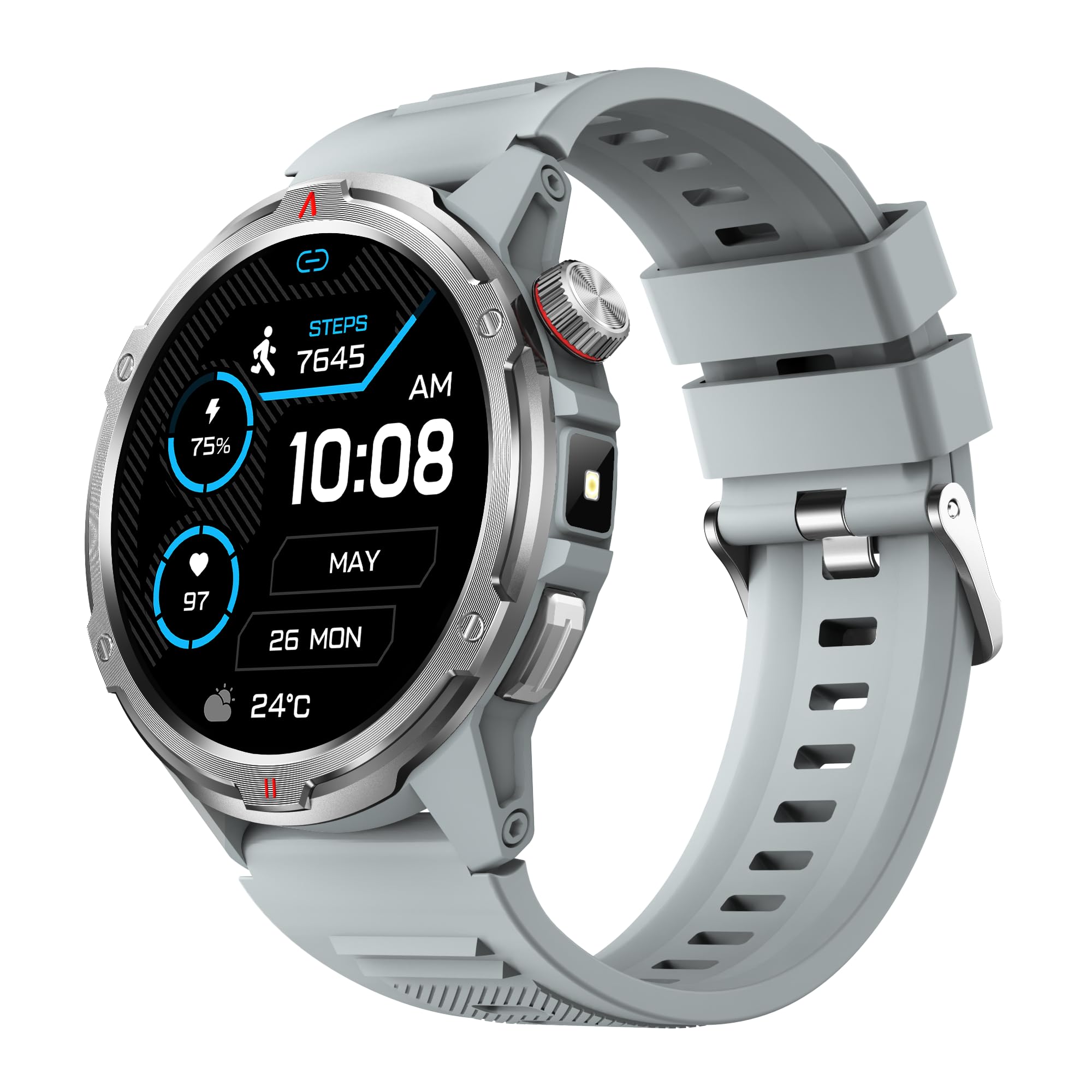
画像:主な製品 view showing the 1.43" AMOLED HD Full Touch Screen and physical buttons.
2. コミュニケーション機能
Stay connected directly from your wrist with Bluetooth calling and smart notifications.
- ブルートゥース通話: With the latest Bluetooth 5.2 chip, a high-quality speaker, and microphone, you can make and receive calls directly from your watch. You can also add up to 100 contacts and view コールログ。
- スマートノーティフィケーション: Receive message alerts, alarms, and other daily essentials from your paired smartphone. (Note: Message reply is not supported).

Image: BT Call & Message Sync Watch
Video: This video highlights the stylish design and various features of the smartwatch, including communication capabilities.
3. 健康モニタリング
The AOLON Tetra R4 utilizes Cywee Professional Algorithms for accurate health tracking, providing insights into your well-being.
- 心拍数モニタリング: Real-time heart rate monitoring throughout the day, whether at rest or during high-intensity exercise.
- 血中酸素濃度(SpO2)モニター: Measure your blood oxygen level anytime to regulate your body.
- ストレスレベルのモニタリング: Built-in PPG, SAR, AFE sensors and advanced algorithms monitor stress levels and provide alerts.
- 睡眠モニター: Combined with advanced algorithm analysis, it tracks deep sleep, light sleep, awake time, and REM sleep to help you understand and improve your sleep quality.
- 月経周期の追跡: 女性の健康のためのインテリジェントな管理と思いやりのあるリマインダーを提供します。
- ワンタップ測定: Check your heart rate, blood oxygen, and stress level simultaneously with a single tap.

Image: Heart Rate Monitoring
Video: This video demonstrates the heart rate and SpO2 monitoring features of the smartwatch.
4. スポーツモードとアクティビティトラッキング
Track your fitness journey with over 100 sports modes and comprehensive activity tracking.
- 100以上のスポーツモード: Supports a wide range of activities, from running and cycling to swimming and mountaineering.
- アクティビティトラッカー: 歩数、消費カロリー、移動距離を記録します。
- AGPS機能: Built-in AGPS provides accurate positioning and trajectory tracking for outdoor activities.

Image: 100+ More Sport Modes
Video: This video showcases the smart health features and the variety of over 100 sports modes available on the watch.
5. Outdoor Tools
Designed for outdoor enthusiasts, the Tetra R4 includes practical tools for navigation and convenience.
- コンパス: ナビゲーション用のコンパスが内蔵されています。
- 懐中電灯: A convenient flashlight function for low-light situations.
- AGPS, Altimeter, Barometer: Auxiliary functions to assist with outdoor exploration.

Image: Built-in AGPS Movement
Video: This video demonstrates the IP68 waterproof rating and suitability for daily activities, including outdoor use.
6. カスタマイズ
Personalize your watch to match your style and preferences.
- ウォッチフェイス: Choose from over 150 pre-designed dials in the app, or customize your watch face with your own photos.

Image: Choose from a variety of watch faces
7. その他の実用的な機能
The Tetra R4 offers a range of additional features to enhance your daily life.
- 天気予報
- 目覚まし時計
- ストップウォッチとタイマー
- 音楽コントロール
- Remote Shutter for camera control
- 携帯電話を探す機能
- 電卓
- 世界時計
- 緊急通報
- 音声アシスタント

Image: Multiple Practical Functions
Video: This video demonstrates various multi-functional aspects of the Aolon Tetra R4 Smart Watch.
メンテナンス
1. 防水等級
The AOLON Tetra R4 Smart Watch has an IP68防水等級. This means it is resistant to dust and can withstand immersion in water up to 1.5 meters for up to 30 minutes. It is suitable for daily use, including hand washing, rain, and shallow swimming. However, it is not recommended for hot showers, saunas, or diving, as steam and high water pressure can compromise the seals.

Image: IP68 Level Waterproof
2. 清掃とお手入れ
時計の性能と外観を維持するには:
- 時計とストラップを定期的に柔らかくて乾いた布で拭いてください。amp 布。
- 強力な化学薬品や研磨剤入りの洗剤の使用は避けてください。
- 充電する前に、充電接点が清潔で乾燥していることを確認してください。
3. バッテリー寿命の最適化
バッテリーの寿命を延ばすには:
- Adjust screen brightness to a lower level.
- Disable the Always-On Display (AOD) feature if not needed.
- アプリのバックグラウンド更新と通知を制限します。
- Turn off continuous heart rate monitoring if not required for extended periods.
トラブルシューティング
AOLON Tetra R4 スマートウォッチで問題が発生した場合は、次の解決策を試してください。
- 時計がオンにならない/充電されない: Ensure the charging cable is securely connected to both the watch and a power source. Try a different USB port or power adapter.
- 接続の問題 (Bluetooth): Make sure Bluetooth is enabled on your smartphone and the watch is within range. Restart both the watch and your phone, then attempt to re-pair via the GloryFitPro app.
- Time synchronization incorrect: Ensure the watch is properly connected to the GloryFitPro app, as time is usually synced automatically from your phone. Reinstalling the app might resolve persistent issues.
- Inaccurate step count or health data: Ensure the watch is worn snugly on your wrist. Calibrate the device through the app if available.
- 画面が反応しない: 電源ボタンを長押しして時計を再起動してください。反応しない場合は、バッテリーを完全に使い切ってから充電してください。
仕様
| 特徴 | 仕様 |
|---|---|
| モデル番号 | テトラR4 |
| 画面 | 1.43インチ AMOLED、466x466解像度 |
| バッテリー容量 | 350mAh |
| 通常使用時のバッテリー寿命 | 最長7日間 |
| 待機時間 | 最長30日間 |
| 充電時間 | 約2.5時間 |
| 防水等級 | IP68 |
| 接続性 | ブルートゥース5.2 |
| オペレーティングシステムの互換性 | Android 4.4以降、iOS9.0以降 |
| 健康モニタリング | Heart Rate, SpO2, Stress, Sleep, Menstrual Cycle |
| スポーツモード | 100以上 |
| 屋外設備 | Compass, Flashlight, AGPS, Altimeter, Barometer |
| 重さ | 52グラム |
保証とサポート
AOLONは 12ヶ月保証 for the Tetra R4 Smart Watch. For any questions or issues, please contact AOLON Customer Support through Amazon. Our support team aims to provide a responsive resolution within 24 hours.