
1. はじめに
This manual provides essential instructions for the setup, operation, and maintenance of your TMY Projector. Please read this manual thoroughly before using the product to ensure proper functionality and to maximize your view体験。 今後の参考のために、このマニュアルを保管してください。
2.製品オーバーview
2.1 パッケージ内容
パッケージにすべてのアイテムが揃っていることを確認します。
- TMY Projector Unit
- リモートコントロール
- HDMIケーブル
- 電源コード
- 保証書
2.2 主な特徴
- Netflix公式ライセンス: Access streaming services directly without external devices.
- 1080P解像度: 鮮明で詳細な画像を提供します。
- 電動フォーカスと自動キーストーン: 最適な鮮明さと形状を実現する自動画像調整。
- 270°回転スタンド: Flexible projection angles, including ceiling projection.
- Upgraded WiFi 6 Connectivity: 安定した高速ワイヤレス ストリーミングを保証します。
- Dual-Mode Bluetooth 5.2: Connects to external speakers or functions as a standalone Bluetooth speaker.
- 複数の接続オプション: HDMI, USB, Phone/PC mirroring.
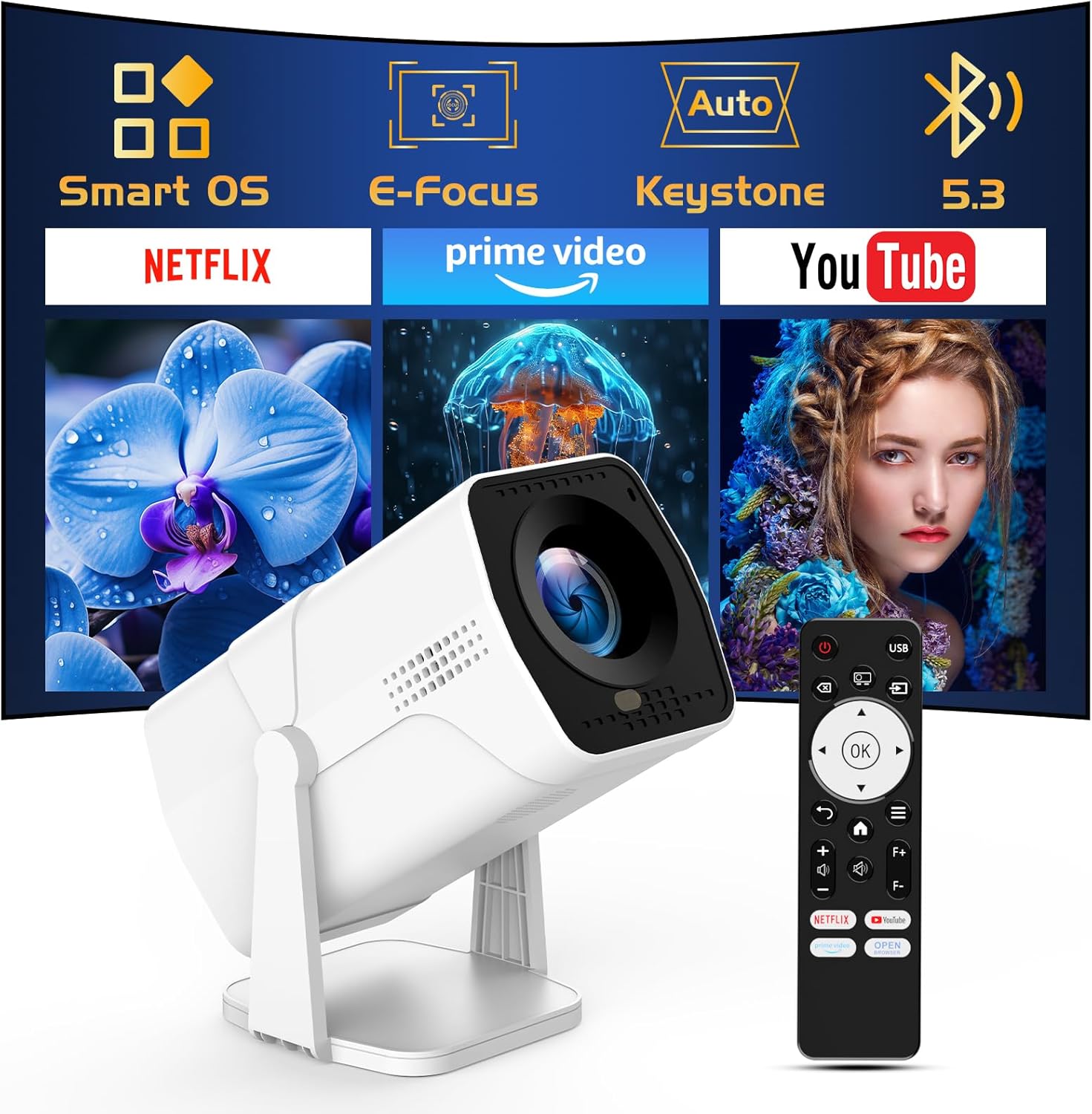
Image: The TMY Projector unit, its remote control, and a projected screen displaying logos for Smart OS, E-Focus, Auto Keystone, Bluetooth 5.3, Netflix, Prime Video, and YouTube.
3. セットアップ
3.1 配置
Position the projector on a stable, flat surface. The 270° rotatable stand allows for versatile placement, including projecting onto walls or ceilings. Ensure adequate ventilation around the projector.

Image: A TMY Projector positioned on a bedside table, projecting an image onto the ceiling, demonstrating its 270° rotatable stand for multi-angle viewing。
3.2電源接続
- 電源コードをプロジェクターの電源入力ポートに接続します。
- 電源コードのもう一方の端を標準の電源コンセントに差し込みます。
3.3 初回電源投入とフォーカス調整
- プロジェクタまたはリモコンの電源ボタンを押して、デバイスの電源をオンにします。
- プロジェクターの機能 エレクトリックフォーカス そして 自動キーストーン correction. The image will automatically adjust for clarity and a rectangular shape within approximately 2 seconds.
- If further adjustment is needed, use the remote control to fine-tune the focus.

Image: A TMY Projector projecting a vibrant image onto a screen, with an overlay illustrating the 'FOCUS' function and icons for Auto Keystone and 50%-100% Zoom.
3.4 ネットワーク接続(WiFi)
The projector supports WiFi 6 for a fast and stable internet connection.
- リモコンを使用して「設定」メニューに移動します。
- 「ネットワーク」または「WiFi設定」を選択します。
- リストから希望の WiFi ネットワークを選択し、パスワードを入力します。
- 接続を確認します。

Image: A TMY Projector wirelessly connected to a tablet, smartphone, and laptop, illustrating its WiFi 6 connectivity for faster streaming with no lagging.
3.5 Bluetooth接続
The projector features Dual-Mode Bluetooth 5.2 for audio connectivity.
- Projector Mode (Output): To connect to external Bluetooth speakers or soundbars: Navigate to 'Bluetooth Settings', enable Bluetooth, and pair with your audio device.
- Speaker Mode (Input): To use the projector's built-in speakers as a standalone Bluetooth speaker: Select 'Speaker Mode' in the Bluetooth settings. Your phone or other device can then connect to the projector to play audio.

Image: A TMY Projector illustrating its two-way Bluetooth 5.2 functionality, showing connections to a soundbar (Projector Mode) and a smartphone (Speaker Mode).
4. 操作
4.1 スマートOSの操作
The projector runs on a smart TV operating system. Use the provided remote control to navigate menus, select applications, and control playback.

Image: The TMY Projector unit with a projected screen showing a grid of built-in smart OS applications, including Netflix, YouTube, Prime Video, TikTok, and others.
4.2 組み込みアプリへのアクセス
The projector comes with pre-installed and officially licensed applications such as Netflix, Prime Video, and YouTube. Access these directly from the home screen or through the 'App Store' for additional content.

Image: A TMY Projector projecting a screen filled with content from officially licensed apps like Netflix, Prime Video, and YouTube, with the remote control in the foreground.
4.3 外部機器の接続
プロジェクターには、外部デバイスを接続するための複数のポートが備わっています。
- HDMI: Connect TV sticks, TV boxes, PCs/Laptops, or gaming consoles (e.g., PS).
- USB: メディアを再生する files directly from USB drives or connect other USB accessories.
- Phone/PC Mirroring: Wirelessly mirror content from your smartphone or PC (refer to the on-screen instructions for specific mirroring protocols).
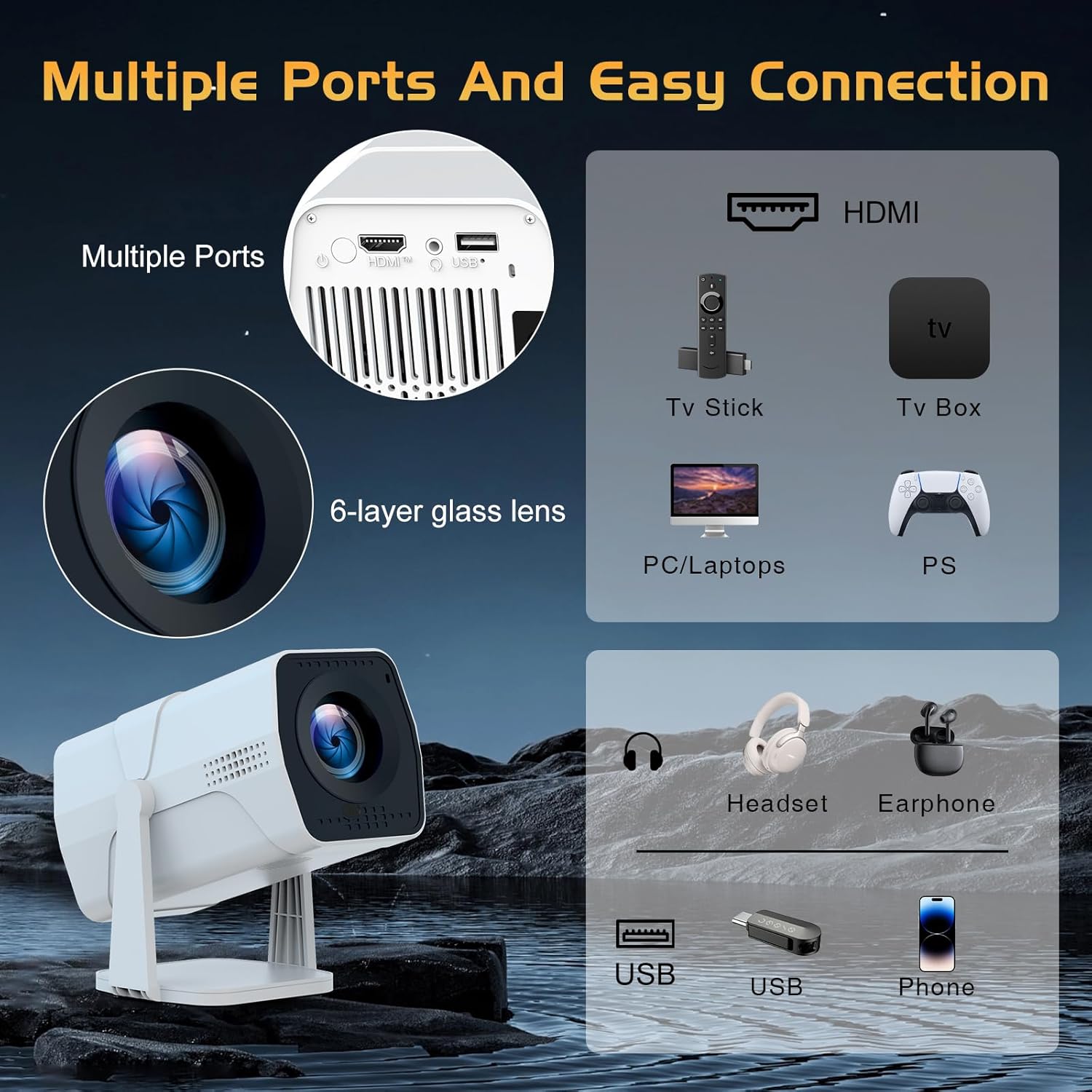
Image: A detailed diagram showing the multiple ports on the TMY Projector (HDMI, USB) and various connection possibilities, including TV sticks, PCs, gaming consoles, headsets, and phones.
4.4 Screen Zoom Function
The projector includes a 50%-100% zoom function, allowing you to adjust the screen size without moving the projector. This feature can be accessed via the remote control or settings menu.
5. メンテナンス
To ensure the longevity and optimal performance of your TMY Projector, follow these maintenance guidelines:
- レンズの掃除: 光学レンズ専用の柔らかく糸くずの出ない布を使用してください。研磨剤や刺激の強い化学薬品の使用は避けてください。
- 外装の清掃: プロジェクターの外装は、柔らかく乾いた布で拭いてください。液体クリーナーを直接使用しないでください。
- 換気: 過熱を防ぐため、通気口がふさがれていないことを確認してください。
- ストレージ: 長期間使用しない場合は、プロジェクターを直射日光やほこりを避け、涼しく乾燥した場所に保管してください。
6。 トラブルシューティング
If you encounter issues with your TMY Projector, refer to the following common problems and solutions:
- 電源なし:
- 電源コードがプロジェクターと正常な電源コンセントの両方にしっかりと接続されていることを確認します。
- 電源コンセントが機能しているかどうかを確認してください。
- 画像なし/ぼやけた画像:
- Verify the projector is powered on and the lens cap is removed.
- Allow the automatic focus and keystone correction to complete. If still blurry, manually adjust focus using the remote.
- Ensure the projection surface is suitable and the projector is within the recommended distance.
- If using an external source (HDMI), ensure the correct input source is selected.
- 音が出ない:
- プロジェクターおよび接続されている外部オーディオ デバイスの音量レベルを確認します。
- Bluetooth スピーカーを使用する場合は、正しくペアリングされ接続されていることを確認してください。
- If using internal speakers, ensure external Bluetooth output is not selected.
- リモコンが応答しない:
- 電池が正しく挿入されており、消耗していないことを確認してください。
- リモコンをプロジェクターの IR 受信機に直接向けます。
- WiFi接続の問題:
- Ensure your WiFi network is active and within range.
- WiFiパスワードを再確認してください。
- Restart the projector and your WiFi router.
- If the connection times out, try moving the projector closer to the router or reducing interference.
7. 仕様
| 特徴 | 仕様 |
|---|---|
| ブランド | TMY |
| モデル | B0DRFF5KMF |
| アイテム重量 | 2.79ポンド |
| 製品寸法 | 5.35 x 4.84 x 7.09インチ |
| 色 | 白 |
| 特集 | Speakers, Electric Focus, Auto Keystone, 270° Rotatable Stand |
| 接続技術 | HDMI, USB, WiFi 6, Bluetooth 5.2 |
| ディスプレイ解像度 | 1920 x 1080 (1080P フルHD) |
| 推奨用途 | 屋内 |

Image: A visual comparison showing the TMY Projector's 1080P Full HD image quality, emphasizing that it is recommended for use in dark environments for optimal viewing, contrasted with daytime or light-on conditions.
8. 保証とサポート
TMY is committed to providing excellent customer service and product support.
- 保証: この製品には 3 年間の保証が付いています。
- 返品規則: Enjoy a 30-day return period.
- テクニカルサポート: Lifetime after-sale service and technical support are available.
- 応答時間: Expect a quick reply within 24 hours for support inquiries.
さらに詳しい情報については、公式ウェブサイトをご覧ください。 TMY Store on Amazon or contact customer support through the provided channels in your warranty card.