
1. はじめに
Welcome to the user manual for your new XIAOMI Redmi Note 14 Pro+ 5G Smartphone. This guide provides essential information on setting up, operating, and maintaining your device. Please read it carefully to ensure optimal performance and longevity of your smartphone.
2. パッケージ内容
パッケージに次のアイテムが含まれていることを確認してください。
- XIAOMI Redmi Note 14 Pro+ 5G Smartphone
- USBケーブル
- クイックスタートガイド(地域によって異なる場合があります)
- SIM取り出しツール(地域によって異なる場合があります)
Note: A charger is not included in the package. Please use a compatible 120W HyperCharge adapter for optimal charging.
3.デバイスオーバーview
Familiarize yourself with the physical components of your Redmi Note 14 Pro+ 5G.
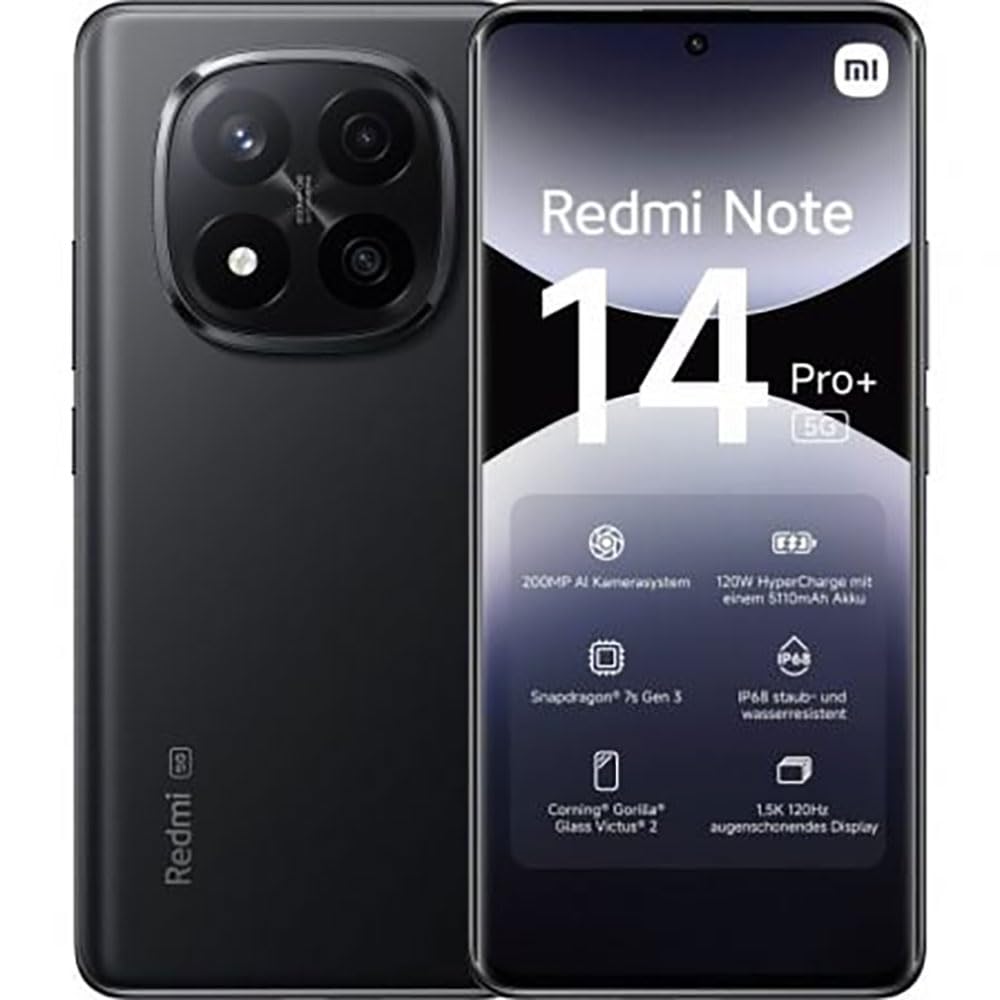
The image displays the front and back of the XIAOMI Redmi Note 14 Pro+ 5G smartphone. The front shows the display with 'Redmi Note 14 Pro+ 5G', '200 Megapixels', and '256 GB' text. The back features a prominent camera module with multiple lenses and the 'Redmi 5G' branding.
主要コンポーネント:
- フロントディスプレイ: 6.67-inch 1.5K 120Hz AMOLED display with Corning Gorilla Glass Victus 2.
- リアカメラモジュール: Houses the 200MP Pro-Grade AI Camera system.
- 電源ボタン: 側面にあり、デバイスの電源のオン/オフやスリープ/ウェイクに使用します。
- 音量ボタン: 側面にあり、メディアや通話の音量を調整するのに使用します。
- USB Type-Cポート: 充電やデータ転送に。
- SIMカードスロット: Supports Dual SIM Nano SIM cards.
- 講演者: オーディオ出力用のステレオ スピーカー。
4. セットアップ
4.1. SIMカードの挿入
- デバイスの側面にある SIM カード トレイを見つけます。
- SIM取り出しツールをトレイの横にある小さな穴に挿入し、トレイが飛び出すまでしっかりと押します。
- Place your Nano SIM card(s) into the tray with the gold contacts facing down. Ensure proper orientation.
- カチッと音がするまでトレイをゆっくりとスロットに戻します。
4.2. デバイスの電源を入れる
を押し続けます 電源ボタン on the side of the phone until the XIAOMI logo appears on the screen. Follow the on-screen instructions to complete the initial setup, including connecting to Wi-Fi, setting up your Google account, and configuring security features like fingerprint recognition.
4.3. 初期費用
It is recommended to fully charge your device before first use. Connect the USB Type-C cable to the phone and a compatible 120W HyperCharge adapter (not included) to a power outlet.
5. スマートフォンの操作
5.1. 基本的なナビゲーション
- タッチスクリーン: タップして選択、スワイプしてスクロール、ピンチしてズームします。
- ホーム画面: アプリとウィジェットの中心ハブ。
- 通知パネル: 画面の上から下にスワイプして、通知やクイック設定にアクセスします。
- アプリドロワー: Swipe up from the bottom of the screen (or tap the app drawer icon) to view インストールされているすべてのアプリケーション。
5.2. 電源のオン/オフと再起動
- に 電源を切る: Press and hold the Power Button until the power menu appears, then select "Power off."
- に 再起動: Press and hold the Power Button until the power menu appears, then select "Restart."
5.3. セキュリティ機能
Your device supports various security options:
- 指紋認識: 指紋を登録して、素早く安全にロックを解除します。
- 顔認証: 顔を使ってデバイスのロックを解除します。
- PIN/パターン/パスワード: Standard security methods.
これらの設定にアクセスするには 設定 > セキュリティとプライバシー.
6. カメラ機能
The Redmi Note 14 Pro+ 5G features a powerful 200MP Pro-Grade AI Camera system designed to enhance your photography experience.
- 200MPメインカメラ: Capture highly detailed images with optical image stabilization (OIS).
- 複数のカメラモード: Includes automatic, scene, portrait, and manual modes for versatile shooting.
- Dual LED Flash: Provides enhanced lighting in low-light conditions.
- フロントカメラ: A 20MP front sensor for high-quality selfies and video calls.
- ビデオ録画: Supports up to 8K video capture at 120 fps.
7. AI機能
Leverage the integrated AI functionalities for a smarter user experience:
- AI消去プロ: Intelligently remove unwanted objects or people from your photos.
- AI画像拡張: Expand the boundaries of your images using AI.
- AIノート: Smart note-taking capabilities.
- AI字幕: Generate subtitles for videos or audio in real-time.
- AIレコーダー: Enhanced voice recording with AI features.
- AI通訳: リアルタイムの言語翻訳。
- ジェミニ: Integrated AI assistant.
- Googleで検索するにはサークルをクリックしてください: 画面上のオブジェクトを丸で囲むことで、情報をすばやく検索できます。
8. 充電
Your Redmi Note 14 Pro+ 5G supports 120W HyperCharge technology for rapid charging.
- バッテリー容量: 5110mAh リチウムポリマーバッテリー。
- 充電: Use the provided USB Type-C cable with a compatible 120W power adapter (sold separately) for optimal charging speeds.
- バッテリー寿命: Expect up to 20 hours of talk time. Actual battery life may vary based on usage.
Always use certified charging accessories to prevent damage to your device.
9. メンテナンス
9.1. 防水・防塵性能
このデバイスの特徴は IP68 定格 for dust and water resistance. This means it is protected against dust ingress and can withstand immersion in water up to 1.5 meters for 30 minutes. However, this resistance is not permanent and may decrease over time with normal wear. Avoid exposing the device to hot water, saltwater, or other liquids.
9.2. デバイスのクリーニング
- 画面と本体を清掃するには、柔らかく糸くずの出ない布を使用してください。
- 研磨剤入りの洗剤、溶剤、エアゾールスプレーの使用は避けてください。
- If the device gets wet, wipe it thoroughly with a clean, dry cloth before charging or using ports.
9.3. ソフトウェアの更新
定期的にソフトウェアアップデートを確認し、インストールして、デバイスに最新の機能、セキュリティパッチ、パフォーマンスの改善が適用されていることを確認してください。 設定 > 端末情報 > MIUIバージョン 更新を確認します。
10。 トラブルシューティング
デバイスで問題が発生した場合は、次の一般的な解決策を試してください。
- デバイスの電源が入らない: バッテリーが充電されていることを確認してください。充電器に少なくとも15分間接続してから、電源を入れてみてください。
- アプリがクラッシュまたはフリーズする: 問題のあるアプリを閉じて再度開いてください。問題が解決しない場合は、スマートフォンを再起動してください。
- ネットワーク接続が悪い: Check your SIM card is correctly inserted. Try toggling Airplane Mode on and off. If the issue persists, contact your network provider.
- バッテリーの消耗が早い: Reduce screen brightness, close unused apps, and disable unnecessary features like GPS or Bluetooth when not in use.
- 画面が反応しない: Force restart your device by holding the Power Button for approximately 10-15 seconds.
より複雑な問題については、XIAOMIの公式サポートを参照してください。 webサイトをご覧いただくか、カスタマーサービスにお問い合わせください。
11. 仕様
| 特徴 | 仕様 |
|---|---|
| ブランド | 小米 |
| モデル名 | レッドミーノート14プロ+5G |
| オペレーティング·システム | アンドロイド14 |
| CPUモデル | スナップドラゴン7第3世代 |
| ラム | 8ギガバイト |
| ストレージ容量 | 256ギガバイト |
| 画面サイズ | 6.67インチ |
| ディスプレイ解像度 | 2712 x 1220 ピクセル |
| リフレッシュレート | 120Hz |
| リアカメラ解像度 | 200 Megapixels (with OIS) |
| フロントカメラの解像度 | 20メガピクセル |
| バッテリー容量 | 5110mAh |
| 充電技術 | 120Wハイパーチャージ |
| 耐水性 | IP68 |
| セルラーテクノロジー | 5G |
| SIMカードタイプ | Nano SIM (Dual SIM) |
| 接続性 | USBタイプC |
12. 保証とサポート
12.1. 製造元の保証
Your XIAOMI Redmi Note 14 Pro+ 5G Smartphone comes with a 2年間のメーカー保証この保証は、通常の使用状況における材料および製造上の欠陥を対象としています。保証請求の際は、購入証明書を保管してください。
The warranty does not cover damage caused by accidents, misuse, unauthorized modifications, or normal wear and tear.
12.2. カスタマーサポート
For technical assistance, warranty claims, or further information, please visit the official XIAOMI support website or contact their customer service department. Contact details can typically be found on the XIAOMI webサイトまたは製品に付属の保証カードに記載されています。