
導入
This manual provides instructions for setting up and using your ECONTROLLY BN59-01385B Voice Remote Control. This replacement remote is designed to be compatible with various Samsung Smart TV models, offering voice control functionality and direct access buttons for popular streaming services.

フロント view of the ECONTROLLY BN59-01385B Voice Remote Control.
セットアップガイド
1. 電池の取り付け
リモコンには単4アルカリ電池2本が必要です(別売)。
- リモコンの背面にある電池コンパートメントカバーを開きます。
- 単 4 電池 2 本を挿入し、プラス (+) とマイナス (-) の端子がコンパートメント内のインジケータと正しく揃っていることを確認します。
- 電池カバーをしっかりと閉じてください。
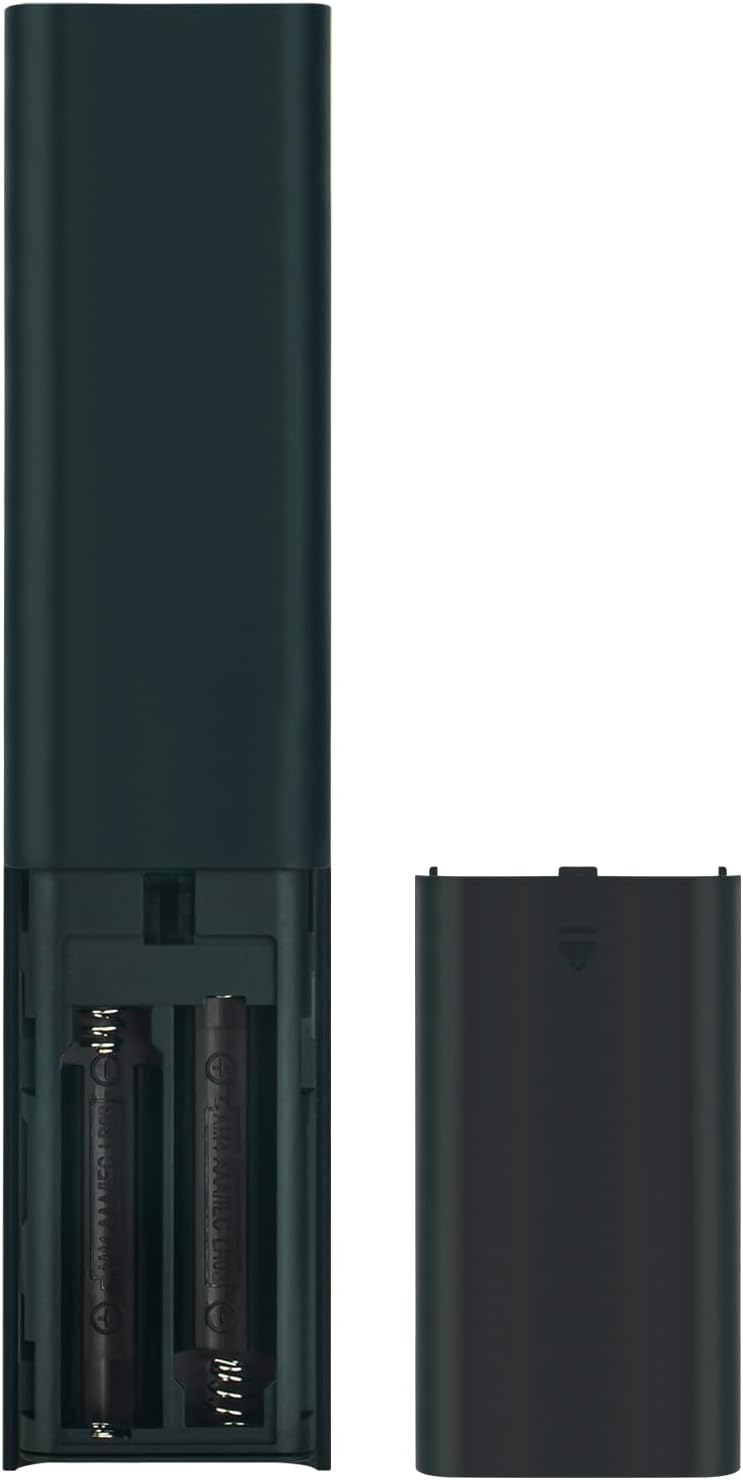
Image showing the battery compartment for AAA batteries.
2. Pairing the Remote Control with Your TV
This remote control uses Bluetooth connectivity and requires pairing with your Samsung TV before use. Follow these steps to pair:
- Samsung TV の電源がオンになっていることを確認してください。
- リモコンをテレビに向けます。
- 同時に押し続けると、 戻る ボタン(曲線矢印)と 再生/一時停止 ボタンを3秒以上押します。
- A pairing message should appear on your TV screen, indicating successful pairing.
If pairing is unsuccessful, ensure the batteries are correctly installed and try again. Move closer to the TV if necessary.
操作手順
The ECONTROLLY BN59-01385B remote control provides intuitive navigation and voice command capabilities.
主な機能:
- 電源ボタン: Located at the top right, typically marked with a circle and a vertical line. Turns the TV on or off.
- 音声制御ボタン (
 ): Located near the top, marked with a microphone icon. Press and hold to activate voice commands for searching content, changing settings, or controlling smart home devices.
 - Navigation Pad (Directional Buttons & Enter): The large circular pad in the center. Use to navigate menus and select items.
- 戻るボタン: Located below the navigation pad, marked with a curved arrow. Returns to the previous screen or menu.
- ホームボタン: Located below the navigation pad, marked with a house icon. Accesses the Smart Hub or home screen.
- 再生/一時停止ボタン: Located below the navigation pad, marked with a play/pause icon. Controls media playback.
- 音量アップ/ダウンボタン (+/-): Adjusts the TV volume.
- チャンネルアップ/ダウンボタン (up/down arrows): Changes TV channels.
- クイック アクセス ボタン: Dedicated buttons for Netflix, Samsung TV Plus, Prime Video, and Disney+ for direct app launch.
The microphone button activates voice control for your Samsung TV.
メンテナンスとケア
- Keep the remote control dry. Moisture can damage the internal circuits.
- リモコンを極端な温度にさらさないでください。
- リモコンは柔らかく乾いた布で拭いてください。研磨剤入りの洗剤や溶剤は使用しないでください。
- リモコンを長期間使用しない場合は、液漏れを防ぐために電池を取り外してください。
- Handle the remote with care to prevent drops or impacts.
トラブルシューティング
| 問題 | 解決 |
|---|---|
| リモコンが応答しません。 |
|
| 音声制御が機能しません。 |
|
| ボタンが固まったり、反応しなくなったりします。 |
|
仕様
- モデル番号: PT-BN59-01385B
- ブランド: Eコントロール
- 接続性: ブルートゥース
- コントローラタイプ: 音声コントロール
- 特別な機能: Voice Search, Quick Access Buttons
- 対応デバイス: サムスンテレビ
- 電源: 単4アルカリ電池2本(別売)
- 最大範囲: 10メートル(33フィート)
- 材料: アブソリュート
- 色: 黒
- 寸法(長さ×幅): Approximately 16.1 cm (6.33 in) x 3.5 cm (1.37 in)
- 重さ: 約2オンス(56.7グラム)

Physical dimensions of the remote control.
対応テレビモデル
This remote control is compatible with various Samsung Smart TV models, including but not limited to:
- QN85Bシリーズ: QA55QN85BA, QA65QN85BA, QA75QN85BA, QA85QN85BA, QA65QN85BAW, QA75QN85BAW, QA85QN85BAW, QA55QN85BAWXXY, QA65QN85BAWXXY, QA75QN85BAWXXY
- Q60B Series: QA55Q60BA, QA65Q60BA, QA75Q60BA, QA85Q60BA, QA55Q60BAW, QA65Q60BAW, QA75Q60BAW, QA85Q60BAW, QA55Q60BAWXXY, QA65Q60BAWXXY, QA75Q60BAWXXY, QA85Q60BAWXXY
- Q70B Series: QA55Q70BA, QA65Q70BA, QA75Q70BA, QA85Q70BA, QA55Q70BAW, QA65Q70BAW, QA75Q70BAW, QA85Q70BAW, QA55Q70BAWXXY, QA65Q70BAWXXY, QA75Q70BAWXXY, QA85Q70BAWXXY
- Q80B Series: QA55Q80BA, QA65Q80BA, QA75Q80BA, QA85Q80BA, QA55Q80BAW, QA65Q80BAW, QA75Q80BAW, QA85Q80BAW, QA55Q80BAWXXY, QA65Q80BAWXXY, QA75Q80BAWXXY, QA85Q80BAWXXY
- QN90Bシリーズ: QA43QN90BA, QA50QN90BA, QA55QN90BA, QA65QN90BA, QA75QN90BA, QA85QN90BA, QA43QN90BAW, QA50QN90BAW, QA55QN90BAW, QA65QN90BAW, QA75QN90BAW, QA85QN90BAW, QA43QN90BAWXXY, QA50QN90BAWXXY, QA55QN90BAWXXY
This list is not exhaustive. If your TV model is not listed, please refer to your TV's user manual or contact ECONTROLLY support for compatibility information.

Visual comparison of the replacement remote with an original remote.
サポートとお問い合わせ
For further assistance or inquiries, please refer to the product listing on Amazon or contact ECONTROLLY customer support.