
1.製品オーバーview
The GOLDCHAMP GC-9000A is a professional 4-in-1 gas detector designed for monitoring Hydrogen Sulfide (H2S), Oxygen (O2), Carbon Monoxide (CO), and Combustible Gas (LEL). It features a 2.8-inch LCD display for clear readings and multiple alarm modes to ensure safety in various environments.

図1: 前面 view of the GOLDCHAMP GC-9000A Gas Detector, showing the display and control buttons.
主な特徴:
- 4 in 1ガス検知器: Monitors H2S, O2, CO, and LEL simultaneously.
- 複数のアラームモード: Provides vibration, audible, and visual alarms.
- 2.8インチLCDディスプレイ: Offers clear, real-time data readings including gas concentrations, time, and battery status.
- 充電式バッテリー: Equipped with a 2500mAh lithium battery for over 10 hours of continuous operation.
- 耐久性に優れたデザイン: Features a convenient back clip for portability and use in demanding environments.
2. 安全情報
Read all safety warnings and instructions carefully before using this device. Failure to follow these instructions may result in electric shock, fire, serious injury, or property damage.
一般的な安全上の注意:
- デバイスを開けたり、改造したりしないでください。内部コンポーネントはユーザーによる修理はできません。
- Ensure the device is fully charged before use to prevent unexpected power loss during critical monitoring.
- デバイスを極端な温度、直射日光、腐食性物質にさらさないでください。
- Regularly check the device for any signs of damage. Do not use if damaged.
- This device is a monitoring tool and should not replace proper safety protocols and personal protective equipment.
- Calibration should be performed regularly by qualified personnel to ensure accuracy.
3. セットアップ
3.1 パッケージ内容
パッケージにすべてのアイテムが揃っていることを確認します。
- ゴールドチAMP GC-9000A Gas Detector x 1
- USB充電ケーブル×1
- 取扱説明書 x 1
- 収納袋×1

Figure 2: Contents of the GC-9000A package, including the detector, USB cable, manual, and storage bag.
3.2 デバイスのレイアウト
Familiarize yourself with the main components of the GC-9000A Gas Detector:
- LCDディスプレイ: Shows gas readings, battery level, time, and alarm status.
- コントロールボタン: ESC/▲ (Escape/Up), ▲/OK (Power/OK), ENT/▼ (Enter/Down).
- ガスセンサー: Located at the bottom of the device, responsible for detecting gases.
- アラームインジケータ: LED lights for visual alarms, internal buzzer for audible alarms, and vibration motor.
- 充電ポート: デバイスを充電するための USB ポート。
- バッククリップ: For attaching the device to clothing or equipment.

図3:詳細 view of the GC-9000A, highlighting its dimensions, multifunctional back clip, and sensor areas.
3.3デバイスの充電
Before first use, fully charge the GC-9000A. Connect the provided USB charging cable to the device's charging port and a compatible USB power adapter (not included). The battery indicator on the LCD display will show charging status. A full charge typically provides over 10 hours of standby time.

Figure 4: The USB charging port on the side of the GC-9000A detector.
4. 操作手順
4.1 電源オン/オフ
- 電源オン: Press and hold the ▲/OK button for approximately 3 seconds until the device powers on and the display illuminates.
- 電源を切る: Press and hold the ▲/OK button for approximately 3 seconds. A confirmation prompt will appear; select 'Yes' to power off.
4.2 表示情報
The 2.8-inch LCD display provides real-time information:
- Gas Readings: Displays current concentrations for H2S, O2, CO, and LEL.
- 時間: 現在の日付と時刻。
- バッテリーの状態: バッテリーの残り寿命を表示します。
- 警報状態: Icons or indicators for active alarms.
4.3つのアラームモード
The GC-9000A utilizes three distinct alarm modes to alert users to potential hazards:
- 可聴アラーム: 大きなビープ音。
- 振動アラーム: デバイスが振動します。
- ビジュアルアラーム: LED warning lights flash.
These alarms activate when gas concentrations exceed preset high or low alarm values. The device will continue to alarm until the gas levels return to a safe range or the alarm is acknowledged/silenced (refer to advanced settings in the full manual for silencing options).
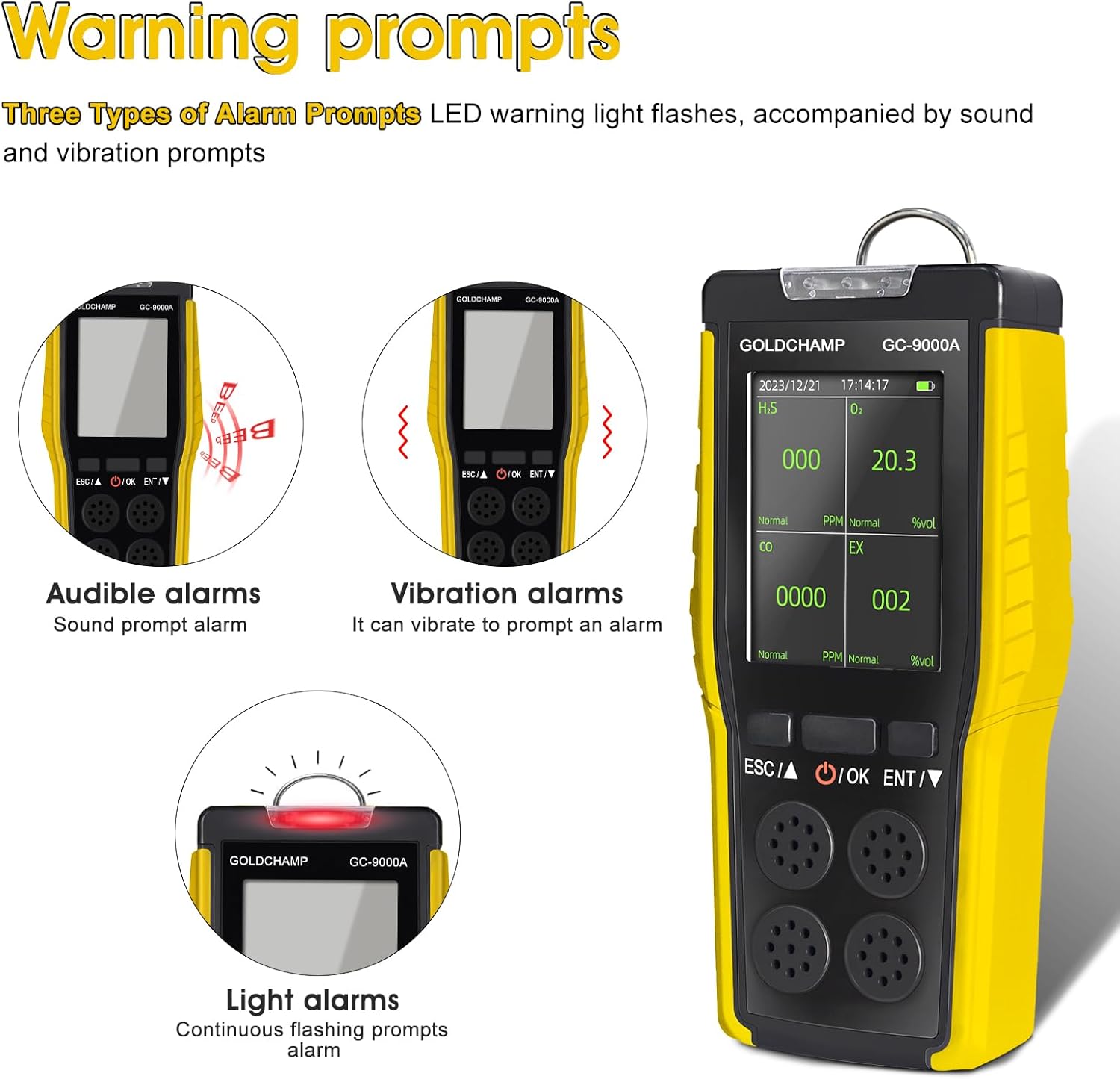
Figure 5: The three alarm modes (audible, vibration, and light) demonstrated on the GC-9000A.
4.4 アラーム値の設定
The device allows for customization of high and low alarm thresholds for each gas. Refer to the detailed menu navigation section in the complete manual for step-by-step instructions on accessing and adjusting these settings.
5. メンテナンス
5.1 クリーニング
- 装置の外側を柔らかい布で拭きます。amp 布。
- 研磨剤入りの洗剤や溶剤を使用したり、デバイスを水に浸したりしないでください。
- Ensure the sensor openings are clear of dust and debris.
5.2 キャリブレーション
Gas detectors require periodic calibration to maintain accuracy. Calibration should be performed by trained professionals using certified calibration gases. The frequency of calibration depends on usage, environmental conditions, and local regulations. Consult the full manual or contact GOLDCHAMP support for calibration service recommendations.
5.3 ストレージ
- デバイスは直射日光や極端な温度を避け、涼しく乾燥した場所に保管してください。
- 長期間保管する場合は、バッテリーが部分的に(約 50%)充電されていることを確認し、過放電を防ぐために数か月ごとに充電してください。
- Keep the device in its protective storage bag when not in use.
6。 トラブルシューティング
This section addresses common issues you might encounter with your GC-9000A Gas Detector.
| 問題 | 考えられる原因 | 解決 |
|---|---|---|
| デバイスの電源が入りません。 | バッテリー残量が少ない、またはデバイスが故障しています。 | Charge the device fully. If the issue persists, contact support. |
| No alarm when gas is detected. | Alarm settings are off, or gas concentration is below threshold. | Check alarm settings in the menu. Ensure gas levels exceed the set alarm points. |
| ガスの測定値が不正確です。 | Sensors are dirty, or calibration is required. | Clean sensor openings. Perform or arrange for professional calibration. |
| バッテリーの消耗が早いです。 | Aging battery or frequent alarm activations. | Ensure the device is fully charged. If battery life significantly degrades, contact support for battery replacement options. |
7. 仕様
Detailed technical specifications for the GOLDCHAMP GC-9000A Gas Detector:
| 特徴 | 仕様 |
|---|---|
| モデル番号 | GCUS-9000A |
| ガスが検出されました | Hydrogen Sulfide (H2S), Oxygen (O2), Carbon Monoxide (CO), Combustible Gas (LEL) |
| H2S範囲 | 0-100 PPM |
| O2範囲 | 0-30% ボリューム |
| CO範囲 | 0-1000 PPM |
| LEL範囲 | 0〜100%LEL |
| 画面 | 2.8インチ液晶 |
| アラームモード | Vibration, Audible, Visual |
| 電源 | バッテリー駆動(3.7V 2500mAhリチウムバッテリー) |
| バッテリー寿命 | Greater than 10 hours (standby) |
| 製品寸法(奥行き×幅×高さ) | 3インチ x 4インチ x 3インチ |
| アイテム重量 | 9.6オンス |
| メーカー | ゴールドチAMP |
8. 保証とサポート
保証情報:
Please refer to the warranty card included with your product or visit the official GOLDCHAMP web詳細な保証条件については、ウェブサイトをご覧ください。保証は通常、購入日から一定期間、製造上の欠陥を対象とします。
カスタマーサポート:
For technical assistance, troubleshooting not covered in this manual, or warranty claims, please contact GOLDCHAMP customer support. Contact information can usually be found on the product packaging, the official GOLDCHAMP webサイト、または小売店を通じてご購入いただけます。
Webサイト: Visit the GOLDCHAMP Amazonで購入