
1. はじめに
This manual provides essential instructions for the installation, maintenance, and troubleshooting of your Braun Front Housing Sealing Cover. This component is designed to ensure the proper function and sealing of your compatible Braun electric shaver.
Please read these instructions carefully before proceeding with installation or maintenance to ensure safe and correct usage.
2.製品オーバーview
The Braun Front Housing Sealing Cover is an original OEM replacement part that includes the integrated switch button. It is crucial for maintaining the waterproof integrity and operational functionality of your shaver's front housing.
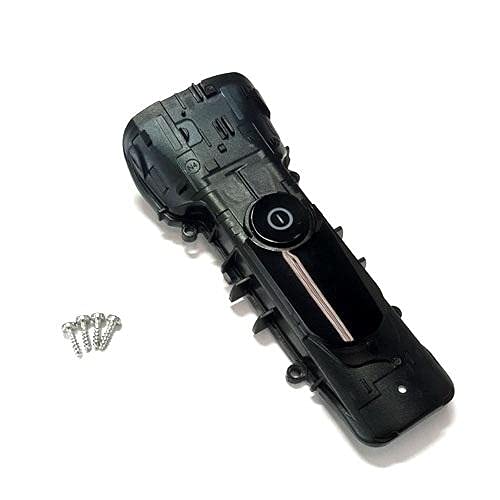
Figure 1: Braun Front Housing Sealing Cover with integrated switch button. This image shows the complete replacement part.
2.1 主な特徴:
- Original OEM Product: Ensures compatibility and quality.
- Integrated Switch Button: Replaces the entire front housing cover including the power switch.
- Sealing Function: Essential for maintaining the shaver's water resistance.
3. 互換性
This Front Housing Sealing Cover is compatible with the following Braun shaver types and models:
3.1 Compatible Shaver Types:
- 5790
- 5791
- 5793
- 5795
3.2 Compatible Shaver Models (Series 9):
- 9030s, 9040s, 9050cc, 9070cc, 9075cc, 9080cc, 9090cc, 9093s, 9095cc
- 9240s, 9242s, 9250cc, 9260s, 9280cc, 9290cc, 9291cc, 9292cc, 9293s, 9295cc, 9296cc, 9297cc, 9299s
3.3 Compatible Shaver Models (Series 8):
- 8325s, 8330s, 8340s, 8345s, 8350s, 8359s, 8360cc, 8365cc, 8370cc, 8371cc, 8380cc, 8385cc, 8390cc, 8391cc
- 8410s, 8413s, 8417s, 8450cc, 8453cc, 8457cc, 8460cc, 8463cc, 8467cc
- 8510s, 8513s, 8517s, 8560cc, 8563cc, 8567cc, 8577cc, 8617s, 8663cc
注記: Always verify your shaver's type number (usually found on the shaver body) to ensure full compatibility before purchasing or installing this part.
4. インストール(セットアップ)
Replacing the front housing sealing cover requires careful handling. If you are unsure about any step, it is recommended to seek professional assistance or refer to a detailed service manual for your specific shaver model.
4.1 必要なツール:
- 小型プラスドライバー
- Plastic prying tool (optional, for delicate separation)
- 清潔で柔らかい布
4.2 インストール手順:
- 電源を切る: Ensure your shaver is completely turned off and disconnected from any power source.
- シェーバーヘッドを取り外す: シェーバーヘッドを本体から慎重に取り外します。
- ネジの位置: Identify and remove any screws securing the front housing. These are typically located on the back or sides of the shaver body.
- Gently Pry Open: Using a plastic prying tool or your fingernails, carefully separate the old front housing cover from the shaver body. Work slowly to avoid damaging internal components or plastic clips.
- スイッチの切断: If the switch button assembly is separate, carefully disconnect any small wires or connectors associated with the old switch. The new part includes the switch, so ensure the connection points are clear.
- クリーンシーリングエリア: Before installing the new cover, gently clean the sealing surfaces on the shaver body to ensure a proper, watertight seal. Use a clean, soft cloth.
- 新しいカバーを取り付けます: Align the new Front Housing Sealing Cover with the shaver body. Ensure the switch button aligns correctly with the internal mechanism.
- 所定の位置に押し込みます: Gently press the new cover into place until all clips engage and the cover sits flush with the shaver body.
- 固定ネジ: Reinsert and tighten the screws removed in step 3. Do not overtighten.
- シェーバーヘッドを再度取り付けます。 シェーバーヘッドを再度取り付けます。
- テスト機能: Turn on the shaver to ensure the switch button functions correctly.
警告: Improper installation can compromise the shaver's water resistance and may lead to damage. Proceed with caution.
5. 操作
Once the Front Housing Sealing Cover is correctly installed, the operation of your Braun shaver remains unchanged. The integrated switch button will function as before, allowing you to power the shaver on and off.
- 電源オン/オフ: Press the switch button to turn the shaver on or off.
- クリーニング: The sealing cover ensures the shaver remains water-resistant for cleaning under running water, as per your shaver's original instructions.
6. メンテナンス
Regular maintenance of your shaver, including the newly installed front housing, will prolong its lifespan and ensure optimal performance.
6.1 Cleaning the Cover:
- After each use, rinse the shaver head and the front housing under warm running water.
- Use a small brush (often supplied with the shaver) to remove any trapped hair from around the switch button and seams.
- シェーバーを保管する前に、完全に自然乾燥させてください。
6.2 検査:
- Periodically inspect the sealing cover for any signs of damage, cracks, or wear.
- Ensure the switch button operates smoothly and does not stick.
- If any damage is observed, consider replacing the part to maintain water resistance and functionality.
7。 トラブルシューティング
This section addresses common issues that may arise after installing the front housing sealing cover.
| 問題 | 考えられる原因 | 解決 |
|---|---|---|
| Shaver does not turn on/off after installation. | Switch button not properly aligned or connected. | Re-open the housing and ensure the switch mechanism is correctly seated and connected. |
| Water ingress during cleaning. | Improper sealing of the front cover; cover not fully seated or damaged. | Carefully inspect the edges of the cover for gaps. Ensure all clips are engaged and screws are tightened. If damaged, replace the cover. |
| Front cover does not sit flush. | Internal components obstructing the cover; clips not engaged. | Verify that no wires or components are pinched. Ensure all plastic clips are aligned and fully engaged. |
If the issue persists after attempting these solutions, contact Braun customer support or a qualified service technician.
8. 仕様
- 部品タイプ: Front Housing Sealing Cover with Switch Button
- メーカー: ブラウン
- 商品の重量: 約85.05g
- 互換性: Braun Shaver Types 5790, 5791, 5793, 5795; Braun Series 9 and Series 8 models (refer to Section 3 for full list).
- 材料: Durable plastic and sealing components.
9. 保証とサポート
As an Original OEM Product, this part is covered by Braun's standard warranty policy for replacement parts. Please retain your proof of purchase for warranty claims.
9.1 保証情報:
For detailed warranty terms and conditions, please refer to the documentation provided with your original Braun shaver or visit the official Braun webサイト。
9.2 カスタマーサポート:
If you require further assistance with installation, troubleshooting, or have questions regarding this product, please contact Braun customer support:
- オンラインサポート: 公式サイトをご覧ください ブラウン webサイト FAQ とサポート リソースについては、こちらをご覧ください。
- 連絡先: Refer to your shaver's original manual or the Braun web地域の連絡先電話番号と電子メール サポートのサイト。
注記: Unauthorized repairs or use of non-OEM parts may void your shaver's warranty.