
BYTECH BC-AU-BE-146-WT
User Manual: BYTECH TWS Earbuds
Model: BC-AU-BE-146-WT
導入
Thank you for choosing the BYTECH TWS Earbuds. This manual provides essential information for setting up, operating, and maintaining your new wireless earbuds. Please read this manual carefully before use to ensure optimal performance and longevity of your device.
These earbuds feature advanced Bluetooth 5.3 technology and True Wireless Stereo (TWS) connectivity, offering a seamless audio experience.
箱の中には何が入っていますか?
- BYTECH TWS Earbuds (Left and Right)
- ワイヤレス充電ケース
- ユーザーマニュアル(このドキュメント)
- (Note: Charging cable may be included but not explicitly listed in product specifications. Please check packaging.)
製品終了view

図1: The BYTECH TWS Earbuds in their open wireless charging case. The case features a digital display indicating the battery level, and the earbuds are white with a sleek design. The case also shows subtle color gradients, possibly from an LED indicator.
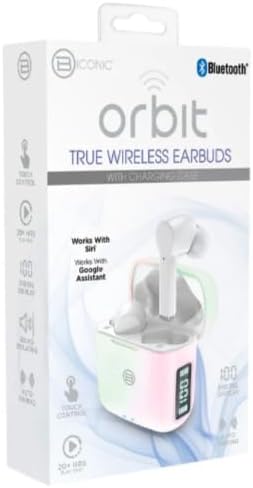
図2: Retail packaging for the BYTECH Orbit True Wireless Earbuds. The box highlights key features such as Bluetooth connectivity, touch control, 20+ hours of play, auto pairing, and compatibility with Siri and Google Assistant.
設定
1. イヤホンとケースの充電
Before first use, fully charge the earbuds and the charging case. Place the earbuds into the charging case. The case is equipped with wireless charging capability. Connect the charging case to a power source using a compatible charging cable (not explicitly listed as included, please check your package) or place it on a wireless charging pad.
- 充電ケースのデジタルディスプレイにバッテリーレベルが表示されます。
- Ensure the earbuds are properly seated in their slots for charging.
2. デバイスとのペアリング(Bluetooth)
- イヤホンが充電されていることを確認します。
- 充電ケースを開けます。イヤホンは自動的にペアリングモードになります(イヤホンのランプが点滅している場合は点滅します)。
- スマートフォンまたは Bluetooth 対応デバイスで、Bluetooth 設定に移動します。
- Bluetoothをオンにします。
- 検索する new devices. You should see "BYTECH BC-AU-BE-146-WT" or a similar name appear in the list of available devices.
- Select the device name to connect. Once connected, a voice prompt will confirm the successful pairing, and the indicator lights on the earbuds will stop flashing.
- For subsequent uses, the earbuds will automatically connect to the last paired device when taken out of the case, provided Bluetooth is enabled on your device.
These earbuds support True Wireless Stereo (TWS) connectivity, meaning both earbuds connect to each other wirelessly to provide a stereo sound experience.
イヤホンの操作
The BYTECH TWS Earbuds feature intuitive touch controls for various functions. While specific touch gestures are not detailed in the product description, common functions typically include:
- 再生/一時停止: どちらかのイヤホンを 1 回タップします。
- 次のトラック: 右のイヤホンをダブルタップします。
- 前のトラック: 左のイヤホンをダブルタップします。
- 通話の応答/終了: 着信中にどちらかのイヤホンを 1 回タップします。
- 通話を拒否: 着信中にどちらかのイヤホンを 2 秒間押し続けます。
- 音声アシスタントを有効にする: Triple tap or press and hold (check specific model behavior) to activate Siri (for iOS devices) or Google Assistant (for Android devices).
- 音量コントロール: Some models allow volume adjustment via touch (e.g., tap and hold left for volume down, right for volume up). If not, adjust volume directly on your connected device.
Please refer to the quick start guide included in your packaging for precise touch control instructions specific to your BC-AU-BE-146-WT model.
メンテナンス
適切なメンテナンスを行うことで、イヤホンの寿命が長くなり、最適なパフォーマンスが確保されます。
- クリーニング: Regularly clean the earbuds and charging case with a soft, dry, lint-free cloth. Do not use abrasive cleaners, alcohol, or chemical solvents. Gently remove any earwax or debris from the earbud tips and speaker mesh using a small, soft brush or cotton swab.
- ストレージ: 使用しないときは、イヤホンをほこりや汚れ、物理的な損傷から保護するため、必ず充電ケースに入れて保管してください。ケースは直射日光や極端な温度を避け、涼しく乾燥した場所に保管してください。
- バッテリーのケア: バッテリー寿命を延ばすため、イヤホンとケースを頻繁に完全に放電することは避けてください。長期間使用しない場合でも、定期的に充電してください。
- 耐水性: These earbuds are not specified as water-resistant. Avoid exposure to water, sweat, and high humidity to prevent damage.
トラブルシューティング
If you encounter issues with your BYTECH TWS Earbuds, try the following solutions:
- イヤホンがデバイスとペアリングされない:
- イヤホンが充電されており、ケースから取り出されていることを確認してください。
- デバイスの Bluetooth をオフにしてからオンにします。
- Forget the device ("BYTECH BC-AU-BE-146-WT") from your device's Bluetooth settings and try pairing again.
- イヤホンに他のデバイスが接続されていないことを確認してください。
- イヤホンが片方しか動作しない:
- 両方のイヤホンを充電ケースに戻し、蓋を閉じて数秒待ってから、再び取り出します。
- 両方のイヤホンが充電されていることを確認します。
- イヤホンをリセットしてみてください (具体的なリセット手順については、クイック スタート ガイドを参照してください)。
- 音が出ない、または音量が低い:
- 接続されているデバイスとイヤホンの両方の音量レベルを確認してください。
- イヤホンが耳に正しく装着されていることを確認してください。
- イヤホンのスピーカーメッシュからゴミを取り除きます。
- 充電に関する問題:
- Ensure the charging cable (if used) is securely connected and functional.
- ワイヤレス充電を使用する場合は、ケースが充電パッドに正しく置かれていることを確認してください。
- ケースの充電ポートにゴミがないか確認してください。
問題が解決しない場合は、カスタマー サポートにお問い合わせください。
仕様
| 特徴 | 仕様 |
|---|---|
| ブランド | バイテック |
| モデル名 | BC-AU-BE-146-WT |
| モデル番号 | BC-AU-BE-146-WT |
| 接続技術 | ブルートゥース5.3 |
| フォームファクター | 耳内(イントラウラル) |
| 色 | 白 |
| 含まれるコンポーネント | ワイヤレス充電ケース |
| メーカー | Biconic |
| ASIN | B0DPRCBT76 |
| 初回利用可能日 | 6年2024月XNUMX日 |
保証とサポート
For warranty information and customer support, please refer to the documentation included with your product packaging or visit the official BYTECH webサイトをご覧ください。保証条件は地域や販売店によって異なる場合があります。
保証請求に備えて購入証明書を保管してください。
Ask a question about this manual
Ask about setup, troubleshooting, compatibility, parts, safety, or missing instructions. Manuals+ will review the question and use this page’s manual context to help answer it.