
1. 重要な安全情報
Please read this entire manual before installation and assembly. If you have any questions regarding any of the instructions or warnings, please contact your local distributor for assistance.
- We accept no responsibility for incorrect or faulty installation.
- Follow the enclosed installation instructions carefully.
- Check the condition and completeness of all items before beginning.
- The fastening materials supplied for wall mounting are intended exclusively for fastening to solid masonry or concrete. For other wall types, such as hollow bricks, plasterboard, or lightweight construction, please contact a specialist retailer for information on suitable fastening elements.
- Under no circumstances should you exceed the limit values specified for the product.
2. パッケージ内容
Verify that all components are present and undamaged before installation. If any parts are missing or damaged, do not attempt to install. Contact customer support for replacement parts.

Figure 2.1: XTRARM TiTon Double TV Wall Mount and included hardware components, including various screws, anchors, washers, and a drilling template.
通常、パッケージには次のものが含まれます。
- XTRARM TiTon Double TV Wall Mount assembly
- Standard mounting hardware for TV and wall (various screws, anchors, washers)
- 掘削テンプレート
- Small spirit level
- Multiple hook-and-loop straps for cable management
3. 仕様
| 特徴 | 仕様 |
|---|---|
| 取り付けタイプ | 壁掛け |
| 移動タイプ | Articulated, Swivel, Tilt, Rotate |
| 材料 | 金属 |
| 色 | 黒 |
| 壁の距離 | 12.9 cm (retracted) to 120 cm (extended) |
| 回転 | Up to 90° (portrait/landscape) |
| スイベル | Up to 180° (90° left/right) |
| 傾き | -5°~+12° |
| 推奨テレビサイズ | Approximately 52 – 110 inches |
| 重量容量 | 最大80kg |
| VESA互換性 | 100x100mm, 100x200mm, 200x100mm, 200x200mm, 200x300mm, 300x200mm, 300x300mm, 400x200mm, 400x300mm, 400x400mm, 500x300mm, 600x200mm, 600x400mm |

Figure 3.1: VESA compatibility and maximum weight capacity.

Figure 3.2: Key dimensions and movement capabilities of the mount.
Figure 3.3: Comprehensive technical drawing with detailed dimensions and adjustment ranges.
4. セットアップとインストール
Proper installation is crucial for the safety and stability of your TV. Ensure you have the necessary tools and assistance before proceeding.
4.1 必要なツール(付属していません)
- ドリル
- Stud finder (if mounting to wood studs)
- 鉛筆
- 巻尺
- ソケットレンチまたはモンキーレンチ
- プラスドライバー
4.2 取り付け場所の選択
Select a wall location that can safely support the weight of the mount and your TV. For solid concrete or masonry walls, use the provided anchors. For wood stud walls, ensure the mount is centered on a stud. Avoid mounting to drywall alone.
4.3 Attaching the Wall Plate
- Position the drilling template at the desired height on the wall and mark the drill holes with a pencil. Use the included spirit level to ensure it is perfectly horizontal.
- Drill pilot holes at the marked locations. The drill bit size will depend on your wall type and the chosen anchors/screws.
- 壁アンカー(壁のタイプに応じて必要な場合)を下穴に挿入します。
- Align the wall plate with the drilled holes and secure it to the wall using the appropriate screws and washers. Ensure it is firmly attached.
4.4 テレビにテレビブラケットを取り付ける
- 画面の損傷を防ぐため、テレビを画面を下にして柔らかく清潔な表面に慎重に置いてください。
- テレビの背面にある VESA 取り付け穴を確認します。
- Select the correct size screws and spacers (if needed) from the provided hardware that fit your TV's VESA pattern.
- Attach the two vertical TV brackets to the back of your TV, ensuring they are level and securely fastened. Do not overtighten.
4.5 テレビを壁掛け金具に取り付ける
- 補助を受けながら、テレビを慎重に持ち上げ、付属のテレビ ブラケットを壁プレートに引っ掛けます。
- テレビが壁プレートにしっかりと固定されていることを確認します。
- 誤って外れないように、ブラケットの安全ロック機構を作動させてください。

図4.1:例ample of the XTRARM TiTon Double TV Wall Mount installed with a television.
5. 操作手順
The XTRARM TiTon Double mount offers full motion capabilities for optimal view角度を変える。
5.1 壁の距離の調整
Gently pull or push the TV to extend or retract the mount. The mount allows for a wall distance ranging from 12.9 cm to 120 cm.

Figure 5.1: Adjustable wall distance of the mount.
5.2 スイベル調整
The mount can swivel up to 180 degrees (90 degrees left or right) to direct the screen towards different viewingエリア。

Figure 5.2: Swivel capability of the mount.
5.3 傾き調整
Adjust the vertical tilt of your TV from -5 degrees to +12 degrees to reduce glare and optimize viewing comfort. Loosen the tilt adjustment knobs, set the desired angle, and then retighten the knobs.
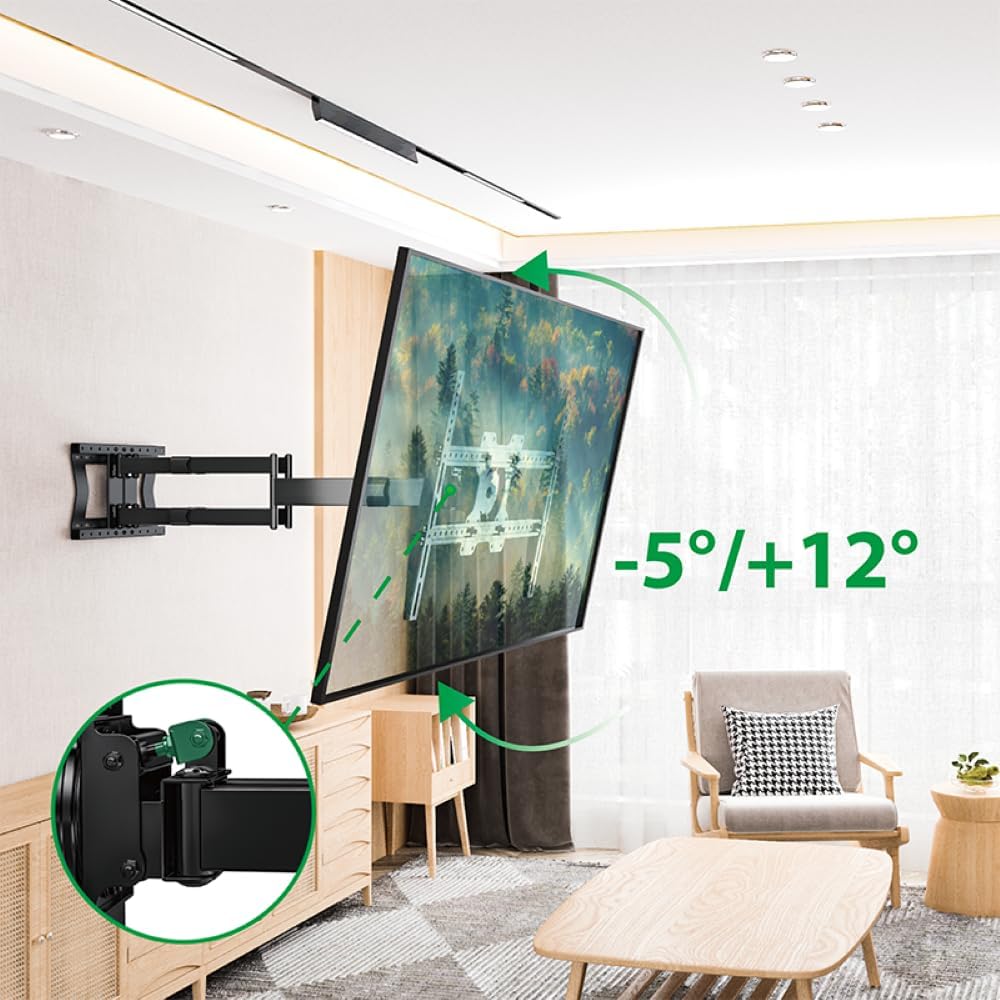
Figure 5.3: Tilt adjustment range and mechanism.
5.4 回転調整
The mount allows for a 90-degree rotation, enabling you to switch between landscape and portrait orientation for your TV.

Figure 5.4: 90-degree rotation capability.
5.5 ケーブル管理
Use the provided hook-and-loop straps to bundle and organize cables along the mount arms for a tidy appearance and to prevent snagging during adjustments.
6. メンテナンス
定期的なメンテナンスにより、テレビ壁掛け金具の寿命が長くなり、安全に動作することが保証されます。
- クリーニング: マウント部分は柔らかく乾いた布で拭いてください。仕上げを傷める可能性のある研磨剤入りの洗剤や溶剤は使用しないでください。
- 接続を確認してください: すべてのネジとボルトがしっかりと締まっているか定期的に確認してください。必要に応じて締め直してください。ただし、締めすぎないようにしてください。
- 摩耗を検査します: マウントに摩耗、損傷、腐食の兆候がないか定期的に点検してください。問題が見つかった場合は、使用を中止し、カスタマーサポートにご連絡ください。
7。 トラブルシューティング
If you encounter any issues with your XTRARM TiTon Double TV Wall Mount, refer to the following common problems and solutions:
| 問題 | 考えられる原因 | 解決 |
|---|---|---|
| テレビが水平ではない | Wall plate or TV brackets not level during installation. | Carefully remove the TV, adjust the wall plate or TV brackets using a spirit level, and re-mount. |
| マウントの移動が困難 | ジョイントがきつすぎるか、潤滑が必要な可能性があります。 | Check for any overtightened bolts. Apply a small amount of silicone-based lubricant to moving joints if necessary. |
| マウントが不安定に感じる | Loose wall plate, incorrect anchors, or exceeding weight capacity. | Immediately remove the TV. Re-check all wall plate fasteners. Ensure correct anchors were used for your wall type. Verify TV weight does not exceed 80 kg. If issues persist, consult a professional installer. |
8. 保証とサポート
For information regarding warranty coverage, technical support, or replacement parts, please refer to the documentation provided at the time of purchase or visit the official XTRARM webサイトでご確認ください。購入証明として購入レシートを保管してください。