
1. はじめに
Thank you for choosing the TEKO Hover Scrubber Omni Electric Mop. This manual provides essential information for the safe and efficient operation, maintenance, and troubleshooting of your new electric mop. Please read this manual thoroughly before first use and retain it for future reference.
2. 安全情報
火災、感電、または怪我のリスクを軽減するために、次の安全上の注意事項を守ってください。
- 機器を使用する前にすべての説明書をお読みください。
- 機器を水やその他の液体に浸さないでください。
- 髪の毛、ゆったりとした衣服、指、および体のすべての部分を開口部や可動部分から遠ざけてください。
- このマニュアルに記載されているとおりに使用してください。製造元が推奨するアタッチメントのみを使用してください。
- 破損したコードやプラグと一緒に使用しないでください。 アプライアンスが正常に機能しない場合、落としたり、損傷したり、屋外に置いたり、水中に落としたりした場合は、サービスセンターに返送してください。
- コードを引っ張ったり持ち運んだり、コードをハンドルとして使用したり、コードのドアを閉めたり、鋭いエッジや角の周りでコードを引っ張ったりしないでください。 コードを加熱面に近づけないでください。
- コードを引っ張ってプラグを抜かないでください。プラグを抜くときは、コードではなくプラグをつかんでください。
- 濡れた手でプラグや器具を扱わないでください。
- 開口部に物を入れないでください。開口部を塞いだ状態で使用しないでください。ほこり、糸くず、髪の毛、空気の流れを妨げるものなどを入れないでください。
- 階段を掃除するときは特に注意してください。
- ガソリンなどの引火性または可燃性の液体を採取したり、それらが存在する可能性のある場所で使用したりしないでください。
- タバコ、マッチ、熱い灰など、燃えているものや煙が出ているものを拾わないでください。
- プラグを抜く前にすべてのコントロールをオフにしてください。
- この機器は、安全に責任を負う人物による機器の使用に関する監督または指示がない限り、身体的、感覚的、または精神的能力が低下している人、あるいは経験と知識が不足している人(子供を含む)による使用を想定していません。
- 子供が機器で遊ばないように監督する必要があります。
3. パッケージ内容
パッケージにすべてのアイテムが含まれていることを確認します。
- TEKO Hover Scrubber Omni Electric Mop Unit
- 調整可能なハンドルアセンブリ
- Baseboard Cleaner Attachment
- Washable Microfiber Pads (various types, e.g., plush, fine plush, abrasive sponge, polishing cloth)
- 充電アダプター
- ユーザーマニュアル(このドキュメント)

Image 3.1: Contents of the TEKO Hover Scrubber Omni Electric Mop package, including the main unit, handle, baseboard cleaner, and various cleaning pads.
4.製品オーバーview
Familiarize yourself with the components of your TEKO Hover Scrubber Omni Electric Mop.
- 本体: Houses the motor, battery, and dual counter-rotating heads.
- ハンドル: Adjustable for user comfort and reach.
- Dual Counter-Rotating Heads: Designed for scrubbing, mopping, and polishing.
- マイクロファイバーパッド: Attach to the rotating heads for cleaning.
- Baseboard Cleaner Attachment: For cleaning edges and baseboards.

Image 4.1: The dual counter-rotating heads with various pad types for different cleaning tasks.

Image 4.2: The baseboard cleaner attachment, designed for cleaning edges and corners.
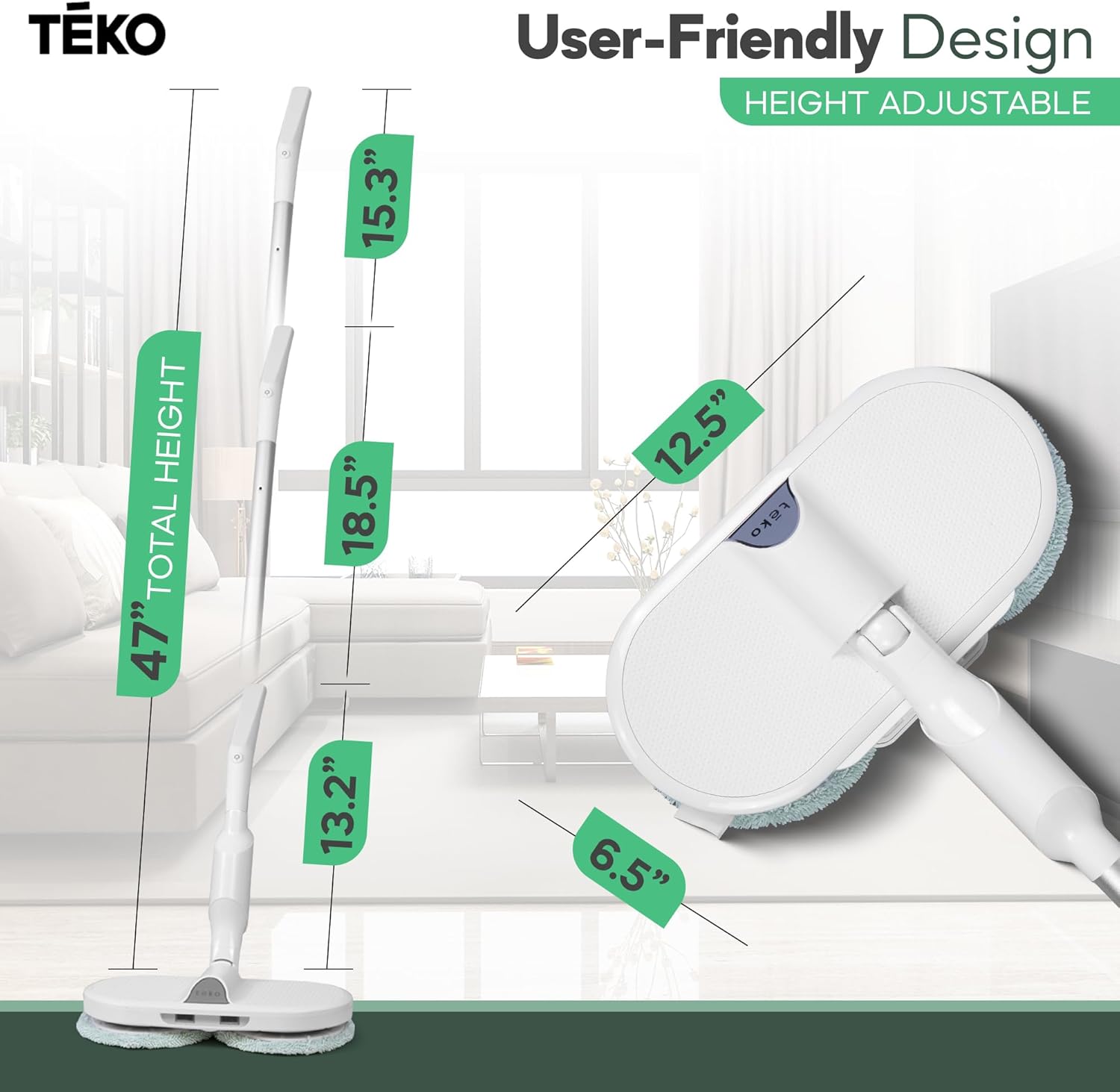
Image 4.3: The adjustable handle feature, allowing for customized height during use.
5. セットアップ
5.1 組み立て
- すべてのコンポーネントをパッケージから慎重に取り出します。
- Connect the handle sections by aligning and clicking them into place. Ensure they are securely fastened.
- Attach the assembled handle to the main mop unit until it clicks securely.
- Select the appropriate cleaning pads for your task and attach them to the bottom of the rotating heads. The pads are typically secured with hook-and-loop fasteners.
- If using, attach the baseboard cleaner attachment to the designated port on the main unit.
5.2 バッテリーの充電
The TEKO Hover Scrubber Omni is equipped with a rechargeable battery for cordless operation. Before first use, fully charge the device.
- 本体の充電ポートを見つけます。
- 充電アダプターを充電ポートに接続します。
- アダプタを標準の電源コンセントに差し込みます。
- Allow approximately 3 hours for a full charge. The indicator light will change to signify a full charge (refer to product specific indicator details if available).
- A full charge provides up to 40 minutes of continuous runtime.

Image 5.1: Illustration of the charging process and battery runtime information.
6. 操作手順
6.1 電源のオン/オフ
- To turn on the mop, press the power button located on the handle.
- To turn off the mop, press the power button again.
6.2一般的なクリーニング
- Ensure the appropriate cleaning pads are attached and moistened if necessary for wet mopping.
- Turn on the device. The dual rotating heads will begin to spin.
- Gently guide the mop across the floor surface. The counter-rotating action will scrub and polish.
- The 360° rotatable head allows for easy maneuverability around furniture and into tight spaces.
- For optimal results, move the mop slowly and steadily.

Image 6.1: The mop's flexible head design enables cleaning in hard-to-reach areas like under beds, sofas, and in corners.
6.3 床の適合性
The Hover Scrubber Omni is suitable for a variety of hard floor surfaces, including:
- ハードウッド
- タイル
- ラミネート
- リノリウム
- 大理石
- 研磨コンクリート
- 石
- セメント
- 竹
- ビニール
Always test on an inconspicuous area first, especially on delicate or newly installed flooring.

Image 6.2: Visual representation of the diverse floor types the mop can effectively clean.
6.4 Using the Baseboard Cleaner Attachment
For cleaning baseboards and tight corners:
- Ensure the main mop unit is turned off.
- Attach the baseboard cleaner attachment to the designated port.
- デバイスの電源をオンにします。
- Guide the attachment along baseboards or into corners to clean these areas.
- Turn off the device and remove the attachment when finished.
7. メンテナンス
7.1 Cleaning the Microfiber Pads
The cleaning pads are washable and reusable:
- After each use, remove the pads from the mop heads.
- Machine wash the pads with similar colors in cold water. Do not use bleach or fabric softener.
- Tumble dry on low heat or air dry. Ensure pads are completely dry before reattaching or storing.

画像7.1: 以上view of the machine washable mop attachments provided with the unit.
7.2 Cleaning the Mop Unit
- 本体とハンドルを拭きますamp 布で汚れや残留物を取り除きます。
- 過酷な化学薬品や研磨剤入りのクリーナーは使用しないでください。
- 保管する前に、ユニットが完全に乾いていることを確認してください。
7.3 ストレージ
- Store the mop in a cool, dry place away from direct sunlight.
- 長期間保管する場合は、バッテリーの状態を維持するために、定期的にバッテリーを充電してください。
8。 トラブルシューティング
一般的な問題とその解決策については、次の表を参照してください。
| 問題 | 考えられる原因 | 解決 |
|---|---|---|
| モップが作動しません。 | 電池が消耗しています。 | Charge the battery fully (refer to Section 5.2). |
| モップが作動しません。 | 電源ボタンが正しく押されていません。 | 電源ボタンがしっかりと押されていることを確認してください。 |
| モップでは効果的に掃除できません。 | パッドが汚れているか摩耗しています。 | Clean or replace the microfiber pads. |
| モップでは効果的に掃除できません。 | Pads are too dry for the task. | Moisten pads appropriately for wet mopping. |
| Mop stops during use. | 電池が消耗しています。 | バッテリーを充電してください。 |
| Mop is difficult to maneuver. | Handle not adjusted correctly. | Adjust the handle height for comfortable use. |
9. 仕様
| 特徴 | 詳細 |
|---|---|
| モデル番号 | HI2105UD |
| ブランド | テコ |
| メーカー | テコ |
| 電源 | 充電式バッテリー |
| ランタイム | 最長40分(約) |
| 充電時間 | 約3時間 |
| ヘッド素材 | マイクロファイバー |
| ハンドル材質 | プラスチック |
| 表面の推奨事項 | Hard Floors (Hardwood, Tile, Laminate, Linoleum, Marble, Polished Concrete, Stone, Cement, Bamboo, Vinyl) |
| GTIN | 00810077927625 |
10. 保証とサポート
For warranty information, technical support, or service inquiries, please refer to the contact information provided with your purchase or visit the official TEKO webサイトでご確認ください。保証請求に備えて購入証明書を保管してください。