
導入
This manual provides essential information for the safe and efficient operation of your SCULPFUN S9 PRO 10W Laser Engraver. The S9 PRO features 10W laser beam shaping technology, offering a 0.06mm ultra-fine laser focus for strong cutting penetration and precision. It is capable of cutting materials such as 15mm thick wood and 10mm acrylic, and engraving ceramics and stainless steel. Please read this manual thoroughly before use to ensure proper setup, operation, and maintenance.

安全情報
レーザー彫刻機の操作には潜在的な危険が伴います。怪我や損傷を防ぐため、すべての安全ガイドラインを遵守してください。
- 目の保護: Always wear appropriate laser safety glasses when operating the machine. The integrated laser filter on the S9 PRO blocks 98% of ultraviolet light, allowing observation without additional safety glasses for bystanders, but direct laser exposure should always be avoided.
- 電源スイッチ: The machine is equipped with a secure power switch. Always turn off the machine when not in use or during maintenance.
- 安全な配置: Utilize the fastening holes on the four feet and frame structure to secure the machine and data cables, preventing accidental movement.
- 表面保護: Use the provided A4-sized steel pad to protect your work surface from laser damage.
- 換気: Ensure adequate ventilation in your workspace to dissipate fumes produced during engraving and cutting.
- 可燃性物質: Do not engrave or cut highly flammable materials without proper precautions.
- 子供とペット: Keep children and pets away from the operating area. The laser point can attract attention, but direct exposure is dangerous.

パッケージ内容
開梱時にすべてのコンポーネントが揃っていることを確認します。
- 1 x SCULPFUN S9 Pro 10 W Laser Engraver
- A4-sized steel pad
- 電源アダプター
- USBケーブル
- 組み立てツール
- ユーザーマニュアル(このドキュメント)
セットアップガイド
1. 組み立て
The SCULPFUN S9 PRO features a fast assembly design, allowing for installation typically within 10 to 20 minutes. Follow the steps below:
- ステップ1: Assemble the main frame components.
- ステップ2: Attach the X-axis and laser module to the frame.
- ステップ3: 必要なケーブルをすべて接続します。
- 仕上げる: すべての接続が確実に行われ、フレームが安定していることを確認します。
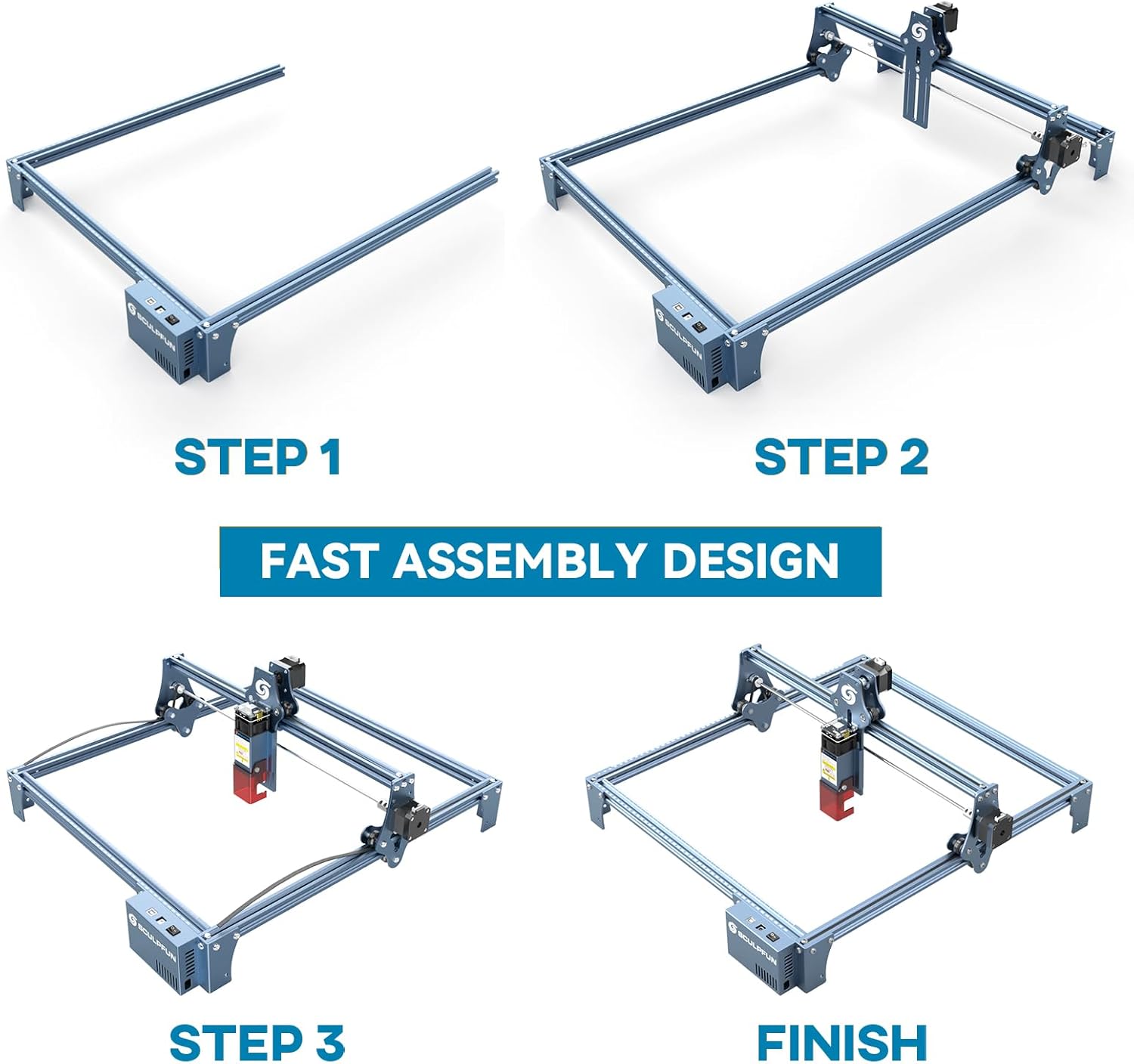
The full-metal structure enhances robustness and engraving accuracy. The X and Y axes include precise scale lines, forming a rectangular measuring ruler for quick object sizing.


2.フォーカス調整
The S9 PRO features a quick fixed-focus design. The laser combines a fixed-focus lens with a sliding design for easy adjustment.
- Place the laser module over your material.
- Move the laser module up or down until the focus is achieved.
- ネジを締めてレーザーモジュールを固定します。

操作手順
1. ソフトウェアの互換性
The SCULPFUN S9 PRO is compatible with various advanced engraving software:
- LaserGRBL (Windows)
- LightBurn (Windows, macOS, Linux)
- Benbox
- Grblコントローラー
- LiteFire
It supports engraving in PWM mode and various file formats including JPG, PNG, DXF, SVG, AI, G-code, NC, and BMP.

2. Material Capabilities
The 10W laser module provides strong cutting and engraving capabilities across a wide range of materials:
- 切断: Up to 15mm thick wood, 10mm black acrylic.
- 彫刻: Wood, leather, ceramics, stainless steel, aluminum oxide, PCB board, paper, cardboard, dark stone, and more.


3. General Operation Workflow
- デザイン: Create or import your design using compatible software (e.g., LightBurn, LaserGRBL).
- マテリアルの配置: Place your material on the work surface, ensuring it is flat and secure. Use the integrated rulers for precise positioning.
- フォーカス調整: Adjust the laser focus as described in the Setup section.
- ソフトウェア設定: Configure laser power, speed, and passes in your chosen software according to the material and desired effect. Refer to software documentation for detailed settings.
- 運用開始: ソフトウェアから彫刻または切断プロセスを開始します。動作中は機械を監視します。
- 完了: Once the process is complete, turn off the machine and carefully remove your finished piece.
メンテナンス
Regular maintenance ensures optimal performance and extends the lifespan of your SCULPFUN S9 PRO.
- レーザーレンズをクリーニングします。 レーザーの精度を維持するために、柔らかく糸くずの出ない布とレンズ洗浄液を使用して、レーザー レンズを定期的に清掃してください。
- 作業エリアを清掃する: Remove debris and dust from the engraving area after each use to prevent interference with machine movement.
- ベルトとレールの検査: Check the drive belts for tension and wear. Keep the guide rails clean and lubricated if necessary to ensure smooth movement of the laser module.
- ファームウェアの更新: 公式SCULPFUNをチェック webサイトで利用可能なファームウェア アップデートを確認し、マシンに最新の機能と改善が適用されていることを確認してください。
トラブルシューティング
このセクションでは、発生する可能性のある一般的な問題について説明します。
- レーザーが発射されない:
- Check if the power cable is securely connected and the power switch is on.
- Verify that the USB cable is connected to your computer and the machine.
- Ensure the software is correctly configured and sending commands.
- Check the laser module connection.
- 彫刻/切断品質が悪い:
- Re-check the laser focus. An incorrect focus is a common cause of poor quality.
- Adjust laser power and speed settings in your software. Different materials require different settings.
- 材料が平らでしっかりと置かれていることを確認してください。
- レーザー レンズが汚れているように見える場合は、清掃してください。
- Machine Not Moving Correctly:
- Check for any obstructions on the rails or belts.
- Ensure belts are properly tensioned and not slipping.
- すべてのケーブルがしっかりと接続されていることを確認してください。
- ソフトウェアとマシンを再起動します。
- ソフトウェア接続の問題:
- ソフトウェアで正しい COM ポートが選択されていることを確認してください。
- Try restarting your computer and the engraver.
- Reinstall the software or drivers if necessary.
For persistent issues, refer to the SCULPFUN support webサイトをご覧いただくか、カスタマーサービスにお問い合わせください。
仕様
| ブランド | スカルファン |
| モデル番号 | S9PRO10W-ELE |
| レーザーパワー | 10W(ダイオードレーザー) |
| レーザーフォーカス | 0.06mm (Ultrafine) |
| 彫刻精度 | 0.01mm |
| 彫刻エリア | 400×410ミリ |
| 電源 | AC |
| パッケージ寸法 | 61.79 x 38.4 x 13.4 cm |
| パッケージ重量 | 4.95キロ |
| 含まれるコンポーネント | 1 x SCULPFUN S9 Pro 10 W laser engraver |
| ソフトウェアの互換性 | LaserGRBL, LightBurn, Benbox, GrblController, LiteFire |
| 対応OS | Windows、macOS、Linux 対応 |
| サポート File フォーマット | JPG, PNG, DXF, SVG, AI, G-code, NC, BMP |
保証とサポート
For warranty information, technical support, or service inquiries, please contact SCULPFUN customer support through their official webご購入いただいたサイトまたは販売店にお問い合わせください。購入証明書としてレシートを保管してください。
メーカー: スカルファン
初回利用可能日: 29年2024月XNUMX日