
1. はじめに
This manual provides detailed instructions for the installation, operation, and maintenance of the ADVANTECH PCIE-1612C-AE 4-Port RS-232/422/485 PCIe Communication Card. This interface module is designed to expand your system's serial communication capabilities, offering robust and reliable data transfer for industrial and commercial applications. Please read this manual thoroughly before attempting to install or operate the device.
2. 安全情報
デバイスの損傷を防ぎ、個人の安全を確保するために、次の安全上の注意事項を守ってください。
- Always disconnect power from your computer system before installing or removing any internal components.
- Wear an anti-static wrist strap and work on an anti-static mat to prevent electrostatic discharge (ESD) damage to the card and other components.
- 敏感なコンポーネントに触れないように、カードの端を持って扱ってください。
- 過熱を防ぐために、コンピューターケース内の換気が適切であることを確認してください。
- カードを湿気や極端な温度にさらさないでください。
3. パッケージ内容
パッケージ内のすべての品目が揃っていることを確認してください。品物が不足または破損している場合は、直ちに販売店にご連絡ください。
- 1 x ADVANTECH PCIE-1612C-AE 4-Port RS-232/422/485 PCIe Communication Card
- Documentation (e.g., Quick Start Guide, Driver CD/USB - may vary by package)
4.製品オーバーview
The ADVANTECH PCIE-1612C-AE is a high-performance PCIe communication card designed for reliable serial data transmission. It features four independent serial ports, configurable for RS-232, RS-422, or RS-485 standards, making it versatile for various industrial and embedded applications.
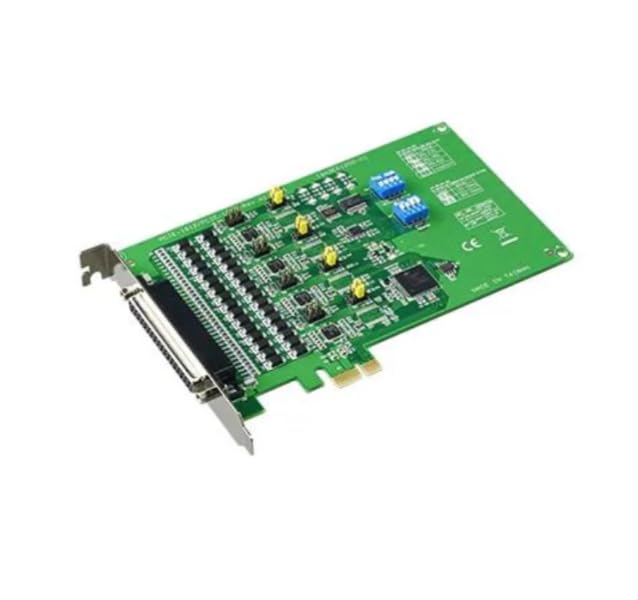
Figure 1: ADVANTECH PCIE-1612C-AE 4-Port RS-232/422/485 PCIe Communication Card. This image shows the physical card with its PCIe connector and four serial port connectors.
主な特徴:
- Number of Channels / Ports: 4 ポート
- 最大データレート: 921.6kb/秒
- インターフェースタイプ: PCIe, RS-232/422/485
- 運用供給量tage: 3.3ボルト
- 動作温度範囲: -10°C ~ +60°C
5. セットアップ
Follow these steps to properly install the PCIE-1612C-AE card into your computer system:
- システムを準備する: Power off your computer and disconnect the power cord from the wall outlet. Disconnect all peripheral devices.
- コンピューターケースを開きます。 マザーボードと拡張スロットにアクセスするには、コンピューター ケースのサイド パネルを取り外します。
- 利用可能な PCIe スロットを見つけます。 Identify an empty PCI Express (PCIe) slot on your motherboard. The PCIE-1612C-AE requires a standard PCIe slot.
- スロットカバーを取り外す: Remove the metal slot cover corresponding to the chosen PCIe slot from the back of your computer case.
- カードをインストールします: Carefully align the PCIE-1612C-AE card with the PCIe slot. Apply even pressure to both ends of the card until it is firmly seated in the slot. Ensure the card's bracket is flush with the back of the computer case.
- カードを安全に保管する: Secure the card's bracket to the computer case using the screw or latch mechanism provided by your case.
- ケースを閉じる: Replace the computer's side panel and secure it.
- 電源を再接続します: Reconnect the power cord and all peripheral devices. Power on your computer.
- ドライバーのインストール: Once the operating system boots, it may automatically detect the new hardware. Install the necessary drivers from the provided media or download them from the ADVANTECH webサイトにアクセスします。画面の指示に従ってドライバーをインストールします。
6.運用
After successful installation and driver setup, the PCIE-1612C-AE card's serial ports will be available in your operating system's Device Manager (Windows) or equivalent system information utility (Linux). Each port can be configured for its specific communication parameters (baud rate, data bits, parity, stop bits, flow control) through your operating system's settings or application software.
- デバイスの接続: Connect your RS-232, RS-422, or RS-485 compatible devices to the corresponding ports on the PCIE-1612C-AE card using appropriate serial cables.
- ソフトウェア構成: Use your serial communication software or application to select the correct COM port number assigned to each physical port on the card and configure the communication parameters to match your connected device.
- RS-422/485 Mode: For RS-422/485 modes, ensure proper termination and biasing are applied if required by your network topology. Refer to your device's documentation for specific requirements.
7. メンテナンス
The PCIE-1612C-AE card is designed for long-term reliability with minimal maintenance. However, adhering to general computer maintenance practices will help ensure optimal performance:
- ほこりの除去: Periodically open your computer case (after disconnecting power) and use compressed air to gently remove dust buildup from the card and surrounding components. Dust can impede heat dissipation and lead to component failure.
- 環境制御: 動作環境が指定された温度と湿度の範囲内であることを確認してください。
- ケーブル管理 Keep internal cables tidy to maintain good airflow within the case.
8。 トラブルシューティング
If you encounter issues with your PCIE-1612C-AE card, consider the following troubleshooting steps:
- カードが検出されません:
- カードが PCIe スロットに完全に装着されていることを確認します。
- Try installing the card in a different PCIe slot.
- Check your computer's BIOS/UEFI settings to ensure PCIe slots are enabled.
- ドライバーがインストールされない/動作しない:
- Verify you have downloaded the correct drivers for your operating system and card model from the ADVANTECH webサイト。
- Uninstall any previous serial port drivers before installing new ones.
- Check Device Manager for any error codes related to the serial ports.
- 通信エラー:
- Confirm that the serial cable is correctly connected and not damaged.
- Verify that the communication parameters (baud rate, data bits, parity, stop bits, flow control) in your software match those of the connected device.
- For RS-485, check for proper wiring (A/B lines) and termination.
- Test with a known working serial device or loopback test if possible.
9. 仕様
| 特徴 | 仕様 |
|---|---|
| モデル番号 | PCIE-1612C-AE |
| メーカー | アドバンテック |
| 製品タイプ | インターフェースモジュール |
| Number of Channels / Ports | 4 ポート |
| インターフェースタイプ | PCIe, RS-232/422/485 |
| 最大データレート | 921.6kb/秒 |
| 運用供給量tage | 3.3ボルト |
| 最低動作温度 | -10℃ |
| 最大動作温度 | +60℃ |
| アイテム重量 | 7 ポンド |
10. 保証とサポート
For warranty information, please refer to the documentation included with your purchase or contact your reseller or ADVANTECH directly. Warranty terms and conditions may vary by region and purchase agreement.
For technical support, driver downloads, or further assistance, please visit the official ADVANTECH website or contact their customer support services. Provide your product model number (PCIE-1612C-AE) and any relevant system information when seeking support.