
1. はじめに
The ORICO IG740-PRO is a high-performance M.2 NVMe Solid State Drive designed for demanding applications. Utilizing the PCIe 4.0 interface and NVMe 2.0 protocol, it offers exceptional data transfer speeds and robust reliability for both personal and industrial use. This manual provides essential information for the proper installation, operation, and maintenance of your SSD.

Image 1.1: The ORICO IG740-PRO SSD showcasing its high sequential read/write speeds of up to 7450MB/s and 6500MB/s respectively, and random read/write IOPS of 1000K and 900K.
主な機能は次のとおりです。
- Blazing-Fast Transfer Performance: Up to 7450 MB/s read and 6500 MB/s write speeds with 1000K IOPS.
- Industrial-Grade Reliability: Engineered with multi-level testing, exceeding 1.5 million hours MTBF.
- Advanced Data Security: Features power-loss protection, LDPC ECC error correction, flash management, and AES encryption.
- 効率的な放熱: Includes a copper cooling vest, silicone thermal pads, and a graphene heat spreader.
- 幅広い互換性: Suitable for laptops, desktops, game consoles (PS5), POS terminals, and automotive systems.
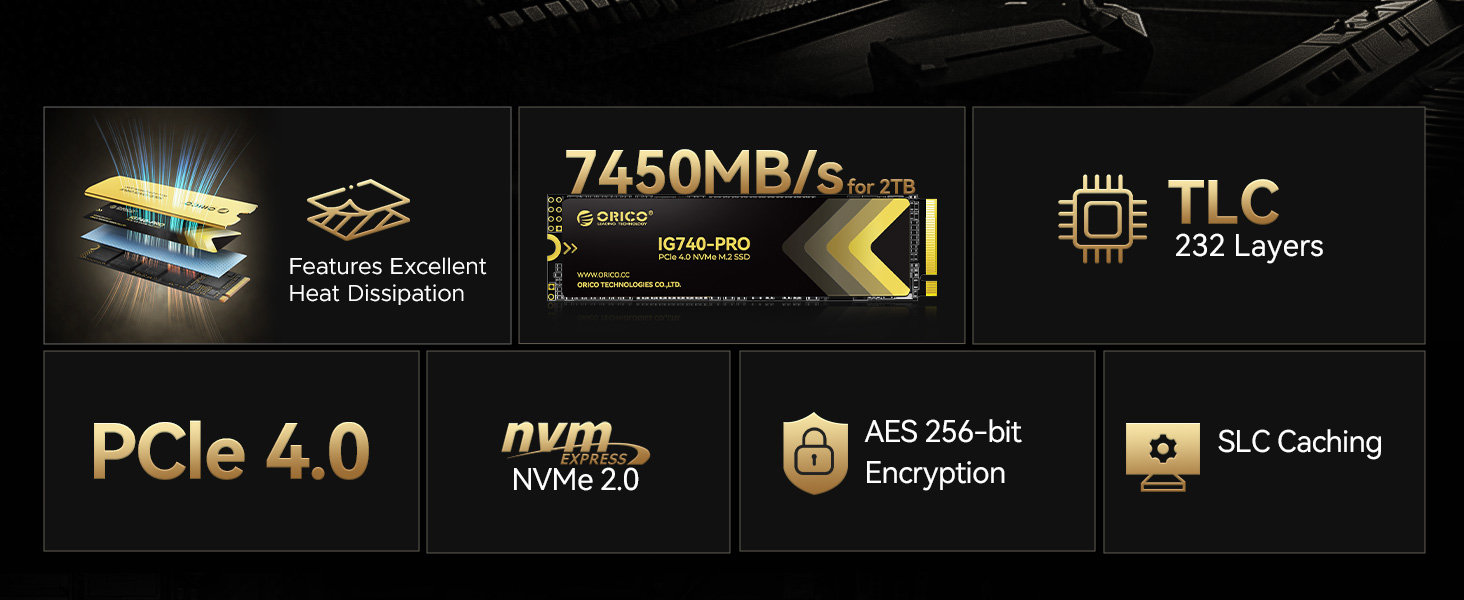
Image 1.2: The ORICO IG740-PRO SSD depicted in an industrial setting, emphasizing its rigorous testing including vibration, full load, 48-hour aging, and constant temperature/humidity tests for industrial-grade reliability.
2. セットアップとインストール
Before installation, ensure your system is powered off and disconnected from the power source. It is recommended to wear an anti-static wrist strap to prevent electrostatic discharge (ESD) damage to components.
2.1 パッケージ内容
パッケージにすべてのアイテムが揃っていることを確認します。
- ORICO IG740-PRO SSD
- シリコンサーマルパッド
- 銅製ヒートシンク
- 取り付けネジ
- ドライバー
- 梱包箱

Image 2.1: Contents of the ORICO IG740-PRO package, including the SSD, thermal pad, copper heatsink, screw, and screwdriver.
2.2 インストール手順
- システムを準備する: Open your computer case or laptop to access the M.2 slot. Consult your system's manual for specific instructions on accessing the M.2 slot.
- Install Thermal Components: Apply the silicone thermal pad to the SSD, then attach the copper heatsink. Ensure proper contact for optimal heat dissipation.
- SSDを挿入します: Gently insert the ORICO IG740-PRO SSD into the M.2 slot at a 30-degree angle. Push it in until it is fully seated.
- セキュアSSD: Push the SSD down until it is parallel with the motherboard. Use the provided screw and screwdriver to secure the SSD in place.
- クローズシステム: コンピューターまたはラップトップを組み立て直します。
- 電源を入れて初期化する: Power on your system. The SSD may need to be initialized and formatted through your operating system's Disk Management utility (Windows) or Disk Utility (macOS) before it can be used. Refer to your operating system's documentation for detailed instructions.
3. 操作手順
Once installed and formatted, the ORICO IG740-PRO SSD functions as a standard storage device. Its high-speed capabilities are particularly beneficial for:
- オペレーティング システム ドライブ: Install your operating system for faster boot times and overall system responsiveness.
- ゲーム: Reduce game loading times and improve in-game asset streaming.
- プロフェッショナルアプリケーション: Accelerate data-intensive tasks such as video editing, 3D rendering, and large file 転送。
- 産業用途: Reliable performance for edge computing, AI, big data, and POS terminals.

Image 3.1: The ORICO IG740-PRO SSD shown in diverse applications, including an enterprise data center, industrial PC, and a personal gaming setup, illustrating its wide compatibility and utility.
To maximize performance, ensure your system's motherboard supports PCIe 4.0 and that the SSD is installed in a compatible slot. Regularly check for driver and firmware updates for your motherboard and SSD.
4. メンテナンス
Solid State Drives generally require less maintenance than traditional Hard Disk Drives. However, certain practices can help ensure optimal performance and longevity.
4.1 熱管理
The ORICO IG740-PRO includes a copper cooling vest, silicone thermal pads, and a graphene heat spreader to manage heat. Ensure proper airflow within your system to prevent thermal throttling, which can reduce performance.

Image 4.1: Diagram illustrating the efficient heat dissipation system of the ORICO IG740-PRO SSD, featuring a copper cooling vest, silicone thermal pad, and graphene heat spreader, alongside power efficiency management and adaptive thermal control.
4.2 データの整合性とセキュリティ
The SSD incorporates advanced features to protect your data:
- LDPC ECC: Low-Density Parity-Check Error Correction Code helps detect and correct data errors.
- AES暗号化: Advanced Encryption Standard provides hardware-level data security.
- Power-Loss Protection: 予期せぬ停電時にデータを保護tages。
- TRIMコマンド: Ensure your operating system's TRIM command is enabled to maintain write performance over time.
- ファームウェアの更新: 定期的にORICOをチェックする website for firmware updates to improve performance and stability.

Image 4.2: Visual representation of the ORICO IG740-PRO SSD's enhanced data integrity and security features, including Dynamic Cache, Secure Erase, Power Loss Protection, AES Encryption, and LDPC ECC.
4.3 データのバックアップ
While the ORICO IG740-PRO is highly reliable, regular data backups are crucial to prevent data loss from unforeseen circumstances such as system failures or accidental deletion.
5。 トラブルシューティング
If you encounter issues with your ORICO IG740-PRO SSD, refer to the following common troubleshooting steps:
- SSD が検出されません:
- SSD が M.2 スロットに正しく装着されていることを確認します。
- システムの BIOS/UEFI 設定をチェックして、M.2 スロットが有効になっており、正しく構成されていることを確認します (例: NVMe モード)。
- マザーボードのドライバーが最新であることを確認してください。
- アダプタ カードを使用する場合は、正しくインストールされ、互換性があることを確認してください。
- パフォーマンスが遅い:
- Confirm the SSD is installed in a PCIe 4.0 compatible M.2 slot (if your system supports it). Using a PCIe 3.0 slot will limit speeds.
- Check for thermal throttling. Ensure the heatsink is properly installed and your system has adequate cooling.
- オペレーティング システムで TRIM コマンドが有効になっていることを確認します。
- Ensure your system's power management settings are not limiting performance.
- データの破損またはエラー:
- ディスクチェックユーティリティ(Windowsの場合は「chkdsk」など)を実行して、問題を特定し修復します。 file システムエラー。
- Update SSD firmware to the latest version.
- If issues persist, consider backing up data and performing a secure erase or reformatting the drive.
If these steps do not resolve the issue, please contact ORICO customer support.
6. 仕様
The following table outlines the key specifications of the ORICO IG740-PRO M.2 NVMe SSD:

Image 6.1: Detailed specifications for the ORICO IG740-PRO SSD, including capacity, read speed, write speed, and TBW (Total Bytes Written) for different capacities, along with a 5-year warranty.
| 特徴 | 詳細 |
|---|---|
| モデル番号 | IG740PRO |
| デジタルストレージ容量 | 2TB |
| ハードディスクインターフェース | NVMe |
| 接続技術 | PCIe 4.0 x4 |
| フォームファクター | M.2 2280 |
| 読み取り速度(最大) | 7450 MB/秒 |
| 書き込み速度(最大) | 6500 MB/秒 |
| IOPS (Random Read) | 1000K |
| IOPS (Random Write) | 900K |
| 平均故障間隔 | 1.5万時間 |
| 特集 | LDPC ECC, AES Encryption, Power-Loss Protection, Copper Heatsink |
| 対応デバイス | Game Console (PS5), Laptop, Desktop, Industrial PC |
| 寸法 | 12.8 x 8.7 x 1.9 cm(小包) |
| アイテム重量 | 0.06キログラム |
7. 保証とサポート
7.1 保証情報
The ORICO IG740-PRO SSD comes with a 5年間の限定保証 or up to the specified Total Bytes Written (TBW), whichever comes first. This warranty covers defects in materials and workmanship under normal use. Please retain your proof of purchase for warranty claims.
7.2 カスタマーサポート
技術的なサポート、トラブルシューティング、保証に関するお問い合わせは、ORICOの公式カスタマーサポートまでお問い合わせください。 website or the retailer where the product was purchased. You may need to provide your product model number (IG740PRO) and purchase details.
For more information, visit the official ORICO webサイト: www.orico.cc