
導入
This manual provides detailed instructions for the safe and efficient operation of your Phomemo M836-B Portable Thermal Printer. The M836-B is an inkless, wireless thermal printer designed for portability and convenience, supporting various paper sizes including US Letter and A4. Please read this manual thoroughly before using the printer to ensure optimal performance and longevity.
製品終了view
主な特徴
- インクレスサーマル印刷: Utilizes thermal technology, eliminating the need for ink cartridges or ribbons.
- ワイヤレス接続: Supports Bluetooth for seamless connection with iOS and Android devices.
- USB接続: Compatible with Windows, macOS, ChromeOS, and Linux via USB Type-C.
- 高解像度: Offers a print resolution of 300 DPI for clear text and graphics.
- ポータブルデザイン: Compact and lightweight, ideal for travel and on-the-go printing.
- 複数サイズの用紙のサポート: Accommodates various thermal paper sizes, including US Letter (8.5'' x 11'') and A4.
- モノクロ出力: Prints in black and white.

Image: The Phomemo M836-B printer demonstrating its inkless thermal printing capability, highlighting no mess from ink.

画像: オーバーview of the Phomemo M836-B's key features, including wireless connectivity, inkless operation, 2600mAh battery capacity, and 300 DPI resolution.
パッケージ内容
パッケージにすべてのアイテムが揃っていることを確認します。
- Phomemo M836-B Portable Thermal Printer
- Thermal Paper (as specified in the box)
- USB Type-Cケーブル
- ユーザーマニュアル(このドキュメント)
セットアップガイド
1. プリンターの充電
- 付属のUSB Type-Cケーブルをプリンターの充電ポートに接続します。
- USB ケーブルのもう一方の端を互換性のある USB 電源アダプター (別売) またはコンピューターの USB ポートに接続します。
- The indicator light will show charging status. Charge the printer fully before first use.
2.用紙のセット
The Phomemo M836-B supports both thermal paper rolls and sheet-fed thermal paper.
- 用紙収納部のカバーを開きます。
- For roll paper: Insert the thermal paper roll into the designated slot, ensuring the printing side faces upwards. Gently pull a small length of paper out.
- For sheet-fed paper: Insert the thermal paper sheet into the input slot, ensuring it is straight and aligned.
- 用紙カバーをしっかりと閉じてください。

Image: Illustration of how to load different types of thermal paper (roll and sheet) into the Phomemo M836-B printer, showing the paper selection mechanism.
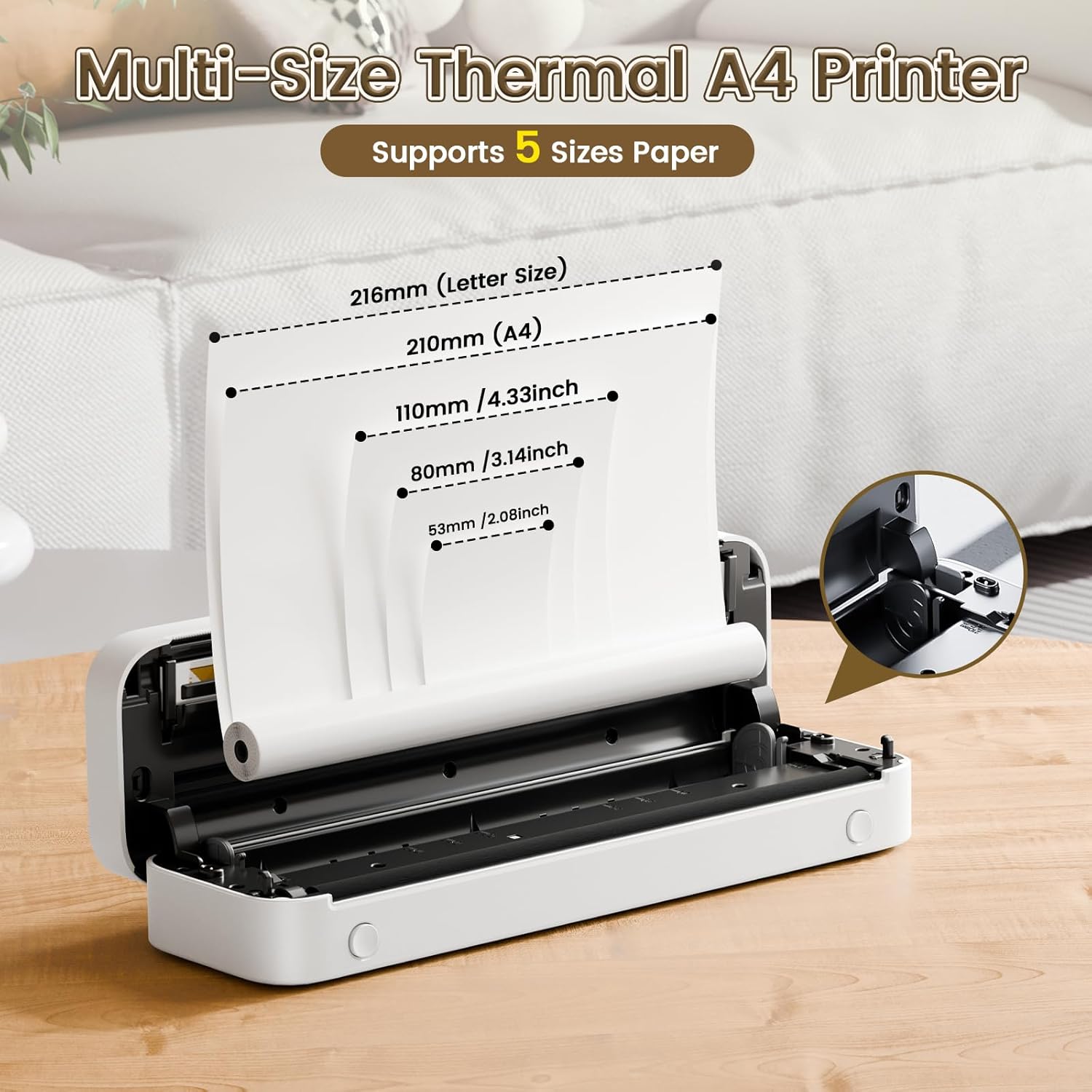
Image: The Phomemo M836-B printer demonstrating support for multiple paper sizes, including US Letter (216mm) and A4 (210mm).
3. デバイスへの接続
プリンターは Bluetooth と USB 接続の両方をサポートしています。
Bluetooth Connection (for iOS/Android)
- Download the official Phomemo app from your device's app store.
- Turn on the printer by pressing and holding the power button.
- モバイルデバイスで Bluetooth を有効にします。
- Open the Phomemo app, search for the printer (M836-B), and pair with it.
- 画面上の指示に従ってペアリングプロセスを完了します。
USB Connection (for Windows/macOS/ChromeOS/Linux)
- プリンターの電源がオンになっていることを確認してください。
- 付属の USB Type-C ケーブルを使用してプリンターをコンピューターに接続します。
- 公式Phomemoをご覧ください web地点 (www.phomemo.com) to download and install the appropriate drivers for your operating system.
- ドライバーがインストールされると、プリンターがコンピューターに認識されるはずです。

Image: Diagram illustrating the two types of connections supported by the Phomemo M836-B: Bluetooth for Android, iOS, and iPad, and USB for Windows, macOS, ChromeOS, and Linux.
操作手順
Printing from Mobile Devices
- Ensure your printer is charged, loaded with paper, and connected via Bluetooth to your mobile device.
- Phomemoアプリを開きます。
- Select the document or image you wish to print from within the app.
- Adjust print settings (e.g., paper size, density) as needed.
- 印刷ボタンをタップして印刷を開始します。
Printing from Computers
- Ensure your printer is charged, loaded with paper, and connected via USB to your computer with drivers installed.
- ドキュメントを開くか、 file コンピュータで印刷したい場合。
- 「File" > "Print" (or use the shortcut Ctrl+P/Cmd+P).
- Select the Phomemo M836-B from the list of available printers.
- Adjust print preferences (e.g., paper size, orientation) as required.
- 「印刷」をクリックします。
Paper Handling Tips
- Always use high-quality thermal paper for best results.
- Ensure the paper is loaded correctly with the printable side facing the print head.
- Avoid exposing thermal paper to direct sunlight or high temperatures, as this can degrade print quality over time.
- Manually tear off printed documents carefully after printing, as the printer does not have an automatic cutter.
メンテナンス
プリンターのクリーニング
- プリンターの電源を切り、電源から外します。
- 柔らかく糸くずの出ない布で軽く拭き取ってください。ampイソプロピルアルコールでプリントヘッドを優しく拭いてください。使用する前に完全に乾かしてください。
- Clean the exterior of the printer with a soft, dry cloth. Do not use abrasive cleaners or solvents.
ストレージ
- プリンターは、直射日光や極端な温度を避け、涼しく乾燥した場所に保管してください。
- If storing for an extended period, ensure the printer is fully charged to maintain battery health.
- Keep thermal paper in its original packaging in a dark, cool place to prevent premature fading.
トラブルシューティング
If you encounter issues with your Phomemo M836-B printer, refer to the following common problems and solutions:
プリンターが起動しない
- バッテリーを確認してください: Ensure the printer is sufficiently charged. Connect it to a power source and try again.
- 電源ボタン: Press and hold the power button for a few seconds to ensure it's properly activated.
Connectivity Issues (Bluetooth/USB)
- ブルートゥース:
- Ensure Bluetooth is enabled on your device and the printer is within range.
- Unpair and re-pair the printer in your device's Bluetooth settings.
- プリンターとモバイルデバイスの両方を再起動します。
- USB:
- USB ケーブルがプリンターとコンピューターの両方にしっかりと接続されていることを確認します。
- Ensure the correct printer drivers are installed on your computer. Reinstall if necessary.
- 別の USB ポートまたはケーブルを試してください。
Poor Print Quality (Blurry, Faded, Streaks)
- プリントヘッドのクリーニング: メンテナンスセクションのクリーニング手順に従ってください。
- Paper Quality/Type: Ensure you are using high-quality thermal paper and that it is loaded correctly.
- 印刷濃度: Adjust print density settings in the Phomemo app or printer driver.
- 紙の保管: Thermal paper exposed to heat or light can degrade. Try a fresh roll of paper.
紙詰まり
- プリンターの電源を切る: Immediately turn off the printer.
- 用紙を取り除く: Gently pull out any jammed paper. Do not force it, as this can damage the printer.
- リロード: Ensure paper is loaded correctly and not wrinkled or bent before restarting.
技術仕様
| 特徴 | 仕様 |
|---|---|
| ブランド | フォメモ |
| モデル名 | M836-B |
| 接続技術 | Bluetooth、USBタイプC |
| 印刷技術 | サーマル |
| プリンタ出力 | モノクロ |
| 最大印刷解像度 | 300DPI |
| 最大印刷速度(モノクロ) | 1.5ページ/分 |
| 対応デバイス | Android Devices, Mac, Windows, iPhone, iPad |
| 最大メディアサイズ | 8.5 x 11インチ(USレター) |
| 用紙サイズのサポート | US Letter, A4 |
| Printing Media Type | 感熱紙 |
| アイテム重量 | 1.53ポンド(約694g) |
| 製品寸法(奥行き×幅×高さ) | 奥行き7.8cm x 幅26.4cm x 高さ4.5cm |
| 制御方法 | アプリ |
| 原産国 | 中国 |
保証とサポート
Specific warranty details for the Phomemo M836-B Portable Thermal Printer are not provided within this document. For information regarding warranty coverage, technical support, or service, please refer to the warranty card included with your product or contact Phomemo customer service directly through their official webサイトまたは製品パッケージに記載されている連絡先情報を参照してください。
Official Phomemo Webサイト: www.phomemo.com