
導入
The GameSir G8 Plus Thanos Edition is a versatile mobile game controller designed to provide a console-like gaming experience across multiple platforms. This manual provides essential information for setting up, operating, maintaining, and troubleshooting your controller.
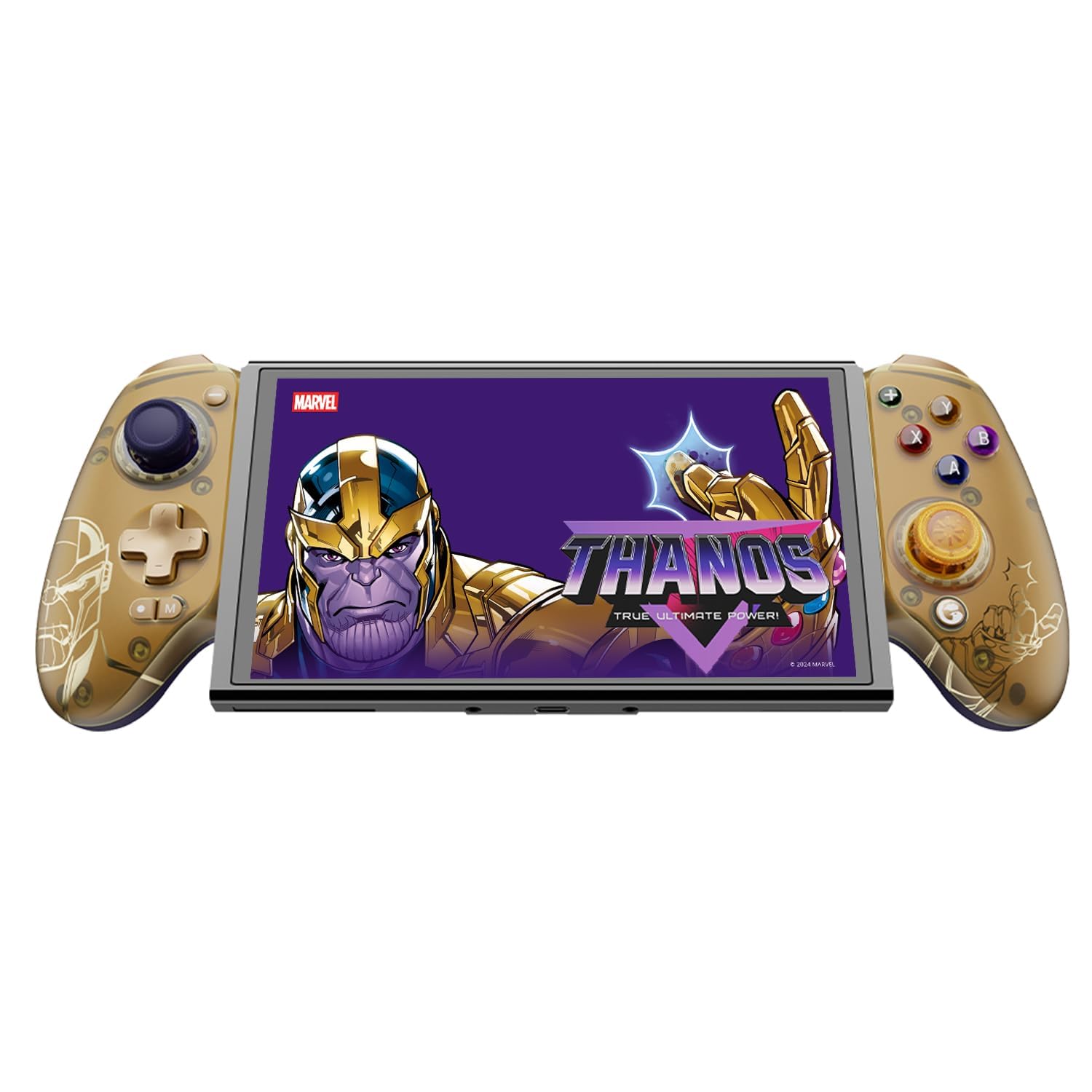
Figure 1: GameSir G8 Plus Thanos Edition Mobile Game Controller.
設定
パッケージ内容
パッケージにすべてのアイテムが揃っていることを確認します。
- GameSir G8 Plus Thanos Edition Mobile Game Controller
- Interchangeable Thumbstick Caps (3 pairs)
- USB-Cケーブル
- ユーザーマニュアル(このドキュメント)

Figure 2: Contents of the GameSir G8 Plus Thanos Edition package.
デバイスの互換性
The GameSir G8 Plus is compatible with a wide range of devices:
- Android devices (Android 8.0 or later)
- iOSデバイス
- ニンテンドースイッチ
- Tablets (4.7 to 8.4 inches)
- PC (via 2.4G receiver, sold separately, or wired)

Figure 3: Universal compatibility of the GameSir G8 Plus.
初期接続
To connect your GameSir G8 Plus controller to a device:
- モバイルデバイスの場合(Bluetooth): Extend the controller to fit your smartphone or tablet. Ensure Bluetooth is enabled on your device. Press and hold the pairing button on the controller until the indicator light flashes, then select "GameSir G8 Plus" from your device's Bluetooth settings.
- Nintendo Switchの場合: Insert the Switch console into the controller. The controller should automatically connect.
- For PC (Wired): 付属の USB-C ケーブルを使用してコントローラーを PC に接続します。
- For PC (2.4G Wireless): Insert the 2.4G receiver (sold separately) into your PC's USB port. The controller should connect automatically.
ビデオ1: 終了view of the Gamesir G8 Plus Bluetooth Marvel Licensed controller, demonstrating its design and features.
オペレーティング
主な機能とコントロール
- ホール効果ジョイスティック: Experience precise 360° control with anti-drift technology, ensuring longevity and accuracy.
- ホール効果トリガー: Optimized triggers provide smooth and quick response, ideal for various game genres.
- マッピング可能な戻るボタン: Two additional back buttons (L4/R4) allow for instant button mapping, enhancing gameplay customization.
- モーションセンシング: A built-in 6-axis gyroscope enhances motion control, particularly useful for compatible Switch games and motion-sensitive gameplay.
- 触覚フィードバック: Console-level haptic feedback provides realistic and immersive sensations during gameplay.

Figure 4: Explanation of GameSir Hall Effect Sticks.

図 5: さまざまなゲーム タイプに応じてトリガー モードを切り替えます。

Figure 6: Motion Control capabilities with built-in 6-axis gyro.

Figure 7: Realistic and immersive haptic sensation.
カスタマイズ
- Magnetic Faceplates: The controller features magnetic faceplates that can be easily removed and swapped for personalized aesthetics or maintenance.
- 交換可能なサムスティックキャップ: Three pairs of thumbstick caps with varying heights are included, allowing users to customize control feel.
- GameSir App: The GameSir app (Android exclusive) allows for real-time customization, including button mapping and sensitivity adjustments, for personalized gameplay.

Figure 8: Free customization options for the controller.

Figure 9: Advanced features of the GameSir G8 Plus.
Video 2: Introduction to the GameHub App, showcasing its features for game management and controller customization.
モード切り替え
The controller supports various modes for different platforms. To switch between modes, press the corresponding key combination:
| モード | ホームインジケーター | 接続方法 | 互換性のあるプラットフォーム |
|---|---|---|---|
| アンドロイド | 緑 | Controller + A | Android 8.0 以降のバージョン |
| DS4 | 青 | Controller + B | iOS |
| スイッチ | 赤 | Controller + X | スイッチ |
| Gタッチ | シアン | Controller + Y | GameSirアプリ |
*作業状態で、対応するキーの組み合わせを押すと、目的のモードに切り替わります。
メンテナンス
GameSir G8 Plus コントローラーの寿命を延ばし、最適なパフォーマンスを確保するには、次のメンテナンス ガイドラインに従ってください。
- クリーニング: コントローラーの表面は、柔らかく乾いた布で拭いてください。頑固な汚れには、軽く拭いてください。amp布を水または中性洗剤で拭いてください。刺激の強い化学薬品や研磨剤は使用しないでください。
- ストレージ: コントローラーは、直射日光や極端な温度を避け、涼しく乾燥した場所に保管してください。長期間使用しない場合は、保管前に必ず完全に充電してください。
- 取り扱い: Avoid dropping the controller or subjecting it to strong impacts. Do not attempt to disassemble the controller beyond removing the magnetic faceplates and thumbstick caps.
トラブルシューティング
If you encounter issues with your GameSir G8 Plus controller, refer to the following common troubleshooting steps:
- コントローラーが接続されていません: Ensure Bluetooth is enabled on your device and the controller is in the correct mode (Android, DS4, Switch). Try restarting both the controller and your device. For wired connections, ensure the USB-C cable is securely connected.
- ボタンまたはジョイスティックが反応しない: Check if the controller's battery is charged. If using the GameSir App, verify that button mappings are correctly configured. For Hall Effect Joysticks, recalibration might be necessary if drift occurs (refer to GameSir App for calibration options).
- デバイスが適合しない: Ensure your device's dimensions are within the supported range of 4.7 to 8.4 inches. The controller's design accommodates devices with larger cameras.
- GameSir App Issues: Ensure your GameSir App is updated to the latest version. The app is currently exclusive to Android devices.
さらにサポートが必要な場合は、GameSir カスタマー サポートにお問い合わせください。
仕様
Detailed specifications for the GameSir G8 Plus Thanos Edition Mobile Game Controller:
| 特徴 | 詳細 |
|---|---|
| 対応デバイス | Android, iOS, Nintendo Switch, PC |
| コントローラータイプ | ゲームパッド |
| 接続技術 | Bluetooth 5.3, USB, 2.4G (receiver sold separately) |
| 追加機能 | Multiuse, Wireless, Hall Effect Joysticks & Triggers, 6-axis Gyroscope, Mappable Back Buttons, Magnetic Faceplates, Interchangeable Thumbstick Caps, Pass-through Charging |
| ボタンの数量 | 6 (standard face buttons) + D-pad, shoulder buttons, triggers, menu buttons, 2 back buttons |
| ハードウェアプラットフォーム | Smartphone, Tablet, Nintendo Switch, PC |
| 電源 | Battery Powered (500mAh per side) |
| アイテム重量 | 620グラム |
| モデル名 | G8プラス |
| メーカー | ゲームサー |
| 色 | Gamesir G8 Plus Thanos Edition (Gold/Purple) |
保証とサポート
保証情報
The GameSir G8 Plus Thanos Edition Mobile Game Controller comes with a 1年間保証. GameSir provides 12 months replacement service for product issues.
カスタマーサポート
If you experience any problems with your product or require further assistance, please feel free to send a message through Amazon. GameSir aims to reply within 24 hours.