1. はじめに
This manual provides detailed instructions for the setup, operation, and maintenance of your THOMSON 8-inch Digital Photo Frame (Model: TRDF-8001C). Please read this manual thoroughly before using the device to ensure proper functionality and to maximize your enjoyment of its features. This digital photo frame is designed to display your cherished photos and videos with an 8-inch IPS HD screen, offering a clear and vibrant viewing の経験。
2. 箱の中身
開梱の際には、以下に挙げる品目がすべて揃っており、良好な状態であることを確認してください。
- THOMSON 8-inch Digital Photo Frame
- リモートコントロール
- 電源アダプター
- フォトフレームスタンド
- ユーザーマニュアル

Figure 2.1: Contents of the THOMSON Digital Photo Frame package.
3. セットアップ
3.1電源接続
- Connect the power adapter to the DC-IN port on the back of the digital photo frame.
- 電源アダプタを標準のコンセントに差し込みます。
- フレームは自動的に電源がオンになります。
3.2 初期設定
- Upon first startup, you will be prompted to select your preferred language. Use the navigation buttons on the remote control or the physical buttons on the back of the frame to select and confirm.
- 現在の日付と時刻を設定します。
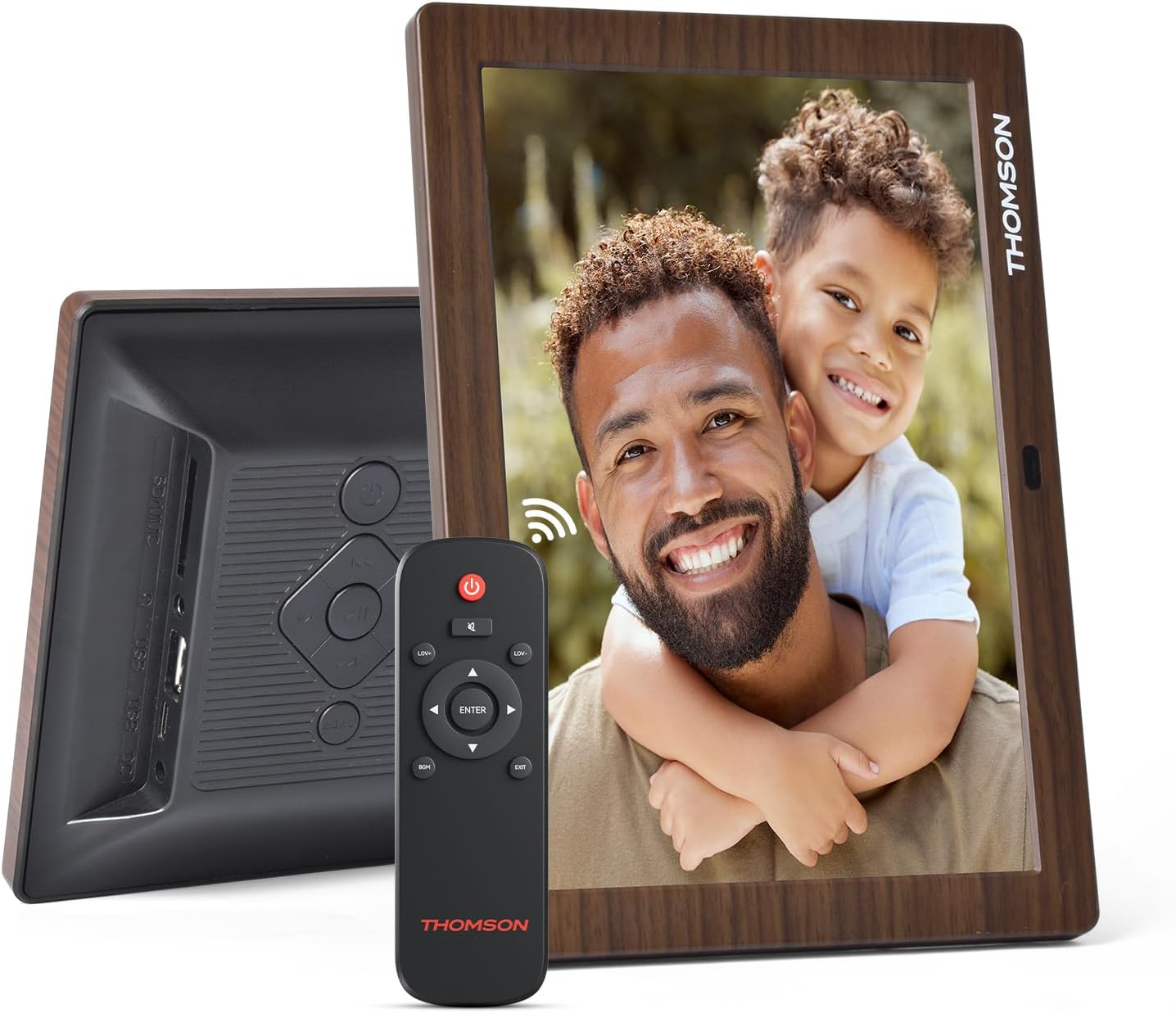
図3.1:背面 view of the frame with power input and physical controls.
3.3 スタンドの取り付け
The digital photo frame can be placed on a flat surface using the included stand. Insert the stand into the designated slot on the back of the frame. The frame also supports wall mounting using the integrated mounting holes.
4. 操作手順
4.1 表示機能
- 8インチ IPS HD スクリーン: Enjoy clear and vibrant images with a 1280x800 resolution from various view角度を変える。
- 自動回転: The built-in gravity sensor automatically adjusts the photo orientation (landscape or portrait) for optimal viewing。

Figure 4.1: The 8-inch IPS HD screen provides a high-quality display for your memories.
4.2 メディア再生
The frame supports playback of photos, music, and videos. You can navigate through your media using the remote control or the physical buttons.
- 写真スライドショー: Configure slideshow intervals and transition effects in the settings.
- 音楽再生: バックグラウンドミュージックを再生しながら view写真を撮る。
- プレイバック: Enjoy your favorite video clips directly on the frame.

Figure 4.2: User interface for media selection and playback options.
4.3 Remote Control and Physical Buttons
Control your digital photo frame conveniently using the included remote control or the physical buttons located on the back of the frame.
- リモートコントロール機能: Power on/off, adjust volume, navigate images, control background music, and access menus.
- 物理ボタン: Provide direct control for essential functions, useful for elderly users.

Figure 4.3: Remote control for convenient operation of the frame.
4.4 Expansion Modes
The frame supports various expansion options for storing your media:
- SD/SDHC/MMC Card: Expand storage up to 32 GB.
- USB-A/Type-C/U-disk: Connect USB drives for additional media.
- 注記: This frame does not have built-in storage. An external memory card or USB drive is required for media storage.

Figure 4.4: Memory expansion slots on the back of the frame.
4.5 自動電源オン/オフ
You can set a customized automatic start and stop time for the frame to conserve energy and manage display times.

Figure 4.5: Setting automatic power on/off times for convenience.
5. メンテナンス
- 画面の掃除: Use a soft, dry, lint-free cloth to gently wipe the screen. For stubborn marks, slightly damp布に水または画面洗浄液を含ませてください。刺激の強い化学薬品は使用しないでください。
- フレームの掃除: フレームを柔らかく乾いた布で拭いてください。
- ストレージ: When not in use for extended periods, disconnect the power adapter and store the frame in a cool, dry place away from direct sunlight.
6。 トラブルシューティング
| 問題 | 考えられる原因 | 解決 |
|---|---|---|
| フレームの電源が入りません。 | 電源アダプターが接続されていないか故障しています。 | 電源アダプターがフレームにしっかりと接続され、電源コンセントが機能していることを確認してください。別のコンセントを試してください。 |
| 画像/動画は表示されません。 | No memory card/USB drive inserted or media files are corrupted/unsupported. | サポートされているメディアが入ったメモリカードまたはUSBドライブを挿入します files. チェック file formats (JPEG for photos, MP4 for videos). Ensure the memory card/USB drive is properly inserted. |
| リモコンが機能しない。 | 電池残量が少ないか障害物があります。 | Replace the remote control battery. Ensure there are no obstructions between the remote and the frame's IR receiver. |
| Images are distorted or incorrect orientation. | Incorrect display settings or disabled auto-rotation. | Check display settings in the menu. Ensure the auto-rotation feature is enabled if desired. |
7. 仕様
- モデル番号: TRDF-8001C
- 画面サイズ: 8インチ
- 解決: 1280x800(WXGA)
- アスペクト比: 16:10
- ディスプレイ技術: IPS HD
- 接続性: DC-4.0, USB-A, Type-C, SD Card, 3.5MM earphone jack
- メモリ拡張: SD/SDHC/MMC card up to 32GB, U-disk
- 電源: コード式電気
- User Interface Input: ボタン、リモコン
- フレーム素材: プラスチック
- 製品寸法: 24.4 x 18 x 2.51 cm
- 製品重量: 240グラム
8. 保証とサポート
For warranty information and customer support, please refer to the documentation included in your product packaging or visit the official Thomson webサイトでご確認ください。保証請求の際は購入証明として領収書を保管してください。