
1. はじめに
The UGREEN 100W GaN Desktop Charger (Model X765) is a high-performance charging solution designed for efficiency and convenience. It features four USB-C ports and two USB-A ports, allowing you to charge up to six devices simultaneously with a total power output of 100W. Utilizing advanced GaN technology, this charger offers a compact design without compromising on power. It supports various fast charging protocols, ensuring optimal charging for a wide range of electronic devices.
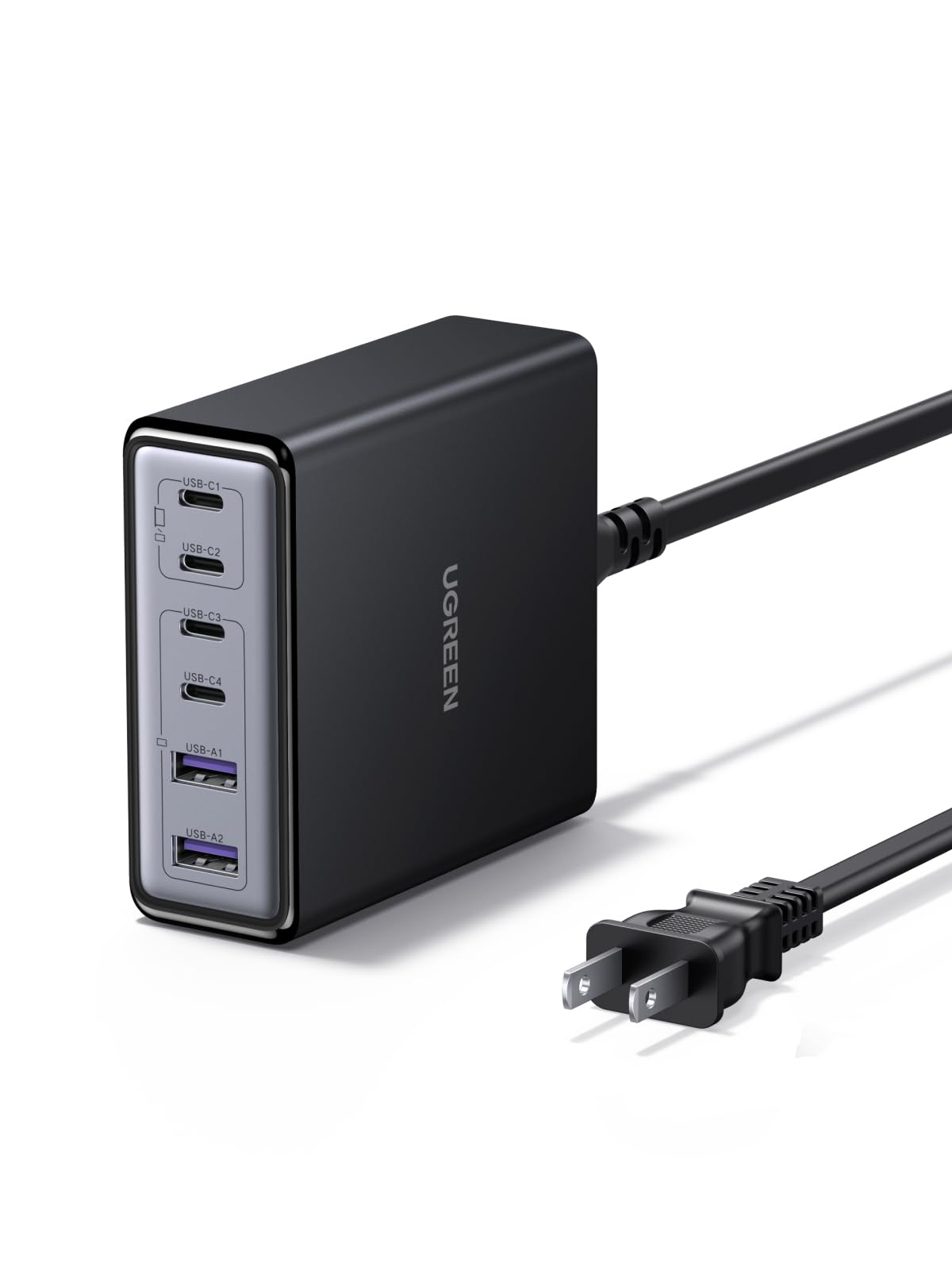
Image 1.1: UGREEN 100W GaN Desktop Charger, showcasinコンパクトなデザインと複数の充電ポートを備えています。
2 製品の特徴
- 6ポート充電: Equipped with 4 USB-C ports and 2 USB-A ports to charge multiple devices simultaneously.
- 合計出力100W: Delivers a combined maximum output of 100W across all ports, intelligently distributing power.
- 65W Single Port Output: USB-C ports can deliver up to 65W individually, suitable for fast-charging laptops.
- GaNテクノロジー: Utilizes Gallium Nitride (GaN) technology for a compact and efficient design.
- コンパクトなデザイン: Measures approximately 8.0 x 8.6 x 3.0 cm, saving desk space.
- 複数の安全保護: 過電流、過電圧を含むtage, short-circuit, overheating, overpower, dry-heat prevention, and undervoltage保護。
- Thermal Guard (TG) Technology: Features real-time temperature monitoring for enhanced safety and longevity.
- 幅広い互換性: Supports various fast charging protocols like PD3.0, QC4.0, PPS, AFC, SCP, UFCS, and FCP.
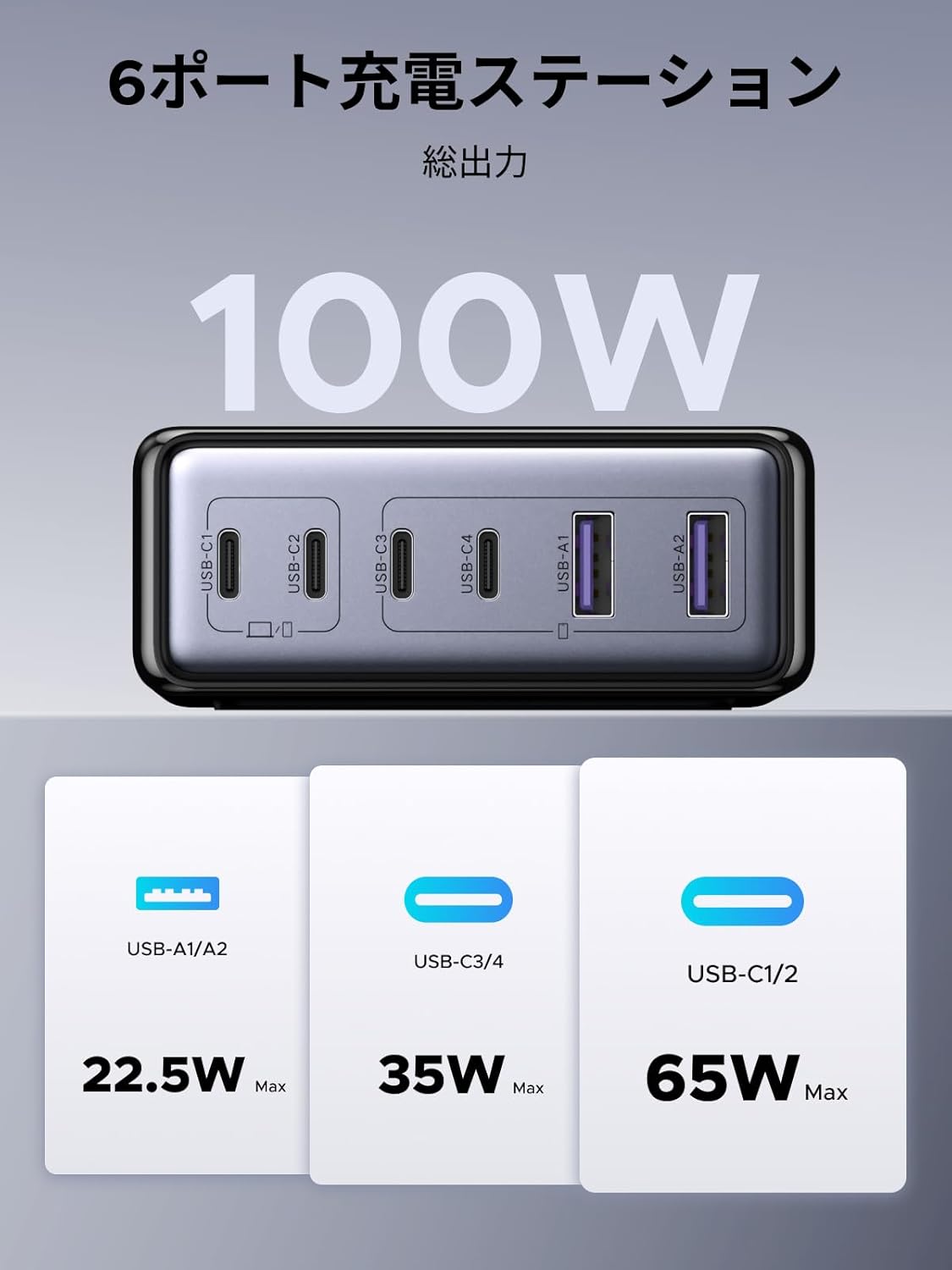
画像2.1: 以上view of the 6-port charging station, illustrating the 100W total output and maximum power delivery for each port type (USB-A/A2: 22.5W Max, USB-C3/C4: 35W Max, USB-C1/C2: 65W Max).

Image 2.2: Depiction of the internal GaN chip and Thermal Guard technology, highlighting safety features such as overvoltage, overheating, overcurrent, and overcharge protection.
3. セットアップ手順
- 電源に接続: Plug the included AC power cable into the charger's power input port, then connect the other end to a wall outlet.
- デバイスを接続する: Use appropriate charging cables to connect your devices to the available USB-C or USB-A ports on the charger.
- 充電の確認: Ensure your devices display a charging indicator to confirm proper connection.

Image 3.1: The charger in use, demonstrating its ability to charge various devices simultaneously, such as a laptop, smartphone, smartwatch, and Nintendo Switch.
4. 操作手順
The UGREEN 100W GaN Desktop Charger intelligently distributes power based on the connected devices' requirements. For optimal performance, consider the following:
- 単一デバイス充電: When charging a single device, a USB-C port can deliver up to 65W, providing rapid charging for compatible laptops and other high-power devices.
- 複数デバイスの充電: When multiple devices are connected, the charger's intelligent power management system dynamically allocates the total 100W output to each port. This ensures efficient charging for all connected devices.
- ポートの優先順位: While the charger manages power automatically, connecting high-power devices (e.g., laptops) to USB-C1 or USB-C2 ports first may optimize their charging speed.
配電Exampレ:

図4.1: 例amples of power distribution when one, two, or three ports are in use. For instance, with two USB-C ports, power might be split as 45W/20W or 20W/45W, or one port might receive 65W while another receives 35W.

図4.2: さらに例amples of power distribution when four, five, or all six ports are utilized. For example, with six ports, power might be distributed as 45W/20W, 20W/45W, 10W, 10W, 5W, 5W across the various USB-C and USB-A ports.
5. メンテナンス
- クリーニング: 清掃する前に、充電器を電源コンセントとすべてのデバイスから外してください。表面は柔らかく乾いた布で拭いてください。液体クリーナーやエアゾールは使用しないでください。
- ストレージ: 充電器は直射日光や極端な温度を避け、涼しく乾燥した場所に保管してください。
- 取り扱い: 充電器を落としたり、強い衝撃を与えたりしないでください。充電器を分解したり改造したりしないでください。
6。 トラブルシューティング
- デバイスが充電されない:
- Ensure the charger is properly plugged into a working wall outlet.
- 充電ケーブルが充電器とデバイスの両方にしっかりと接続されているかどうかを確認します。
- Try a different charging cable or port to rule out cable/port issues.
- デバイスが充電器の出力仕様と互換性があることを確認してください。
- 充電が遅い:
- 急速充電をサポートする高品質のケーブルを使用していることを確認してください。
- Check the power requirements of your device; some devices require higher wattage for optimal speed.
- If multiple devices are connected, the total 100W output is shared. Disconnecting some devices may increase charging speed for others.
- 充電器が暖かく感じる:
- It is normal for the charger to become warm during operation, especially when charging multiple devices or high-power devices.
- 充電器は換気の良い場所に設置し、覆われないようにしてください。
- If the charger becomes excessively hot or emits smoke/unusual odors, immediately unplug it and contact support.
7. 仕様
| ブランド | ユーグリーン |
| モデル番号 | X765 |
| コネクタタイプ | USB タイプ C、USB タイプ A |
| 対応デバイス | Laptops, iPhone 17-8 series, Galaxy S25-S10 series, Xperia, Pixel Pro, MacBook, iPad, Smartwatches, Gaming Consoles |
| 入力ボリュームtage | 100V(交流) |
| 出力電流 | 5 Amps(最大) |
| 出力巻tage | 20.0ボルト(最大) |
| 総出力 | 100W |
| ポート数 | 6 (USB-C x 4、USB-A x 2) |
| 含まれるコンポーネント | ユーザーマニュアル |
| 起源 | 中国 |

Image 7.1: The charger's wide compatibility with devices such as MacBook Pro/Air, iPad Air/Mini/Pro, Dell, Galaxybook, Microsoft Surface, Google Pixel series, iPhone series, Galaxy series, AirPods/Pro, cameras, and gaming consoles.
8. 保証とサポート
このUGREEN製品には、 24ヶ月のメーカー保証 購入日から。この保証は通常の使用における材料および製造上の欠陥をカバーします。
保証の除外事項: The warranty does not cover damages caused by intentional misuse, unauthorized modifications, accidents, or improper handling by the customer or third parties.
For warranty claims, technical support, or any inquiries regarding your UGREEN 100W GaN Desktop Charger, please contact the seller or UGREEN customer service through their official website or the platform where the product was purchased. Please retain your proof of purchase for warranty validation.