
1. はじめに
This manual provides detailed instructions for the proper use, setup, and maintenance of your Caliber Scientific Calculator, Model 297208. Designed for students, engineers, and professionals, this calculator offers 240 functions for a wide range of mathematical and scientific calculations.
Please read this manual thoroughly before using the calculator to ensure optimal performance and longevity.
2. 安全情報
- Keep the calculator away from extreme temperatures, direct sunlight, and high humidity.
- 電卓を落としたり、強い衝撃を与えたりしないでください。
- Do not attempt to disassemble or modify the calculator. This will void the warranty.
- Use only the specified battery type. Incorrect battery usage may cause leakage or explosion.
- バッテリー警告: 電池は子供やペットの手の届かないところに保管してください。電池を飲み込むと危険な場合があります。子供やペットが電池を飲み込んだ場合は、すぐに医師の診察を受けてください。
3. パッケージ内容
Upon opening your Caliber Scientific Calculator package, please verify that all items are present and in good condition:
- Caliber Scientific Calculator (Model 297208)
- Protective Hard Sliding Cover
- One AG10 Button Cell Battery (pre-installed or included separately)
- ユーザーマニュアル(このドキュメント)

Image 1: Caliber Scientific Calculator in retail packaging, showing key features.
4. セットアップ
4.1. 電源
The Caliber Scientific Calculator operates on dual power sources: solar power and battery power. The solar panel provides power in well-lit environments, while the battery ensures operation in low-light conditions.
4.2. バッテリーの取り付け/交換
Your calculator includes one AG10 button cell battery. If battery replacement is needed:
- 電卓がオフになっていることを確認してください。
- 電卓の背面にある電池ボックスを見つけます。
- 小さなドライバーを使用して、電池ボックスのカバーを慎重に開きます。
- Remove the old battery and insert a new AG10 button cell battery, ensuring the correct polarity (+/-).
- 電池カバーを取り付けて、ネジで固定します。
Note: Some models may require a AAA battery. Refer to the specific markings on your calculator's battery compartment if different from AG10.
5. 主要機能view
The calculator features a 10-digit LCD display and 240 functions. Familiarize yourself with the key layout:
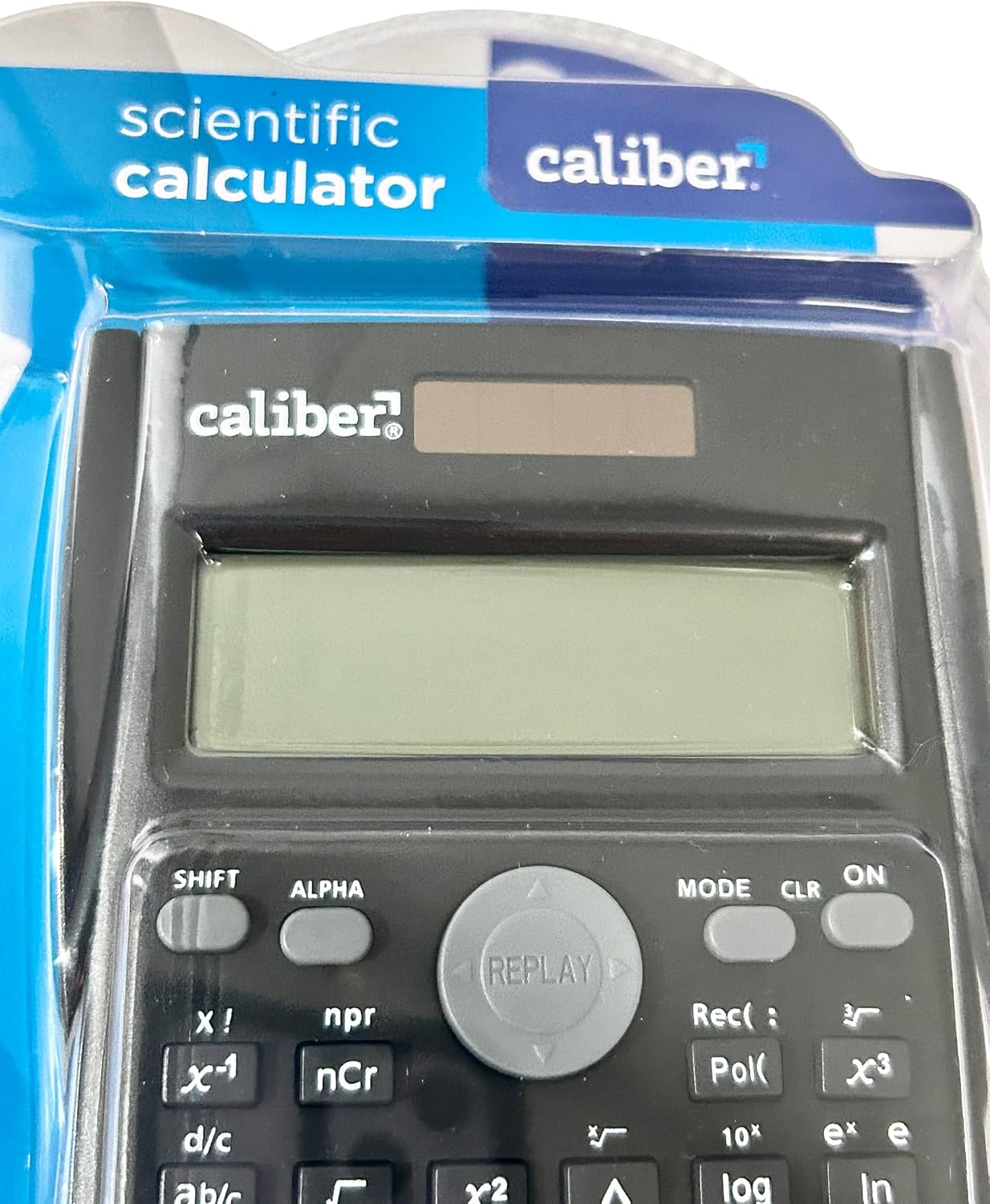
Image 2: Close-up of the calculator's display and key layout.
- 画面: 10-digit LCD for clear viewing of inputs and results.
- オン/オフ: Power on/off the calculator.
- シフト: Accesses secondary functions printed above the keys (typically in yellow or orange).
- アルファ: Accesses alpha characters and variables (typically in red or green).
- モード: Changes calculation modes (e.g., COMP, STAT, EQN).
- CL: いいえ Clears memory or settings.
- DEL: Deletes the last entered digit.
- AC: Clears all entries and resets the calculation.
- 矢印キー: Navigate through entries and results.
- = (等しい): Executes the calculation.
6. 操作手順
6.1. 基本的な計算
基本的な算術演算を実行するには:
- を押す ON key to turn on the calculator.
- 最初の数字を入力してください。
- 希望する操作キー(+, -, ×, ÷).
- 2番目の数字を入力してください。
- を押す = 結果を表示するにはキーを押します。
6.2. 高度な機能
The calculator supports 240 functions, including trigonometric, logarithmic, statistical, and more. To access secondary functions (printed above keys), press the シフト key before the desired function key.
- 三角関数: 罪, コス, 日焼け およびその逆関数(シフト + 罪⁻¹など)。
- 対数関数: ログ (base 10), ln (自然対数)。
- べき乗関数とルート関数: ײ, √, xʸ.
- メモリ機能: 使用 STO (Store) and RCL (Recall) to save and retrieve values.
- 統計計算: 入力 モード and select STAT mode for statistical computations.
For detailed instructions on specific functions, refer to the comprehensive instructions enclosed with your product (if applicable) or consult online resources for scientific calculator usage.
7. メンテナンス
7.1. 清掃
To clean your calculator:
- 柔らかい乾いた布で外側を拭きます。
- 頑固な汚れには、軽くamp布を水と中性洗剤で湿らせ、すぐに拭いて乾かしてください。
- 研磨剤入りの洗剤、溶剤、アルコールは使用しないでください。これらはcを損傷する可能性があります。asing またはディスプレイ。
7.2. ストレージ
When not in use, store the calculator in a cool, dry place, away from direct sunlight and extreme temperatures. Always use the protective hard sliding cover to prevent damage to the keys and display.

Image 3: Packaging detail showing features including the hard sliding cover and dual power.
8。 トラブルシューティング
| 問題 | 考えられる原因 | 解決 |
|---|---|---|
| 電卓が起動しません。 | Insufficient light for solar power, or dead battery. | Move to a brighter area or replace the AG10 button cell battery. |
| Display shows "ERROR". | 数学的なエラー(ゼロ除算、無効な入力など)。 | プレス AC to clear the error and re-enter the calculation correctly. |
| 計算結果が正しくありません。 | Incorrect mode selected, or input error. | 現在のモードを確認してください(モード key) and ensure correct data entry. Clear all memory (シフト + CLRL) 必要ならば。 |
9. 仕様
| モデル番号 | 297208 |
| ブランド | 口径 |
| 表示タイプ | 10桁LCD |
| 関数の数 | 240 |
| 電卓の種類 | 工学/科学 |
| 電源 | Dual Power (Solar & Battery) |
| 電池のタイプ | 1 x AG10 Button Cell (included) or 1 x AAA (may vary by model) |
| 画面サイズ | 3インチ |
| 寸法(L x W) | 6インチ×3インチ |
| エンクロージャ材質 | プラスチック |
| 欧州連合 | 050428205495 |
10. 保証とサポート
10.1. 保証情報
This product is subject to a return policy. For details regarding returns, exchanges, or warranty claims, please refer to the retailer's return policy where the product was purchased.
10.2. カスタマーサポート
For further assistance, technical support, or inquiries not covered in this manual, please contact Caliber customer service through their official webサイトまたは製品を購入した小売店にお問い合わせください。