
JAIOTlink JA-CA42
JAIOTlink 1080P Indoor Security Camera User Manual
Model: JA-CA42
導入
Thank you for choosing the JAIOTlink 1080P Indoor Security Camera. This device is designed to provide reliable and clear monitoring for your home, baby, pets, or any indoor space. Featuring 1080P HD resolution, dual-band Wi-Fi connectivity, color night vision, motion detection with auto-tracking, and two-way audio, this camera offers comprehensive surveillance and communication capabilities. This manual will guide you through the setup, operation, and maintenance of your new security camera.

Image: The JAIOTlink 1080P Indoor Security Camera, a white dome-shaped device with a large black lens array, shown next to a smartphone displaying a live feed of a baby playing, illustrating its use for home monitoring.
安全情報
- このカメラは 屋内使用のみ水、湿気、極端な温度にさらさないでください。
- Use only the provided power adapter and Type-C cable to prevent damage and ensure proper operation.
- Keep the device out of reach of children and pets to avoid accidental damage or injury.
- カメラをご自身で分解したり修理したりしないでください。サポートが必要な場合は、カスタマーサポートにお問い合わせください。
- カメラが落下しないように、安定した面に置くか、しっかりと固定してください。
パッケージ内容
以下の項目のボックスにチェックを入れてください。
- JAIOTlink 1080P Indoor Security Camera Body
- タイプCケーブル
- 取り付けネジ
製品終了view
Familiarize yourself with the main components of your JAIOTlink camera:
- レンズ: ビデオ foo をキャプチャしますtage.
- 赤外線LED: 夜間視認照明用。
- マイクロフォン: 双方向通信とサウンド検出のためにオーディオをキャプチャします。
- スピーカー: 双方向の音声通信用。
- ステータスインジケーターライト: Indicates the camera's current status (e.g., ready for connection, connected).
- MicroSDカードスロット: For local video storage (card not included, supports up to 256GB).
- リセットボタン: カメラを工場出荷時の設定にリセットするために使用されます。
- 電源ポート: Connects the Type-C cable for power supply.
セットアップガイド
1. Download the EseeCloud App
検索する and download the 'EseeCloud' app from your smartphone's app store (App Store for iOS or Google Play Store for Android).

Image: A smartphone screen displaying the EseeCloud app page in an app store, indicating where to download the required application.
2.アカウントを登録する
Open the EseeCloud app and follow the on-screen instructions to register a new account. If you already have an account, simply log in.
3. カメラの電源を入れます
Connect the Type-C cable to the camera's power port and plug the other end into a power outlet. The camera will power on, and the status indicator light will begin to flash, indicating it's ready for connection.
4. Add Device and Connect to Wi-Fi
- In the EseeCloud app, tap the '+' icon to add a new device.
- Follow the prompts to select your camera model or scan a QR code if available.
- Ensure your phone's Bluetooth and location services are enabled as prompted by the app.
- Select your Wi-Fi network (the camera supports both 2.4GHz and 5GHz bands for stable streaming) and enter the password.
- Follow the app's instructions to complete the pairing process. Once connected, the status indicator light will turn solid, and you will receive a confirmation in the app.

Image: A smartphone screen displaying a prompt to enable Bluetooth and location services for device setup.

Image: A smartphone screen showing the Wi-Fi network selection interface within the app, highlighting support for both 2.4G and 5G Wi-Fi bands.

Image: A smartphone screen confirming that the device has been successfully added and configured within the EseeCloud app.
5.カメラの取り付け
The camera can be placed on a flat surface or mounted on a ceiling or wall using the included mounting screws. Choose a location that provides the desired view角度が適切で、Wi-Fi ネットワークの範囲内にあることを確認します。
操作手順
1.ライブ View
EseeCloudアプリを開いてカメラを選択し、 view the live 1080P HD video feed. You can monitor your space in real-time from anywhere.

Image: The JAIOTlink camera alongside icons for TF card and cloud storage, with a filmstrip showing various live view scenarios including a baby, dog, cat, elderly person, and a woman relaxing, illustrating 24/7 live view 能力。
2. 双方向オーディオ
Tap the microphone icon in the app to activate two-way audio. You can speak through the camera's speaker and hear audio from the camera's microphone, allowing for real-time communication with family, pets, or visitors.

Image: A baby in a crib with speech bubbles, one showing a microphone icon and another saying "Baby, Mommy is coming", demonstrating the two-way audio feature for communicating with a baby.
3.パン/チルトコントロール
Use the directional controls in the app to remotely pan the camera 355° horizontally and tilt it 110° vertically, providing a full 360° coverage of the room.
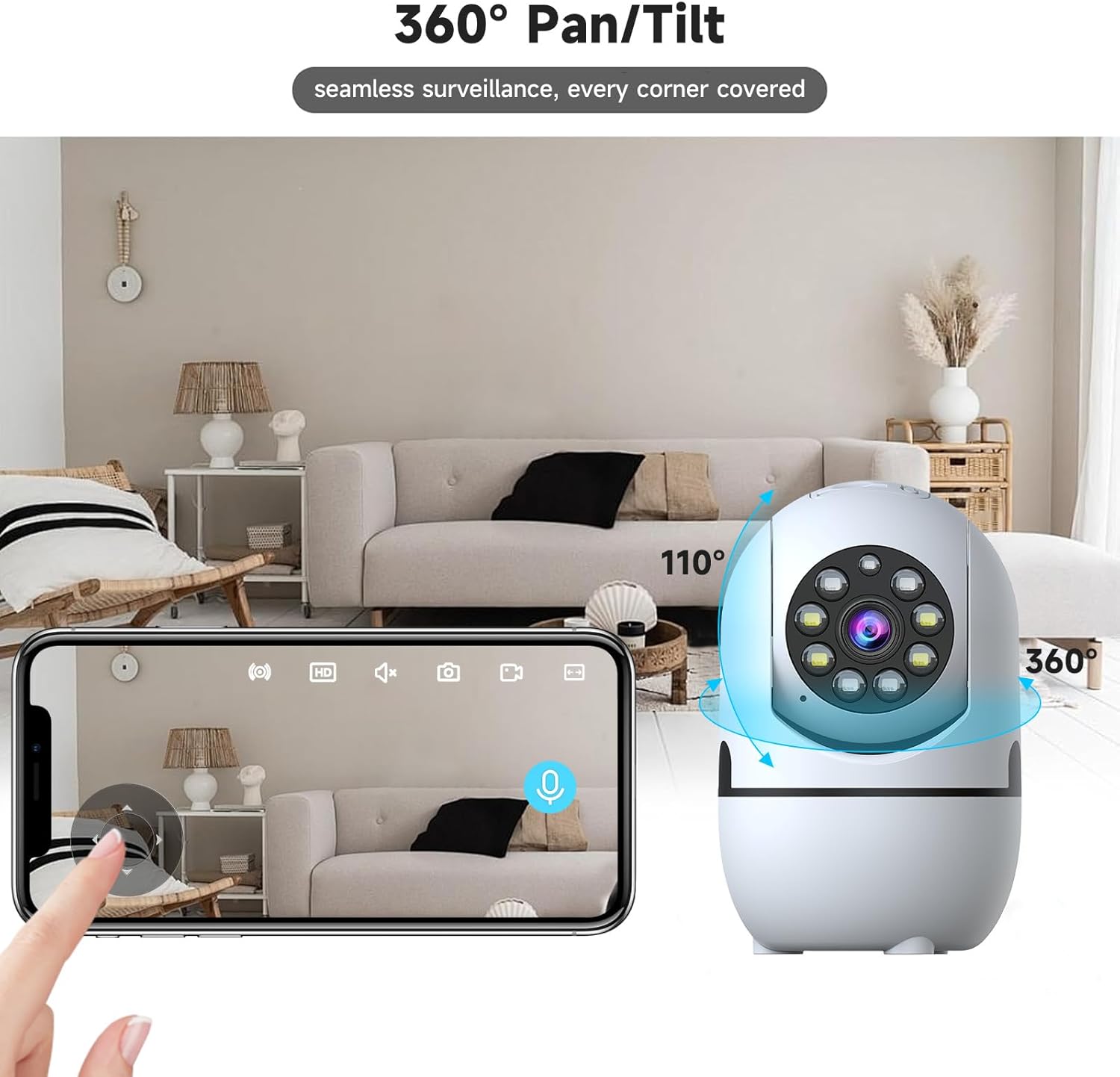
Image: The JAIOTlink camera positioned in a living room, with arrows indicating its 360-degree pan and 110-degree tilt capabilities, demonstrating comprehensive room coverage.
4. モーション検出と自動追跡
Enable motion detection in the app to receive instant notifications when movement is detected. The camera can automatically track moving objects, ensuring important events are captured. You can also set customizable motion detection zones.

Image: A cat on a couch with a blue box highlighting its movement, and a smartphone displaying an 'EseeCloud' notification for motion detection, illustrating the camera's tracking and alert features.

Image: A man in a dimly lit room with a flashlight, and a smartphone displaying the EseeCloud app with options for siren, email, and push notifications upon motion detection, demonstrating security alert features.
5. ナイトビジョン
The camera offers advanced night vision modes:
- フルカラーナイトビジョン: 暗い場所でも鮮明なフルカラー画像を提供します。
- 赤外線ナイトビジョン: Traditional black and white night vision for clear view完全な暗闇の中で。
- スマートナイトビジョン: 検出された動きや光の状態に基づいて、赤外線とカラーの夜間視界を自動的に切り替えます。

Image: A three-panel comparison showing a living room scene under different night vision modes: Full color night vision, Infrared night vision (black and white), and Smart night vision (showing a person detected in color), illustrating the camera's versatile low-light capabilities.
6. ビデオストレージ
録音は次の 2 つの方法で保存できます。
- MicroSDカード: ローカル ストレージ用に、microSD カード (最大 256 GB、別売) をカメラのスロットに挿入します。
- クラウドストレージ: Subscribe to the optional cloud storage service through the app for secure, remote storage of your video footage.
7. Alexaとの互換性
The JAIOTlink camera is compatible with Amazon Alexa. Link your camera to Alexa through the EseeCloud app settings to enable hands-free live view using simple voice commands.
メンテナンス
- クリーニング: カメラのレンズと本体は、柔らかく乾いた布で優しく拭いてください。液体クリーナーやエアゾールは使用しないでください。
- 配置: Ensure the camera is in a well-ventilated area and not obstructed by objects that could block its view または空気の流れ。
- ファームウェアの更新: Regularly check the EseeCloud app for available firmware updates to ensure optimal performance and security.
トラブルシューティング
| 問題 | 考えられる解決策 |
|---|---|
| カメラの電源が入りません。 | Ensure the power cable is securely connected to the camera and the power outlet. Try a different outlet. |
| Wi-Fiに接続できません。 | Check if your Wi-Fi network is 2.4GHz or 5GHz (camera supports both). Ensure the Wi-Fi password is correct. Move the camera closer to the router. Reset the camera and try pairing again. |
| ライブ view is blurry or pixelated. | インターネット接続速度を確認してください。カメラのレンズが汚れていないことを確認してください。また、照明が明るくなるようにカメラの位置を調整してください。 |
| 双方向オーディオが機能しません。 | Ensure microphone and speaker permissions are granted to the EseeCloud app on your phone. Check volume settings on your phone and in the app. |
| Motion detection not sending alerts. | Verify motion detection is enabled in the app. Check notification settings on your phone. Ensure detection zones are correctly configured. |
| MicroSD カードに録画されません。 | Ensure the card is inserted correctly and is not full. Format the card through the app. Use a compatible card (up to 256GB). |
仕様
| 特徴 | 詳細 |
|---|---|
| モデル番号 | JA-CA42 |
| ビデオキャプチャ解像度 | 1080p HD |
| 接続プロトコル | Wi-Fi(2.4GHzおよび5GHzデュアルバンド) |
| パン/チルト範囲 | 355° Horizontal, 110° Vertical (360° Coverage) |
| 暗視範囲 | Up to 33 Feet (Color, Infrared, Smart Modes) |
| ストレージオプション | MicroSD カード(最大 256 GB、別売)、クラウド ストレージ(サブスクリプションが必要) |
| オーディオ | 双方向オーディオ(内蔵マイクとスピーカー) |
| モーション検出 | Yes, with Auto Tracking and Customizable Zones |
| 互換性 | Amazon Alexa, Smartphone App (EseeCloud) |
| 電源 | コード付き電気 (5 ボルト) |
| 寸法(長さ×幅×高さ) | 2.72 x 2.72 x 4.25インチ |
| アイテム重量 | 9.9オンス |
| 材料 | アクリロニトリルブタジエンスチレン(ABS) |
| 屋内/屋外での使用 | 屋内のみ |
保証とサポート
JAIOTlink provides a 12ヶ月間の信頼できる保証 for this product. For any technical assistance, troubleshooting, or warranty claims, please contact our customer support team:
- メールアドレス: E-Mingxun@outlook.com
Please have your model number (JA-CA42) and purchase information ready when contacting support.
動画に関する重要な注意事項
While the product listing indicates the presence of videos, the provided metadata does not include specific URLs or creator information (e.g., 'creator_type: Seller') for these videos. Therefore, no official product videos could be embedded in this manual as per the strict embedding criteria.
Ask a question about this manual
Ask about setup, troubleshooting, compatibility, parts, safety, or missing instructions. Manuals+ will review the question and use this page’s manual context to help answer it.