
導入
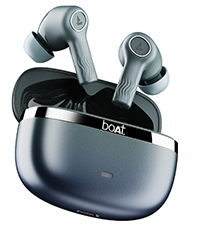
Welcome to the user manual for your boAt Nirvana Ion ANC Pro True Wireless Stereo (TWS) Earbuds. These earbuds are designed to provide a high-quality audio experience with advanced features such as Hi-Res Audio with LDAC, Active Noise Cancellation, and extended battery life. Please read this manual carefully to ensure proper use and optimal performance of your device.

Image: boAt Nirvana Ion ANC Pro TWS Earbuds and charging case.
箱の中身
- TWSイヤホン x 1
- 充電ケース x 1
- 保証カード x 1
- ユーザーマニュアル x 1
- 充電ケーブル(Type-C)×1
設定
1. 初期充電
初めてご使用になる前に、イヤホンと充電ケースを完全に充電してください。付属のType-C充電ケーブルをケースの充電ポートと電源に接続してください。ケースのインジケーターライトが充電状態を示します。
2. デバイスとのペアリング
- 充電ケースの蓋を開けると、イヤホンは自動的にペアリングモードになります。
- スマートフォンまたはその他の Bluetooth 対応デバイスで、Bluetooth 設定に移動します。
- 検索する "Nirvana Ion ANC Pro" in the list of available devices.
- 選択して接続してください。接続されると、音声プロンプトが聞こえます。
The earbuds support Bluetooth v5.3 for stable and efficient wireless connectivity.
3. boAtヒアラブルアプリのインストール
Enhance your experience by installing the boAt Hearables App. This app allows for customization of EQ settings, firmware updates, and other advanced controls.
Scan this QR code to download the boAt Hearables App. Alternatively, visit l.ead.me/bdAX6k.

Image: boAt Hearables App interface for sound customization and ANC control.
操作手順
1.タッチコントロール
The earbuds feature intuitive touch controls for various functions. Specific gestures may vary; refer to the app for customization options.
- 再生/一時停止: どちらかのイヤホンを 1 回タップします。
- 次のトラック: 右のイヤホンをダブルタップします。
- 前のトラック: 左のイヤホンをダブルタップします。
- 通話の応答/終了: どちらかのイヤホンを 1 回タップします。
- 通話を拒否: どちらかのイヤホンを長押しします。
- 音声アシスタントを有効にする: どちらかのイヤホンをトリプルタップします。
- ANC モードを切り替える: Long press on either earbud (customizable via app).
2. アクティブノイズキャンセレーション(ANC)モード
The Nirvana Ion ANC Pro offers up to 32dB Active Noise Cancellation to reduce ambient noise. You can switch between different modes:
- ANCモード: 外部のノイズを低減し、臨場感あふれるリスニング体験を実現します。
- 透明モード: 音声を聞きながら周囲の音も聞くことができ、状況認識力が向上します。
- 通常モード: ノイズキャンセルや透明化のない標準的なオーディオ再生。

Image: Demonstrating 32dB Active Noise Cancellation.
3. Dual EQ Modes with Crystal Bionic Sound
Experience high-fidelity audio with 10mm drivers and choose between two distinct sound profiles:
- Crystal Bionic Sound: Powered by HiFi, this mode delivers enhanced clarity and detail.
- boAtシグネチャーサウンド: Provides a balanced and dynamic audio experience, characteristic of boAt products.

Image: Visual representation of Dual EQ Modes.
4. BEAST™ Mode (Low Latency for Gaming)
Activate BEAST™ Mode for an ultra-low latency experience, ideal for gaming. This mode reduces audio delay to approximately 60ms, ensuring synchronized sound with on-screen action.

Image: BEAST™ Mode for low latency gaming.
5. マルチポイント接続
Connect your earbuds to two devices simultaneously and seamlessly switch between them. For example, you can listen to music on your laptop and instantly answer a call on your phone without re-pairing.

Image: Multipoint Connectivity feature.
6. Crystal Clear Calling with ENx™ Technology
The earbuds are equipped with 4 microphones and ENx™ Technology to ensure your voice is transmitted clearly during calls, even in noisy environments.

Image: Crystal Clear Calling with ENx™ Technology.
7. 充電とバッテリー寿命
The earbuds offer an impressive total playback time of up to 120 hours with the charging case. The ASAP™ Charge feature provides 4 hours of playback from just 10 minutes of charging.

Image: 120 Hours Playback and ASAP™ Charge.
メンテナンス
- クリーニング: イヤホンと充電ケースのお手入れには、柔らかく乾いた布をご使用ください。刺激の強い化学薬品や研磨剤は使用しないでください。
- ストレージ: 使用していないときは、イヤホンを保護し、充電を保つために充電ケースに保管してください。
- 耐水性: The earbuds are not water resistant. Avoid exposure to water, sweat, or moisture.
- 充電ポート: Type-C 充電ポートをほこりやごみから守ってください。
トラブルシューティング
| 問題 | 解決 |
|---|---|
| イヤホンがペアリングされない | イヤホンが充電されていることを確認してください。デバイスのBluetoothをオフにしてからオンにしてください。イヤホンをケースに戻し、閉じてから再び開いてペアリングモードに切り替えてください。 |
| イヤホンが XNUMX つしか機能していない | Place both earbuds back in the case, close the lid, then open again. Check battery levels for both earbuds. Try resetting the earbuds (refer to app or support for specific reset instructions). |
| 音量が低い、または音質が悪い | Adjust volume on your device and through touch controls. Ensure earbuds are clean and properly seated in your ears. Check EQ settings in the boAt Hearables App. |
| 充電の問題 | Ensure the charging cable is securely connected. Try a different charging cable or power adapter. Clean the charging port on the case. |
| ANCは効果がない | Ensure earbuds are properly sealed in your ear canal. Switch between ANC modes using touch controls or the app. |
仕様
| 特徴 | 詳細 |
|---|---|
| モデル名 | Nirvana Ion ANC Pro |
| ブランド | ボート |
| 耳の位置 | 耳に装着 |
| Bluetoothバージョン | 5.3 |
| Bluetooth範囲 | 15メートル |
| 騒音制御 | アクティブノイズキャンセリング(最大32dB) |
| オーディオドライバーのサイズ | 10ミリメートル |
| オーディオコーデック | LDAC(ハイレゾオーディオ) |
| バッテリー寿命(合計) | 最大120時間 |
| 急速充電 | ASAP™ Charge (10 mins = 4 Hrs playback) |
| 制御方法 | タッチ、音声コントロール |
| マイク | 4 (with ENx™ Technology) |
| 耐水性レベル | 耐水性はありません |
| 対応デバイス | スマートフォン、タブレット、ノートパソコン、デスクトップ |
| 重さ | 45グラム(約) |
保証とサポート
Your boAt Nirvana Ion ANC Pro TWS Earbuds come with a 1年間保証 購入日より。
For product-related queries, technical support, or warranty claims, please contact boAt customer support:
- サポートへのお問い合わせ: +91 (022) 69181920
- メールアドレス: info@imaginemarketingindia.com
- メーカー: イマジンマーケティング株式会社
- 製造元住所: ユニット番号204 & 205, 2nd Floor, D-wing & E-wing, Corporate Avenue, Andheri Ghatkopar Link Road, Mumbai, Maharashtra-400093, India.
保証の有効性を確認するために購入領収書を保管してください。


