
1. はじめにview
This manual provides essential information for the setup, operation, and maintenance of your CHUWI Hi10 X2 Tablet Keyboard with Touchpad. Designed specifically for the CHUWI Hi10 X2 and Hi10 X1 Windows tablets, this 2-in-1 magnetic keyboard transforms your tablet into a versatile laptop, enhancing productivity and convenience.
The keyboard features a magnetic docking interface for seamless connection, eliminating the need for separate charging or Bluetooth pairing. Its ultra-slim and portable design makes it ideal for various uses, from business and education to everyday tasks and gaming.
2 製品の特徴
- Magnetic Docking Interface: Designed for CHUWI Hi10 X2 / Hi10 X1 Windows tablets, ensuring easy and stable connection.
- No Charging or Pairing Required: The docking magnetic suction design provides energy efficiency and a faster input response time compared to Bluetooth keyboards.
- 統合タッチパッド: Supports multi-touch gestures for responsive navigation and control.
- 強化された入力エクスペリエンス: Features a borderless keyboard with well-spaced keys and optimized key travel for accuracy and comfort.
- 2-in-1 機能: Transforms your tablet into a versatile laptop instantly, complete with a sturdy stand for optimal view角度を変える。
- Ultra Slim and Portable: Lightweight and easy to attach or remove, making it convenient for travel and daily use.

Image: The CHUWI Hi10 X2 Tablet Keyboard provides an enhanced typing experience with its well-spaced keys, designed for comfort and precision.

Image: The high-precision touchpad supports multi-touch gestures for responsive navigation and control.
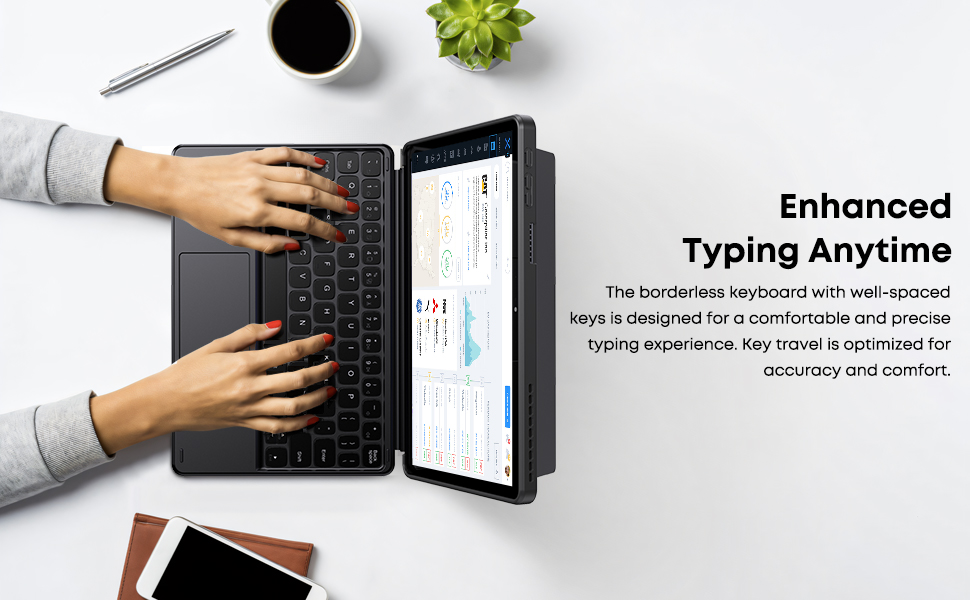
Image: The Smart Keyboard attaches magnetically to the Hi10 X1/X2 tablet, providing instant power and a great typing experience without needing charging or pairing.
3. セットアップ
- キーボードの取り付け: Align the magnetic docking interface of the keyboard with the corresponding pins on your CHUWI Hi10 X2 or Hi10 X1 tablet. The magnets will guide the keyboard into place, establishing an instant connection.
- キックスタンドの使用: The keyboard case includes a built-in stand. Fold out the stand from the back of the case to prop up your tablet at a comfortable viewingまたはタイピングの角度。
- 初回使用: No initial charging or Bluetooth pairing is required for the keyboard to function with your compatible CHUWI tablet once magnetically docked.
Video: This video demonstrates the installation of the CHUWI Hi10 X1 keyboard and showcases the protective case. It illustrates how to attach the tablet to the keyboard and utilize the case's features.
4. 操作手順
- タイピング: Begin typing immediately after docking your tablet. The keyboard provides a familiar layout for efficient text input.
- タッチパッドの使用法: The integrated touchpad supports standard mouse functions and multi-touch gestures.
- 一本指でタップ: 左クリックします。
- 2本指タップ: 右クリック。
- 2本指でスクロール: 上または下にスクロールします。
- ピンチしてズーム: 2 本の指を使って拡大または縮小します。
- キーボードの取り外し: Gently pull the tablet away from the magnetic docking interface to detach the keyboard.
5. メンテナンス
- クリーニング: Use a soft, dry, lint-free cloth to clean the keyboard and touchpad surfaces. For stubborn marks, slightly damp布を水で濡らしてください。刺激の強い化学薬品や研磨剤は使用しないでください。
- ストレージ: When not in use, keep the keyboard attached to the tablet to protect the screen and keys. Store in a cool, dry place away from direct sunlight and extreme temperatures.
- 取り扱い: Avoid placing heavy objects on the keyboard or bending it excessively to prevent damage to the keys or internal components.
6。 トラブルシューティング
- キーボードが応答しない:
- Ensure the tablet is correctly docked to the magnetic interface.
- キーボードを取り外して再度取り付け、接続をリセットします。
- Restart your CHUWI tablet.
- タッチパッドが動作しない:
- Check if the touchpad has been accidentally disabled (refer to your tablet's settings for input devices).
- Ensure the touchpad surface is clean and free from obstructions.
- Try detaching and reattaching the keyboard.
- キーが固着したり反応しない:
- Clean around the affected keys with a soft, dry brush or compressed air to remove any debris.
- キーボードに液体をこぼさないようにしてください。
7. 仕様
| ブランド: | チュウィ |
| モデル番号: | CHUWI Hi10 X1 Tablet Keyboard (Compatible with Hi10 X2) |
| 対応デバイス: | Hi10 X1 tablet, Hi10 X2 tablet |
| 接続技術: | Magnetic Docking Interface (faster than Bluetooth) |
| キーボードの説明: | Numeric (Standard QWERTY layout with touchpad) |
| 特別な機能: | Foldable, Lightweight, Portable, Integrated Touchpad, Magnetic Connection |
| 色: | 黒 |
| 材料: | シリコーン |
| 商品の重量: | 9.9オンス |
| パッケージ寸法: | 9.88 x 7.8 x 0.67インチ |
| 含まれるコンポーネント: | Hi10 X1 Tablet Keyboard |
8. 保証とサポート
Your CHUWI Hi10 X2 Tablet Keyboard is covered by a 1-year service period, valid immediately after purchase. CHUWI is committed to providing high-quality products and excellent service.
For any questions or support needs, CHUWI offers lifetime factory professional support and 24-hour online assistance. Please refer to the contact information provided with your tablet or visit the official CHUWI web詳細については、サイトをご覧ください。