
1. はじめに
This manual provides detailed instructions for the safe and effective use of the SEQURE HT140 2-IN-1 Portable Hot Tweezers Soldering Iron Kit. The HT140 is designed for precision soldering and desoldering tasks, particularly for Surface Mount Devices (SMD). Please read this manual thoroughly before operating the device.
2. 安全情報
- はんだ付けを行う際は必ず適切な目の保護具を着用してください。
- はんだの煙を吸い込まないように、作業スペースの換気を十分に行ってください。
- The soldering tips reach high temperatures. Avoid direct contact with skin to prevent burns.
- Place the device on the provided stand when not in use to prevent accidental contact or damage.
- Do not use the device near flammable materials or liquids.
- チップの交換やメンテナンスを行うときは、電源を切ってください。
- お子様の手の届かない場所に保管してください。
3. パッケージ内容
以下にリストされているすべてのアイテムがパッケージに含まれていることを確認してください。
- HT140 Host (Main Unit) x 1
- Hot Tweezers Desoldering Tip (IS type) x 2
- HT Station (Stand with cleaning sponge) x 1
- Accessory Package (Hex keys, spare screws) x 1
- 収納袋×1
- 1.5m PD 240W Silicone Wire (USB-C to USB-C) x 1
- PD 65W Fast Charging Adapter (US + EU plug) x 1

4.製品オーバーview
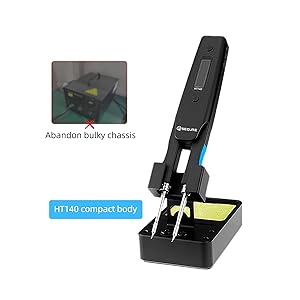
The SEQURE HT140 is an innovative 2-in-1 tool that functions as both a soldering iron and hot tweezers. It features rapid heating, precise temperature control, and a compact design suitable for various electronic repair and SMD work.
4.1 主な特徴
- 2-in-1 機能: Operates as a single-sided soldering iron or double-sided hot tweezers.
- 急速加熱: Melts solder in approximately 2 seconds.
- 広い温度範囲: Adjustable from 50°C to 500°C (122°F to 932°F).
- プリセット温度: Three customizable temperature settings for efficiency.
- スマートコントロールシステム: Features temperature calibration, compensation, auto sleep, and auto standby.
- OLEDディスプレイ: High-definition display for clear temperature and status indication.
- デュアル電源入力: Supports Type-C (PD3.1/3.0/2.0, QC3.0/2.0) and DC5525 (5V-28V, max 140W).
- コンパクトで持ち運びに便利: 持ち運びやすく、さまざまな環境で使いやすいように設計されています。

4.2 2 in 1機能
The HT140 can be configured for two primary modes of operation:
- Soldering Iron Mode: Utilizes single-sided heating for precise soldering of individual components.
- Hot Tweezers Mode: Employs double-sided heating for efficient desoldering and removal of SMD components.

5. セットアップ
5.1 はんだ付けチップの取り付け
- Ensure the HT140 is powered off and cool.
- Loosen the small set screws on the tip holders using the provided hex key.
- Carefully insert the desired C120 hot tweezers cartridge tips into the holders. Ensure they are fully seated.
- Tighten the set screws to secure the tips. Do not overtighten.
5.2 電源の接続
The HT140 supports both Type-C (USB-C) and DC5525 power inputs.
- Type-Cの使用: Connect the provided 1.5m PD 240W Silicone Wire to the Type-C port on the HT140 and to a compatible PD (Power Delivery) charger (e.g., the included 65W adapter).
- Using DC5525: Connect a compatible DC power adapter (5V-28V) to the DC5525 port.
Note: For optimal performance and rapid heating, use a power source capable of delivering at least 65W, ideally up to 140W.
6. 操作
6.1 電源オン/オフ
Connect the device to a power source. The OLED display will illuminate. To power off, disconnect the power source.
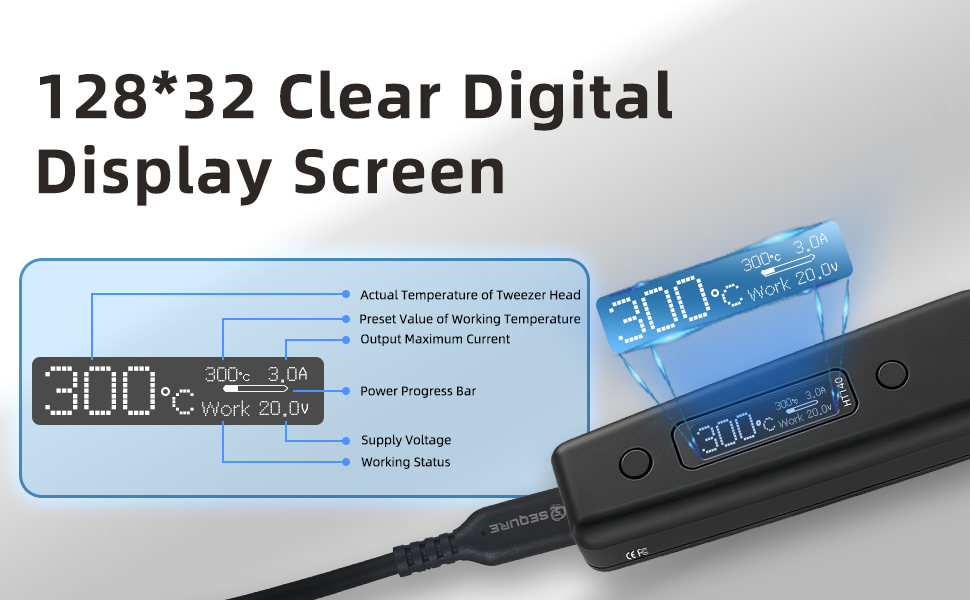
6.2 OLEDディスプレイ
The OLED display provides real-time information about the device's status:
- Actual Temperature of Tweezer Head
- 動作温度のプリセット値
- 出力最大電流
- パワープログレスバー
- 供給量tage
- 作業状況
6.3温度調整
The temperature can be adjusted from 50°C to 500°C. Use the control buttons on the device to increase or decrease the target temperature. The display will show the current and target temperatures.

6.4 Preset Temperatures (TurboSet Mode)
The HT140 supports three groups of default heating temperatures for quick access:
- SetTemp 1: 280°C (Adjustable)
- SetTemp 2: 320°C (Adjustable)
- SetTemp 3: 380°C (Adjustable)
Refer to the device's menu for instructions on how to select and customize these preset temperatures.
6.5 Auto Sleep & Standby
To conserve energy and reduce tip wear, the HT140 features adjustable auto sleep and standby modes:
- Adjustable Sleep Time: Configurable from 5s to 360s of inactivity.
- Adjustable Sleep Temperature: Set between 50°C and 500°C.
- 自動スタンバイ: Enters standby mode after a default of 5 minutes following sleep mode (adjustable).

6.6 Power Input Compatibility
The HT140 is compatible with a wide range of power sources, supporting 5V-28V DC input with a maximum power of 140W. This includes PD chargers, power adapters, and 3S-6S LiPo batteries.

6.7ファームウェアのアップグレード
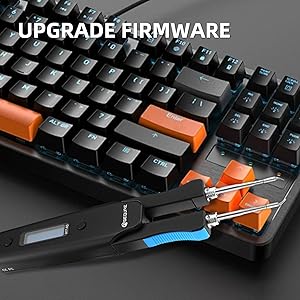
The HT140 supports firmware upgrades to enhance functionality and performance. Connect the device to a computer via the USB-C port and follow the instructions provided on the SEQURE official website for the upgrade process.
7. メンテナンス
7.1 チップの洗浄
Regularly clean the soldering tips to ensure optimal performance and longevity. Use the included cleaning sponge (dampened, not wet) or brass wool to wipe off excess solder and oxidation.
7.2 Tip Tinning
After cleaning and before storage, always tin the tips with a thin layer of fresh solder. This prevents oxidation and prolongs tip life.
7.3 ストレージ
When not in use, store the HT140 in its provided storage bag to protect it from dust and physical damage.
8。 トラブルシューティング
- デバイスの電源が入らない: Ensure the power cable is securely connected and the power source is functioning correctly and providing sufficient wattage.
- Tips not heating: Check if the tips are correctly installed and the set screws are tightened. Verify the power input.
- 不正確な温度測定: Perform a temperature calibration as described in the device's menu settings.
- Poor solder wetting: Clean and re-tin the tips. Ensure the correct temperature is set for the solder type being used.
9. 仕様
| 特徴 | 仕様 |
|---|---|
| モデル | HT140 |
| 電源入力 | Type-C (PD3.1/3.0/2.0, QC3.0/2.0), DC5525 |
| 巻tage範囲 | 5V-28V DC |
| 最大パワー | 140W |
| 温度範囲 | 50°C - 500°C (122°F - 932°F) |
| 加熱時間(30℃~300℃) | As fast as 2 seconds (with 140W input) |
| 画面 | HD OLED |
| 互換性のあるヒント | C120 Hot Tweezers Cartridge Tips |
| オートスリープ | Adjustable (5s-360s) |
| 自動スタンバイ | Adjustable (default 5 minutes after sleep) |
| 材料 | 金属、プラスチック |
| アイテムの長さ | 6.3インチ |
| アイテム重量 | 1.76オンス |

10. 保証とサポート
For warranty information and technical support, please refer to the official SEQURE webご購入の際は、サイトをご覧いただくか、販売店にお問い合わせください。購入証明書としてレシートを保管してください。


