1. はじめに
This manual provides essential information for the safe and efficient use of your Acer SA270G0bi 27-inch IPS Full HD Monitor. Please read it thoroughly before operating the device and keep it for future reference.
2. 安全情報
- 電源: モニターに付属の電源アダプターのみを使用してください。電源コンセントが適切にアースされていることを確認してください。
- 配置: Place the monitor on a stable, flat surface. Avoid direct sunlight, heat sources, and areas with high humidity or dust.
- 換気: 通気口を塞がないでください。適切な空気の流れを確保するために、モニターの周囲に十分なスペースを確保してください。
- クリーニング: 清掃する前に電源コードを抜いてください。柔らかく乾いた布を使用してください。液体洗剤やエアゾールスプレーの使用は避けてください。
- 液体および異物: Do not allow liquids or foreign objects to enter the monitor. If this occurs, immediately unplug the monitor and contact service personnel.
- 目の快適さ: Take regular breaks to reduce eye strain. Adjust screen brightness and contrast to a comfortable level.
3. パッケージ内容
パッケージにすべてのアイテムが含まれていることを確認します。
- Acer SA270G0bi Monitor
- Monitor Stand (Round Base)
- 電源コード
- HDMIケーブル
- Mini D-Sub (VGA) Cable
- ユーザーマニュアル(このドキュメント)
4. セットアップ
4.1 モニタースタンドの組み立て
- モニターとスタンドのコンポーネントをパッケージから慎重に取り出します。
- スタンドネックをモニターパネルに取り付けます。カチッと音がしてしっかりと固定されていることを確認してください。
- Attach the round base to the stand neck. Tighten the screw at the bottom of the base to secure it.
4.2接続ケーブル
必要なケーブルをモニターとコンピューターに接続します。
- 電力ケーブル: 電源コードをモニターの電源入力に接続し、次にアースされた電源コンセントに接続します。
- ビデオケーブル: Connect either an HDMI cable or a Mini D-Sub (VGA) cable from your computer's video output to the corresponding input on the monitor.

画像: 背面 view of the Acer SA270G0bi monitor showing dimensions and available ports. It features one HDMI 1.4 port and one Mini D-Sub 15-pin port. The monitor has a tilt angle of 15 degrees up and 5 degrees down. Please note that this model does not include built-in speakers or a headphone jack.
4.3電源オン
モニターの電源ボタンを押して電源を入れます。モニターはアクティブな入力ソースを自動的に検出します。
5. モニターの操作
5.1 オンスクリーンディスプレイ(OSD)メニュー
The OSD menu allows you to adjust various monitor settings. Use the buttons on the monitor (usually located on the bottom right or rear) to navigate the menu.
一般的な OSD 設定:
- 輝度コントラスト: ディスプレイ全体の輝度とコントラストを調整します。
- 色の設定: 色温度、ガンマ、個々の RGB レベルを変更します。
- 入力ソース: Manually select between HDMI and Mini D-Sub inputs.
- 画像モード: Select predefined display modes (e.g., Standard, ECO, Game, Movie).
5.2 主な特徴
- IPSパネル: 鮮やかな色彩と幅広い viewing angles (178° horizontal/vertical) with the Full HD (1920x1080) IPS panel. The non-glare surface reduces reflections.

Image: The Acer SA270G0bi monitor highlighting its IPS display technology, Full HD (1920x1080) resolution, wide 178-degree viewing angles, and non-glare panel for comfortable viewing。
- 120Hzリフレッシュレートと1ms VRB: Experience smoother visuals with a 120Hz refresh rate and a rapid 1ms Visual Response Boost (VRB) to reduce motion blur and ghosting.
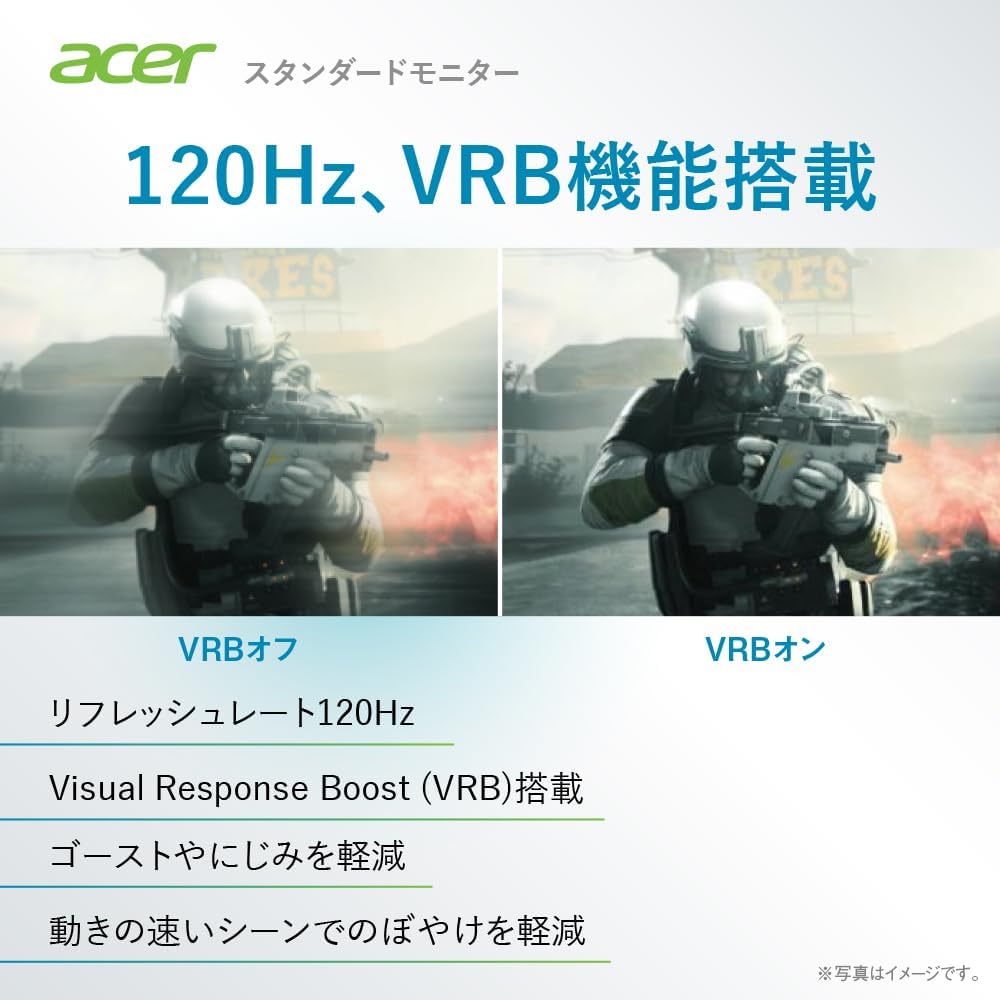
Image: A comparison demonstrating the effect of Visual Response Boost (VRB) on the Acer SA270G0bi monitor. The left side shows VRB off with more motion blur, while the right side shows VRB on, resulting in clearer images during fast-moving scenes.
- アダプティブシンク: モニターのリフレッシュ レートをグラフィック カードのフレーム レートと同期して、画面のティアリングやスタッタリングを解消します。
- ゼロフレーム設計: The ultra-thin bezel design maximizes screen space and is ideal for multi-monitor setups.

画像: 側面と前面 view of the Acer SA270G0bi monitor, illustrating its ultra-thin profile and Zero Frame design, which minimizes the bezel for an expansive viewing の経験。
- Acer VisionCare™: Technologies like Flicker-less, Blue Light Shield, and Low Dimming are integrated to help reduce eye fatigue during prolonged use.

Image: The Acer SA270G0bi monitor displaying a city skyline, with an overlay indicating Acer VisionCare™ technology. This feature includes Flicker-less, Blue Light Shield, and Acer Low Dimming technologies designed to reduce eye strain.
5.3 Acer ディスプレイ ウィジェット
The Acer Display Widget software allows for intuitive control of monitor settings directly from your PC. Download and install the application to access various display modes and split-screen functions.

Image: Screenshot of the Acer Display Widget interface, showing options for Visual Modes (sRGB, Reading, Darkroom, User, Standard, ECO, Graphic, Movie), Visual Sync, and Split Screen settings, allowing PC-based control of the monitor.
6. メンテナンス
6.1 モニターの掃除
- 清掃する前に必ずモニターの電源プラグをコンセントから抜いてください。
- 柔らかく糸くずの出ない布で軽く拭き取ってください。ampened with water to clean the screen. Avoid using alcohol-based cleaners, solvents, or abrasive materials.
- モニターcの場合asing、柔らかく乾いた布を使用してください。
7。 トラブルシューティング
| 問題 | 考えられる解決策 |
|---|---|
| 画面に画像がありません | Ensure the power cable is securely connected. Check if the video cable (HDMI/D-Sub) is properly connected to both the monitor and the computer. Press the monitor's power button. Select the correct input source via the OSD menu. |
| 画像がぼやけたり歪んだりする | Check the video cable connection. Ensure the display resolution and refresh rate are set correctly in your computer's display settings. For D-Sub connections, use the OSD's auto-adjust function. |
| 色が間違っています | OSDメニューで色設定(明るさ、コントラスト、色温度)を調整します。モニターを工場出荷時の設定にリセットします。 |
| モニターのちらつき | Ensure the refresh rate is set correctly. Enable Acer VisionCare's Flicker-less feature if available. Check for external interference. |
8. 仕様
| 特徴 | 詳細 |
|---|---|
| モデル名 | SA270G0bi |
| パネルサイズ | 27インチ |
| パネルタイプ | IPS、非光沢 |
| 解決 | フルHD(1920×1080ピクセル) |
| アスペクト比 | 16:9 |
| リフレッシュレート | 120Hz (HDMI), 56-75Hz (Mini D-Sub) |
| 応答時間 | 1ms(VRB) |
| View角度 | 178° (水平) / 178° (垂直) |
| 表示色 | 約16.77万色 |
| 入力端子 | 1 x HDMI 1.4, 1 x Mini D-Sub 15-pin |
| スピーカー | 装備なし |
| ヘッドホンジャック | 装備なし |
| 寸法(幅×奥行き×高さ) | 61.2 x 21.2 x 44.7 cm |
| 重さ | 3.5キロ |
| 傾斜角度 | 上昇15°、下降5° |
9. 保証とサポート
For product support, warranty information, and frequently asked questions, please visit the official Acer support page:
Support business hours: 10:00 - 19:00, 365 days a year (excluding company-designated holidays).