
1. はじめに
This manual provides detailed instructions for the FREEWOLF M68 60% Wireless Gaming Keyboard. Please read this manual carefully before using the product to ensure proper operation and longevity.

Figure 1: FREEWOLF M68 Wireless Gaming Keyboard (Shimmer color variant)
2.製品オーバーview
主な特徴:
- トライモード接続: 有線 (USB-C)、2.4GHz ワイヤレス、Bluetooth 5.0 接続をサポートします。
- マルチデバイスの互換性: Connects to Windows, Mac, Linux, PC, Laptop, iPad, iOS, and Android devices.
- コンパクト60%レイアウト: Features 67 keys, optimizing desktop space.
- PBT キーキャップ: Durable Polybutylene Terephthalate keycaps with clear legends.
- レインボーLEDバックライト: Offers constant and breathing modes with adjustable brightness and speed.
- 長持ちバッテリー: Built-in 2000mAH battery provides extended usage.
- 人間工学に基づいたデザイン: Double leg braces allow for three adjustable typing angles.
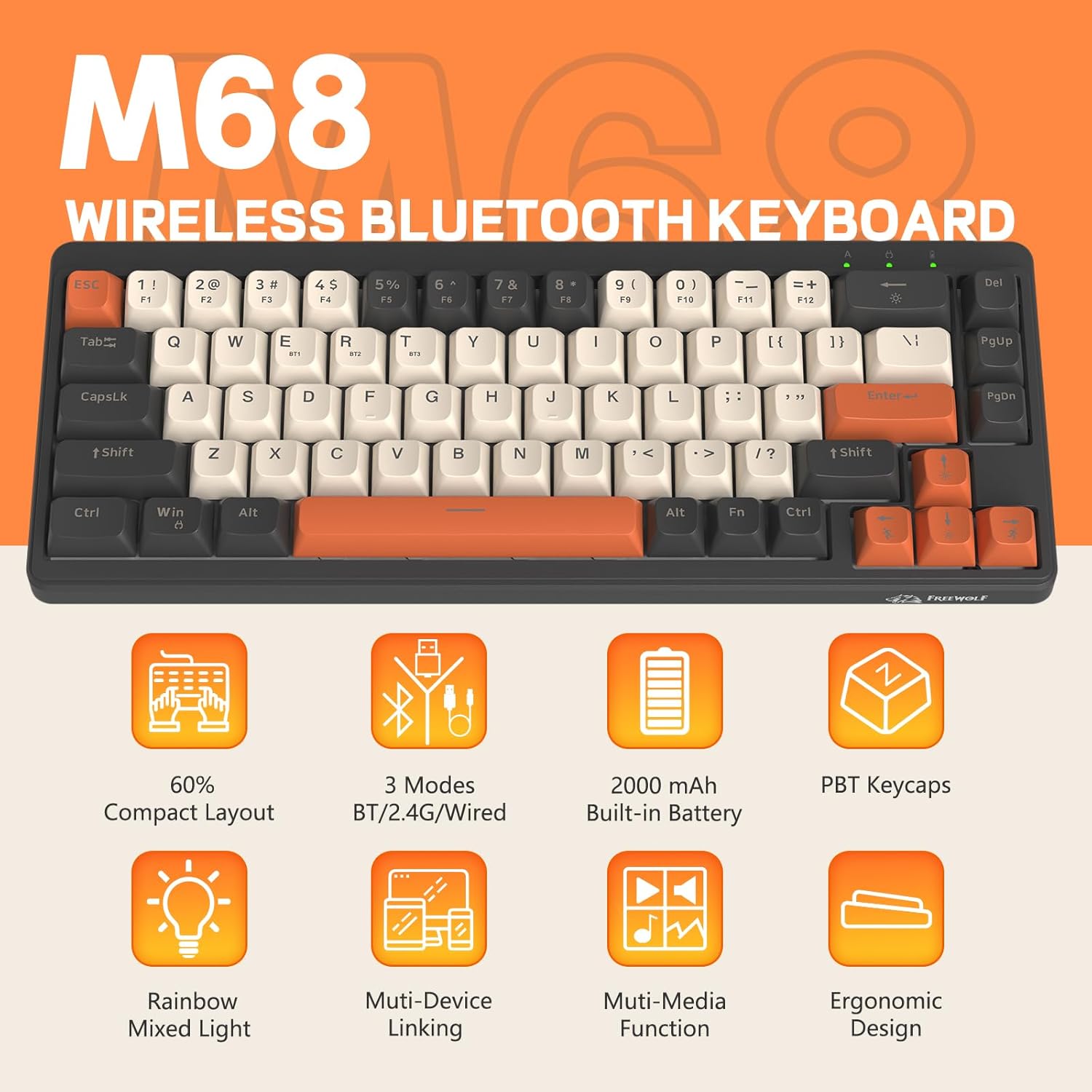
図2:以上view of FREEWOLF M68 key features.
3. セットアップと接続
3.1. トライモード接続オーバーview
The M68 keyboard supports three connection methods: wired via USB-C, 2.4GHz wireless via a USB receiver, and Bluetooth 5.0. You can switch between these modes using the dedicated switch on the keyboard.

図3:詳細 view of the 3-mode connection options.
3.2.有線接続
- キーボード上の USB-C ポートを見つけます。
- 付属の USB-C ケーブルをキーボードに接続し、もう一方の端をコンピューターの USB ポートに接続します。
- キーボードのモード スイッチが有線 (USB) の位置に設定されていることを確認します。
- キーボードはシステムによって自動的に認識されます。
3.3. 2.4GHzワイヤレス接続
- Locate the 2.4GHz USB receiver (often stored in a compartment on the keyboard).
- USBレシーバーをコンピューターの使用可能なUSBポートに接続します。
- キーボードのモードスイッチを 2.4GHz ワイヤレスの位置に設定します。
- キーボードは自動的に接続されます。接続されない場合は、 FN+R ペアリングを開始します。
3.4.Bluetooth接続
The M68 can connect to up to three Bluetooth devices simultaneously.
- キーボードのモードスイッチを Bluetooth の位置に設定します。
- To enter pairing mode for a specific channel (BT1, BT2, or BT3), press and hold FN+Q (BT1の場合) FN+W (BT2の場合)、または FN + E (for BT3) until the corresponding indicator light flashes rapidly.
- On your device (PC, laptop, tablet, phone), open Bluetooth settings and search for "FREEWOLF M68".
- ペアリングするキーボードを選択します。接続されるとインジケーターライトが点灯します。
- ペアリングされたBluetoothデバイスを切り替えるには、 FN + Q/W/E 簡単に。
4. 操作
4.1.バックライト制御
The M68 features customizable rainbow LED backlighting.
- FN + バックスペース: Toggle backlight on/off or switch between constant and breathing modes.
- FN + 左矢印: バックライトの速度を下げます。
- FN + 右矢印: バックライトの速度を上げます。
- FN + 上矢印: バックライトの明るさを上げます。
- FN + 下矢印: バックライトの明るさを下げます。

図 4: バックライト調整キーの組み合わせ。
4.2. 人間工学的調整
The keyboard includes double leg braces on the back to adjust the typing angle for comfort.
- Flip the keyboard over to access the leg braces.
- 2つのsを調整するtage leg braces to achieve your preferred typing angle (flat, one stage, or two stages)。

Figure 5: Ergonomic angle adjustments.
4.3.バッテリー管理
The keyboard has a built-in 2000mAH rechargeable battery.
- 充電: Connect the keyboard via the USB-C cable to a power source (computer USB port or wall adapter). The charging indicator will show status.
- バッテリー寿命: Up to 60 hours with backlight on, and up to 200 hours with backlight off.
- 節電: The keyboard will enter sleep mode after a period of inactivity to conserve battery. Press any key to wake it up.

Figure 6: Battery capacity information.
5. メンテナンス
- クリーニング: Use a soft, dry cloth to clean the keyboard surface. For keycaps, you may use a slightly damp 布で拭いてください。過度の湿気を避けてください。
- キーキャップの取り外し: If necessary, use a keycap puller to carefully remove PBT keycaps for deeper cleaning or replacement.
- ストレージ: キーボードは、直射日光や極端な温度を避け、涼しく乾燥した場所に保管してください。
- 液体を避ける: Do not expose the keyboard to liquids to prevent damage to internal components.
6。 トラブルシューティング
| 問題 | 考えられる原因 | 解決 |
|---|---|---|
| キーボードが反応しない(有線) | ケーブル接続が緩んでいる、モードが正しくありません。 | Ensure USB-C cable is securely connected. Check if the mode switch is set to wired. Try a different USB port. |
| Keyboard not responding (2.4GHz) | USB receiver not connected, incorrect mode, pairing issue. | Ensure USB receiver is plugged in. Set mode switch to 2.4GHz. Re-pair by pressing FN+R. Try a different USB port for the receiver. |
| キーボードが反応しない(Bluetooth) | Not paired, incorrect mode, device Bluetooth off. | Ensure device Bluetooth is on. Set mode switch to Bluetooth. Enter pairing mode (FN + Q/W/E) and re-pair. Forget the device on your system and re-pair. |
| バックライトが機能しない、または点灯しない | バックライトがオフ、バッテリー残量が少ない、ソフトウェアの不具合。 | プレス FN + バックスペース to toggle. Charge the keyboard. Try resetting the keyboard (refer to advanced functions if available, or disconnect/reconnect). |
| キーが認識されない、または二重入力される | キーキャップの下のほこり/ごみ、スイッチの問題。 | Carefully remove keycap and clean. If issue persists, contact support. |
7. 仕様
| モデル | M68 |
| ブランド | フリーウルフ |
| 接続性 | 有線(USB-C)、2.4GHzワイヤレス、Bluetooth 5.0 |
| キーレイアウト | 60% (67キー) |
| キーキャップ素材 | PBT(ポリブチレンテレフタレート) |
| バックライト | レインボーLED(RGB) |
| バッテリー容量 | 2000mAH |
| 対応デバイス | Laptop, PC, Tablet (Windows, Mac, Linux, iOS, Android) |
| 製品寸法 | 32.51 x 12.5 x 3.99 cm |
| 重さ | 600グラム |
| 特集 | Ergonomic (adjustable angles), Backlit |
8. 保証とサポート
For warranty information, technical support, or customer service inquiries, please refer to the contact information provided with your purchase or visit the official FREEWOLF webサイト。
保証請求のために購入証明書を保管してください。