
1. はじめに
The MiBOXER TRI-PW 500W AC Triac Dimmer is designed for precise control of lighting systems in residential and commercial environments. This device integrates WiFi and 2.4GHz technology, allowing for remote operation via compatible applications and MiBOXER remote controls. It supports triac dimming, ensuring compatibility with a wide range of lighting fixtures, including LED, halogen, and incandescent lights, for smooth and consistent dimming from full brightness to a soft glow.
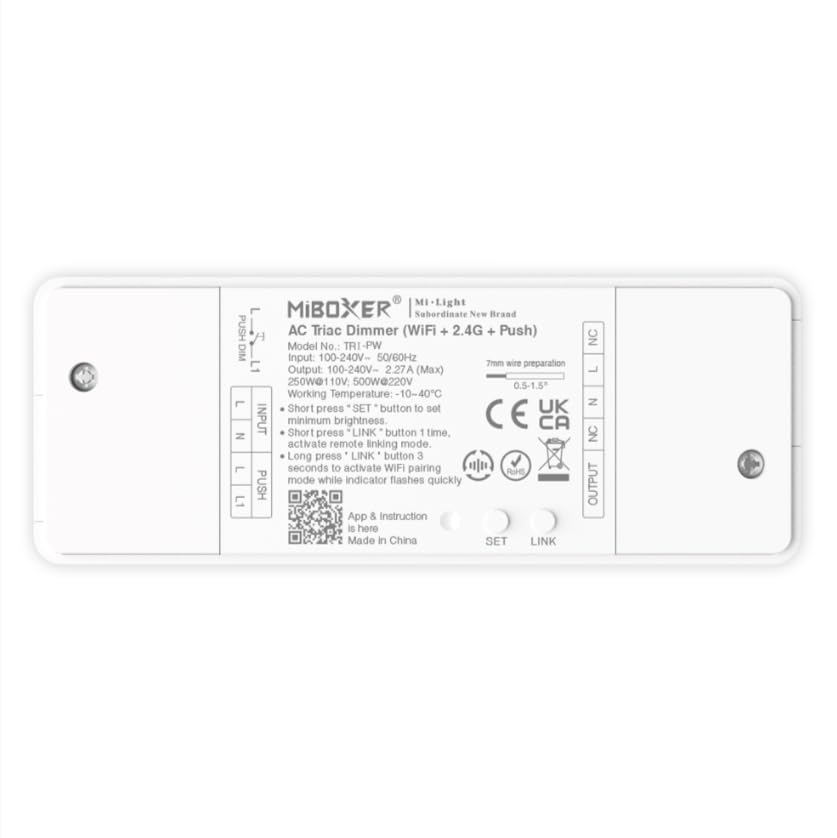
画像1.1: 以上view of the MiBOXER TRI-PW 500W AC Triac Dimmer unit.
2. 安全情報
- 電気設備: 設置は、地域の電気工事規定および規制に従って、資格のある電気技師が行う必要があります。
- 電源切断: 調光器の取り付けやメンテナンスを行う前に、必ず回路ブレーカーの電源を切ってください。
- 巻tage互換性: 入力ボリュームを確認するtage matches the dimmer's specifications (100-240V AC).
- 耐荷重: Do not exceed the maximum load capacity of 500W. Overloading can cause damage or fire.
- 屋内使用のみ: This device is intended for indoor use in dry locations. Avoid exposure to moisture or extreme temperatures.
- 互換性: Use only with compatible dimmable lighting fixtures (LED, halogen, incandescent).
3. パッケージ内容
パッケージにすべてのコンポーネントが含まれていることを確認します。
- MiBOXER TRI-PW 500W AC Triac Dimmer Unit
- User Manual (may be included as a separate document)

Image 3.1: MiBOXER TRI-PW Dimmer unit shown with its packaging and a user manual.
4 製品の特徴
- Powerful 500W Capacity: Supports high-power loads, suitable for various lighting fixtures.
- トライアック調光技術: Provides flicker-free dimming for LED, halogen, and incandescent lights.
- WiFi & 2.4GHz Control: Integrates with WiFi and MiBOXER 2.4GHz systems for smartphone or remote control.
- Push Control Compatibility: Allows for quick, on-site dimming adjustments via a push button.
- アプリと音声コントロール: Compatible with major smart home platforms for app-based and voice command control.
- メモリ機能: Retains previous lighting settings after power cycles.
5. 仕様
| 特徴 | 詳細 |
|---|---|
| ブランド | ミボクサー |
| モデル名 | トライPW |
| 特集 | 500W ACトライアック調光器 |
| 周波数帯域クラス | シングルバンド |
| 無線通信規格 | 802.11b |
| 対応デバイス | PUSH調光をサポート |
| 推奨用途 | Home lighting systems |
| 接続技術 | Wi-Fi |
| スマートホームの互換性 | Smart Home Compatible (e.g., Amazon Alexa, Google Assistant) |
| カバレッジ | LED, halogen, incandescent, high-power loads |
| 頻度 | 2.4GHz帯 |
| 寸法(約) | 117mm (長さ) x 45mm (幅) x 24mm (高さ) |
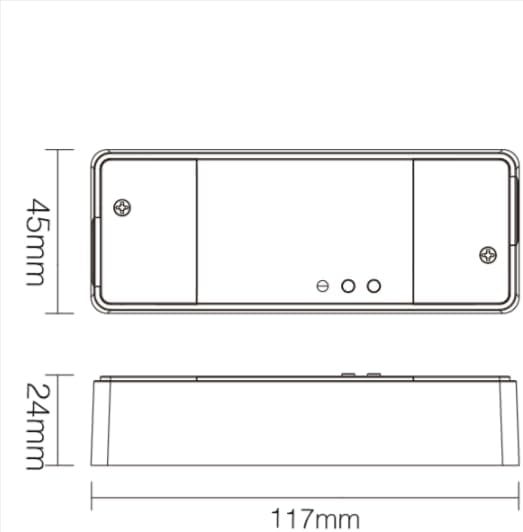
Image 5.1: Technical drawing showing the approximate dimensions of the TRI-PW dimmer.

Image 5.2: Packaging dimensions for the MiBOXER TRI-PW dimmer.
6. セットアップとインストール
重要: 取り付けを始める前に、回路ブレーカーで電源が切断されていることを確認してください。
配線図
The MiBOXER TRI-PW dimmer supports two primary wiring methods for integration with a push switch. Both methods are suitable for triac dimming LED lights, traditional filament lamps、およびハロゲンlamps.

Image 6.1: Wiring diagrams for connecting the MiBOXER TRI-PW dimmer with a push switch.
Method 1: Single-Wire Push Switch Connection
- Connect the Live (L) and Neutral (N) input wires from your power supply (100-240V~) to the corresponding 'INPUT' terminals on the dimmer.
- Connect the Live (L) and Neutral (N) output wires to your lighting fixture (100-240V~) from the 'OUTPUT' terminals.
- Connect one wire from the push switch to the 'PUSH' terminal on the dimmer.
- Connect the other wire from the push switch to the Live (L) input terminal.
Method 2: Two-Wire Push Switch Connection
- Connect the Live (L) and Neutral (N) input wires from your power supply (100-240V~) to the corresponding 'INPUT' terminals on the dimmer.
- Connect the Live (L) and Neutral (N) output wires to your lighting fixture (100-240V~) from the 'OUTPUT' terminals.
- Connect the two wires from the push switch directly to the 'PUSH' terminals on the dimmer.
After wiring, secure the dimmer in a suitable electrical box or enclosure. Restore power at the circuit breaker.
7. 操作手順
7.1. Push Switch Control
- ショートプレス: Turn the lights ON or OFF.
- 長押し: Adjust the brightness level. Release the button to set the desired brightness.
7.2. WiFi App Control
The TRI-PW dimmer supports control via a smart app (e.g., Tuya Smart app). No additional 2.4G gateway is required for app control.
- Download the compatible smart home app from your device's app store.
- アカウントに登録またはログインします。
- Put the dimmer into pairing mode (refer to the app's instructions or the dimmer's specific pairing procedure, usually involving a long press of the 'SET' button or power cycling).
- Follow the in-app instructions to add the device to your network.
- Once connected, you can control the dimmer's ON/OFF state and brightness from your smartphone.
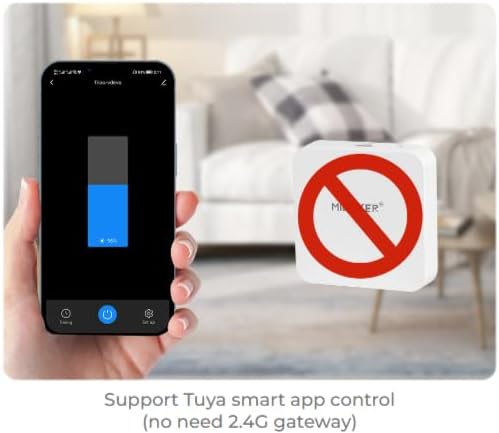
図7.1: 例ample of controlling the dimmer using a smartphone application.
7.3. 2.4GHz Remote Control
The dimmer can be paired with MiBOXER 2.4GHz remote controls for direct wireless control.
- 調光器の電源がオンになっていることを確認します。
- Refer to your MiBOXER 2.4GHz remote control's manual for specific pairing instructions. Typically, this involves pressing a "Link" or "Pair" button on the remote within a few seconds of powering on the dimmer or pressing the dimmer's 'SET' button.
- A successful pairing is usually indicated by the connected light flashing.
7.4. 音声コントロール(Alexa/Googleアシスタント)
The TRI-PW dimmer is compatible with smart home voice assistants like Amazon Alexa and Google Assistant when integrated through a compatible smart home app.
- Ensure your dimmer is successfully connected to the smart home app (e.g., Tuya Smart).
- Amazon Alexa または Google Home アプリを開きます。
- Enable the skill or service for the smart home app you are using (e.g., "Tuya Smart" skill).
- Discover devices. Your dimmer should appear in the list.
- Assign a name to your dimmer (e.g., "Living Room Light").
- You can now control your light using voice commands, such as "Alexa, turn on Living Room Light" or "Hey Google, dim Living Room Light to 50%."

Image 7.2: The dimmer is compatible with voice control platforms like Amazon Alexa and Google Assistant.
8. メンテナンス
- クリーニング: Disconnect power before cleaning. Wipe the dimmer with a soft, dry cloth. Do not use liquid cleaners or aerosols.
- 検査: 配線接続部の締め付け具合や摩耗、損傷の兆候がないか定期的に確認してください。
- ファームウェアの更新: If available, check the smart home app for firmware updates to ensure optimal performance and security.
9。 トラブルシューティング
| 問題 | 考えられる原因 | 解決 |
|---|---|---|
| ライトが点灯しない。 | No power, incorrect wiring, faulty bulb, dimmer not paired. | Check circuit breaker. Verify wiring according to diagrams. Test bulb. Re-pair dimmer with app/remote. |
| ライトがちらついたり、ハム音がしたりします。 | Incompatible bulb, overloaded circuit, loose wiring. | Ensure bulbs are dimmable and compatible with triac dimmers. Reduce load. Check wiring connections. |
| Dimmer not responding to app/remote. | Dimmer out of range, WiFi issue, not paired. | Ensure dimmer is within WiFi/2.4GHz range. Check WiFi router. Re-pair dimmer with app/remote. |
| WiFiに接続できません。 | Incorrect WiFi password, 5GHz network, dimmer not in pairing mode. | Verify WiFi password. Ensure you are connecting to a 2.4GHz network. Put dimmer into WiFi pairing mode. |
10. 保証とサポート
This MiBOXER TRI-PW dimmer comes with a 2年間保証 購入日から。この保証は通常の使用における材料および製造上の欠陥をカバーします。
The warranty does not cover damage caused by improper installation, misuse, unauthorized modifications, or acts of nature.
For technical support or warranty claims, please contact your retailer or the manufacturer directly. Please have your purchase receipt and product model number (TRI-PW) available when contacting support.
詳細については、 AmazonのMiBOXERストア.

