
1. はじめに
This manual provides detailed instructions for the installation, operation, and maintenance of your Tbest Brushless Motor Controller Kit, which includes an 80A motor speed controller and an S966 LCD display panel. This kit is designed for use with 60V 2000W, 60V 3000W, 72V 3000W, and 72V 5000W Hall brushless motors, offering versatile performance for electric bicycle conversions.
Please read this manual thoroughly before installation and operation to ensure correct usage and optimal performance of the product.
2.製品オーバーview
2.1 含まれるコンポーネント
The Tbest Brushless Motor Controller Kit typically includes the following components:
- 80A Brushless Motor Speed Controller
- S966 LCD Display Panel
- 20X Throttle
- 8C Speed Assist Sensor
- Associated wiring harnesses and connectors
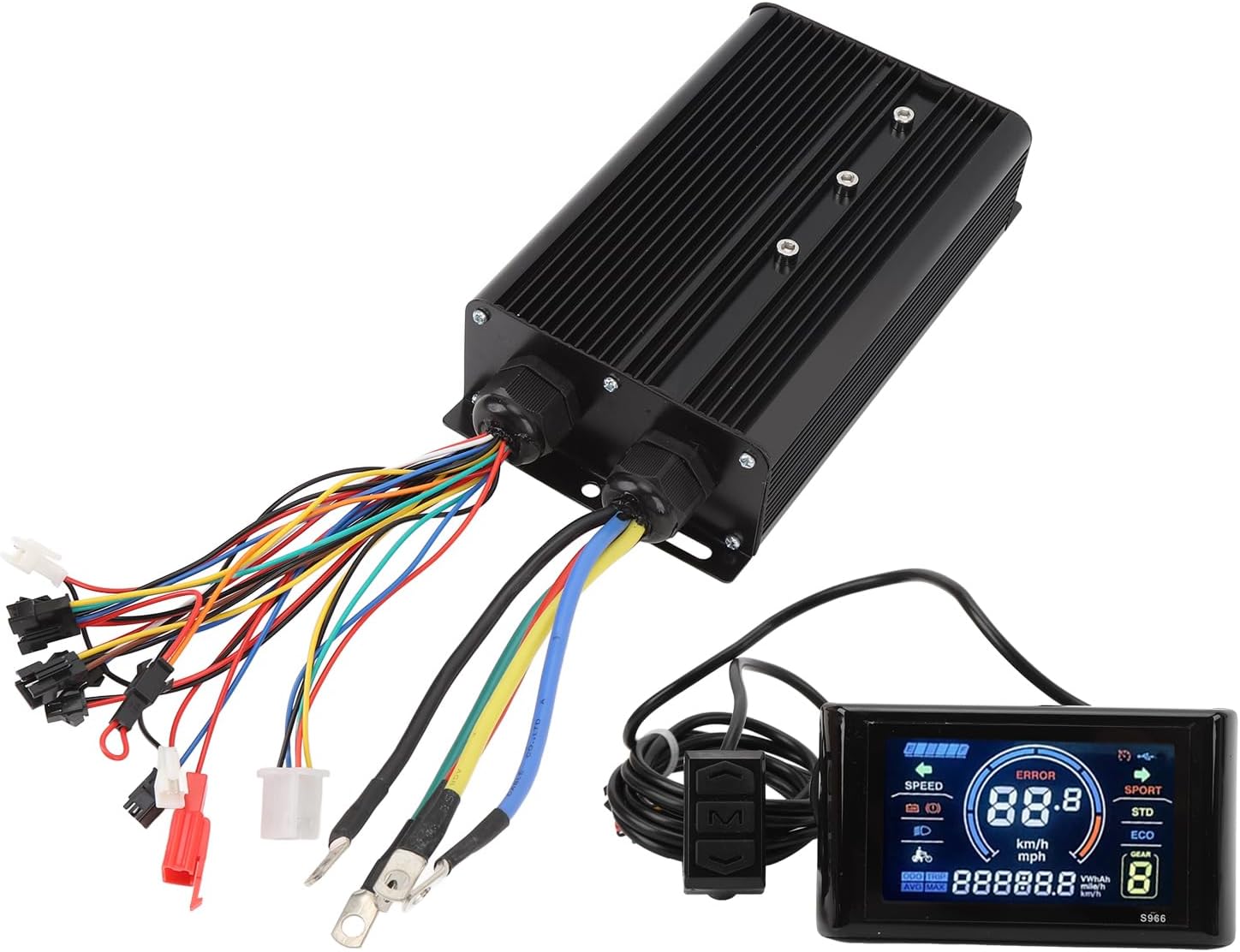
図2.1:以上view キットに含まれるすべてのコンポーネント。
This image displays the complete kit, including the brushless motor controller, S966 LCD display, throttle, speed assist sensor, and various wiring components.
2.2 主な特徴
- 多彩な互換性: Supports 60V 2000W, 60V 3000W, 72V 3000W, and 72V 5000W Hall brushless motors.
- 効率的な放熱: Controller housing made of aluminum alloy with a grooved design to prevent thermal overload.
- 耐久性のある構造: LCD display crafted from robust ABS material for longevity.
- ユーザーフレンドリーなインターフェース: S966 LCD display provides clear information and easy control.
- 正確な制御: Ensures steady speed, accurate braking, and smooth direction changes.
3. 仕様
| 特徴 | 仕様 |
|---|---|
| ブランド | ベスト |
| コントローラ電流 | 80A |
| Compatible Motor Wattage | 2000W、3000W、5000W |
| Compatible Motor Voltage | 60V、72V(DC) |
| コントローラー素材 | アルミニウム合金 |
| 表示モデル | S966 |
| 表示タイプ | 液晶 |
| ディスプレイ材料 | アブソリュート |
| ディスプレイVol。tage互換性 | 24V-72V |
| 表示画面サイズ | 4.3 inches (approx. 110x62mm) |
| 動作温度 | -20°C ~ 60°C |
| アイテム重量 | 2.01キログラム(キット全体) |

Figure 3.1: S966 LCD Display showing dimensions.
This image illustrates the physical dimensions of the S966 LCD display, measuring approximately 100mm in length and 61.5mm in height.
4. セットアップとインストール
The Tbest Brushless Motor Controller Kit is designed for straightforward installation. Proper connection of all components is crucial for safe and correct operation. It is recommended to have basic electrical knowledge or seek professional assistance if unsure.
4.1 安全上の注意
- 設置や配線を始める前に、必ず電源を切ってください。
- Verify all connections are secure and correctly polarized to prevent damage to components.
- Avoid exposing the controller or display to excessive moisture or extreme temperatures beyond specified operating conditions.
4.2配線接続
The controller features multiple color-coded wires and connectors for various functions. Refer to the diagram below for typical connections. While specific wiring diagrams are not provided in this manual, the connectors are designed to be user-friendly.

Figure 4.1: Tbest Brushless Motor Controller showing input and output wiring.
This image displays the brushless motor controller unit with its numerous color-coded wires and connectors, which are used to connect to the motor, battery, display, throttle, and other accessories.
- モーター接続: Connect the three thick phase wires (typically green, blue, yellow) from the controller to the corresponding motor phase wires. Connect the smaller Hall sensor wires (usually a 5-pin connector) to the motor's Hall sensor port.
- バッテリー接続: Connect the thick red wire from the controller to the positive (+) terminal of your battery and the thick black wire to the negative (-) terminal. Ensure correct polarity.
- S966 LCD Display: Connect the display's connector (typically a 5-pin or 2-pin connector, depending on type) to the designated port on the controller.
- スロットル: Connect the throttle unit to its corresponding connector on the controller.
- Speed Assist Sensor (PAS): Install the 8C speed assist sensor on your bicycle's pedal crank and connect its wire to the controller.
- その他の付属品: Connect any additional accessories such as brake levers (with cut-off switches) or lights to their respective ports on the controller.
After all connections are made, double-check them for security and correctness before applying power.
5. Operating Instructions (S966 LCD Display)
The S966 LCD display provides essential information and control over your electric bicycle system. Familiarize yourself with its functions for an optimal riding experience.
5.1 Display Layout and Indicators

Figure 5.1: S966 LCD Display with key indicators labeled.
This image highlights the various sections of the S966 LCD display, including Battery level, Speed, Standard Mode (STD), Economy Mode (ECO), Gear level, and Total Mileage (ODO/TRIP).
- バッテリーインジケーター: 現在のバッテリー充電レベルを表示します。
- 速度表示: Indicates current speed in km/h or mph.
- エラーインジケータ: Displays error codes if a system fault occurs.
- モード選択: Typically includes SPORT, STD (Standard), and ECO (Economy) modes for different power outputs.
- Gear/PAS Level: Shows the current pedal assist level (e.g., 1-5 or 1-9).
- 走行距離: Displays ODO (total odometer) or TRIP (current trip distance).
- ヘッドライトインジケーター: Shows if headlights are active.
5.2 ボタンの機能
The S966 display typically features three buttons for control:

Figure 5.2: S966 LCD Display control buttons and their functions.
This image illustrates the three control buttons on the S966 display: Up (Upshift), M (Mode/Turn), and Down (Downshift).
- 上ボタン(▲):
- Short press: Increase PAS level / Upshift.
- Long press: (Function may vary, e.g., turn on/off headlights).
- モードボタン(M):
- Short press: Cycle through display information (e.g., ODO/TRIP, Voltage)。
- Long press: Power on/off the system. Enter/exit settings menu.
- 下ボタン(▼):
- Short press: Decrease PAS level / Downshift.
- Long press: (Function may vary, e.g., walk assist mode).
Note: Specific long-press functions and settings menu navigation may vary. Refer to the display's internal settings for customization options.

Figure 5.3: S966 LCD Display mounted on a handlebar.
This image shows the S966 LCD display securely mounted on a bicycle handlebar, providing a clear view of the screen for the rider.
6. メンテナンス
Regular maintenance ensures the longevity and reliable performance of your Tbest Brushless Motor Controller Kit.
- クリーニング: コントローラーとディスプレイを柔らかくて乾いた布で拭いてください。amp cloth. Avoid using harsh chemicals or abrasive cleaners. Ensure the display is dry after cleaning.
- 接続: すべての電気接続部がしっかりと締まっているか、腐食の兆候がないか定期的に点検してください。接続が緩んでいると、断続的な動作や損傷につながる可能性があります。
- 環境保護: While the controller is designed to be water-resistant, avoid prolonged exposure to heavy rain or submersion. Store the electric bicycle in a dry environment when not in use.
- 検査: Regularly inspect the wiring for any signs of wear, cuts, or damage. Replace damaged wires immediately.
7。 トラブルシューティング
If you encounter issues with your Tbest Brushless Motor Controller Kit, refer to the following common troubleshooting steps:
| 問題 | 考えられる原因 | 解決 |
|---|---|---|
| システムの電源が入らない。 | Battery disconnected or low charge. Loose power connections. Faulty display. | Check battery connection and charge level. Ensure main power wires are securely connected. Verify display cable connection. |
| モーターが応答しません。 | Loose motor phase wires or Hall sensor wires. Faulty throttle. Controller error. | Inspect all motor and Hall sensor connections. Check throttle functionality. Look for error codes on the S966 display. |
| ディスプレイにエラーコードが表示されます。 | Specific system fault (e.g., motor Hall sensor error, controller over-current). | Note the error code and consult the display's specific error code list (if available) for diagnosis. Common issues include Hall sensor disconnection or motor phase wire issues. |
| Inconsistent speed assist. | Speed assist sensor (PAS) misaligned or faulty. Loose PAS connection. | Check the alignment and cleanliness of the PAS sensor. Ensure its cable is securely connected to the controller. |
If problems persist after attempting these solutions, contact customer support for further assistance.
8. 保証とサポート
Tbest products are manufactured to high-quality standards. For warranty information or technical support, please refer to the documentation provided with your purchase or contact your retailer. Keep your purchase receipt as proof of purchase for warranty claims.
さらに詳しいサポートが必要な場合は、 Tbest Store on Amazon.