
1.製品オーバーview
The Genérico MF253L 4G LTE Router is designed to provide stable and secure wireless network connectivity, especially in areas with limited wired internet access. This device allows you to interlink wireless networks, ensuring high-speed information transfer for various devices.
主な機能は次のとおりです。
- Continuous signal with 300 Mbps speed.
- Wireless connectivity for flexible use in home or office environments.
- Triple-band width for simultaneous task execution and efficient file 転送。
- 4G LTE technology (150/50 Mbps) and 3G (850/1900/2100MHz) frequency support.
- GSM Quadriband (850/900/1800/1900 MHz) support.
2. パッケージ内容
パッケージにすべてのアイテムが含まれていることを確認してください。
- 1x Genérico MF253L 4G LTE Router
- 1x外部アンテナ
- 1x Power Adapter (110v / 220v compatible)
- 1x RJ45 Network Cable
3. セットアップ手順
3.1. SIMカードの挿入
- Locate the SIM card slot on the router. This is typically found on the side or bottom of the device.
- Carefully insert your activated 4G SIM card into the slot until it clicks into place. Ensure the SIM card is oriented correctly as indicated by the diagram near the slot.
3.2. アンテナの接続
- Attach the provided external antenna to the designated antenna port on the router. Screw it on clockwise until it is finger-tight.
- Position the antenna vertically for optimal signal reception.

図1:側面 view of the router with the external antenna connected.
3.3. ルータの電源投入
- 電源アダプタをルーターの電源入力ポートに接続します。
- Plug the power adapter into a standard electrical outlet (110v or 220v).
- Wait for the router's indicator lights to stabilize. The 4G/3G signal light should turn solid, indicating a successful network connection.
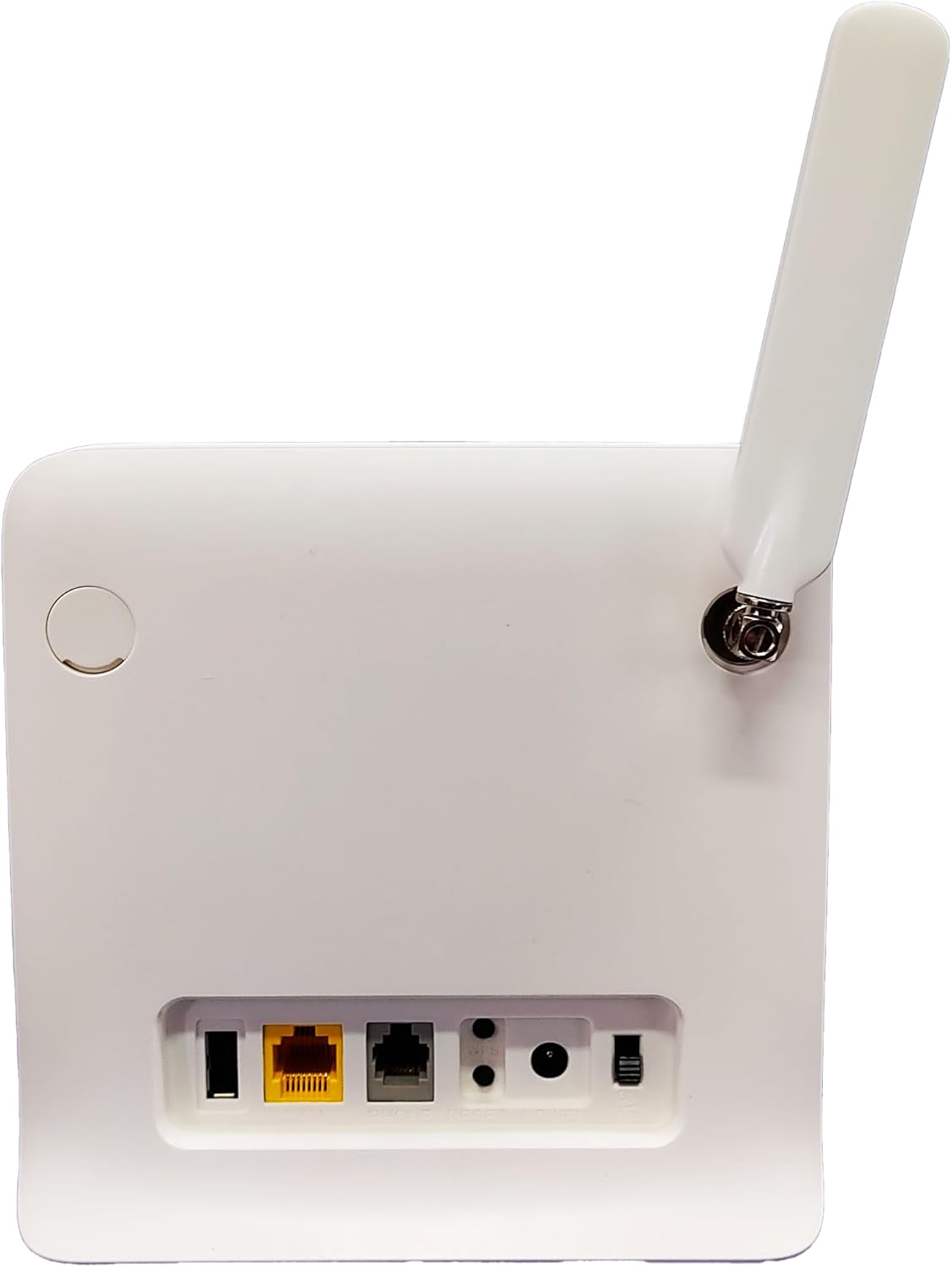
Figure 2: Rear panel of the router with power and network ports.
3.4.デバイスの接続
Wi-Fi または Ethernet ケーブル経由でデバイスを接続できます。
- Wi-Fi接続: Locate the Wi-Fi network name (SSID) and password printed on a label on the router (usually on the bottom). Connect your computer, smartphone, or tablet to this network.
- イーサネット接続: Use the provided RJ45 network cable to connect your computer or other network-enabled device to one of the LAN ports on the router.

図3: 前面 view of the router showing indicator lights and typical device connections.
4. 操作手順
4.1. アクセス Web インタフェース
- 開く web ルーターに接続されたデバイス上のブラウザ。
- Enter the default IP address (e.g., 192.168.1.1 or 192.168.0.1) into the address bar and press Enter. This address is usually found on the router's label.
- Enter the default username and password (also on the router's label) to log in.
4.2。 基本設定
- Wi-Fi 名とパスワードを変更します。 Navigate to the Wireless Settings section to customize your SSID and password for enhanced security.
- ネットワークモード: The router automatically detects the best network mode (4G/3G). You can manually select it if needed in the Network Settings.
- APN設定: In most cases, the APN settings are automatically configured by the SIM card. If you experience connectivity issues, you may need to manually enter the APN details provided by your mobile carrier.
4.3. 表示灯
Familiarize yourself with the router's LED indicators:
- 力: 緑色に点灯している場合は、デバイスの電源がオンになっていることを示します。
- Wi-Fi: Solid green indicates Wi-Fi is active. Blinking indicates data transfer.
- Signal (SIG): Indicates the strength of the 4G/3G signal. More bars/lights usually mean stronger signal.
- 3G/4G: Indicates the current network type.
- LAN: Solid green indicates a device is connected via Ethernet. Blinking indicates data transfer.
5. 仕様
| 特徴 | 説明 |
|---|---|
| モデル名 | MF253L |
| 接続技術 | LTE(4G) |
| 4G LTE Frequencies | 150/50 Mbps (850/2600 MHz) |
| 3G Frequencies | 850/1900/2100MHz |
| GSM周波数 | Quadriband (850/900/1800/1900 MHz) |
| 無線通信規格 | 802.11.be |
| データ転送速度 | 300メガビット/秒 |
| Max Upload Data Rate | 50メガビット/秒 |
| LANポート帯域幅 | 300 Mbps |
| ポート数 | 1(LAN) |
| アンテナ数 | 1 (外部) |
| 対応デバイス | Personal Computer, Notebook, Smartphone, Tablet |
| セキュリティプロトコル | WPA3 |
| 制御方法 | タッチ(経由 web インターフェース) |
| カバレッジ | Standard wireless for home or small office |
6。 トラブルシューティング
- インターネット接続なし:
- SIM カードが正しく挿入され、アクティブ化されているかどうかを確認します。
- Verify the 4G/3G signal strength indicator on the router. If the signal is weak, try repositioning the router or antenna.
- Ensure the APN settings in the router's web interface match your mobile carrier's requirements.
- 電源アダプターを抜き差ししてルーターを再起動します。
- Wi-Fi速度が遅い:
- デバイスがルーターの最適な範囲内にあることを確認してください。
- Reduce interference by keeping the router away from other electronic devices (microwaves, cordless phones).
- アクティブなデバイスや帯域幅を大量に消費するアクティビティの数を制限します。
- アクセスできません Web インタフェース:
- Confirm your device is connected to the router's Wi-Fi or via Ethernet.
- Double-check the IP address, username, and password.
- ブラウザのキャッシュをクリアするか、別のブラウザを使用してみてください。
7. メンテナンス
- 定期清掃: 適切な通気性を確保するため、ルーターを清潔に保ち、ほこりを取り除いてください。柔らかく乾いた布を使用してください。
- ファームウェアの更新: 定期的にメーカーの webファームウェアのアップデートについては、こちらのサイトをご覧ください。ファームウェアをアップデートすると、パフォーマンスの向上、新機能の追加、バグの修正などが可能になります。
- 最適な配置: Place the router in a central location, away from obstructions and potential sources of interference, to maximize Wi-Fi coverage.
8. 保証とサポート
この製品には、 3ヶ月保証 against manufacturing defects. For warranty claims or technical support, please contact your retailer or the manufacturer's customer service.
9. 製品ビデオ終了view
ビデオ: 将軍view of a 4G modem/router setup and features. While not specific to the MF253L model, it provides useful visual context for similar devices.