
1. はじめに
Thank you for choosing the Acouto Programmable LED Display. This flexible, IP65 water-resistant LED panel features 16x96 pixels, offering a versatile solution for displaying custom messages, patterns, and animations. Powered by a standard USB 5V connection, it is designed for ease of use and portability. This manual provides essential information for the proper setup, operation, and maintenance of your LED display.
2. 安全情報
- Ensure the power supply is 5V/2A. Using an incorrect power supply may damage the device.
- デバイスを極端な温度や直射日光に長時間さらさないでください。
- Avoid bending the panel excessively or sharply, as this may damage the internal circuitry.
- Keep the device away from open flames and heat sources.
- Although IP65 water-resistant, avoid submerging the device in water.
- 自分でデバイスを分解したり修理したりしないでください。 サポートが必要な場合は、カスタマー サポートにお問い合わせください。
3.製品オーバーview
主な特徴:
- カスタマイズ可能なディスプレイ: Personalize with text, patterns, animations, doodles, and musical rhythms. Adjust brightness and speed.
- High-Intensity Light Output: Equipped with 1536 RGB lamp beads for bright color effects with low energy consumption.
- IP65防水性能: Durable design suitable for various environments.
- ポータブルデザイン: Thin and lightweight with a USB interface for easy folding and bending.
- Eco-friendly Control: Powered by the ipixel color app, eliminating the need for batteries.
- 多用途: Ideal for festive gatherings, weddings, bars, trade shows, offices, and holiday decorations.
パッケージ内容:
- 1 x Acouto Programmable LED Display (16x96 Pixels)
- USBケーブル1本
- 1 x Remote Control (with 1 CR2025 200mAh battery included)
- Adhesive Strips for mounting
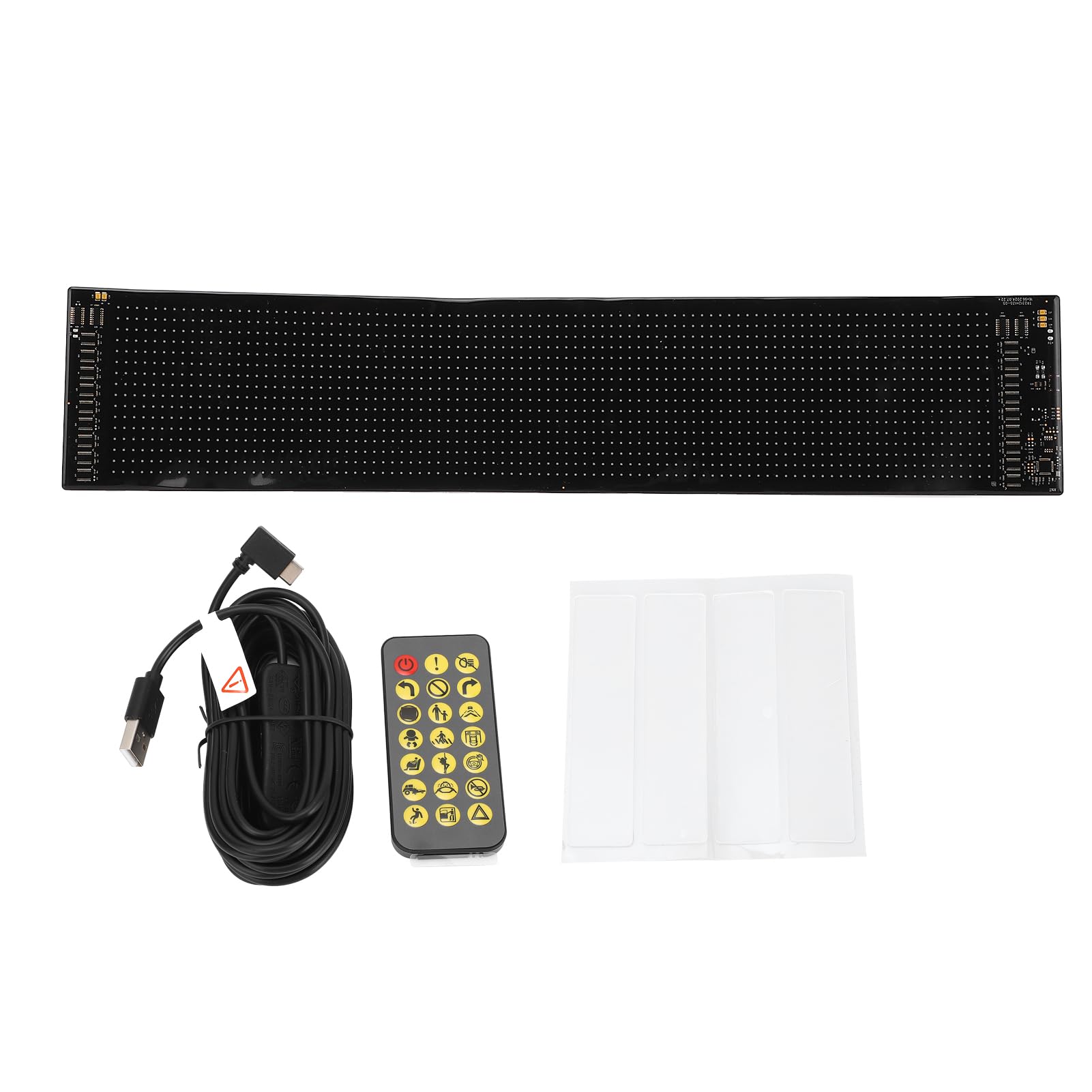
Image 3.1: The Acouto Programmable LED Display, showcasin柔軟なデザインが特徴です。

Image 3.2: Included USB cable and remote control for the LED display.
4. セットアップ
4.1電源接続
- Unroll the LED display carefully.
- Connect the provided USB cable to the display's USB port.
- Plug the other end of the USB cable into a 5V/2A USB power source (e.g., a wall adapter, power bank, or computer USB port). The display should power on.

画像4.1: クローズアップ view of the LED display's connection area, showing the USB port.
4.2 アプリのインストール
- ダウンロード "ipixel color" スマートフォンのアプリストア(iOS または Android)からアプリケーションをダウンロードします。
- デバイスにアプリケーションをインストールします。
- Open the app and follow the on-screen instructions to connect to your LED display via Bluetooth.
4.3 ディスプレイの取り付け
The display is lightweight and flexible, allowing for various mounting options:
- 粘着テープ: Use the provided adhesive strips to attach the display to smooth, clean surfaces like walls, windows, or other objects. Ensure the surface is dry and free of dust before application.
- Folding/Bending: The flexible design allows it to conform to curved surfaces or be folded for storage.

Image 4.2: Adhesive strips provided for easy mounting of the LED display.
5. 操作手順
5.1 Using the ipixel color App
The ipixel color app is the primary interface for customizing your LED display.
- 接続する: Ensure your display is powered on and Bluetooth is enabled on your smartphone. Open the ipixel color app and connect to your device.
- テキスト表示: Enter custom text messages. You can adjust font, size, color, scrolling direction, and speed.
- Patterns & Animations: Select from pre-loaded patterns or animations, or create your own.
- Doodles: Use the app's doodle feature to draw custom images or designs directly on the display.
- 音楽のリズム: Synchronize the display's patterns with music played through your phone.
- 明るさと速度: Adjust the overall brightness of the display and the scrolling speed of text/animations within the app settings.

Image 5.1: The LED display showcasing a custom text message, controlled via the app.

Image 5.2: The LED display presenting a dynamic pattern, customizable through the app.
5.2 リモコンの使用
付属のリモコンを使用すると、基本機能にすばやくアクセスできます。
- 電源ボタン: Turn the display On/Off.
- モード選択: Cycle through different display modes (e.g., text, patterns, animations).
- 明るさ調整: Increase or decrease display brightness.
- 速度調整: Control the scrolling speed of text or animations.
- 方向制御: Change the scrolling direction.
6. メンテナンス
- クリーニング: Gently wipe the display surface with a soft, dry cloth. Do not use abrasive cleaners or solvents.
- ストレージ: When not in use, store the display in a cool, dry place. Avoid sharp folds or heavy objects on top of it.
- 電池交換(リモコン): If the remote control stops responding, replace the CR2025 battery. Ensure correct polarity.
7。 トラブルシューティング
- ディスプレイの電源が入らない:
- Check if the USB cable is securely connected to both the display and the power source.
- Ensure the USB power source is providing 5V/2A. Try a different USB port or adapter.
- App Not Connecting to Display:
- ディスプレイの電源がオンになっていることを確認してください。
- スマートフォンでBluetoothが有効になっていることを確認します。
- Restart the ipixel color app and try connecting again.
- If issues persist, try restarting both your smartphone and the LED display.
- リモコンが動作しない:
- リモコンの電池(CR2025)を交換する必要があるかどうかを確認します。
- Ensure there are no obstructions between the remote and the display.
- Display Content Not Updating:
- Verify that the app is successfully connected to the display.
- Confirm that you have saved and sent the new content from the app to the display.
8. 仕様
| 特徴 | 仕様 |
|---|---|
| アイテムタイプ | Programmable LED Display |
| モデル番号 | Acoutomgf4in3x68 |
| 材料 | Silicone, PCB |
| 画面ピクセル | 16×96 |
| 展開時の寸法(長さ x 幅) | Approx. 59.4 cm x 4.7 cm (23.4 x 1.85 inches) |
| LEDの数 | 1536個 |
| 電源 | USB5V |
| 電源入力 | 5V、2A、10W |
| 耐水性評価 | IP65 |
| リモコン電池 | 1 x CR2025 200mAh (included) |
| 制御アプリケーション | ipixel color app |
| メーカー | アクト |
| 製品重量 | 418グラム |
| 原産国 | 中国 |
9. 保証とサポート
Acouto products are designed for reliability and performance. For warranty information or technical support, please refer to the documentation provided with your purchase or contact your retailer. If you encounter any issues not covered in this manual, please reach out to Acouto customer service for assistance.