
1. はじめに
ご購入ありがとうございますasing the Max Power MPD437 Ultra PRO M2 Portable Bluetooth Speaker. This speaker is designed to provide high-quality audio in various environments, featuring water resistance and dust-proof capabilities for outdoor use. Please read this manual carefully before using the product to ensure proper operation and to maximize its lifespan.
安全情報
- スピーカーを極端な温度や直射日光に長時間さらさないでください。
- スピーカーを落としたり、強い衝撃を与えたりしないでください。
- スピーカーを分解したり改造したりしないでください。保証が無効になります。
- スピーカーを医療機器から遠ざけてください。
- 付属の充電ケーブルのみを使用してください。
2. パッケージ内容
パッケージにすべてのアイテムが揃っていることを確認します。
- Max Power MPD437 Ultra PRO M2 ポータブル Bluetooth スピーカー
- 電源ケーブル
- AUXケーブル
- ユーザーマニュアル(このドキュメント)
3.製品オーバーview
Familiarize yourself with the components of your Max Power MPD437 Ultra PRO M2 speaker.
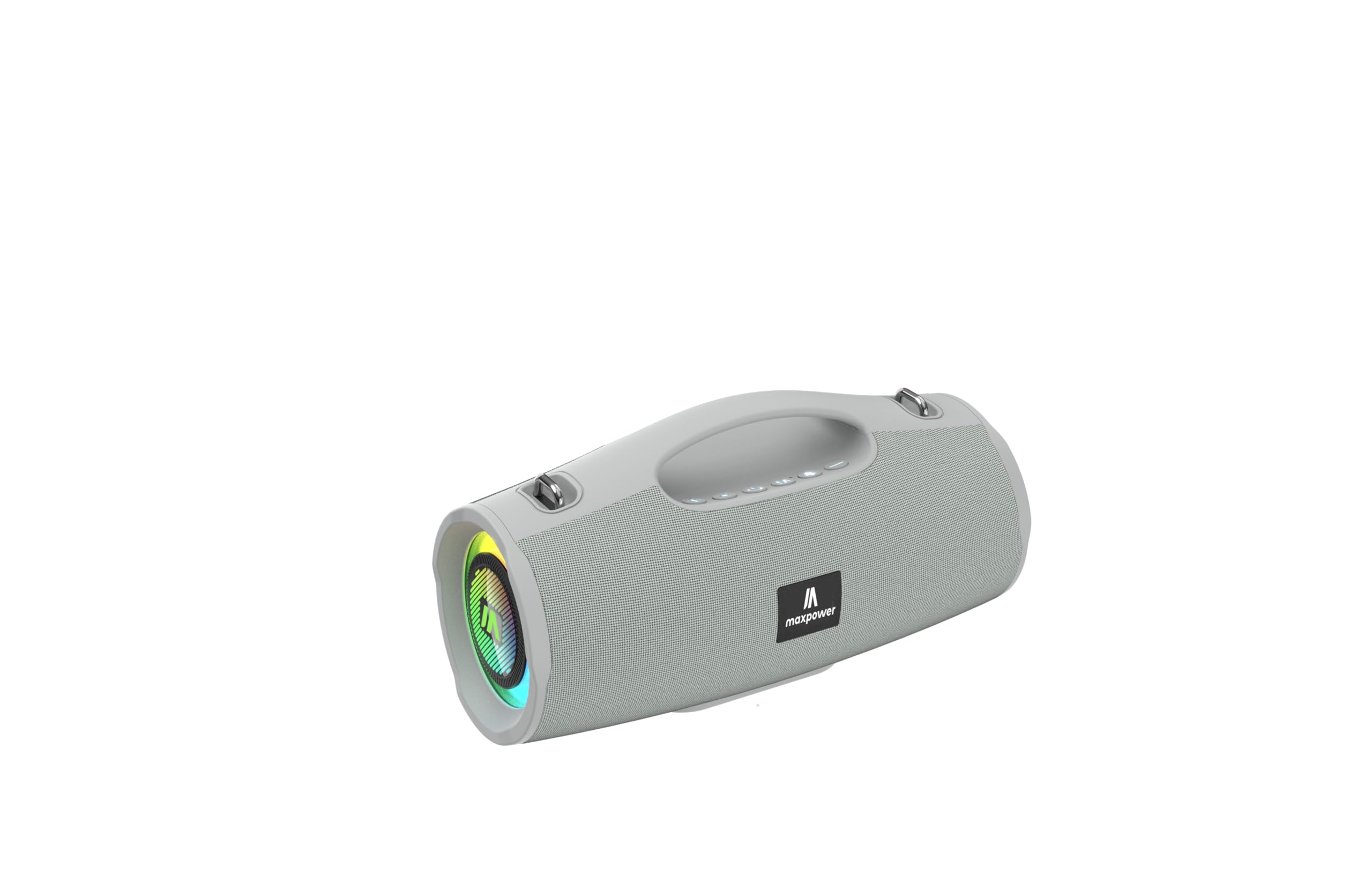
This image displays the Max Power MPD437 Ultra PRO M2 speaker. It features a robust grey casing, an integrated carrying handle at the top, and a series of control buttons. One end of the speaker is equipped with an LED light ring, indicating its operational status and adding visual effects.
主要コンポーネント:
- 一体型キャリングハンドル: 持ち運びに便利です。
- コントロールボタン: For power, volume, playback, and mode selection.
- スピーカーグリル: Protects the speaker drivers.
- LEDライトリング: Provides visual effects and indicates status.
- 充電ポート: 電源ケーブルを接続します。
- AUX入力: 有線オーディオ接続用。
4. セットアップ
4.1 スピーカーの充電
- Connect the provided Power Cable to the charging port on the speaker.
- Plug the other end of the Power Cable into a suitable power source.
- LEDインジケーターが充電状態を示します。フル充電には約3時間かかります。
- 完全に充電されたら充電ケーブルを外します。
4.2Bluetoothペアリング
- Press and hold the Power button to turn on the speaker. The speaker will enter Bluetooth pairing mode, indicated by a flashing LED light.
- デバイス(スマートフォン、タブレット、ラップトップ)で Bluetooth を有効にし、利用可能なデバイスを検索します。
- Select "MPD437 Ultra PRO M2" from the list of devices.
- ペアリングされると、スピーカーから確認音が鳴り、LED ライトの点滅が停止します。
- スピーカーは、電源を入れると、最後にペアリングしたデバイスに自動的に再接続しようとします。
4.3AUX接続
- Connect one end of the provided AUX Cable to the AUX input port on the speaker.
- Connect the other end of the AUX Cable to the audio output jack of your device.
- スピーカーは自動的にAUXモードに切り替わります。
5. 操作手順
5.1 電源オン/オフ
- 電源オン: 電源ボタンを2〜3秒間押し続けます。
- 電源を切る: 電源ボタンを2〜3秒間押し続けます。
5.2 ボリュームコントロール
- 音量を上げる: 「+」ボタンを押します。
- 音量を下げる: 「-」ボタンを押します。
5.3 Playback Control (Bluetooth/AUX Mode)
- 再生/一時停止: 再生/一時停止ボタンを押します。
- 次のトラック: 「+」ボタンを長押しします。
- 前のトラック: 「-」ボタンを長押しします。
5.4 モード選択
Press the 'M' (Mode) button to switch between Bluetooth, AUX, and FM Radio modes.
5.5 FMラジオの操作
- 「M」ボタンを使用して FM ラジオ モードに切り替えます。
- 再生/一時停止ボタンを押すと、利用可能な FM 局が自動的にスキャンされて保存されます。
- 保存したステーション間を移動するには、「+」ボタンと「-」ボタンを使用します。
5.6つのLEDライトモード
The speaker features vibrant LED lights. Press the dedicated LED button (if available, or a long press on a specific button) to cycle through different light modes or turn them off.
6. メンテナンス
6.1 クリーニング
- ソフトでスピーカーを拭きます、damp 布。
- 研磨剤入りの洗剤、アルコール、化学溶剤は使用しないでください。
- 充電やケーブルの接続を行う前に、すべてのポートが乾いていることを確認してください。
6.2 ストレージ
- スピーカーは直射日光を避け、涼しく乾燥した場所に保管してください。
- 長期間保管する場合は、バッテリーの状態を維持するために、数か月ごとにバッテリーを約 50% まで充電してください。
7。 トラブルシューティング
| 問題 | 考えられる原因 | 解決 |
|---|---|---|
| スピーカーの電源が入りません。 | 電池が消耗しています。 | 付属の電源ケーブルを使用してスピーカーを充電します。 |
| スピーカーから音が出ない。 | 音量が低すぎるかミュートされています。デバイスが正しくペアリングされていません。AUXケーブルが完全に挿入されていません。 | Increase volume on both speaker and connected device. Re-pair Bluetooth. Ensure AUX cable is securely connected. |
| Bluetooth経由でペアリングできません。 | スピーカーがペアリングモードになっていません。デバイスのBluetoothがオフになっています。スピーカーがデバイスから離れすぎています。 | Ensure speaker is in pairing mode (flashing LED). Turn on Bluetooth on your device. Move speaker closer to your device (within 35 feet). |
| FMラジオの受信状態が悪い。 | 現在の場所では信号が弱いです。 | 信号受信状態が良好な場所にスピーカーを移動します。 |
8. 仕様
| モデル名 | ウルトラプロM2 |
| 商品型番 | MPD437 |
| ブランド | 最大パワー |
| スピーカータイプ | ポータブルスピーカー |
| 接続技術 | Bluetooth、補助 |
| 無線通信技術 | ブルートゥース |
| Bluetooth範囲 | 35フィート |
| 特集 | Dustproof, FM Radio, LED Light, Water Resistant |
| 耐水性レベル | 耐水性 |
| 電源 | 電池駆動 |
| バッテリー容量 | 3000ミリamp 営業時間 |
| 充電時間 | 3時間 |
| オーディオ出力モード | ステレオ |
| 信号対ノイズ比 | 85デシベル |
| 制御方法 | 触る |
| 製品寸法 | 奥行き4.5インチ x 幅5インチ x 高さ9.9インチ |
| アイテム重量 | 2.65 ポンド |
| 含まれるコンポーネント | AUX Cable, Power Cable |
| 欧州連合 | 785571466584 |
| GTIN | 785571466584 |
9. 保証とサポート
9.1 限定保証
The Max Power MPD437 Ultra PRO M2 Portable Bluetooth Speaker comes with a limited warranty. Please refer to the warranty card included in your package or contact Max Power customer support for detailed warranty terms and conditions.
9.2 カスタマーサポート
For technical assistance, troubleshooting, or warranty inquiries, please contact Max Power customer support. Contact information can typically be found on the product packaging or the official Max Power webサイト。