
1. はじめに
Thank you for choosing the Sharkoon AK6 RGB ATX PC Case. This manual provides essential information for the proper installation, operation, and maintenance of your new PC case. Please read this guide thoroughly before beginning the assembly process to ensure optimal performance and longevity of your components.
2. 安全情報
- PC ケース内のコンポーネントを取り付けたり取り外したりする前に、必ず壁のコンセントから電源を外してください。
- 強化ガラスパネルは慎重に取り扱ってください。壊れやすく、落としたり衝撃を与えたりすると割れることがあります。
- ケースを極端な温度、湿度、直射日光にさらさないでください。
- 小さな部品やネジは子供の手の届かないところに保管してください。
- Ensure proper grounding to prevent electrostatic discharge (ESD) damage to sensitive electronic components.
3. パッケージ内容
パッケージにすべてのアイテムが含まれていることを確認してください。
- Sharkoon AK6 RGB ATX PCケース
- 付属品ボックス(ネジ、ケーブルタイ、その他の小さな部品が含まれています)
- ユーザーマニュアル(このドキュメント)
4.製品オーバーview
The Sharkoon AK6 RGB ATX PC Case is designed with a modern glass aesthetic, featuring seamless integration of tempered glass on the front and side panels. It includes four pre-installed 120mm addressable RGB PWM fans for optimal airflow and visual appeal. The case supports a wide range of components, including BTF motherboards, and offers ample space for high-performance hardware.

Figure 4.1: Front interior view of the Sharkoon AK6 RGB PC case, showcasing the pre-installed addressable RGB fans and the spacious main chamber.

図4.2: 角度付き view of the Sharkoon AK6 RGB PC case, highlighting the tempered glass side panel and the top mesh for ventilation.

図4.3:背面 view of the Sharkoon AK6 RGB PC case, showing the I/O shield cutout, rear exhaust fan mount, and expansion slots.
フロントI/Oパネル
The front I/O panel is located on the side of the case and includes:
- 電源ボタン
- リセットボタン
- 2 x USB Ports (Type-A)
- USB タイプ C ポート x 1
- Audio Jacks (TRRS)
5. セットアップとインストール
Follow these steps to install your components into the Sharkoon AK6 RGB PC Case.
5.1 ケースの準備
- ケースを平らで安定した面に置きます。
- Carefully remove the tempered glass side panel by unscrewing the thumb screws at the rear and gently pulling the panel away.
- Remove the rear metal side panel by unscrewing the thumb screws.
5.2マザーボードの取り付け
The AK6 RGB supports Mini-ITX, Micro-ATX, ATX, and BTF motherboards.
- Install the I/O shield into the cutout at the rear of the case (if not pre-installed on your motherboard).
- マザーボードをケース内のスタンドオフに合わせます。すべてのスタンドオフがマザーボードの取り付け穴に合っていることを確認してください。
- アクセサリ ボックスの適切なネジを使用してマザーボードを固定します。
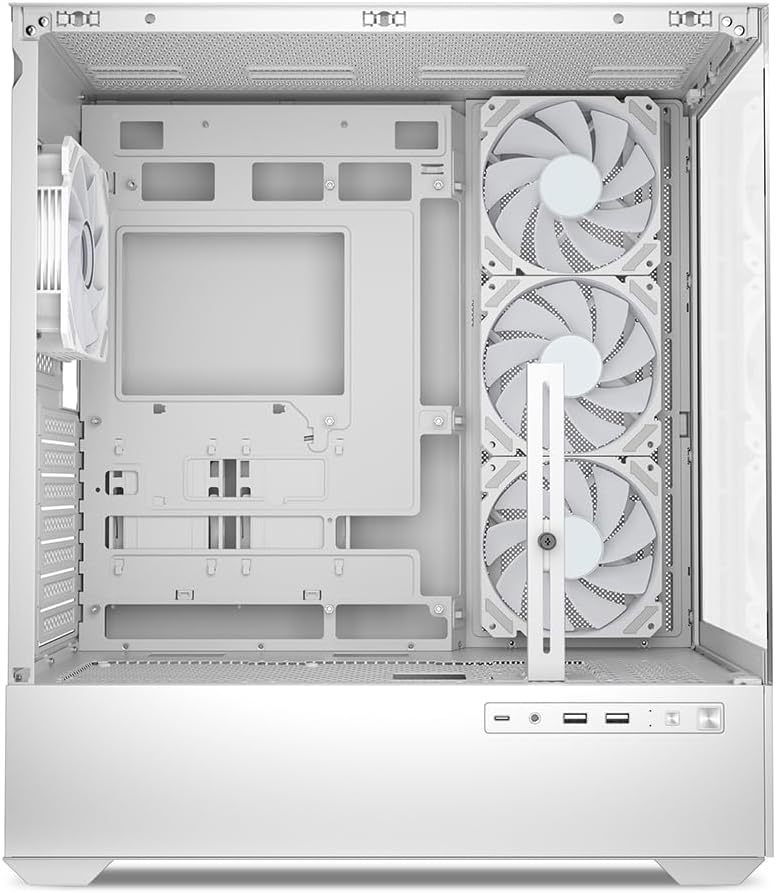
図5.1: 内部 view of the Sharkoon AK6 RGB PC case, illustrating the motherboard tray, cable management cutouts, and front fan mounting points.
5.3 電源の設置
The case features a bottom-mount power supply design.
- 電源ユニット (PSU) をケース下部背面の専用コンパートメントにスライドさせます。
- Align the PSU with the screw holes at the rear of the case.
- 付属のネジでPSUを固定します。
5.4 ストレージデバイスのインストール
The AK6 RGB supports up to two 3.5" HDDs or four 2.5" SSDs.
- For 3.5" HDDs: Locate the drive cages beneath the PSU shroud. Slide the HDD into a drive tray and secure it with screws.
- For 2.5" SSDs: SSDs can be mounted on the dedicated brackets behind the motherboard tray or on the 3.5" drive trays using adapter screws.
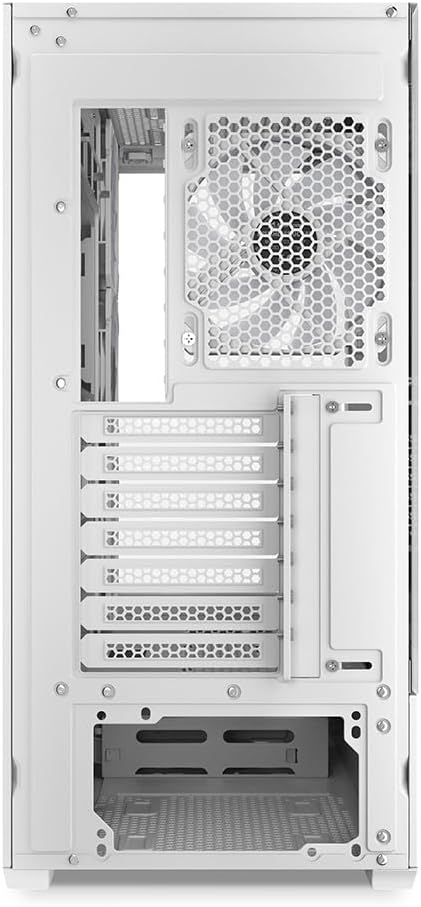
図5.2: 後部内装 view of the Sharkoon AK6 RGB PC case, detailing the drive cages for 3.5-inch HDDs and 2.5-inch SSDs, and the power supply shroud area.
5.5 グラフィックカードと拡張カードのインストール
- ケース背面にある必要な拡張スロットカバーを取り外します。
- グラフィック カードまたはその他の拡張カードをマザーボード上の適切な PCIe スロットに挿入します。
- Secure the cards with screws. The case includes a rubberized graphics card support for larger cards.
5.6 CPU Cooler and Radiator Installation
The case supports CPU coolers up to 17 cm in height and allows for extensive liquid cooling setups.
- CPU クーラーは製造元の指示に従って取り付けてください。
- For liquid cooling, the case can accommodate a 360mm radiator at the top and an additional 280mm radiator.
5.7 ケーブル管理
マザーボードトレイ背面のケーブルマネジメント用カットアウトと結束ポイントを活用して、ケーブルを配線・固定します。これにより、エアフローと美観が向上します。
6. 操作手順
6.1電源オン
After all components are installed and cables are connected, replace the side panels. Connect the power cable to your PSU and a wall outlet, then press the power button on the front I/O panel to start your system.
6.2 RGBファンコントロール
The AK6 RGB comes with four pre-installed addressable RGB PWM fans. These fans are connected to an RGB controller which also provides connections for up to four LED elements and four PWM fans. The RGB lighting can typically be controlled via your motherboard's RGB software (if compatible) or through a dedicated button on the case (if present and connected).
6.3 気流の最適化
The case is designed for ideal airflow, with three inverted fans drawing air from the side into the case. The top and rear fan mounts allow for additional exhaust fans. Ensure proper fan orientation for optimal cooling performance.

図6.1:例ample of a fully assembled system within the Sharkoon AK6 RGB PC case, featuring various components and active RGB lighting.
7. メンテナンス
定期的なメンテナンスは、PC コンポーネントの寿命とパフォーマンスの維持に役立ちます。
- ダストフィルター: Periodically clean the removable dust filters (e.g., on the top and bottom) to maintain optimal airflow and prevent dust buildup inside the case. Use compressed air or a soft brush.
- ガラスパネル: Clean tempered glass panels with a soft, lint-free cloth and a glass cleaner. Avoid abrasive materials that could scratch the surface.
- インテリアクリーニング: 圧縮空気を使用して、内部コンポーネントとファンの埃を除去します。清掃する前に、システムの電源をオフにし、プラグを抜いてください。
8。 トラブルシューティング
If you encounter issues with your PC case, refer to the following common troubleshooting steps:
- 電源なし: Ensure the power supply is properly connected to the wall outlet and the motherboard. Check all internal power cables (24-pin ATX, 8-pin CPU, PCIe power).
- ファンが回転しない/RGBが機能しない: Verify that all fan and RGB cables are correctly connected to the motherboard or the included RGB controller. Check your motherboard's BIOS/UEFI settings or RGB software for fan speed and lighting control.
- フロントI/Oポートが機能しない: Confirm that the front panel connectors (USB, audio, power/reset switches) are correctly plugged into the corresponding headers on your motherboard.
- 過熱: Ensure all fans are spinning correctly and oriented for proper airflow. Clean dust filters and internal components. Verify CPU cooler installation.
For further assistance, please contact Sharkoon support.
9. 仕様
| 特徴 | 仕様 |
|---|---|
| ブランド | シャークーン |
| モデル名 | AK6RGB |
| モデル番号 | C-AK6W |
| ケースタイプ | ATXタワー |
| 色 | 白 |
| 材料 | 強化ガラス |
| マザーボードの互換性 | Mini ITX, Micro ATX, ATX, BTF |
| 電源取付タイプ | ボトムマウント |
| 冷却方法 | 空気 |
| プレインストールされたファン | 4 x 120mm Addressable RGB PWM Fans |
| CPUクーラーの最大高さ | 17センチ |
| グラフィックカードの最大長 | 41 cm (with rubberized support) |
| PSU の最大長 | 23.5センチ |
| ラジエーターサポート | Top: up to 360mm, Additional: up to 280mm |
| ドライブベイ | 2 x 3.5インチ HDD または 4 x 2.5インチ SSD |
| フロントI / Oポート | 2 x USB Type-A, 1 x USB Type-C, Audio (TRRS) |
| アイテム重量 | 6.1キログラム |
| 特集 | RGB Lighting, Unique Glass Appearance, BTF Motherboard Support |
10. 保証
Sharkoon製品は高い品質基準に基づいて製造されています。保証に関する詳細は、製品に付属の保証書またはSharkoonの公式ウェブサイトをご覧ください。 webサイト。保証は通常、通常の使用における材料および製造上の欠陥を対象とします。
11. サポート
If you require technical assistance or have questions regarding your Sharkoon AK6 RGB ATX PC Case, please visit the official Sharkoon website for support resources, FAQs, and contact information. You may also find updated drivers or software for the RGB controller there.
Webサイト: www.sharkoon.com