
キスント KN300BT
Kisnt KN300BT Bluetooth テンキー ユーザーマニュアル
Model: KN300BT
1. はじめに
The Kisnt KN300BT is a wireless numeric keypad designed to enhance your productivity by providing quick access to numeric input. It features dual Bluetooth connectivity, allowing seamless switching between two paired devices. This manual provides instructions for setting up, operating, and maintaining your number pad.

画像1.1: 以上view of the Kisnt KN300BT Bluetooth Number Pad highlighting its key features.
2. 箱の中身
パッケージの内容をチェックして、すべてのアイテムが揃っていることを確認してください。
- 1 x 34 Keys Bluetooth Number Pad
- ユーザーマニュアル x 1
- 1 x USB-C - USB-A 充電ケーブル
3. セットアップ: Bluetoothペアリング
The Kisnt KN300BT supports dual Bluetooth connectivity, allowing you to pair with two devices simultaneously and switch between them.
3.1 初期ペアリング
- 電源オン: Locate the operating system switch on the top edge of the number keypad. Slide it to either the 'WIN' or 'MAC' position, corresponding to your computer's operating system.
- Bluetooth チャネルを選択: Set the power switch to 'BT1' or 'BT2' to select your desired Bluetooth channel.
- ペアリングモードに入る: Press and hold the 'connect' key for 5 seconds. The NumLock light will quickly flash blue, indicating the keypad is in pairing mode.
- デバイスに接続: On your computer or device, open Bluetooth settings and search for 'Numeric Keypad'. Select it to complete the pairing process.

画像3.1: 詳細 view of the keypad's side, showing the power switch, charging port, and operating system switch.
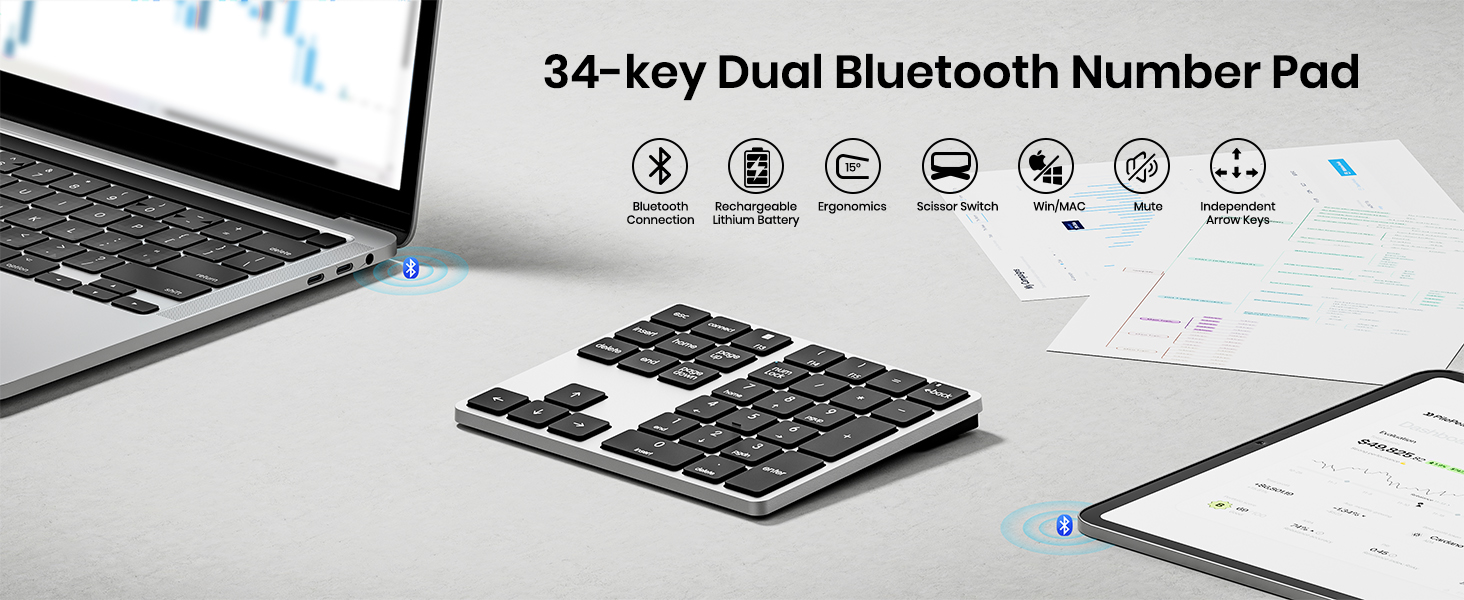
Image 3.2: Visual guide for the Bluetooth pairing process.
3.2 ペアリングされたデバイス間の切り替え
To switch between two paired devices, simply press the 'BT1' or 'BT2' button on the keypad to select the corresponding channel.
4. 操作手順
The KN300BT features a 34-key extended layout, including number keys, function keys, and navigation keys.
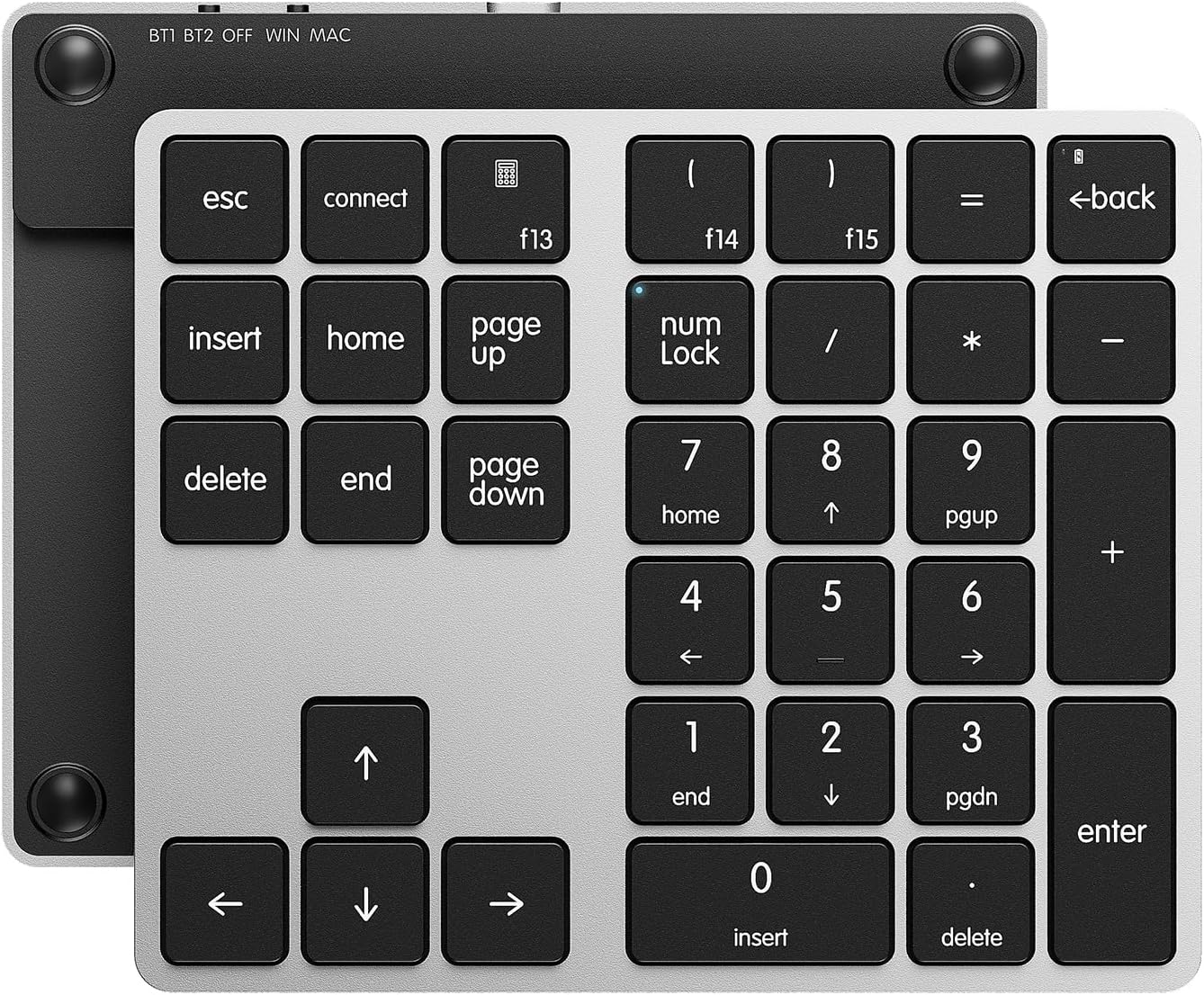
Image 4.1: The 34-key layout of the Kisnt KN300BT Number Pad.
4.1主な機能
- 数字キー (0-9): 標準の数値入力。
- 算術演算子 (+、-、、/): 計算用です。
- キーを入力してください: 入力を確定します。
- Esc キー: エスケープ機能。
- Back Space Key: 文字を削除します。
- 挿入キー: 挿入モードを切り替えます。
- キーの削除: Deletes selected items or characters.
- Home/End Keys: Navigates to the beginning/end of a line or document.
- Page Up/Page Down Keys: ページをスクロールします。
- 矢印キー(上、下、左、右): ナビゲーション用。
- ナンロック: Toggles the numeric keypad function.
4.2 Mac and Windows Compatibility
The keypad includes an operating system switch to optimize key functions for either Mac or Windows environments.
- Macユーザー: The F13-F15 keys are customizable as preferred shortcuts via system settings in macOS.
- Windows ユーザー: The Calculator, left parenthesis, and right parenthesis functions are applicable only in Windows systems.
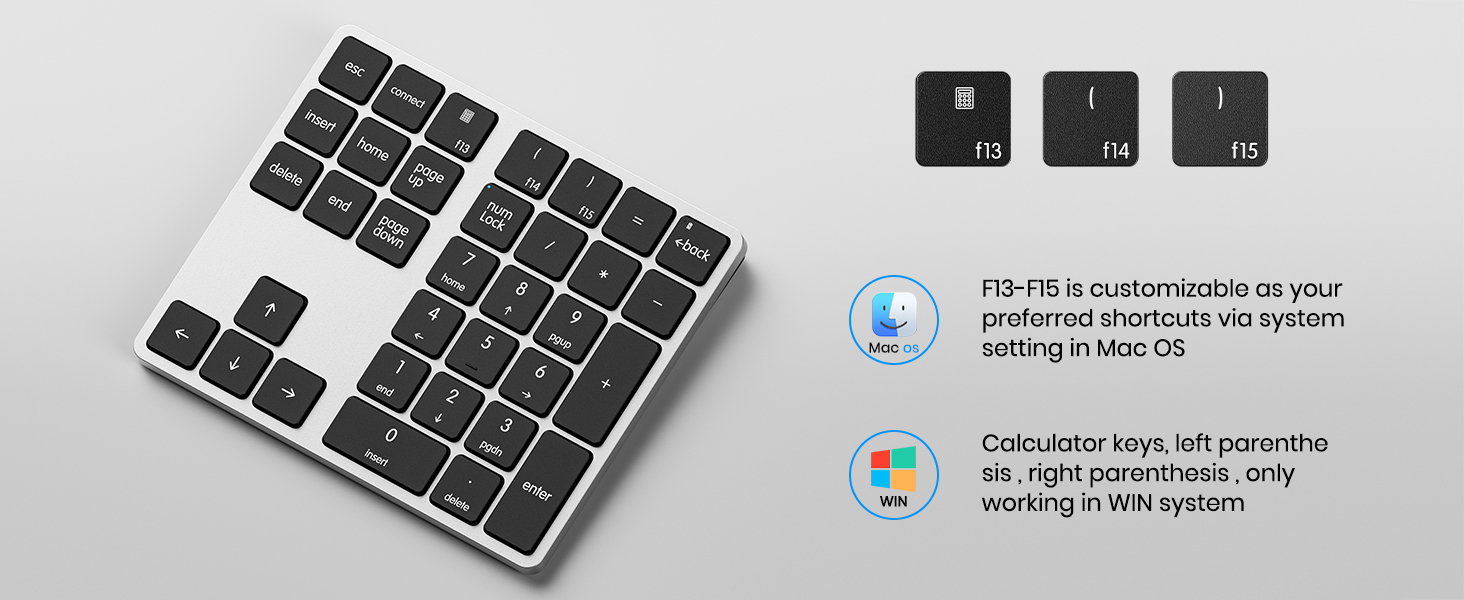
Image 4.2: Mac and Windows specific key functions.
5. 充電とバッテリー
The Kisnt KN300BT is equipped with a built-in 300mAh lithium rechargeable battery.
5.1 キーパッドの充電
- Connect the provided USB-C to USB-A charging cable to the charging interface on the keypad and a USB power source.
- 充電中は充電インジケータライトが点灯します。
- 注記: The USB-C cable is for charging only and cannot be used to operate the device.
5.2 自動スリープ機能
To conserve battery life, the keypad features an auto-sleep function. It will automatically enter sleep mode when no operation is performed for a period of time. To wake up the keypad, simply press any key.

Image 5.1: Battery features including fast charging and auto-sleep.
6. 仕様
| 特徴 | 仕様 |
|---|---|
| モデル番号 | KN300BT |
| 接続技術 | ブルートゥース |
| キーの数 | 34 |
| バッテリー | 300mAh リチウムイオン(充電式) |
| 製品寸法 | 長さ5.5インチ x 幅4.6インチ x 高さ0.6インチ (14 x 11.7 x 1.5 cm) |
| アイテム重量 | 5.6オンス(158.7グラム) |
| 材料 | プラスチック |
| キーボードの説明 | X Scissor Number Pad |
| 対応デバイス | ノートパソコン、Mac、PC、スマートフォン、タブレット |
7。 トラブルシューティング
7.1 接続の問題
- キーパッドが接続されません: Ensure the keypad is charged and powered on. Verify the operating system switch is set correctly (WIN/MAC). Make sure the correct Bluetooth channel (BT1/BT2) is selected. Re-enter pairing mode by holding the 'connect' key for 5 seconds and try pairing again from your device's Bluetooth settings.
- 接続が頻繁に切断される: Ensure the keypad is within the effective Bluetooth range (approximately 33 feet or 10 meters) of your device. Minimize potential interference from other wireless devices. Try re-pairing the keypad.
7.2 キーが反応しない
- 特定のキーが機能しない: Check if the Num Lock indicator is on or off, depending on your intended use of the numeric keys. Ensure the keypad is properly connected via Bluetooth.
- All keys unresponsive: Recharge the keypad. If the issue persists, try resetting the Bluetooth connection on both the keypad and your device.
8. 保証とサポート
8.1 保証情報
Kisnt offers a 2-year after-sales service for quality issues. If you encounter any quality-related problems within this period, please contact us for a replacement.
8.2 カスタマーサポート
For any issues or inquiries regarding your Kisnt product, please contact us:
- メールアドレス: kisnt_vip@163.com
- 正式 Webサイト: http://www.kisnt.cn/

Image 8.1: Kisnt customer support contact details.