
1. はじめに
This manual provides detailed instructions for setting up, operating, and maintaining your Mercusys MR27BE BE3600 Dual-Band Wi-Fi 7 Router. The MR27BE is designed to deliver high-speed wireless connectivity with Wi-Fi 7 technology, featuring dual-band operation and multiple high-speed Ethernet ports for a robust home or small office network.
2. パッケージ内容
パッケージに次のアイテムが含まれていることを確認してください。
- Mercusys MR27BE Wi-Fi 7 Router
- 電源アダプター
- イーサネットケーブル
- クイックインストールガイド

This image displays the retail packaging for the Mercusys MR27BE BE3600 Dual Band Wi-Fi 7 Router, highlighting key features and branding.
3. フィジカルオーバーview
3.1 背面パネル
The rear panel of the MR27BE router features various ports and buttons for connectivity and control.
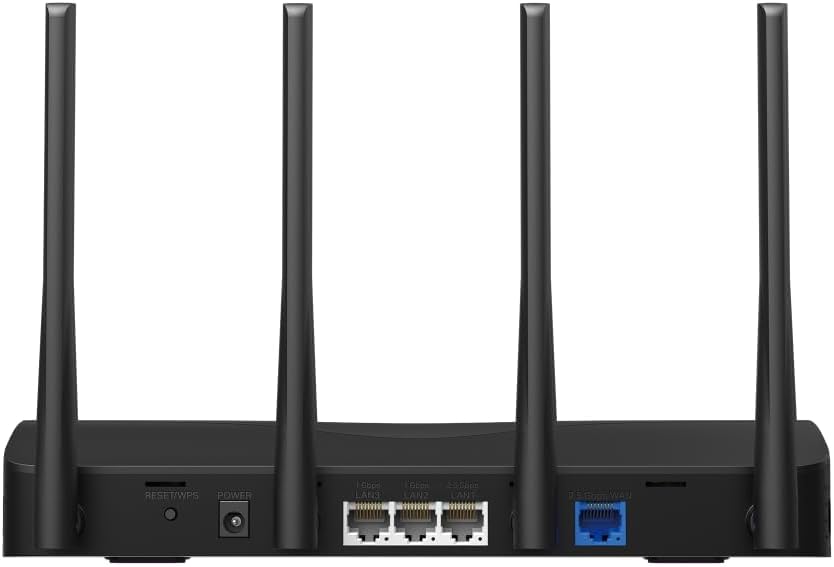
This image displays the rear panel of the MR27BE router, highlighting the 2.5 Gbps WAN port (blue), 2.5 Gbps LAN port, two 1 Gbps LAN ports, the Reset/WPS button, and the power input.
- 電源ポート: 付属の電源アダプターをここに接続します。
- リセット/WPSボタン: Press and hold for 1 second to activate WPS. Press and hold for more than 5 seconds to factory reset the router.
- LAN ポート (1 Gbps): Two Gigabit Ethernet ports for connecting wired devices.
- LAN Port (2.5 Gbps): One 2.5 Gigabit Ethernet port for high-speed wired connections.
- WAN ポート (2.5 Gbps): One 2.5 Gigabit Ethernet port for connecting to your modem or internet service provider's (ISP) network.
3.2 主な特徴
The MR27BE router incorporates advanced features for enhanced network performance.

This graphic illustrates key features of the MR27BE, including its Wi-Fi 7 capabilities, the presence of 2x 2.5 Gbps ports and 2x Gigabit ports, four omni-directional high-gain antennas, EasyMesh compatibility, and easy app control.

This image demonstrates the speed performance of the MR27BE router, indicating up to 2880 Mbps on the 5 GHz band and 688 Mbps on the 2.4 GHz band, showcasing its Wi-Fi 7 capabilities.
4. セットアップ
4.1ハードウェア接続
- 電源を切る: モデムの電源を外します(該当する場合)。
- WANポートに接続: Connect one end of the Ethernet cable to your modem's Ethernet port and the other end to the blue 2.5 Gbps WAN port on your MR27BE router.
- 接続電源: Connect the power adapter to the router's Power port and plug it into an electrical outlet.
- 電源オン: Wait for the router to power on completely. The LED indicator should turn solid green.
- デバイスを接続する(オプション): For wired devices, connect an Ethernet cable from your computer or other device to one of the yellow LAN ports on the router.

This image shows the 2.5 Gbps ports of the MR27BE router in use, illustrating connections for 2.5 Gbps wired devices and multi-gig internet access, emphasizing high-performance networking.
4.2初期構成
You can configure your router using the MERCUSYS app or a web ブラウザ。
MERCUSYS アプリの使用:
- MERCUSYS アプリを App Store または Google Play からダウンロードしてください。
- Connect your smartphone to the router's default Wi-Fi network (SSID and password are on the label at the bottom of the router).
- MERCUSYS アプリを開き、画面の指示に従ってセットアップを完了します。
使用して Web ブラウザ:
- Connect your computer to the router via an Ethernet cable or the default Wi-Fi network.
- 開く web ブラウザとタイプ
mwlogin.netor192.168.1.1アドレスバーに入力します。 - プロンプトが表示されたらログイン パスワードを作成します。
- Follow the Quick Setup wizard to configure your internet connection and Wi-Fi settings.
5. ルーターの操作
5.1 デバイスの接続
- ワイヤレスデバイス: 検索する your Wi-Fi network name (SSID) on your device and enter the Wi-Fi password you set during setup.
- 有線デバイス: Connect an Ethernet cable from your device to any available LAN port on the router.
5.2 EasyMeshの互換性
The MR27BE router supports EasyMesh, allowing you to create a seamless whole-home Wi-Fi network by adding compatible EasyMesh range extenders or other routers.

This diagram visually explains how the EasyMesh system, compatible with the MR27BE router, can expand Wi-Fi coverage throughout an entire home, ensuring seamless connections.
To set up an EasyMesh network, refer to the instructions provided with your EasyMesh compatible devices or the MERCUSYS app.
5.3 詳細設定( Web インターフェース)
アクセス web インターフェース(mwlogin.net) を使用して、次のような詳細設定を構成します。
- ゲストネットワーク: ゲスト用に個別の Wi-Fi ネットワークを作成します。
- ペアレンタルコントロール: 特定のデバイスのインターネット アクセスを管理します。
- ネットワークセキュリティ: Configure firewall rules and access control.
- 動作モード: Switch between Router, Access Point, or Range Extender modes.
6. メンテナンス
6.1 ファームウェアアップデート
Regularly updating the router's firmware ensures optimal performance and security. You can check for updates via the MERCUSYS app or the web interface under System Tools > Firmware Upgrade.
6.2 ルーターの再起動
If you experience network issues, a simple restart can often resolve them. You can restart the router via the MERCUSYS app, the web interface, or by unplugging and replugging the power adapter.
6.3 工場出荷時設定へのリセット
A factory reset will restore the router to its default settings. This can be done by pressing and holding the Reset/WPS button on the rear panel for more than 5 seconds until the LED blinks rapidly, or via the web interface under System Tools > Factory Defaults.
7。 トラブルシューティング
7.1 インターネットアクセスなし
- Check all cable connections, especially the WAN port connection to your modem.
- モデムが正しく動作していることを確認してください。
- モデムとルーターの両方を再起動します。
- ルーターのインターネット設定を確認してください web インタフェース。
7.2 Wi-Fi信号の問題
- ルータが障害物や干渉源(電子レンジ、コードレス電話など)から離れた中央の場所に設置されていることを確認します。
- 最適なカバレッジを得るためにルーターのアンテナを調整します。
- Consider using EasyMesh compatible devices to extend coverage in larger homes.
7.3 Wi-Fiパスワードまたはログインパスワードを忘れた場合
- デフォルトの Wi-Fi パスワードはルーターの下部にあるラベルに記載されています。
- If you changed it and forgot, you will need to perform a factory reset to restore default settings, then reconfigure the router.
8. 仕様
| モデル名 | MR27BE |
| ワイヤレス標準 | 802.11be(Wi-Fi 7) |
| 周波数帯域クラス | デュアルバンド |
| WANポート | 1x 2.5 Gbps WAN Port |
| LANポート | 1x 2.5 Gbps LAN Port, 2x 1 Gbps LAN Ports |
| 特集 | EasyMesh対応 |
| 製品寸法 | 7.87 x 5.91 x 3.94インチ |
| アイテム重量 | 2.23ポンド |
| 含まれるコンポーネント | MR27BE, Power Adapter, instruction manual |
9. サポート
For technical support, warranty information, or further assistance, please visit the official Mercusys website or contact Mercusys customer support.
- マーキュシス公式 Webサイト: www.mercusys.com
- Refer to the Quick Installation Guide for initial setup and contact details.