
1.製品オーバーview
The YNF OBD2 Scanner Reader is a Bluetooth wireless auto diagnostic scan tool designed for use with iOS and Android devices. It provides comprehensive vehicle diagnostic capabilities, allowing users to monitor vehicle performance, read and clear error codes, and access live data.
主な機能は次のとおりです。
- Comprehensive Performance Testing: Supports fast reading of Diagnostic Trouble Codes (DTCs), electronic emission readiness, turning off Check Engine Light (CEL) or Malfunction Indicator Lamp (MIL), resetting monitors, reading live data, retrieving Vehicle Identification Number (VIN), battery health checks, freeze frame data, sensor data, data streaming, diagnostic reports, and onboard monitoring.
- Intuitive Data Visualization: Displays detected data in clear, easy-to-read charts for engine coolant temperature, engine speed, vehicle speed, and control module voltage.
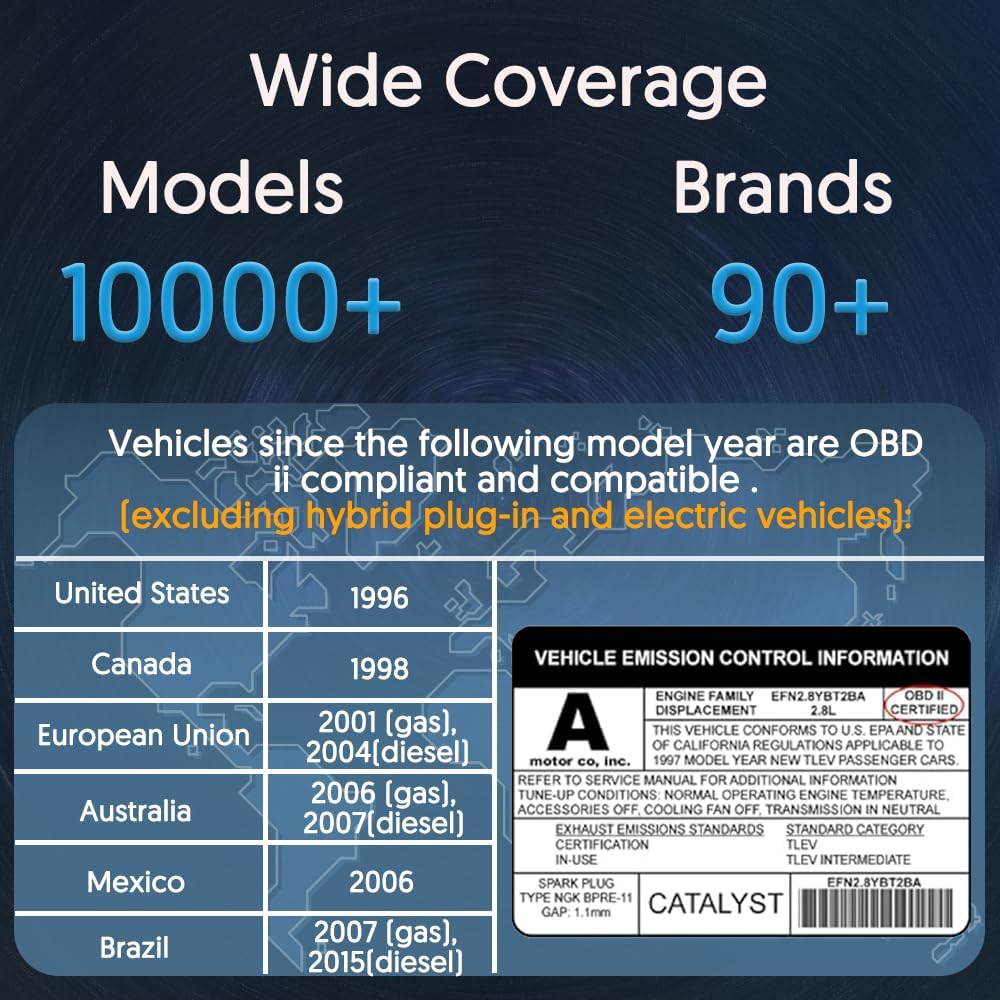
- 幅広い互換性: Supports over 96% of car makes and models from 1996 to the present, including Toyota, Honda, Chevrolet, Ford, Mercedes-Benz, Jeep, BMW, Porsche, Subaru, Nissan, Cadillac, Volkswagen, and Lexus. Supports multiple languages.
- 高度な Bluetooth 接続: Features an upgraded Bluetooth system for faster and more reliable connections.
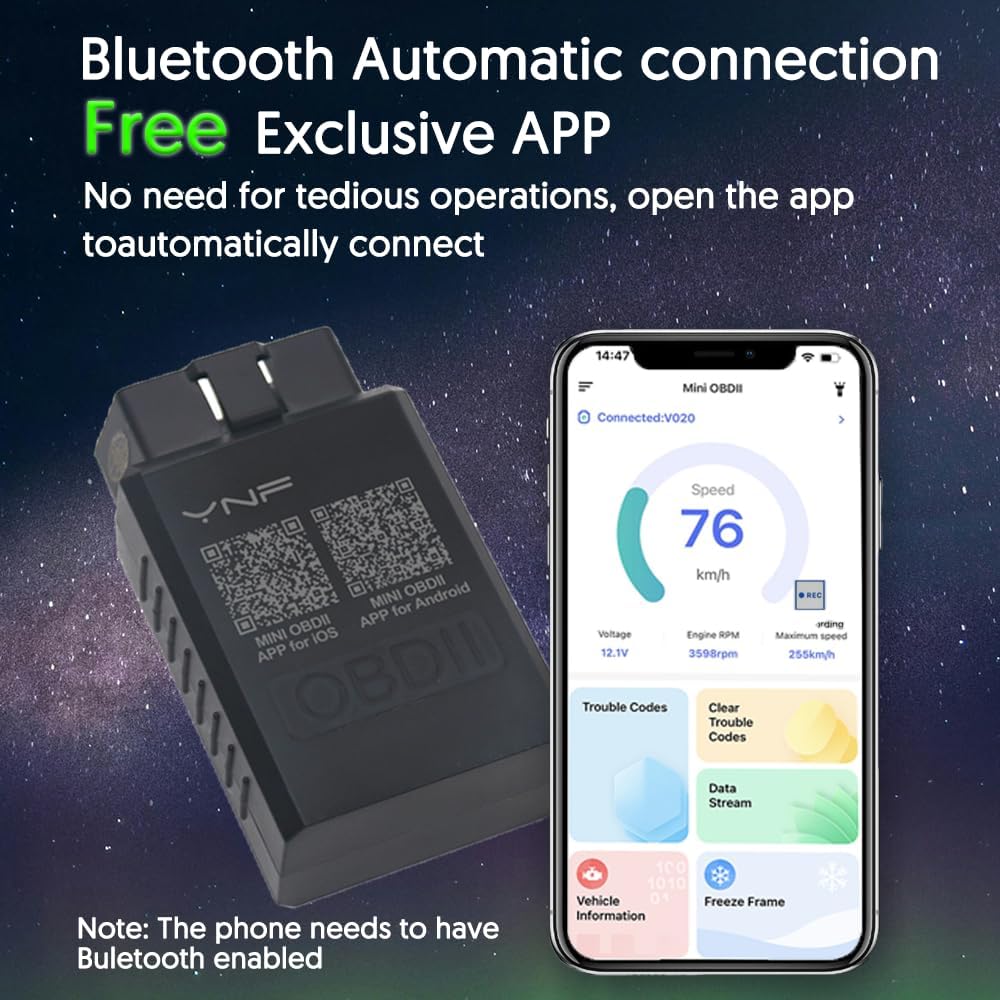
- Exclusive Free App: Dedicated app for Android and Apple systems, downloadable via QR code, designed for smooth user experience and compatibility.

2. 含まれるもの
The product package for the YNF OBD2 Scanner Reader includes:
- YNF OBD2 Scanner Reader device (Model YNF-V01H4)
- 詳細なユーザーマニュアル(この文書)
- Access to 24-hour troubleshooting email support
3. セットアップ手順
Follow these steps to set up your YNF OBD2 Scanner Reader:
- Step 1: Download the "MINI OBDII" App. Scan the QR code located on the back of your YNF OBD2 Scanner device or search for "MINI OBDII" in the Apple App Store (for iOS) or Google Play Store (for Android). Ensure you download the official app.
- Step 2: Plug in the Scanner and Start the Vehicle. Locate your vehicle's OBD-II port, typically found under the dashboard on the driver's side. Firmly plug the YNF OBD2 Scanner into the port. Once connected, start your vehicle's engine.
- Step 3: Enable Bluetooth on Your Smartphone. Go to your smartphone's settings and ensure Bluetooth is turned on.
- Step 4: Run the App and Connect. Open the "MINI OBDII" app on your smartphone. The app is designed to automatically connect to the YNF OBD2 Scanner via Bluetooth. Wait for the connection to establish.

4. 操作手順
Once the YNF OBD2 Scanner is connected to your vehicle and the app is running, you can begin diagnosing your vehicle. The app provides various functions to monitor and analyze your car's performance.
4.1. Reading and Clearing Error Codes
- Navigate to the "Trouble Codes" section within the app.
- The app will display any detected Diagnostic Trouble Codes (DTCs) along with their descriptions.
- To clear codes and turn off the Check Engine Light (CEL), select the "Clear Trouble Codes" option. Ensure you understand the cause of the code before clearing it, as clearing codes without addressing the underlying issue may lead to recurring problems.
4.2. Viewライブデータ
- Access the "Data Stream" or "Live Data" section in the app.
- この機能により、 view real-time sensor data from your vehicle, such as engine RPM, vehicle speed, coolant temperature, fuel system status, and more.
- The data is often presented in graphical format for easier interpretation. Compare these readings against normal operating values to identify potential anomalies.
4.3. Performance Tests and Other Functions
The app offers additional diagnostic functions:
- I / M準備: Checks if the various emissions-related systems are operating correctly and are ready for an inspection.
- バッテリーテスト: Provides information on your vehicle's battery health.
- フレームデータのフリーズ: Captures a snapshot of engine conditions at the moment a trouble code was set, aiding in diagnosis.
- O2センサーテスト: Monitors the oxygen sensors to ensure they are functioning within specifications.
- EVAP システムテスト: Checks the Evaporative Emission Control System for leaks.
- 車両情報(VIN): Retrieves the Vehicle Identification Number and other vehicle details.
5. メンテナンス
The YNF OBD2 Scanner Reader is designed for durability and requires minimal maintenance. To ensure its longevity and optimal performance:
- ストレージ: 使用していないときは、デバイスを直射日光や極端な温度を避け、涼しく乾燥した場所に保管してください。
- クリーニング: Use a soft, dry cloth to clean the exterior of the device. Avoid using harsh chemicals or abrasive cleaners.
- 接続ポート: Keep the OBD-II connector free from dust and debris.
- ソフトウェアアップデート: Periodically check the "MINI OBDII" app for updates to ensure you have the latest features and compatibility improvements.
6。 トラブルシューティング
If you encounter issues with your YNF OBD2 Scanner Reader, refer to the following common troubleshooting steps:
6.1. デバイスがアプリに接続されない
- 電力を確認します: Ensure the scanner is firmly plugged into the vehicle's OBD-II port and the vehicle's ignition is on (or engine running). The device typically draws power from the vehicle.
- Bluetooth 有効: スマートフォンで Bluetooth が有効になっていることを確認します。
- アプリ実行中: Make sure the "MINI OBDII" app is open and attempting to connect.
- 再起動: Try restarting both the app and your smartphone's Bluetooth. You may also try unplugging and re-plugging the scanner.
- アプリのバージョン: Ensure you have the latest version of the "MINI OBDII" app installed.
6.2. Inaccurate or Frozen Data Display
- 安定した接続: Ensure the Bluetooth connection is stable. Interference from other wireless devices can sometimes affect data transmission.
- 車両互換性: While the device has broad compatibility, ensure your specific vehicle model and year are supported. Refer to the compatibility information in Section 1.
- アプリの再起動: アプリを閉じて再度開きます。
- デバイスのリセット: Unplug the scanner from the OBD-II port for a few seconds, then plug it back in.
6.3. アプリの互換性の問題
The "MINI OBDII" app is designed to solve compatibility issues across different systems and models. If you experience persistent compatibility problems, ensure you are using the correct app and that your smartphone's operating system (iOS or Android) meets the minimum requirements (Android 11.0, iOS 10.0 or later).

7. 仕様
| 特徴 | 詳細 |
|---|---|
| ブランド名 | YNF |
| モデル番号 | YNF-V01H4 |
| 部品番号 | YNF-OBD-1 |
| 電源 | Corded Electric (via OBD-II port) |
| オペレーティングシステムの互換性 | Android 11.0, iOS 10.0 and later |
| アイテム数 | 1 (Scanner device) |
| 含まれるコンポーネント | マニュアル |
8. 保証とサポート
YNF is committed to manufacturing products to the highest quality standards. The Bluetooth Code Reader comes with a detailed manual and access to dedicated customer support.
- カスタマーサポート: For any issues or inquiries, please contact our customer service team via email. We offer 24-hour troubleshooting email support. Refer to the product packaging or the official YNF web連絡先の詳細についてはサイト。
- 品質保証: We strive to ensure our products provide both functionality and durability.