
G63
スマートライトサウンドマシン ユーザーマニュアル
モデル: G63 | ブランド: Generic
1. はじめに
The Generic G63 Smart Light Sound Machine is a versatile device designed to enhance your daily routine and improve sleep quality. It integrates multiple functions including a smart LED light with seven color selections, a natural sleep aid sound machine, an alarm clock with sunrise simulation, and a convenient 10W wireless charging pad for compatible devices. This manual provides detailed instructions for setup, operation, and maintenance of your new device.

Image: The Generic G63 Smart Light Sound Machine, showcasing its design with integrated clock, wireless charging pad, and vibrant LED lighting.
2. 安全情報
- デバイスを水や過度の湿気にさらさないでください。
- 落としたり、強い衝撃を与えないでください。
- Use only the provided or recommended power adapter (5V/2A) to prevent damage.
- デバイスを熱源や直射日光から遠ざけてください。
- ご自身でデバイスの分解や修理を試みないでください。資格のあるサービス担当者にご連絡ください。
- 特にワイヤレス充電中は、デバイスの周囲に適切な換気を確保してください。
3. パッケージ内容
パッケージに以下の項目が含まれているか確認してください。
- Generic G63 Smart Light Sound Machine
- USB-C充電ケーブル
- リモートコントロール
- ユーザーマニュアル(このドキュメント)
4 製品の特徴
- Multi-functional Lamp: Combines smart lighting, sound machine, and alarm clock.
- ワイヤレス充電: Integrated 10W wireless charging pad for compatible smartphones and devices.
- ダイナミックライティング: Seven selectable LED light colors with dimmable options and sunrise simulation.
- サウンドマシン: Features natural sleep aid sounds and can function as a Bluetooth speaker (V5.2, 3W).
- 目覚まし時計: Digital display with alarm function.
- Voice-Activated Adjustment: Lights can change to the rhythm of music or be adjusted via voice commands.
- 360° Surround Sound Structure: Designed for immersive audio experience.
- ポータブルデザイン: Built-in 3.7V/300MAH battery for 2-3 hours of use.
5. セットアップ
5.1 初期充電
Before first use, fully charge the Smart Light Sound Machine. Connect the provided USB-C charging cable to the device's charging port and the other end to a 5V/2A power adapter (not included) or a compatible USB power source. The charging indicator will show the charging status. A full charge takes approximately 2.5 hours.
5.2 配置
Place the device on a stable, flat surface, such as a bedside table or desk. Ensure there is adequate space around the device for ventilation, especially for the wireless charging function.
6. 操作手順

Image: Key Function Introduction, showing the control buttons on the device's base for volume, call management, and light effects.
6.1 電源オン/オフ
Press and hold the power button (usually indicated by a power symbol) for a few seconds to turn the device on or off. The digital display will illuminate when the device is powered on.
6.2 時間設定
To set the time, refer to the specific instructions in your remote control's manual or the device's on-screen prompts. Typically, there is a dedicated button for time setting, followed by using volume/navigation buttons to adjust hours and minutes. Confirm your selection to save the time.
6.3 照明制御
Press the "Mode/Switch Light Effect" button (often labeled 'M' or a light bulb icon) to cycle through the seven available light colors and effects. Hold the button to dim or brighten the light. The sunrise simulation feature can be activated through the alarm settings.

Image: The Smart Light Sound Machine providing ambient light in a bedroom setting, demonstrating its use as a sleep aid.
6.4 Sound Control and Bluetooth Pairing
Bluetoothのペアリング: Turn on the device. Activate Bluetooth on your smartphone or audio device and search for "G63" or "Smart Light Sound Machine" in the list of available devices. Select it to pair. A confirmation sound will indicate successful pairing.
音量調整: Use the "Volume Down/Previous Song" buttons (often labeled with '-' and '+' or arrow icons) on the device or remote control to adjust the volume. Short press for volume, long press to skip tracks.
サウンドの再生: Once paired via Bluetooth, you can play music or select from the device's built-in natural sleep aid sounds. Use the mode button to switch between Bluetooth audio and internal sound modes.

Image: The Smart Light Sound Machine emitting colorful lights and musical notes, illustrating its audio capabilities.
6.5 目覚まし時計機能
To set an alarm, locate the alarm button (often an alarm clock icon) on the device or remote. Press it to enter alarm setting mode. Use the navigation buttons to set the desired alarm time and select the alarm sound or sunrise simulation option. Confirm to save the alarm. To snooze or turn off the alarm, refer to the specific button functions on the device.
6.6ワイヤレス充電
Place your Qi-compatible smartphone or device on the designated wireless charging pad located on the base of the Smart Light Sound Machine. Ensure the device is centered on the pad for optimal charging. The charging indicator on your phone will confirm that charging has begun. This device supports up to 10W wireless charging.

Image: The Smart Light Sound Machine with a smartphone on its wireless charging pad. Note: While the image indicates 5W, the product specifications state 10W wireless charging capability.
6.7 Voice-Activated Adjustment
The device supports intelligent voice-activated adjustments. When enabled, the lights can change in rhythm with music or be adjusted by voice commands. Refer to the device's specific voice command prompts or the remote control for activation and usage details.
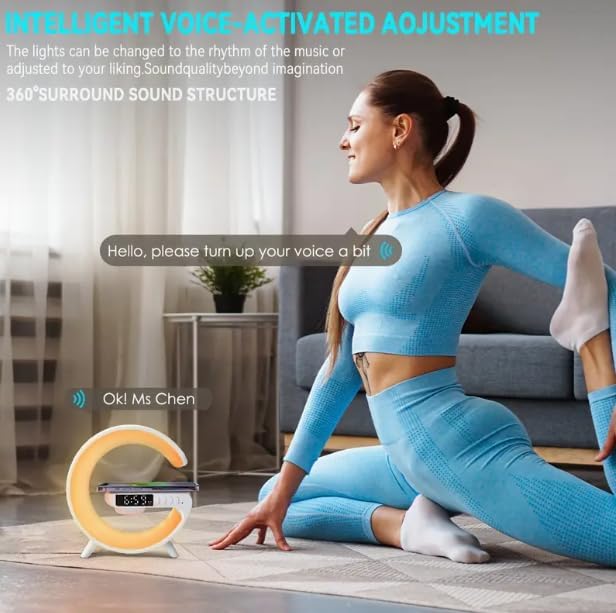
Image: Illustration of the voice-activated adjustment feature, where the device responds to spoken commands.
7. メンテナンス
- クリーニング: デバイスの表面を拭く際は、柔らかく乾いた布をご使用ください。研磨剤入りの洗剤や溶剤は使用しないでください。
- ストレージ: 長期間使用しない場合は、直射日光を避けて涼しく乾燥した場所に保管してください。
- バッテリーのケア: バッテリーの寿命を延ばすには、デバイスを頻繁に完全に放電することを避けてください。頻繁に使用しない場合でも、定期的に充電してください。
8。 トラブルシューティング
| 問題 | 考えられる原因 | 解決 |
|---|---|---|
| デバイスの電源が入らない。 | バッテリー残量が少ない。電源ケーブルが正しく接続されていません。 | Charge the device fully. Ensure the USB-C cable is securely connected to both the device and a working power source. |
| スピーカーから音が出ません。 | Volume too low; Not paired via Bluetooth; Incorrect mode selected. | Increase volume. Re-pair Bluetooth device. Ensure the device is in Bluetooth audio mode if playing from an external source. |
| ワイヤレス充電が機能しません。 | Phone not Qi-compatible; Phone not centered; Foreign objects on pad; Device not powered on. | Ensure your phone supports Qi wireless charging. Re-position phone on the center of the pad. Remove any metal objects or thick cases. Ensure the Smart Light Sound Machine is powered on. |
| Cannot set or change time/alarm. | Incorrect button sequence; Firmware issue. | Refer to the specific instructions for time/alarm setting in the manual or remote control guide. Try resetting the device if issues persist. |
| Lights not changing or dimming. | Incorrect button usage; Device malfunction. | Ensure you are using the correct button ("Mode/Switch Light Effect") and pressing/holding it as instructed. |
9. 仕様
| モデル | G63 |
| 寸法(長さ×幅×高さ) | 奥行き5.7インチ x 幅5.7インチ x 高さ2.17インチ (約150x54x27mm) |
| アイテム重量 | 7.3オンス |
| Bluetoothバージョン | バージョン5.2 |
| スピーカー電源 | 3W |
| バッテリー | 3.7V/300mAh |
| 使用時間 | 2~3時間 |
| 充電時間 | 2.5時間 |
| 充電ポート | タイプC |
| 充電入力 | 5V/2A |
| ワイヤレス充電出力 | 10W |
| 光源の種類 | LED (7 colors) |
| 材料 | プラスチック |
| 含まれるコンポーネント | リモートコントロール |

Image: Product Size diagram, illustrating the physical dimensions of the Smart Light Sound Machine.
10. 保証とサポート
本製品にはメーカーの標準保証が付いています。具体的な保証条件については、パッケージに同梱されている保証書をご覧ください。テクニカルサポート、トラブルシューティング、または保証請求については、ご購入時に提供された連絡先情報を使用して、販売店またはメーカーに直接お問い合わせください。
For further assistance, please visit the Generic brand's official support webサイトにアクセスするか、カスタマーサービスにお問い合わせください。
関連文書 - G63
 |
G63 Smart Light Sound Machine Instruction Manual Instruction manual for the G63 smart light sound machine, detailing its functions, usage, and technical specifications. Includes guidance on Bluetooth connectivity, light modes, TF card playback, and FCC compliance. |
 |
Sharper Image トラベル スリープサウンドマシン(アラーム付き) - 取扱説明書 Sharper Image トラベル スリープ サウンド マシン (アラーム付き) (商品番号 204865) のユーザー ガイド。電源、時計とアラームの設定、サウンドの選択、タイマーの使用、スヌーズ、バックライト、その他の機能について説明します。 |
 |
Brookstone Tranquil Moments 上級ユーザーマニュアル: 睡眠サウンドと目覚まし時計 Brookstone Tranquil Moments Advanced 睡眠サウンドマシンのユーザーマニュアル。デバイスの操作方法、16種類の睡眠サウンドの選択、アラームの設定、スリープタイマーの使い方、そしてより良い睡眠とリラクゼーションのための脳波同調について学びましょう。 |
 |
Sound Oasis BST-150 睡眠サウンドセラピーシステム 目覚まし時計 取扱説明書 Comprehensive instruction manual for the Sound Oasis BST-150 Sleep Sound Therapy System Alarm Clock, detailing setup, operation, features, sound library, app integration, and technical specifications. |
 |
MELLA子供用スリープトレーナーセットアップガイド(LittleHippo著) LittleHippo MELLAは、睡眠トレーナー、ナイトライト、サウンドマシンとして多機能です。このセットアップガイドでは、機能、メリット、サポート情報について説明します。 |
 |
Oregon Scientific WS683 DreamScience Sleep Companion User Manual User manual for the Oregon Scientific WS683 DreamScience Brainwave-oriented Sleep Companion, detailing setup, features, operation, and specifications for enhanced sleep and relaxation. |
Ask a question about this manual
Ask about setup, troubleshooting, compatibility, parts, safety, or missing instructions. Manuals+ will review the question and use this page’s manual context to help answer it.