
導入
Thank you for choosing the LEMNOI 7-inch Digital Calendar Clock (Model SG9). This device is designed to assist individuals, particularly those with memory loss or dementia, by clearly displaying the time, date, and day of the week. It features multiple alarm and medication reminder functions, adjustable brightness, and can also serve as a digital photo frame. Please read this manual carefully to ensure proper setup and operation.
パッケージ内容
- LEMNOI 7-inch Digital Calendar Clock (SG9)
- 電源アダプター
- ユーザーマニュアル
- Stand (for tabletop use)

製品終了view
The LEMNOI SG9 features a clear 7-inch HD display and intuitive controls. The front panel includes navigation buttons for easy menu interaction.

設定
1. 電源接続
- Connect the power adapter to the DC IN port on the back of the clock.
- 電源アダプタを標準のコンセントに差し込みます。
- 時計は自動的に電源が入ります。
注記: The clock operates on AC power and does not use batteries for primary function. A built-in backup system saves settings during power outages。
2. 初期言語の選択
- Upon first power-on, the clock may display a language selection screen.
- 使用 Up そして 下 buttons to navigate through the language options (English, French, German, Italian, Spanish).
- を押す OK ボタンをクリックして選択を確定します。

3. 時刻と日付の設定
- を押す メニュー/返品 メインメニューにアクセスするためのボタン。
- Navigate to "Date & Time" using the Up/下 ボタンを押して押す OK.
- 年、月、日、時間、分を Up/下 ボタン。使用 左/右 フィールド間を移動します。
- Select 12-hour or 24-hour format as preferred.
- プレス OK to save changes and メニュー/返品 終了します。
操作手順
1. 表示モード
The clock offers 6 distinct display modes, including a unique floral surface mode that changes weekly. You can cycle through these modes by pressing the 左 or 右 buttons from the main display.

2. Brightness Adjustment and Auto-Dimming
The clock features 5 levels of adjustable brightness and an automatic dimming function to optimize visibility day and night.
- 手動明るさ: Access the "Brightness" setting in the menu to select a level from 1 to 5.
- 自動調光: Enable "Auto Dimming" in the settings. You can customize the start and end times for dimming, and set the desired dimming brightness level (e.g., 0% for a completely dark screen at night).


3.アラーム設定
The clock supports up to 15 daily alarms and 15 medication reminders, each with customizable labels and frequencies.
- アラームを設定する:
- From the main menu, select "Alarm" or "Take Medicine".
- Choose an alarm slot (e.g., Alarm 1, Medication 1).
- Set the desired time (hour and minute).
- Select the frequency: Daily, Weekdays (Mon-Fri), Weekends (Sat-Sun), or Specific Dates.
- Choose an alarm label from the 12 available options (e.g., Wake Up, Drink Water, Meeting with Doctor, Dog Walking). These labels are displayed with vivid color images for easy comprehension.
- Select an alarm sound.
- プレス OK 保存します。
- 薬のリマインダー: Specifically designed for morning, afternoon, and evening medication alerts.
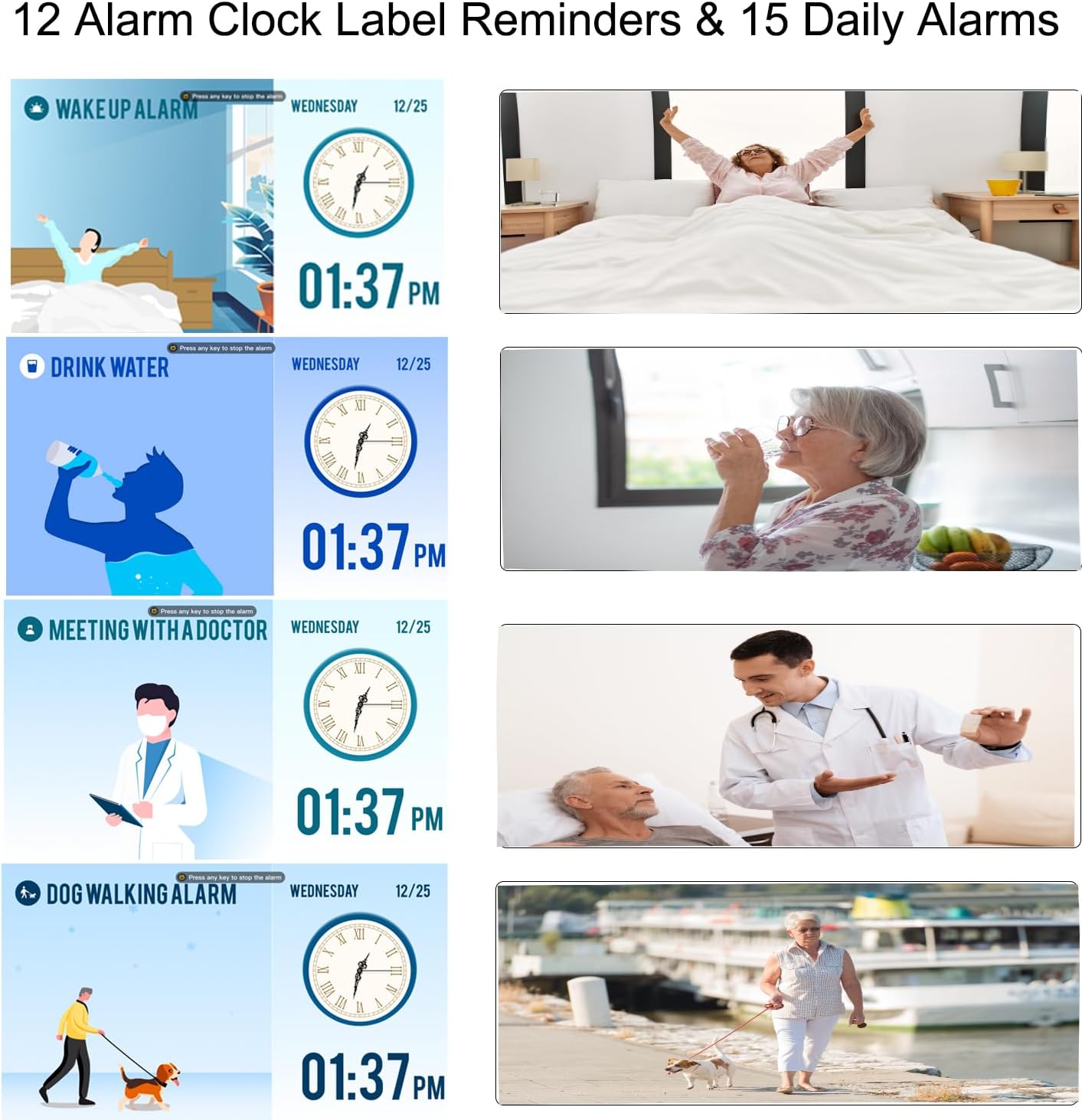

4. 夏時間(DST)
The clock supports automatic adjustment for Daylight Saving Time. Ensure this feature is enabled in the "Date & Time" settings for accurate time display.

5. Using as a Digital Photo Frame
The clock can function as a high-resolution digital photo and video frame. Insert a USB flash drive (not included) into the USB port on the side of the clock. Navigate to the "Photo Frame" option in the menu to play your media.

メンテナンス
- クリーニング: Use a soft, dry cloth to clean the screen and body of the clock. Do not use liquid cleaners or abrasive materials.
- 配置: Place the clock on a stable, flat surface or mount it securely on a wall. Avoid direct sunlight, high temperatures, or humid environments.
- 力: Always use the provided power adapter. Disconnect power during thunderstorms or when not in use for extended periods.

トラブルシューティング
| 問題 | 考えられる原因 | 解決 |
|---|---|---|
| 時計が点灯しません。 | 電源が接続されていません。 | 電源アダプタが時計と機能している電源コンセントにしっかりと接続されていることを確認します。 |
| ディスプレイが暗すぎるか明るすぎます。 | Brightness settings are incorrect or auto-dimming is active. | Adjust manual brightness in settings or check auto-dimming schedule and brightness level. |
| アラームは鳴っていません。 | Alarm is disabled, volume is too low, or incorrect time/frequency set. | Verify alarm settings, ensure volume is audible, and check alarm time/frequency. |
| 電源を切った後の時刻が正しくないtage. | Backup battery may be depleted or not functioning. | The clock has a backup system for settings. If time is incorrect, manually reset the time and date. |
| Cannot play photos/videos. | USB drive not inserted correctly or unsupported file 形式。 | Ensure USB drive is fully inserted. Check that media files are in supported formats (e.g., JPEG for photos, common video formats). |
仕様
| 特徴 | 詳細 |
|---|---|
| ブランド | LEMNOI |
| モデル番号 | SG9 |
| 表示タイプ | デジタル |
| 画面サイズ | 7インチ |
| 解決 | 1024 x 600 ピクセル |
| 製品寸法(幅×高さ) | 19 cm × 16 cm |
| アイテム重量 | 290グラム |
| 材料 | アクリロニトリルブタジエンスチレン(ABS) |
| 電源 | 電気ケーブル |
| 特集 | Auto-dimmable, Adjustable Brightness (5 levels), Temperature Indicator, 6 Display Modes, 15 Daily Alarms, 15 Medication Reminders, 12 Alarm Labels, Digital Photo Frame Function, Daylight Saving Time Auto-Adjust, Multi-language Support |
| 取り付けタイプ | テーブルトップ |
| Required Battery (Backup) | 1 CR123A (not included for primary operation) |
保証とサポート
For warranty information or technical support, please refer to the contact details provided on the product packaging or the official LEMNOI webサイトでご確認ください。保証請求の際は購入証明として領収書を保管してください。