
導入
Thank you for choosing the Yoidesu Cordless Phone System. This system combines a corded base unit with a cordless handset, offering advanced features such as a digital answering machine, photo dialing, smart call blocking, and an expandable design. This manual will guide you through the setup, operation, and maintenance of your new phone system to ensure optimal performance.
パッケージ内容
下記のすべての品目がパッケージに含まれていることをご確認ください。不足品や破損品がある場合は、カスタマーサポートまでご連絡ください。
- Corded Base Unit with Handset
- コードレスハンドセット
- Cordless Handset Charging Base
- AC Power Adapters (2)
- 電話回線コード
- コードレスハンドセット用充電式バッテリー
- ユーザーマニュアル(このドキュメント)
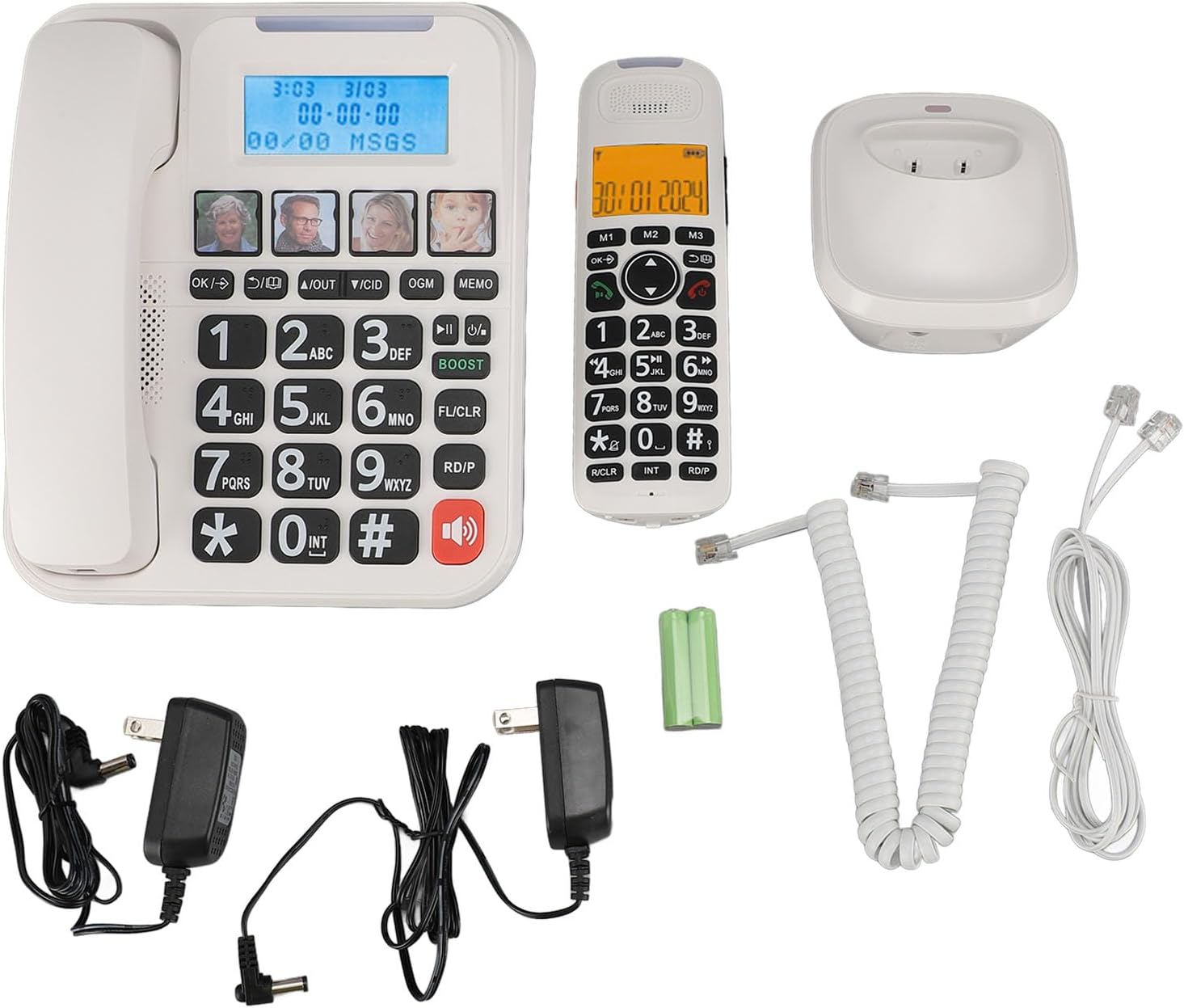
図1: Complete package contents of the Yoidesu Cordless Phone System.
製品終了view
コード付きベースユニット
The base unit serves as the central hub for your phone system, featuring a large display, keypad, and dedicated buttons for answering machine functions and photo dialing.
- 2インチの大画面: Displays caller ID, call history, and answering machine status with high-contrast text.
- 大型キーパッド: Oversized buttons for easy dialing, especially in low-light conditions.
- Photo Dialing Buttons: Four customizable buttons for quick access to frequently dialed numbers with associated photos.
- AMP ボタン: Enhances call volume by up to 28dB for improved clarity.
- Answering Machine Controls: Play/Stop, Skip, Record, and Memo functions.

図2: フロント view of the Corded Base Unit.
コードレスハンドセット
The cordless handset provides mobility and convenience, allowing you to make and receive calls away from the base unit.
- 表示画面: Shows caller information, menu options, and battery status.
- ナビゲーションボタン: For menu navigation and volume adjustment.
- Talk/End Buttons: 通話を開始および終了します。
- Intercom (INT) Button: For internal calls between handsets or base unit.

図3: フロント view of the Cordless Handset.
設定
1. ベースユニットの接続
- 電話回線コードの一方の端をベースユニットの背面にある TEL LINE ジャックに接続します。
- 電話回線コードのもう一方の端を壁の電話ジャックに接続します。
- Plug one AC power adapter into the DC IN 6V jack on the back of the base unit.
- AC 電源アダプタのもう一方の端を標準の電源コンセントに差し込みます。

図4: Rear connections of the Base Unit.
2. ハンドセットのバッテリーの取り付け
- コードレスハンドセットの背面にある電池ボックスのカバーを開きます。
- Insert the supplied rechargeable battery, ensuring correct polarity (+/-).
- 電池ボックスのカバーを閉じます。
3. ハンドセットの充電
- Plug the second AC power adapter into the DC IN 6V jack on the cordless handset charging base.
- AC 電源アダプタのもう一方の端を標準の電源コンセントに差し込みます。
- Place the cordless handset onto its charging base. The charging indicator on the handset should illuminate.
- バッテリー容量を完全に確保するために、初めて使用する前に少なくとも 12 時間充電してください。

図5: Cordless Handset on Charging Base.
4. Registering Additional Handsets (Optional)
The system supports up to five handsets. Refer to the specific instructions provided with additional handsets for registration procedures. Typically, this involves placing the base unit in registration mode and then initiating registration from the new handset.
操作手順
通話の発信と受信
- 電話をかけるには: コード付き受話器を持ち上げるか、 話す button on the cordless handset, then dial the number.
- 電話を受けるには: コード付き受話器を持ち上げるか、 話す 電話が鳴ったら、コードレス受話器のボタンを押します。
- 通話を終了するには: Place the corded handset back on the base or press the 終わり コードレス受話器のボタン。
通話音量を調整する
通話中に を押す AMP button on the base unit to increase the volume by 28dB. On the cordless handset, use the navigation buttons to adjust the earpiece volume.
Using the Digital Answering Machine
The integrated answering machine can record up to 60 minutes of messages, outgoing announcements, and memos.
- 再生メッセージ: を押す 再生/停止 ベースユニットのボタン。
- 送信メッセージの記録 (OGM): を押す OGM button and follow the voice prompts.
- Record Memo: を押す メモ button and speak after the tone.
Photo Dialing
Set up four frequently dialed numbers with associated photos for quick access.
- プログラムするには: Select an empty photo slot on the base unit. Follow the on-screen prompts to enter the contact's name and phone number. You can then insert a printed photo into the designated slot.
- ダイヤルするには: Simply press the desired photo button on the base unit.

図6: Using the Photo Dialing feature.
Smart Call Blocker and Caller ID
The system can store up to 30 incoming call numbers on handsets and 29 on the base unit. The call block function helps prevent unwanted calls.
- 発信者番号: Incoming call numbers are displayed on both the base unit and handset screens.
- 通話ブロック: Access the call block menu to add numbers manually or block numbers from the caller ID history. You can set it to manual or automatic mode, allowing only calls from saved contacts.
電話帳と通話履歴
Store up to 50 phonebook entries. Review 10 outgoing call numbers and incoming call numbers (30 on handset, 29 on base).
- 連絡先を追加: Navigate to the phonebook menu and enter the name and number.
- Review 歴史: Use the navigation buttons to scroll through incoming and outgoing call lists.
Intercom and 3-Way Calling
The expandable system allows for internal communication and conference calls.
- インターホン: を押す 内部 button on a handset or base unit to call another registered handset or the base unit.
- 3者通話: Supports conference calls between a landline, a sub-phone (handset), and a third-party phone. Refer to the system menu for initiating this feature.
メンテナンス
クリーニング
Wipe the phone system with a soft, damp 布で拭いてください。刺激の強い化学薬品や研磨剤入りの洗剤は使用しないでください。清掃する前に、必ず電源プラグを抜いてください。
バッテリーケア
To prolong battery life, always return the cordless handset to its charging base when not in use. If the phone will be unused for an extended period, remove the battery from the handset.
トラブルシューティング
| 問題 | 考えられる原因 | 解決 |
|---|---|---|
| 発信音なし | 電話回線コードが外れているか故障しています。 | Ensure the telephone line cord is securely connected to both the base unit and the wall jack. Test with another phone if possible. |
| 端末が充電されない | Handset not properly seated on charging base; charging base not powered; faulty battery. | Ensure the handset is correctly placed on the charging base. Check that the charging base's power adapter is plugged in. Replace battery if necessary. |
| 留守番電話が録音されない | Answering machine is off; memory is full. | Ensure the answering machine is turned on. Delete old messages to free up memory. |
| 通話品質が悪い/雑音がある | Interference from other electronic devices; handset too far from base unit. | Move the base unit away from other electronics. Ensure the handset is within range of the base unit. |
仕様
- モデル番号: Yoidesuav12iq6wt4-14
- 留守番電話録音時間: 最大60分
- Handset Expansion: Up to 5 handsets per base unit
- 着信音の音量: 最大90dB(調整可能)
- Call Volume Boost: +28dB via AMP ボタン
- 画面サイズ: 2 inches (handset and base unit)
- Caller ID Storage: 30 incoming calls (handset), 29 incoming calls (base unit)
- Phonebook Entries: 50
- 発信通話ストレージ: 10
- パッケージ寸法: 12.99 x 9.06 x 3.94インチ
- 商品の重量: 2.84ポンド
保証とサポート
For warranty information or technical assistance, please contact Yoidesu customer support. Keep your purchase receipt as proof of purchase for any warranty claims.
メーカー: よいです
発売日: 5年2024月XNUMX日