
1. はじめにview
The GREEN DEVIL SHIELD LD HM Bluetooth Hearing Protection Earmuffs are designed to provide superior hearing protection in noisy environments while allowing for clear communication and audio streaming. Featuring advanced Bluetooth 5.3 technology, Smart Active Listening, and a noise-canceling boom microphone, these earmuffs ensure both safety and connectivity. With an NRR (Noise Reduction Rating) of 27dB and an IP54 rating for splash protection, they are built for demanding conditions. The integrated 1000mAh battery provides extended usage.

Figure 1: GREEN DEVIL SHIELD LD HM Bluetooth Hearing Protection Earmuffs. These earmuffs offer Bluetooth 5.3, Smart Active Listening, hands-free telephony, and a noise-canceling boom microphone.
2. 箱の中身
パッケージの内容を確認し、すべてのアイテムが揃っていることを確認してください。
- Bluetooth Earmuffs for Hard Hat
- 3.5mmオーディオケーブル
- タイプC充電ケーブル
- Noise-Canceling Boom Microphone
- キャリーバッグ
- 取扱説明書
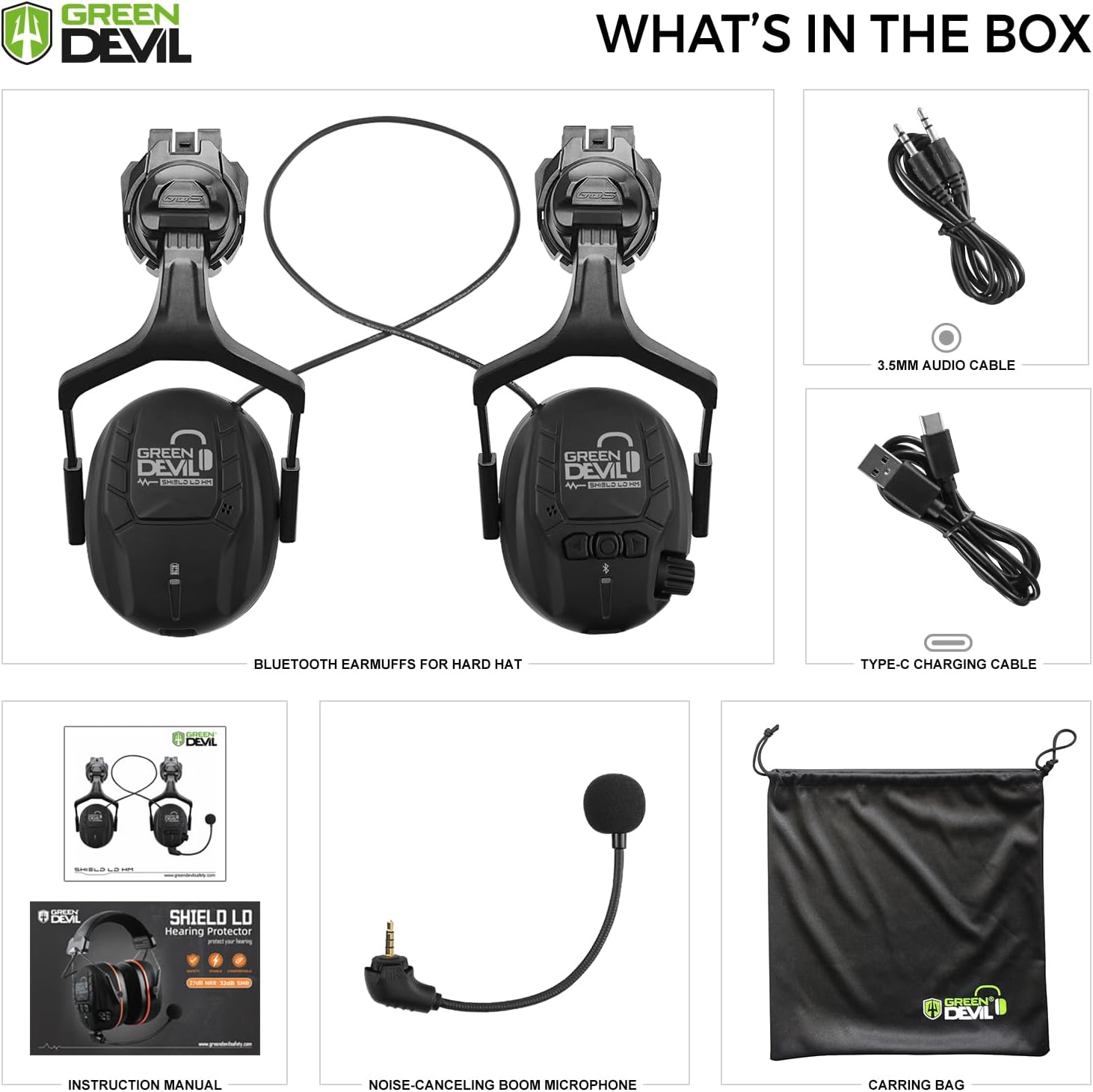
Figure 2: Package contents including the earmuffs, cables, microphone, carrying bag, and manual.
3. セットアップとインストール
3.1 Attaching to a Hard Hat
The earmuffs are designed for easy attachment to most safety helmets. Follow these steps:
- Step 1: Insert Card Slot
Insert the hard hat slot adapters into the slots on each side of the hard hat until they click into place. Ensure the slots are compatible (approximately 0.78 inches / 20mm wide and 1.18 inches / 30mm deep). - Step 2: Adjustment of Position
When in use, the attachment arms must be pushed inward until you hear a click on both sides, indicating a shift from "stand-by" to "usage" position. Position the ear cups over your ears so that the cushions fully enclose the ears and seal tightly against the head. Adjust the position of each ear cup while holding the helmet in place until you have a tight and comfortable fit that exerts even pressure around the ears. - Step 3: Usage Mode
Ensure the cups and attachment arms are not in contact with the inner lining or the edge of the hard hat when in the "usage" position, otherwise this may lead to leakage. - Step 4: Stand-by Mode
To switch to stand-by mode, pull the earmuffs slightly outwards from the helmet slots. This allows the earmuffs to rest off the ears without removing the helmet. No need to take off the helmet frequently to ensure safety at work.

Figure 3: Visual guide for attaching the earmuffs to a safety helmet and adjusting their position.
3.2 オーディオの接続
The earmuffs support both wired and wireless audio connections:
- 有線接続: Use the provided 3.5mm audio cable to connect the earmuffs to an audio source. This mode offers a stable connection.
- ワイヤレス接続(Bluetooth 5.3): For wireless audio, ensure the earmuffs are powered on and in pairing mode. 検索する "GREEN DEVIL SHIELD LD HM" on your device's Bluetooth settings and connect. The wireless range extends up to 80 feet (approximately 24 meters).

Figure 4: The earmuffs can be connected via a 3.5mm audio cable for a stable wired connection or wirelessly via Bluetooth 5.3 for greater freedom.
3.3 Attaching the Boom Microphone
The noise-canceling boom microphone can be attached to the designated port on one of the ear cups. Ensure it is securely inserted for clear communication.
4. 操作手順
Familiarize yourself with the controls for optimal use:
- 電源オン/オフ: Locate the power button on the ear cup. Press and hold to power on or off.
- 音量コントロール: Use the stepless volume regulation knob to adjust the audio level for both connected devices and the Smart Active Listening feature.
- Bluetoothのペアリング: After powering on, the earmuffs will automatically enter pairing mode if not already connected. A blue indicator light will flash. Select "GREEN DEVIL SHIELD LD HM" from your device's Bluetooth list.
- Hands-Free Telephony: When connected via Bluetooth, you can answer and end calls using the designated button. The noise-canceling boom microphone ensures clear voice transmission even in high-noise environments.
- Smart Active Listening: This feature allows you to hear ambient sounds at a safe level while still protecting against harmful loud noises. Adjust the sensitivity using the volume knob.
- バッテリー寿命: The earmuffs are equipped with a 1000mAh battery, providing extended operational time. A Type-C charging cable is included for recharging.

Figure 5: Key controls and features of the GREEN DEVIL SHIELD LD HM earmuffs, including the volume knob and microphone port.
5. メンテナンス
Proper maintenance ensures the longevity and optimal performance of your earmuffs:
- クリーニング: イヤーカップとヘッドバンドを柔らかくて乾いた布で拭いてください。amp 布で拭いてください。刺激の強い化学薬品や研磨剤入りの洗剤は使用しないでください。電子部品に水分が入らないようにしてください。
- ストレージ: When not in use, turn off the power and disconnect from the power source. Store the earmuffs in the provided carrying bag in a cool, dry place. Avoid exposing the product to high temperatures or direct sunlight, especially the low-reflection material of the ear cushions.
- バッテリーのケア: For optimal battery life, avoid fully discharging the battery frequently. Recharge regularly, even if not in constant use.
6。 トラブルシューティング
問題が発生した場合は、次の一般的なトラブルシューティング手順を試してください。
- 電源なし: バッテリーが充電されていることを確認してください。Type-C充電ケーブルを接続し、少なくとも30分間充電してから、再度電源を入れてください。
- 音が出ない: Check the volume level on both the earmuffs and your connected device. Ensure the earmuffs are properly connected via Bluetooth or the 3.5mm audio cable.
- Bluetoothが接続されない: Turn off and on the earmuffs and your device's Bluetooth. Ensure the earmuffs are in pairing mode (indicated by a flashing blue light). Move closer to your device to rule out range issues.
- マイクが機能しない: Ensure the boom microphone is securely plugged into its port. Check your device's audio input settings to ensure the earmuffs' microphone is selected.
- Poor Hearing Protection: Ensure the ear cups form a tight seal around your ears. Adjust the headband and ear cup position as described in Section 3.1.
これらの手順を試しても問題が解決しない場合は、カスタマー サポートにお問い合わせください。
7. 仕様
| ブランド | グリーンデビル |
| モデル | SHIELD LD HM |
| 騒音低減評価 (NRR) | 27デシベル |
| 騒音制御 | Active Noise Cancellation (Smart Active Listening) |
| Bluetoothバージョン | 5.3 |
| バッテリー容量 | 1000mAh |
| 材料 | プラスチック |
| フィットタイプ | 標準 |
| 侵入保護等級(IP) | IP54(水しぶきに対する保護) |
| Hard Hat Slot Compatibility | 0.78 inches / 20mm (width), 1.18 inches / 30mm (depth) |
8. 保証とサポート
For warranty information or technical support, please refer to the contact details provided with your purchase or visit the official GREEN DEVIL webサイトでご確認ください。保証請求に備えて購入証明書を保管してください。