
ピークキープ MHP6030
Peakeep スリムデジタルミラー目覚まし時計 MHP6030 ユーザーマニュアル
モデル: MHP6030
1. はじめに
Thank you for choosing the Peakeep Slim Digital Mirror Alarm Clock. This modern and aesthetic clock is designed to complement any home or office decor while providing essential timekeeping and alarm functions. Its large LED display ensures clear readability, and its versatile features cater to various user preferences.
Key features include a slim design with a mirror face, a large LED display (6"L x 3"W inches) for easy viewing, 6 adjustable brightness levels, a loud alarm with 5 adjustable volumes (55 to 100 dB), a 9-minute snooze function, and a battery backup system to maintain settings during power outages。
2. セットアップ
2.1. 時計の電源供給
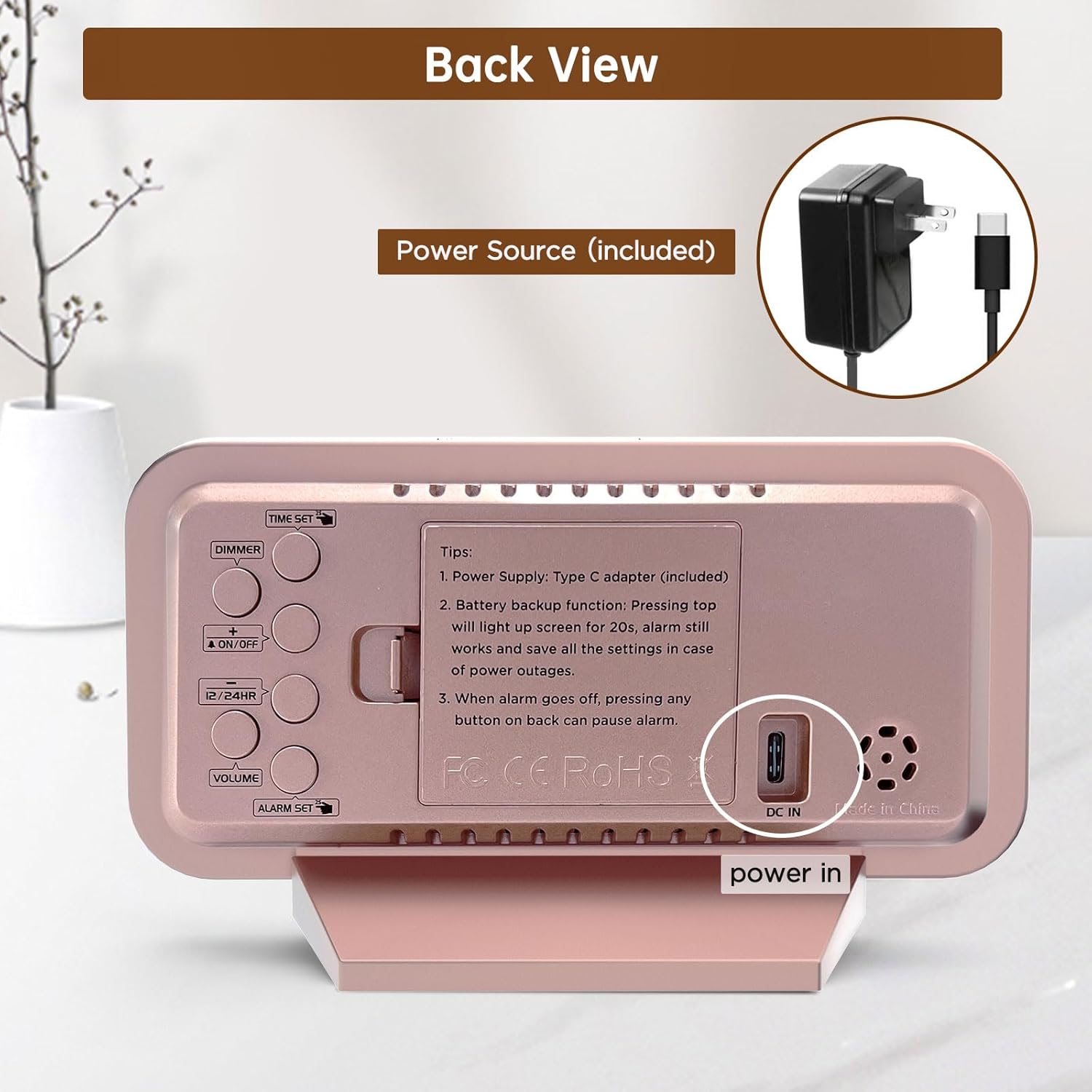
The Peakeep Digital Alarm Clock is primarily powered by the included Type C adapter. Connect the adapter to the DC IN port on the back of the clock and plug it into a standard electrical outlet. The clock display will illuminate, indicating it is powered on.

The clock is powered by the included Type C adapter, ensuring continuous operation.
2.2. バッテリーバックアップの取り付け
停電時のメモリバックアップ用tages, install 4 AAA batteries (not provided) into the battery compartment located on the back of the clock. These batteries will preserve your time and alarm settings and trigger the alarm in case of a power interruption. The screen will light up for 20 seconds with a top touch when running on battery power.

Battery backup ensures settings are saved and the alarm functions during power outages。
3. 操作手順
The control buttons are located on the back of the clock for easy access and adjustment.

後方 view of the clock with clearly labeled buttons for various functions.
3.1.時間を設定する
- を押す 時間設定 button once to enter time setting mode. The hour digits will start blinking.
- 使用 + or - buttons to adjust the hour. Press and hold for fast adjustment.
- プレス 時間設定 again to set the minute digits. Use the + or - 分を調整するためのボタン。
- プレス 時間設定 a third time to exit and save the time.
3.2.アラームの設定
- を押す アラームセット button once to enter alarm setting mode. The alarm hour digits will start blinking.
- 使用 + or - ボタンでアラーム時間を調整します。
- プレス アラームセット again to set the alarm minute digits. Use the + or - 分を調整するためのボタン。
- プレス アラームセット a third time to exit and save the alarm.
- アラームをオン/オフにするには、 オン/オフ ボタンを押します。ディスプレイにアラームアイコンが表示されたり消えたりします。
3.3. ディスプレイの明るさを調整する(調光器)
The clock features 6 adjustable brightness levels (L1 to L5 and OFF) to suit various lighting conditions and personal preferences.
- を押す ディマー button repeatedly to cycle through the 6 brightness levels.
- 快適な明るさレベルを選択してください view昼も夜も。

The clock offers 6 brightness levels, from bright (L5) to off, for optimal visibility and comfort.
3.4. アラーム音量の調整
The alarm has 5 adjustable volume levels, ranging from 55 dB to 100 dB, suitable for both light and heavy sleepers.
- を押す 音量 button repeatedly to cycle through the 5 volume levels (V01 to V05).
- Choose the volume that best suits your waking needs.
Adjust the alarm volume from a gentle 55dB to a loud 105dB to ensure you wake up.
3.5. 12/24時間形式
To switch between 12-hour (AM/PM) and 24-hour (military) time formats, press the 12/24時間 ボタン。
3.6. スヌーズ機能
アラームが鳴ったら、大きな スヌーズ/ライト button on the top of the clock to activate the 9-minute snooze function. The alarm will sound again after 9 minutes.
4. メンテナンス
- Clean the clock's mirror surface and body with a soft, dry cloth. Avoid using abrasive cleaners or solvents.
- 誤って落下するのを防ぐため、時計は安定した平らな面に置いてください。
- 時計は直射日光、極端な温度、高湿度を避けて保管してください。
- If not using the battery backup function, remove the AAA batteries to prevent leakage.
5。 トラブルシューティング
5.1. Display is blank or not lighting up
- Ensure the Type C adapter is securely plugged into both the clock and a working power outlet.
- If using battery backup, press the top スヌーズ/ライト button to temporarily illuminate the screen for 20 seconds. Batteries are for memory backup only and do not keep the display continuously lit.
5.2. Alarm does not sound
- Verify that the alarm is activated (alarm icon visible on the display).
- Check the alarm volume setting to ensure it is not set to V00 (mute).
- If running on battery backup, ensure the batteries are fresh and correctly installed.
5.3. Time/Alarm settings are lost after power outage
- Ensure 4 fresh AAA batteries are installed in the battery compartment for memory retention.
6. 仕様
| 特徴 | 詳細 |
|---|---|
| ブランド | ピーキープ |
| モデル番号 | MHP3129 |
| 色 | Rose Gold With Mirror |
| 表示タイプ | デジタル |
| スタイル | モダンな |
| 製品寸法 | 幅6インチ x 高さ3.5インチ |
| アイテム重量 | 6.4オンス |
| 電源 | Type C Adapter (included) |
| バッテリーバックアップ | 単4電池XNUMX本が必要です(別売り) |
| 特集 | Slim Design Mirror Face, Large Numbers, 6 Brightness Levels, Loud Alarm, Adjustable Volume, Snooze Function |
| 材料 | Plastic, Electronic, Glass |
| 取り付けタイプ | テーブルトップ |
7. 製品ビデオ
7.1. Battery Backup Functionality
This video demonstrates the battery backup feature of the Peakeep Digital Alarm Clock, highlighting how it retains settings and triggers the alarm during power outages。
7.2. Mirror Functionality
This video showcases the clock's mirror surface, illustrating its dual functionality as both a time display and a convenient mirror for quick checks.
8. 保証情報
This product comes with a standard manufacturer's warranty. Please refer to the product packaging or contact customer support for specific warranty terms and conditions.
9. カスタマーサポート
For any questions, technical assistance, or support regarding your Peakeep Slim Digital Mirror Alarm Clock, please contact our customer support team:
- メールアドレス: sales@us-myhome.com
Ask a question about this manual
Ask about setup, troubleshooting, compatibility, parts, safety, or missing instructions. Manuals+ will review the question and use this page’s manual context to help answer it.