1. はじめに
The ELKO EP RFSAI-62B-SL/MT is a state-of-the-art switching actuator designed for smart home environments. This unit features two output relays, making it suitable for controlling various consumer appliances and lighting systems. It integrates seamlessly into Matter-compatible ecosystems through the Thread protocol, ensuring broad interoperability with other Matter-certified devices.
Beyond traditional switches and buttons, the RFSAI-62B-SL/MT can also be controlled using wireless wall switches like the RFGB-40-MT. Its robust design allows for a range of up to 200 meters in open air, providing flexible installation options. The device supports a maximum switching capacity of 2000 W (8 A) and utilizes an AgSnO2 + Zero Cross relay contact, optimized for switching lighting loads efficiently.
2. 安全情報
Please read this manual carefully before installation and operation. Failure to follow these instructions may result in electric shock, fire, or other hazards.
- 設置は、すべての地域および国の電気規則に従って、資格のある電気技師が行う必要があります。
- デバイスの設置または保守を行う前に、回路ブレーカーで電源を切断してください。
- デバイスを湿気、極端な温度、直射日光にさらさないでください。
- デバイスが指定された容量内で使用されていることを確認してくださいtage and current ratings (AC 230 V, 8 A).
- デバイスの修理や改造は行わないでください。すべてのメンテナンスは資格のある担当者にお任せください。
3. パッケージ内容
パッケージにすべてのアイテムが揃っていることを確認します。
- 1x ELKO EP RFSAI-62B-SL/MT Matter Switching Actuator
- ユーザーマニュアル (本書) x 1
4.製品オーバーview
The RFSAI-62B-SL/MT is a compact unit designed for flush mounting. Below is an image of the device with key components highlighted.
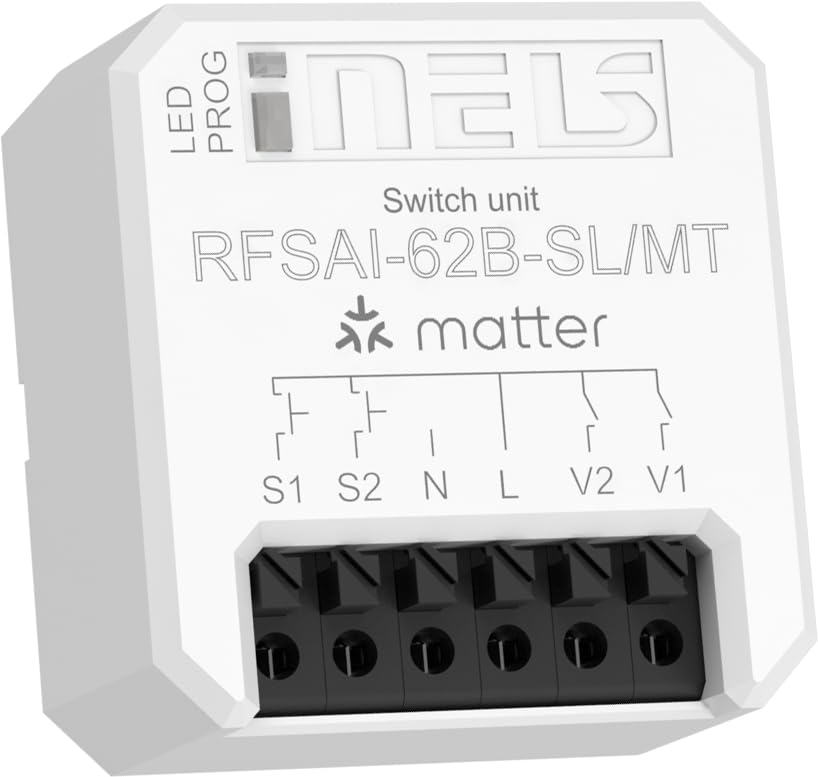
Figure 4.1: ELKO EP RFSAI-62B-SL/MT Matter Switching Actuator.
This image shows the ELKO EP RFSAI-62B-SL/MT Matter Switching Actuator. The device is white with black screwless terminals at the bottom. The top surface features the 'iNELS' logo, 'Switch unit', 'RFSAI-62B-SL/MT', and the 'matter' logo. There are labels for 'LED' and 'PROG' indicating an LED indicator and a program button. Wiring diagrams are printed above the terminals, labeled S1, S2, N, L, V2, and V1.
主要コンポーネント:
- LEDインジケーター: ステータスのフィードバックを提供します。
- PROG (Program/RESET) Button: Used for pairing, resetting, and other programming functions.
- Screwless Terminals: For secure and easy wiring connections.
- S1、S2: Input terminals for external switches/buttons.
- N: Neutral wire connection.
- L: Live wire connection (AC 230V).
- V1、V2: Output terminals for controlled loads (e.g., lighting, appliances).
5. セットアップとインストール
Before proceeding with installation, ensure power is disconnected at the main circuit breaker.
5.1配線手順
- 電源切断: Turn off the main power supply to the circuit where the actuator will be installed. Verify with a voltageテスター。
- 接続電源:
- 接続する ライブ(L) wire (AC 230V) to the 'L' terminal on the actuator.
- 接続する 中立(N) wire to the 'N' terminal on the actuator.
- 負荷を接続する:
- Connect the load (e.g., light fixture) to the V1 および/または V2 terminals. Ensure the neutral wire of the load is connected to the main neutral line.
- Connect External Switches (Optional):
- If using external push-buttons or switches, connect them to the S1 そして S2 terminals. These inputs can be configured for various control modes.
- 安全なインストール: Place the actuator securely within a suitable electrical box or enclosure.
- 電力を回復する: すべての接続が安全で検証されたら、回路ブレーカーで電源を復元します。
5.2 Matter Network Integration
To integrate the RFSAI-62B-SL/MT into your smart home system, you will need:
- One or more Thread Border Routers connected to your Wi-Fi network.
- A Matter-compatible hub (e.g., Home Assistant, Apple HomeKit, Google Home, Amazon Alexa).
- The associated mobile application for your chosen Matter hub.
Follow the pairing instructions provided by your Matter hub's application. Typically, this involves putting the device into pairing mode (often by pressing the PROG/RESET button for a specified duration) and scanning a QR code or entering a pairing code provided with the device.
6. 操作手順
Once successfully integrated into your Matter network, the RFSAI-62B-SL/MT can be controlled in several ways:
- Via Matter Hub Application: Use your preferred Matter controller application (e.g., Home Assistant, Apple Home, Google Home) to remotely switch the connected loads ON or OFF.
- Via External Switches: If wired, the S1 and S2 inputs allow control via traditional wall switches or push-buttons. The functionality of these inputs can be configured within your Matter ecosystem.
- Via Wireless Wall Switches: Compatible wireless wall switches, such as the ELKO EP RFGB-40-MT, can be paired with the actuator for convenient local control without additional wiring.
- PROG/RESET Button: While primarily for pairing and resetting, the PROG button may also offer basic toggle functionality depending on the specific firmware and Matter configuration.
7. メンテナンス
The ELKO EP RFSAI-62B-SL/MT is designed for maintenance-free operation. However, consider the following:
- クリーニング: If necessary, gently wipe the device with a dry, soft cloth. Do not use abrasive cleaners or solvents.
- ファームウェアの更新: Periodically check your Matter hub's application for available firmware updates for the actuator to ensure optimal performance and security.
- 環境条件: Ensure the device remains within its specified operating environment (temperature, humidity) to prevent damage.
8。 トラブルシューティング
| 問題 | 考えられる原因 | 解決 |
|---|---|---|
| デバイスが応答しません。 | No power; Not paired; Out of Thread network range. | Check power supply; Re-pair the device; Ensure it's within range of a Thread Border Router. |
| Cannot connect to Matter network. | Incorrect pairing procedure; Matter hub issue; Thread Border Router issue. | Refer to your Matter hub's pairing guide; Restart Matter hub and Thread Border Router; Try factory resetting the actuator (long press PROG/RESET button). |
| Connected load does not switch. | Incorrect wiring; Overload; Faulty load. | Verify wiring connections; Check load's power consumption against actuator's max rating (2000W/8A); Test the load independently. |
| External switch (S1/S2) not working. | Incorrect wiring; Switch type not compatible; Configuration issue in Matter app. | Check wiring to S1/S2; Ensure switch is compatible (e.g., momentary push-button vs. toggle); Verify input configuration in your Matter hub. |
9. 仕様
| 特徴 | 詳細 |
|---|---|
| 製品寸法(長さ x 幅 x 高さ) | 4.3 x 4.4 x 2.2 cm(1.69 x 1.73 x 0.87インチ) |
| メーカー | エルコ EP |
| モデル番号 | 8975 (Internal), RFSAI-62B-SL/MT (Product) |
| 動作モード | 電気 |
| 現在の評価 | 8 A(最大2000 W) |
| 営業巻tage | 230ボルト(AC) |
| 連絡先の種類 | Normally Closed (AgSnO2 + Zero Cross relay) |
| コネクタタイプ | フラッシュマウント |
| スイッチタイプ | Dimmer (Note: Product description indicates a switching unit, not a dimmer) |
| 端末タイプ | Wago (Screwless terminals) |
| 材料 | プラスチック |
| 通信プロトコル | Matter (Application Protocol), Thread (Communication Protocol) |
| スイッチの数 | 2 (8 A/AC1) |
| 範囲 | Up to 200 m (open air) |
10. 保証とサポート
ELKO EP products are manufactured to the highest quality standards. For warranty information and technical support, please refer to the official ELKO EP webサイトをご覧いただくか、お近くの販売店にお問い合わせください。
さらにサポートが必要な場合は、次のサイトをご覧ください。 www.elkoep.com