
LIECTROUX M7S PRO
LIECTROUX M7S Pro ロボット掃除機 ユーザーマニュアル
Model: M7S Pro
1. はじめに
ご購入ありがとうございますasing the LIECTROUX M7S Pro Robot Vacuum Cleaner. This manual provides essential information for the safe operation, maintenance, and troubleshooting of your device. Please read this manual thoroughly before using the product and retain it for future reference.
安全に関する注意事項
- 初めて使用する前にロボットが完全に充電されていることを確認してください。
- ロボットを濡れた環境や液体の近くで操作しないでください。
- 絡まりを防ぐため、緩んだケーブル、カーテン、小さな物体がロボットの進路に入らないようにしてください。
- ロボットの動作中は、子供やペットを監視してください。
- ロボットを使用して、大きな破片、鋭利な物体、燃えている物質を拾い上げないでください。
- ロボットに付属の純正充電ドックと電源アダプターのみを使用してください。
- Turn off the robot and unplug it from the charging dock before performing any maintenance.
2. パッケージ内容
パッケージにすべてのアイテムが揃っていることを確認します。
- LIECTROUX M7S Pro Robot Vacuum Cleaner
- 充電ドック
- 電源アダプター
- サイドブラシ(セット)
- HEPAフィルター(プリインストールまたはスペア)
- クリーニングツール
- リモートコントロール
- ユーザーマニュアル
3.製品オーバーview
Familiarize yourself with the components of your LIECTROUX M7S Pro robot vacuum cleaner.

図3.1: The LIECTROUX M7S Pro robot vacuum cleaner, showcasing its sleek black design, along with its remote control and a smartphone displaying the cleaning map via the app.
メインコンポーネント:
- トップパネル: Power button, Wi-Fi indicator, charging indicator.
- フロントバンパー: Obstacle detection sensors.
- サイドブラシ: 端や角からほこりやゴミを集めます。
- 駆動輪: Allow movement across various floor types.
- ごみ箱: 乾燥したゴミを集めます。
- Water Tank (for mopping): Holds water for wet cleaning.
- 充電接点: 充電ドックに接続します。
- 崖センサー: Detects drops and prevents falls.
4. セットアップ
4.1 充電ドックの配置
充電ドックを壁際など、開けた場所に置きます。ドックの左右1メートル(3フィート)、前方2メートル(6フィート)以内に障害物がないことを確認してください。充電ドックに電源アダプターを接続し、コンセントに差し込みます。
4.2 初期充電
Place the robot onto the charging dock, ensuring the charging contacts align. The robot will begin charging automatically. For first use, allow the robot to charge completely (approximately 4-5 hours) before operation.

図4.1: The robot vacuum cleaner automatically returning to its charging dock when its battery is low, ensuring it is always ready for the next cleaning cycle.
4.3 アプリ接続(TUYAアプリ)
- Download the "TUYA Smart" app from your smartphone's app store (iOS or Android).
- TUYA アカウントを登録またはログインしてください。
- Ensure your robot is charged and powered on.
- Follow the in-app instructions to add your LIECTROUX M7S Pro robot vacuum cleaner. This typically involves pressing and holding a button on the robot to enter pairing mode and connecting to your home Wi-Fi network.
- 接続するとロボットを制御できます。 view cleaning maps, and set schedules via the app.
4.4 音声アシスタントの統合
The LIECTROUX M7S Pro supports voice control via Amazon Alexa and Google Home. Refer to the respective app (Alexa app or Google Home app) for instructions on how to link your TUYA Smart account and control your robot with voice commands.
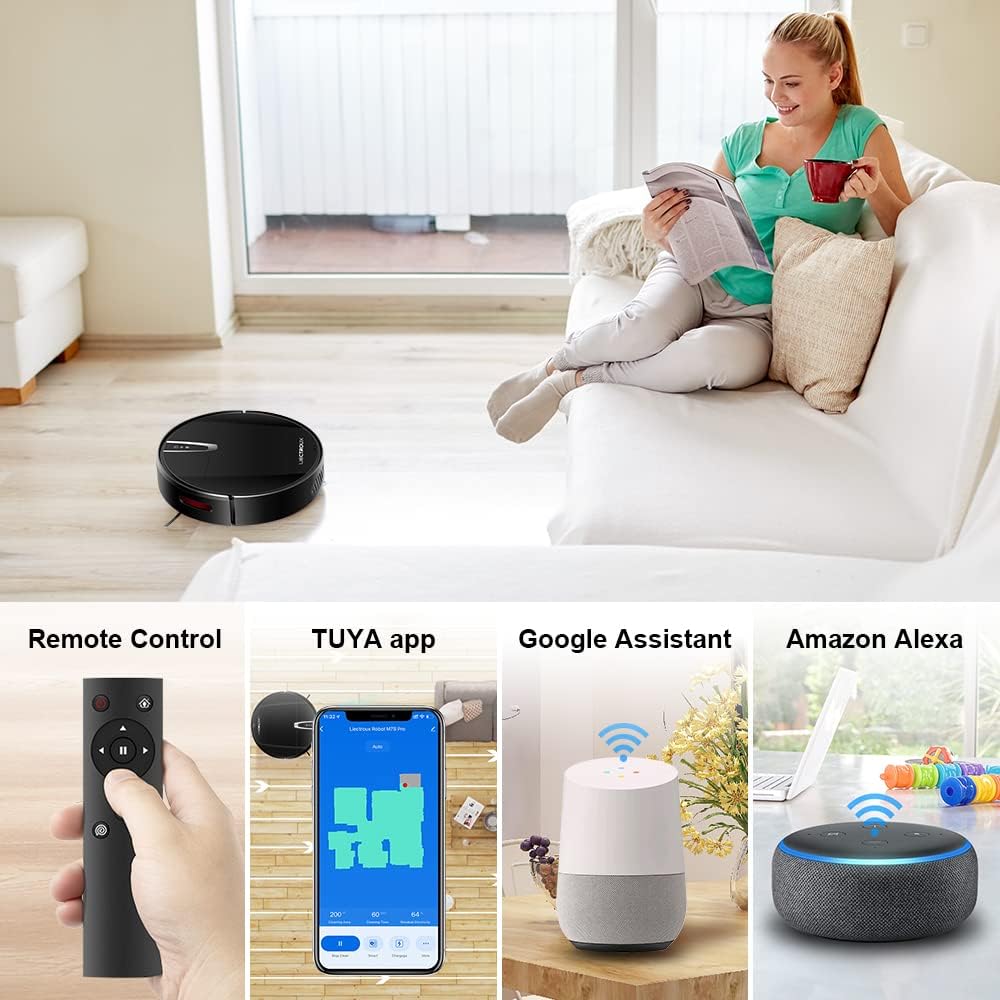
図4.2: Various control methods for the robot vacuum, including a physical remote control, the TUYA smartphone application displaying a cleaning map, and integration with voice assistants like Google Assistant and Amazon Alexa.
5. 操作手順
5.1つのクリーニングモード
The robot offers multiple cleaning modes to suit different needs, accessible via the app, remote control, or voice commands:
- 自動クリーニング: ロボットはインテリジェントにナビゲートして床全体を掃除します。
- スポットクリーニング: 特定の汚れた場所を集中的にらせん状に掃除します。
- エッジクリーニング: 壁や家具の端に沿って掃除します。
- モップモード: For wet cleaning, attach the water tank and mopping cloth.

図5.1: The robot vacuum cleaner operating on a floor with scattered debris, illustrating its powerful suction and various cleaning modes: Scheduled Cleaning, Auto Cleaning, Edge Cleaning, and Spot Cleaning.
5.2 ナビゲーションとマッピング
The M7S Pro utilizes smart gyroscope navigation to create a 2D map of your environment, allowing for precise positioning and efficient route planning. This ensures comprehensive coverage and minimizes missed spots.

図5.2: The robot vacuum cleaner navigating a room, with a grid overlay illustrating its smart gyroscope navigation system for precise positioning and thorough cleaning.

図5.3: A visual comparison showing the efficient, systematic cleaning path generated by the LIECTROUX M7S Pro's gyroscope navigation versus a less organized common route planning method, highlighting intelligent route planning.
5.3 自動充電
When the battery level is low or a cleaning task is complete, the robot will automatically return to its charging dock to recharge. Ensure the charging dock is always powered on and accessible.
5.4 Anti-Drop System
The robot is equipped with cliff sensors to detect stairs and elevated surfaces, preventing it from falling. It also intelligently detects different floor types and adjusts its direction within 10 milliseconds.
6. メンテナンス
定期的なメンテナンスにより、ロボット掃除機のパフォーマンスが最適化され、寿命が延びます。
6.1 ゴミ箱を空にする
Empty the dustbin after each cleaning cycle or when the 'full' indicator appears. Open the top cover, remove the dustbin, and dispose of the collected debris.
6.2フィルターの清掃
The HEPA filter should be cleaned regularly (e.g., weekly) using the provided cleaning tool or a soft brush. Replace the HEPA filter every 3-6 months, depending on usage, to maintain suction efficiency.
6.3 サイドブラシの清掃
Inspect and clean the side brushes regularly. Remove any tangled hair or debris. If brushes are worn or damaged, replace them with new ones.
6.4 センサーと充電接点のクリーニング
Wipe the cliff sensors and charging contacts on both the robot and the charging dock with a clean, dry cloth to ensure proper function and charging.
6.5 Brush-less Suction Nozzle
The M7S Pro features an advanced brush-less suction nozzle designed to minimize hair entanglement, reducing the frequency of cleaning the main suction path.

図6.1: An illustration of the robot vacuum's underside, highlighting the advanced brush-less suction nozzle designed to prevent hair entanglement and ensure consistent cleaning performance.
7。 トラブルシューティング
ロボット掃除機で問題が発生した場合は、次の一般的な問題と解決策を参照してください。
| 問題 | 考えられる原因 | 解決 |
|---|---|---|
| ロボットが起動しません。 | 電池残量が少ないため、電源スイッチがオフになっています。 | Charge the robot; ensure the main power switch is on. |
| ロボットは充電されません。 | Charging contacts dirty; charging dock not powered. | Clean charging contacts; ensure charging dock is plugged in. |
| ロボットが頻繁に動けなくなります。 | 障害物(ケーブル、敷物); 狭いスペース。 | Clear the cleaning area; use virtual walls if available. |
| 洗浄性能が悪い。 | ゴミ箱がいっぱい、フィルターが詰まっている、ブラシが絡まっている。 | ゴミ箱を空にし、フィルターを清掃/交換し、ブラシを清掃します。 |
| アプリの接続の問題。 | Incorrect Wi-Fi password; robot not in pairing mode; 5GHz Wi-Fi network. | Verify Wi-Fi details; re-enter pairing mode; ensure 2.4GHz Wi-Fi is used. |
8. 仕様
| 特徴 | 詳細 |
|---|---|
| ブランド | リエクトゥルー |
| モデル名 | M7S PRO |
| 色 | 黒 |
| 製品寸法 | 32L×32W×7.8Hcm |
| アイテム重量 | 4キログラム |
| 最大吸引力 | 4000Pa |
| バッテリー容量 | 2500mAhリチウムイオン |
| ランタイム | 最大120分 |
| フィルタータイプ | ヘパ |
| コントローラータイプ | App Control, Touchpad Control, Voice Control |
| 音声アシスタントの互換性 | Google Home、Amazon Alexa |
| ナビゲーションタイプ | Gyroscope Navigation (2D Map) |
| 特集 | Anti-drop system, Brush-less suction nozzle |
| 表面の推奨事項 | Low-pile carpet, hard floors, ceramic tiles |
9. 保証とサポート
The LIECTROUX M7S Pro Robot Vacuum Cleaner comes with a standard manufacturer's warranty. Please refer to the warranty card included in your package for specific terms and conditions, including the warranty period and coverage details.
For technical support, troubleshooting assistance, or warranty claims, please contact the seller or LIECTROUX customer service. Contact information can typically be found on the product packaging, the seller's website, or within the TUYA Smart app.
When contacting support, please have your product model number (M7S Pro) and purchase details readily available.
Ask a question about this manual
Ask about setup, troubleshooting, compatibility, parts, safety, or missing instructions. Manuals+ will review the question and use this page’s manual context to help answer it.